

Our Short List of 3

- Size and resolution: 27 inches, 3840 x 2160, 60Hz
- Panel: IPS Black
- Color: Wide gamut with DCI-P3 coverage, HDR support
- Connection and charging: USB-C with DisplayPort Alt Mode and 90W power delivery

- Size and resolution: 27 inches, 3840 x 2160, 60Hz
- Panel: IPS
- Color: 95% P3, 100% sRGB and Rec.709 coverage listed, HDR400 support
- Connection and charging: Thunderbolt 3 with 65W power delivery, plus a second Thunderbolt port for daisy chaining

- Size and resolution: 27 inches, 3840 x 2160, 60Hz
- Panel: IPS, matte finish
- Color: 99% DCI-P3 and 99% Adobe RGB coverage listed, Delta E less than 2 listed, Calman Verified
- Connection and charging: USB-C with 96W power delivery
All 5 Picks at a Glance
| Product | Specs | Action |
|---|---|---|
| 1. Dell UltraSharp U2723QE — Best Overall Hub Monitor |
| Check price on Amazon |
| 2. BenQ PD2725U — Best Thunderbolt Monitor for Mac Workflows |
| Check price on Amazon |
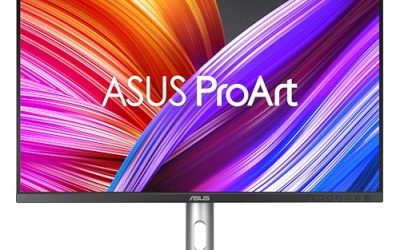
| 3. ASUS ProArt Display PA279CRV — Best for Color-Focused Creators |
| Check price on Amazon |
 4. LG 27UP850-W — Best Balanced All-Rounder |
| Check price on Amazon |
 5. Samsung ViewFinity S8 S80UD — Best Clean Office Option |
| Check price on Amazon |
Key takeaways
- The best external monitors for MacBook Air compared by 4K sharpness, USB-C charging, color coverage and hub features, with picks for creators, office work and clean one-cable desks.
As an Amazon Associate we earn from qualifying purchases.
A MacBook Air is easy to carry and easy to outgrow. The built-in screen is sharp, but it is small for long documents, wide spreadsheets, timelines, code with a preview beside it, or photo editing where you want the image large and the tools out of the way. An external monitor fixes that: you sit down, connect one cable, and you get a bigger workspace while the laptop charges.
The best external monitors for MacBook Air connect over USB-C or Thunderbolt with DisplayPort Alt Mode, deliver enough power over that cable to charge an Air, stay sharp enough that text does not look soft next to the laptop screen, and cover the P3 color space Apple uses, so photos and video look consistent between the two displays.
This guide compares five 27-inch 4K monitors that meet those criteria in different ways: a full hub with Ethernet and KVM, a Thunderbolt monitor designed around Mac workflows, a color-focused creator display, a balanced all-rounder with speakers, and a clean office panel with USB-C and a built-in KVM. All five are external desktop monitors, and all five suit a MacBook Air desk.
Disclosure: This article contains affiliate links to Amazon. If you buy through those links, we may earn a commission at no additional cost to you.
Our top picks
Best for: Color-Focused Creators
Check price on AmazonQuick Picks
- Best overall hub monitor: Dell UltraSharp U2723QE — 4K IPS Black panel, USB-C with 90W power delivery, Ethernet, KVM, and a deep USB hub.
- Best for creators who want Thunderbolt: BenQ PD2725U — Thunderbolt 3, Mac-focused color modes, daisy chaining, and a separate control puck.
- Best for color accuracy on paper: ASUS ProArt Display PA279CRV — 99% DCI-P3 and 99% Adobe RGB coverage and USB-C with 96W power delivery.
- Best balanced all-rounder: LG 27UP850-W — 4K IPS, 95% DCI-P3, DisplayHDR 400, USB-C with 96W power delivery, and built-in speakers.
- Best clean office option: Samsung ViewFinity S8 S80UD — 4K panel with HDR10, USB-C, built-in KVM, and a height-adjustable stand.
If you only read one more section, read How to Choose. MacBook Air models differ in how many external displays they support, and scaling settings decide whether a 4K screen feels sharp or wasted.
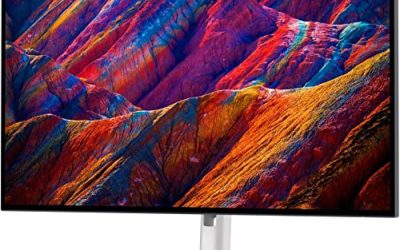
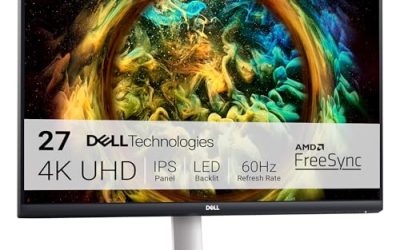
1. Dell UltraSharp U2723QE — Best Overall Hub Monitor
- Size and resolution: 27 inches, 3840 x 2160, 60Hz
- Panel: IPS Black
- Color: Wide gamut with DCI-P3 coverage, HDR support
- Connection and charging: USB-C with DisplayPort Alt Mode and 90W power delivery
The Dell UltraSharp U2723QE is the pick for an Air owner who wants the monitor to replace a separate dock. Plug in one USB-C cable and the laptop gets its picture, its charge, and access to everything connected to the monitor hub — important on an Air, which has very few ports of its own.
The panel uses IPS Black technology, designed for deeper blacks than conventional IPS, so dark scenes hold more detail and dark-mode interfaces look less washed out. The 4K resolution keeps text crisp, and wide DCI-P3 coverage suits office and creative work.
As a hub, this is the most complete monitor here. The wired Ethernet port is rare on monitors and useful if Wi-Fi is unreliable for large uploads or calls. The built-in KVM shares a keyboard and mouse between the Air and a second computer, and the stand adjusts for height, tilt, swivel, and pivot.
Key specifications:
Pros:
Cons:
View the Dell UltraSharp U2723QE on Amazon
Choose this one if your desk has wired networking, external drives, or a second computer to share peripherals with.
2. BenQ PD2725U — Best Thunderbolt Monitor for Mac Workflows
- Size and resolution: 27 inches, 3840 x 2160, 60Hz
- Panel: IPS
- Color: 95% P3, 100% sRGB and Rec.709 coverage listed, HDR400 support
- Connection and charging: Thunderbolt 3 with 65W power delivery, plus a second Thunderbolt port for daisy chaining
The BenQ PD2725U was designed around MacBook use. It uses Thunderbolt 3 rather than plain USB-C, so the connection carries video, data, and charging, and it supports daisy chaining a second compatible display from the monitor itself. Keep the Air display limits in mind, covered below, because daisy chaining does not override what the laptop chip supports.
Color is the other focus. The listing gives 95% P3 coverage alongside 100% sRGB and Rec.709 coverage, factory calibration, and Pantone validation. BenQ also includes Mac-oriented display modes intended to reduce the visible difference between the monitor and a MacBook screen — the point for designers who move an image between the two all day.
A separate Hotkey Puck controller lets you switch inputs and adjust settings without reaching for buttons under the bezel. A built-in KVM supports two computers, and the port list includes Thunderbolt, HDMI, and DisplayPort.
Key specifications:
Pros:
Cons:
View the BenQ PD2725U on Amazon
Choose this one if color consistency with your MacBook matters and you like Thunderbolt daisy chaining in a future setup.
3. ASUS ProArt Display PA279CRV — Best for Color-Focused Creators
- Size and resolution: 27 inches, 3840 x 2160, 60Hz
- Panel: IPS, matte finish
- Color: 99% DCI-P3 and 99% Adobe RGB coverage listed, Delta E less than 2 listed, Calman Verified
- Connection and charging: USB-C with 96W power delivery
The ASUS ProArt Display PA279CRV is the creator pick for buyers who read color specifications first. Its listing covers both major creative spaces, with 99% DCI-P3 and 99% Adobe RGB coverage. DCI-P3 matters most for matching a MacBook Air screen and for video work; Adobe RGB is the extra photographers preparing images for print look for.
ASUS also lists a low Delta E figure and Calman Verified status, describing its factory calibration targets. A calibrated starting point saves time where the Air is the portable half of the setup and this screen is the reference half.
USB-C carries the picture and delivers 96W of power, well above what an Air draws, and the monitor supports daisy chaining for compatible setups. The design is slimmer than many pro monitors, with a matte panel and full stand adjustment.
Key specifications:
Pros:
Cons:
View the ASUS ProArt Display PA279CRV on Amazon
Choose this one if you edit photos or video and want the monitor, not the laptop, to be your color reference.
4. LG 27UP850-W — Best Balanced All-Rounder
- Size and resolution: 27 inches, 3840 x 2160, 60Hz
- Panel: IPS
- Color: 95% DCI-P3 coverage listed, VESA DisplayHDR 400
- Connection and charging: USB-C with 96W power delivery
The LG 27UP850-W is the balanced option. It lacks the Dell hub depth and the BenQ Thunderbolt branding, but it covers the core MacBook Air needs completely: a sharp 4K IPS panel, wide color, HDR support, one-cable USB-C charging, a fully adjustable stand, and built-in speakers. For many Air owners, that list is the whole list.
The panel lists 95% DCI-P3 coverage and VESA DisplayHDR 400, suiting photo viewing, non-reference video work, streaming, and documents. Text at 4K on 27 inches stays sharp at comfortable scaling, without the softness lower-resolution 27-inch monitors can show beside a Retina screen.
The USB-C port delivers 96W, so the Air charges at full speed and the monitor could later serve a hungrier laptop. Two HDMI ports, DisplayPort, and USB downstream ports let other devices share the screen, and the built-in speakers are convenient for calls and casual video.
Key specifications:
Pros:
Cons:
View the LG 27UP850-W on Amazon
Choose this one if you want one monitor for work, light creative tasks, calls, and entertainment without a dock or external speakers.
5. Samsung ViewFinity S8 S80UD — Best Clean Office Option
- Size and resolution: 27 inches, 3840 x 2160, 60Hz
- Panel: IPS-type panel with HDR10 support
- Connection: USB-C input alongside HDMI and DisplayPort
- Hub features: Built-in KVM switch and USB ports
The Samsung ViewFinity S8 S80UD, model LS27D802UANXGO, is the modern office entry: a 27-inch 4K panel with HDR10 support, USB-C connectivity, a built-in KVM switch, and an ergonomic stand. It is aimed at a tidy desk where the Air is the main computer and the monitor needs to be sharp, comfortable, and simple.
The 4K panel gives the same class of text sharpness as the other monitors here. The USB-C input lets the Air connect with one cable for video, and the KVM is useful if a second, work-issued computer shares your keyboard and mouse through the monitor.
Height and pivot adjustment help you set the screen near eye level or turn it vertical for contracts and long web pages. It lacks the creator calibration focus of the ASUS and BenQ and the Ethernet hub of the Dell, but it also avoids paying for features an office desk may never use.
Key specifications:
Pros:
Cons:
View the Samsung ViewFinity S8 S80UD on Amazon
Choose this one if you want a current, tidy 4K office monitor with USB-C and KVM switching, and your work is documents, browsing, and calls rather than color grading.
How to Choose an External Monitor for a MacBook Air
Start with how many displays your Air supports. Base M1 and M2 Air models support one external display at up to 6K at 60Hz through Thunderbolt. Newer Air models expanded that support, including two external displays in certain configurations, such as with the lid closed on some models. Check your exact model before planning a two-monitor desk, because daisy chaining cannot add support the chip does not have. For a single monitor, every pick here works with any Apple silicon Air.
Choose 4K at 27 inches for the sweet spot. It gives a pixel density close in character to the laptop display at sensible macOS scaling, room for two windows side by side, and sharp text, without the large footprint of a 32-inch screen.
Insist on USB-C with power delivery. The cable should carry video through DisplayPort Alt Mode and charge the laptop at the same time. Every monitor here lists enough for an Air, from 65W upward where a figure is listed; 90W or 96W adds headroom for another laptop. Use a cable rated for video — a charge-only cable is a common reason a new monitor shows no picture.
Match color coverage to your work. For writing, browsing, and calls, any of these panels will look good. For photo or video editing, look for DCI-P3 coverage in the mid-90s or higher, as listed for the LG, BenQ, Dell, and ASUS models, because P3 is the space Apple displays use. Print-focused photographers may value the Adobe RGB coverage listed for the ASUS.
Decide whether the monitor should also be your dock. A hub monitor such as the Dell adds Ethernet, USB-A ports, and KVM switching, which can remove a separate dock entirely. A simpler monitor keeps complexity down if you use Bluetooth accessories. List your peripherals first, then count the ports on the listing.
Set up scaling and ergonomics properly. Choose a scaled resolution that gives readable text and enough workspace rather than the highest number. Set the top of the screen near eye level, about an arm’s length away, and match the arrangement in settings to the physical layout. A height-adjustable stand, included on all five picks, makes this easier.
Frequently Asked Questions
Can a MacBook Air run a 4K monitor at 60Hz?
Yes. Apple silicon MacBook Air models support 4K at 60Hz over USB-C or Thunderbolt with DisplayPort Alt Mode, which is how all five monitors here connect. Use a cable rated for video, not a charge-only cable.
Will one cable also charge my MacBook Air?
That is the point of USB-C power delivery. The Dell lists 90W, the LG and ASUS list 96W, and the BenQ lists 65W, all above what a MacBook Air needs. For the Samsung, confirm the charging figure on its current listing before relying on single-cable charging.
How many external monitors can I use with a MacBook Air?
It depends on the chip and model. Base M1 and M2 Air models support one external display. Some newer Air models support two external displays in specific configurations, including with the lid closed in some cases. Check the specifications for your exact model before buying a second monitor.
Is 27 inches too big for a MacBook Air desk?
Usually not. A 27-inch monitor fits most desks, sits comfortably at arm’s length, and pairs well with the Air open beside it or closed underneath. Measure desk depth first. Shallow desks may feel better with the monitor on a VESA arm.
Do I need a Thunderbolt monitor, or is USB-C enough?
USB-C with DisplayPort Alt Mode is enough for one 4K monitor with charging, which covers most Air desks. Thunderbolt, as on the BenQ, adds faster data transfer and daisy-chain support for compatible displays. Choose Thunderbolt if you move large files through monitor-connected storage or plan a chained setup your Air supports.
Why does text look different on the monitor than on my Air?
The screens have different pixel densities and brightness, and macOS scaling affects how large interface elements appear. Choose a scaled resolution that looks like a comfortable workspace size and avoid comparing tiny text at different brightness levels. A 4K 27-inch panel narrows this gap, which is why it is used throughout this guide.
Conclusion
For most MacBook Air owners, the Dell UltraSharp U2723QE is the easiest recommendation: it solves the port problem at the same time as the screen problem, adding Ethernet, KVM, and a full hub behind a sharp IPS Black 4K panel. Creators should look first at the BenQ PD2725U for Thunderbolt and Mac-focused color modes, or at the ASUS ProArt PA279CRV for the widest listed color coverage. For a no-fuss all-rounder, the LG 27UP850-W covers sharpness, charging, speakers, and inputs in one package. For a clean office desk, the Samsung ViewFinity S8 S80UD gives you 4K, USB-C, and KVM switching in a tidy design.
Whichever you choose, confirm your Air model’s display support, use a video-rated cable, and check the live Amazon listing for the exact model, port layout, and charging figure before ordering. Any of these five will make an Air feel like a proper desktop when you sit down, and a laptop again when you unplug one cable.
More from Amazon
Programs that pair well with the guide above. Offers and eligibility are set by Amazon and may change.
Free shipping on eligible items, Prime Video and more. Eligible new members can start with a free trial.
Start a Prime free trialAd-free music streaming. Eligible new subscribers can start with a free trial.
Try Music Unlimited freeA Prime membership for ages 18-24 with a trial period. Eligibility is set by Amazon.
See Prime for Young AdultsAudiobooks and podcasts to listen to on the go. Eligible new members can start with a free trial.
Try Audible freeAs an Amazon Associate we earn from qualifying purchases.

Write Your Review
No reviews yet. Be the first to share your experience!