

Our Short List of 3

- Best for: A desk setup where a 42-inch OLED doubles as a work screen by day and a gaming screen by night.
- 42-inch 4K OLED evo panel, 144Hz refresh rate
- 4 HDMI 2.1 ports with NVIDIA G-SYNC, AMD FreeSync Premium and VRR
- α9 AI Processor Gen7 with Game Optimizer and Game Dashboard
- Dolby Vision and Dolby Atmos, FILMMAKER MODE, webOS 24

- Best for: A desk or bedroom setup where a Samsung OLED handles PC work, streaming and console play on one screen.
- 41.5-inch 4K OLED panel, Motion Xcelerator 144Hz
- NQ4 AI Gen2 processor with 4K AI upscaling
- Dolby Atmos and Object Tracking Sound Lite
- Alexa built-in with Tizen smart platform
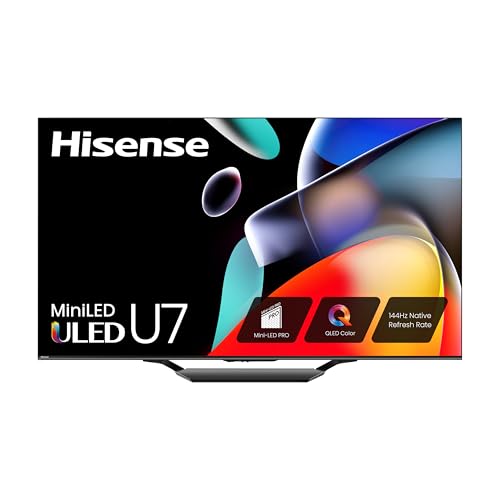
- Best for: Bright living rooms and deep desks where a large, punchy screen doubles as a monitor and a family TV.
- 54.6-inch 4K Mini-LED ULED panel, native 144Hz
- QLED quantum dot color with Full Array Local Dimming Pro
- 144Hz Game Mode Pro with VRR and Alexa compatibility
- Dolby Vision IQ and Dolby Atmos, Google TV
All 5 Picks at a Glance
| Product | Specs | Action |
|---|---|---|
| LG C4 42-Inch OLED evo |
| Check price on Amazon |
| Samsung S90D 42-Inch OLED |
| Check price on Amazon |
| Hisense U7N 55-Inch Mini-LED |
| Check price on Amazon |
 LG B4 48-Inch OLED |
| Check price on Amazon |
 TCL QM7K 55-Inch Mini-LED |
| Check price on Amazon |
Key takeaways
- Five TVs that work well as PC monitors, from desk-friendly 42-inch OLED screens to bright 55-inch Mini-LED sets with low lag and sharp text.
A television can replace a computer monitor at home, but only when you pick the right one. The real decision is not whether a TV works as a monitor, it is which size, panel type and connection setup fits the way you sit, work and play. A 42-inch screen at arm’s length feels very different from a 55-inch screen across the room, and a set built for movies can feel sluggish with a mouse if its game mode stays off.
This guide is for home workers who want a huge screen for documents and spreadsheets, PC gamers who want a big 4K display without monitor prices, and families who want one screen for work by day and films by night. Every set below was chosen from the names and specifications shown on its Amazon product page, with size, refresh rate, panel type and ports checked against the listing.
Quick Picks
As an Amazon Associate we earn from qualifying purchases
| Product | Best for | Key spec from title |
|---|---|---|
| LG C4 42-Inch OLED evo | Small desk setups | 42-inch 4K OLED, 144Hz |
| Samsung S90D 42-Inch OLED | Bright, punchy OLED on a desk | 42-inch 4K OLED, 144Hz |
| Hisense U7N 55-Inch Mini-LED | Bright rooms and big text | 55-inch 4K Mini-LED, 144Hz |
| LG B4 48-Inch OLED | Larger OLED on a budget | 48-inch 4K OLED, 120Hz |
| TCL QM7K 55-Inch Mini-LED | Big-screen value with low lag | 55-inch 4K Mini-LED, 144Hz |
How to Choose
Size and Viewing Distance
Start with your desk, not the screen. A 42-inch TV suits a desk about an arm’s length deep, with the screen roughly 28 to 36 inches from your eyes, and it fits most standard desks without a wall mount. A 48-inch set needs a deeper desk or a mount pushed back, and a 55-inch set belongs on a wall or a deep stand at least four feet away, where its size feels cinematic instead of overwhelming. Measure the width of your desk first, then check the TV’s width with its stand, because a screen that overhangs the edges leaves no room for a keyboard, a mouse or a pair of speakers.
Refresh Rate and Input Lag
A TV used as a monitor should run at 120Hz or 144Hz, with a dedicated game mode that cuts input delay. Every set in this guide supports at least 120Hz, and four of them reach 144Hz, which keeps the mouse pointer smooth and fast games free of smearing. Look for HDMI 2.1 ports, because a single HDMI 2.1 cable carries 4K at 120Hz or 144Hz from a modern graphics card, while older HDMI ports top out lower. Variable refresh rate, sold as FreeSync or G-Sync support, stops screen tearing in games, and a low-lag game mode should switch on automatically when the TV detects a PC signal.
Text Clarity and Chroma
Text is where a TV shows its monitor credentials, because a blurry letter is obvious at arm’s length. A 4K panel at 42 inches packs about 105 pixels per inch, close to a 27-inch 1440p monitor, so small fonts stay readable without heavy scaling. Check that the TV supports full 4:4:4 chroma over HDMI, which keeps colored text edges clean instead of fringed, and set the PC output to the panel’s native resolution. OLED panels render text sharply thanks to per-pixel light, while Mini-LED sets need their sharpness and local dimming tuned so letters do not glow against dark backgrounds.
Panel Type and Room Light
OLED and Mini-LED suit different rooms. OLED gives perfect blacks and per-pixel contrast, which makes dark games and films look superb in a dim room, and its near-instant response keeps motion crisp. Mini-LED backlights reach far higher brightness, so a bright living room or a desk beside a window favors the Hisense or TCL sets in this guide, which stay readable in daylight. OLED owners should vary their content and let the TV run its pixel-care routines, since static taskbars and desktop icons left on screen for hours are the main wear risk for a set used as a daily monitor.
The 5 Best Options
LG C4 42-Inch OLED evo
- Best for: A desk setup where a 42-inch OLED doubles as a work screen by day and a gaming screen by night.
- 42-inch 4K OLED evo panel, 144Hz refresh rate
- 4 HDMI 2.1 ports with NVIDIA G-SYNC, AMD FreeSync Premium and VRR
- α9 AI Processor Gen7 with Game Optimizer and Game Dashboard
- Dolby Vision and Dolby Atmos, FILMMAKER MODE, webOS 24
A desk setup where a 42-inch OLED doubles as a work screen by day and a gaming screen by night.
The listing summary showed no featured offers in its last crawl, and a newer C5 version exists, so confirm the listing before buying.
The 42-inch C4 is the classic TV-as-monitor pick, and it earns that status with a desk-friendly size and a full gaming feature set. Its OLED evo panel produces perfect blacks and vivid color, while four HDMI 2.1 ports, NVIDIA G-SYNC, AMD FreeSync Premium and variable refresh rate cover modern graphics cards. The Game Optimizer dashboard puts lag, refresh rate and picture settings in one place, and the near-invisible bezel keeps the focus on the screen. At 42 inches it fits a standard desk, and its 4K resolution keeps text crisp at normal viewing distance.
Watch out for: The listing summary showed no featured offers in its last crawl, and a newer C5 version exists, so confirm the listing before buying.
Samsung S90D 42-Inch OLED
- Best for: A desk or bedroom setup where a Samsung OLED handles PC work, streaming and console play on one screen.
- 41.5-inch 4K OLED panel, Motion Xcelerator 144Hz
- NQ4 AI Gen2 processor with 4K AI upscaling
- Dolby Atmos and Object Tracking Sound Lite
- Alexa built-in with Tizen smart platform
A desk or bedroom setup where a Samsung OLED handles PC work, streaming and console play on one screen.
No Amazon product page surfaced in search, and availability signals conflict, so check the listing live before buying.
Samsung’s 42-inch S90D is the direct rival to the C4, with the same desk-friendly size and a 144Hz OLED panel built for fast PC use. Its Motion Xcelerator 144Hz mode, 4K AI upscaling and NQ4 AI Gen2 processor keep games smooth and older content sharp, while Dolby Atmos and Object Tracking Sound Lite give the built-in audio more presence than most monitors. The Tizen smart platform covers streaming without a second device, and the slim body suits a desk or a low stand. Its OLED panel delivers the deep blacks and instant response that make both work and play look their best.
Watch out for: No Amazon product page surfaced in search, and availability signals conflict, so check the listing live before buying.
Hisense U7N 55-Inch Mini-LED
- Best for: Bright living rooms and deep desks where a large, punchy screen doubles as a monitor and a family TV.
- 54.6-inch 4K Mini-LED ULED panel, native 144Hz
- QLED quantum dot color with Full Array Local Dimming Pro
- 144Hz Game Mode Pro with VRR and Alexa compatibility
- Dolby Vision IQ and Dolby Atmos, Google TV
Bright living rooms and deep desks where a large, punchy screen doubles as a monitor and a family TV.
The product page extract was thin, and a second ASIN appears in some listings, so confirm the exact model before buying.
The 55-inch U7N is the pick for bright rooms, where its Mini-LED backlight outshines OLED and keeps the picture readable in daylight. Its native 144Hz panel, 144Hz Game Mode Pro and variable refresh rate make it a strong PC gaming screen, while full-array local dimming and quantum dot color keep contrast and color convincing. Google TV puts streaming apps on the set itself, and Dolby Atmos audio means a soundbar is optional rather than essential. At 55 inches it suits a wall mount or a deep stand, not a shallow desk.
Watch out for: The product page extract was thin, and a second ASIN appears in some listings, so confirm the exact model before buying.
LG B4 48-Inch OLED
- Best for: A deep desk or living-room setup where a larger OLED screen serves as both monitor and movie screen.
- 48-inch 4K OLED panel, 120Hz refresh rate
- α8 AI 4K processor with AI upscaling
- Dolby Vision and Dolby Atmos, Alexa support
- Bluetooth, Ethernet, HDMI, USB and Wi-Fi connectivity
A deep desk or living-room setup where a larger OLED screen serves as both monitor and movie screen.
The product page extract was thin and the model is a 2024 set, so confirm stock and the exact listing before buying.
The 48-inch B4 gives you a bigger OLED canvas for less than the C4, and it is the sweet spot for a living-room desk or a deep workstation. Its self-lit OLED pixels deliver detailed, realistic images with deep blacks, and the α8 AI processor upscales lower-resolution content to 4K. A 120Hz refresh rate keeps motion smooth for games and scrolling, while Dolby Vision and Dolby Atmos cover films after work. At 48 inches it needs more viewing distance than the 42-inch sets, so pair it with a deep desk or a wall mount and sit back.
Watch out for: The product page extract was thin and the model is a 2024 set, so confirm stock and the exact listing before buying.
TCL QM7K 55-Inch Mini-LED
- Best for: Buyers who want the biggest bright screen for the money, used as a PC monitor, gaming display and family TV in one.
- 55-inch 4K QD-Mini LED QLED panel, 144Hz native refresh rate
- HDR 3000 brightness with precise dimming zones and Game Accelerator 288
- 4 HDMI ports, Google TV, AirPlay 2 and Google Cast
- Bang and Olufsen 2.2 audio with Dolby Atmos and DTS:X
Buyers who want the biggest bright screen for the money, used as a PC monitor, gaming display and family TV in one.
At 55 inches it needs real viewing distance, so measure your room before choosing this size.
The 55-inch QM7K is the value pick in this guide, pairing a bright QD-Mini LED panel with a full gaming feature set. Its native 144Hz refresh rate and Game Accelerator 288 variable refresh rate keep fast games smooth, while HDR 3000 brightness and precise dimming zones give HDR films real punch. Four HDMI ports cover a PC, a console and a streaming stick, and Google TV with Bang and Olufsen 2.2 audio means the set works well without extra boxes. Amazon’s Choice status and hundreds of recent monthly buyers underline how popular this model is as a big-screen buy.
Watch out for: At 55 inches it needs real viewing distance, so measure your room before choosing this size.
Which One Fits Your Situation
Small Desk in a Spare Room
Pick the LG C4 42-inch. It fits a standard desk, its 4K OLED panel keeps text sharp at arm’s length, and its four HDMI 2.1 ports cover a PC and a console. The Samsung S90D is the fallback if the C4 listing is unavailable, with the same size and refresh rate.
Bright Living Room, Shared Screen
Pick the Hisense U7N 55-inch or the TCL QM7K 55-inch. Both Mini-LED sets stay bright in daylight, their 144Hz panels handle PC games, and their size suits a wall mount shared by the whole household. Choose the Hisense for local dimming, the TCL for value.
Big-Screen Gaming from the Couch
Pick the LG B4 48-inch. Its OLED panel gives deep blacks for dark games and films, its 120Hz refresh rate keeps motion smooth, and its size fills a living-room view without demanding a huge wall. Sit at least five feet back for comfortable viewing.
Tight Budget, Biggest Screen
Pick the TCL QM7K 55-inch. It is the strongest value here, with a 144Hz Mini-LED panel, four HDMI ports and solid built-in audio, so no extra boxes are needed. Just make sure your room gives it enough viewing distance. A wall mount helps, since the included stand is wide and needs a deep, sturdy surface.
Common Mistakes
- Buying a 55-inch TV for a shallow desk, then sitting too close to read text comfortably.
- Skipping game mode, which leaves input lag high and mouse movement feeling sluggish.
- Using an old HDMI cable or a non-HDMI 2.1 port, which caps the panel below 120Hz at 4K.
- Leaving the PC at 1080p output, which wastes the 4K panel and blurs text.
- Running static desktop icons and taskbars on an OLED for hours without varying content or letting pixel care run.
Frequently Asked Questions
Can a TV really replace a computer monitor?
Yes, when the TV is 4K, runs at 120Hz or higher, and has a low-lag game mode. A 42-inch 4K TV gives text sharpness close to a 27-inch 1440p monitor, and its HDMI 2.1 ports carry the full signal from a modern graphics card. The trade-off is size: a TV needs more desk depth and viewing distance than a monitor.
What size TV works best as a PC monitor?
For a desk, 42 inches is the sweet spot, with 48 inches workable on a deep desk or a mount. A 55-inch TV belongs on a wall or a deep stand at least four feet away. Sit roughly 28 to 36 inches from a 42-inch screen, and further back as the size grows, so the whole screen stays inside your field of view.
Do I need an HDMI 2.1 cable?
Yes, for 4K at 120Hz or 144Hz. A standard HDMI cable and an older port can limit the signal, leaving the panel running below its rated refresh rate. Use a certified Ultra High Speed HDMI cable, plug it into the TV’s HDMI 2.1 port, and set the PC output to the panel’s native 4K resolution with the matching refresh rate.
Will an OLED TV suffer burn-in as a monitor?
Static desktop elements can wear an OLED panel over time, so vary your content and avoid leaving the same taskbar or toolbar on screen for hours. Modern OLED TVs run automatic pixel-care routines, and hiding the taskbar, using a dark theme and rotating wallpapers all reduce the risk. For mostly static office work, a Mini-LED set is the safer choice.
More from Amazon
Programs that pair well with the guide above. Offers and eligibility are set by Amazon and may change.
Free shipping on eligible items, Prime Video and more. Eligible new members can start with a free trial.
Start a Prime free trialAd-free music streaming. Eligible new subscribers can start with a free trial.
Try Music Unlimited freeA Prime membership for ages 18-24 with a trial period. Eligibility is set by Amazon.
See Prime for Young AdultsAudiobooks and podcasts to listen to on the go. Eligible new members can start with a free trial.
Try Audible freeAs an Amazon Associate we earn from qualifying purchases.
Write Your Review
No reviews yet. Be the first to share your experience!