

Our Short List of 3

- Best for: Ranked players who want maximum refresh rate on a compact screen.
- 24.5-inch Full HD (1920 x 1080) Fast IPS panel
- Refresh rate overclocks to 310Hz
- 0.3ms response time
- G-SYNC Compatible and FreeSync Premium

- Best for: Competitive players who want a proven 240Hz panel with a flexible stand.
- 24-inch Full HD (1920 x 1080) IPS panel
- 240Hz refresh rate
- 0.5ms response time
- FreeSync Premium

- Best for: Players who want a larger curved screen for immersive Valorant sessions.
- 27-inch Full HD (1920 x 1080) Rapid VA panel
- 240Hz refresh rate
- 0.5ms response time
- 1500R curved design
All 5 Picks at a Glance
| Product | Specs | Action |
|---|---|---|
| ASUS TUF Gaming VG259QMR5A |
| Check price on Amazon |
| ViewSonic XG2431 |
| Check price on Amazon |
| MSI MAG 274CF X24 |
| Check price on Amazon |
 AOC Q27GAZD |
| Check price on Amazon |
 LG UltraGear 32GX870A-B |
| Check price on Amazon |
Key takeaways
- Find the best monitors for Valorant with high refresh rates, fast response times and sharp motion clarity for competitive tactical shooter play.
Valorant is a game where a single duel can turn on a fraction of a second, so the real choice is not which monitor looks best on a spec sheet but which one shows enemy movement clearly enough to react to it. A display that keeps crosshair placement steady, renders fast peeks without smearing, and holds a stable frame pace gives a player information sooner, and sooner information is what wins rounds in a tactical shooter.
This guide is for competitive Valorant players, ranked grinders, and casual players who want a smoother, more responsive setup without guessing at panel jargon. Every monitor below was picked from its name and specifications on its Amazon product page, with refresh rate, response time, panel type, and adaptive sync checked against the listing before it earned a place here.
Quick Picks
As an Amazon Associate we earn from qualifying purchases
| Product | Best for | Key spec from title |
|---|---|---|
| ASUS TUF Gaming VG259QMR5A | Fast-paced ranked play on a compact screen | 310Hz, 0.3ms |
| ViewSonic XG2431 | Competitive play with an ergonomic stand | 240Hz, 0.5ms |
| MSI MAG 274CF X24 | Immersive curved play on a larger screen | 240Hz, 0.5ms |
| AOC Q27GAZD | Sharp QHD visuals with OLED response | 240Hz, 0.03ms |
| LG UltraGear 32GX870A-B | Dual-mode play across resolutions | 240Hz, 0.03ms |
How to Choose
Refresh Rate Comes First
Valorant runs at very high frame rates on modest hardware, so a monitor with a high refresh rate is the single most useful upgrade for this game. A 240Hz panel shows far more frames per second than a 60Hz or 144Hz screen, which makes enemy movement look smoother and easier to track during fast peeks and site retakes. Players who already push well above 240 frames per second can look higher still, since panels that overclock beyond 240Hz exist for that exact situation. Before choosing, check what frame rate the graphics card actually sustains in Valorant at the chosen resolution, because a refresh rate the system cannot feed brings no visible gain.
Response Time and Motion Clarity
Refresh rate alone does not guarantee clean motion, so response time and blur reduction matter just as much for Valorant. A low response time keeps fast-moving targets from leaving visible trails, which helps when an opponent strafes across a doorway or swings a corner at full speed. Some monitors add a blur-reduction mode that works alongside adaptive sync, and that combination can make tracking noticeably steadier during chaotic fights. Read the listing carefully here, because a quoted response figure often describes a best-case mode rather than everyday use, and a panel that smears in dark scenes will hide exactly the movement a player needs to see.
Panel Size and Resolution
Most competitive Valorant players settle on a 24-inch or 27-inch screen at 1080p, because the smaller image keeps the whole playfield inside the field of view and keeps frame rates high. A 27-inch 1440p panel trades some of that frame-rate headroom for sharper text and clearer distant targets, which suits players who also use the monitor for work or single-player games. Very large screens can force the eyes to travel farther to spot the minimap or health bar, so a bigger panel is not automatically better for ranked play. Measure the desk first, then match the size to how far the player sits from the screen.
Adaptive Sync and Everyday Comfort
Adaptive sync keeps the monitor and the graphics card in step, removing the tearing that appears when frame output and refresh fall out of alignment. For Valorant this matters during sudden frame dips, such as utility-heavy executes, where a torn frame can mask an opponent for a critical instant. Check whether the listing names G-SYNC compatibility, FreeSync Premium, or both, and confirm the graphics card supports the standard in question. Beyond sync, look at the stand, since height, tilt, and swivel adjustments decide whether long sessions stay comfortable, and a VESA mount option leaves the door open to an arm later.
The 5 Best Options
ASUS TUF Gaming VG259QMR5A
- Best for: Ranked players who want maximum refresh rate on a compact screen.
- 24.5-inch Full HD (1920 x 1080) Fast IPS panel
- Refresh rate overclocks to 310Hz
- 0.3ms response time
- G-SYNC Compatible and FreeSync Premium
Ranked players who want maximum refresh rate on a compact screen.
The top refresh rate needs overclocking, and the panel is 1080p, so confirm the resolution suits the desk setup. Confirm it is still sold before buying.
The VG259QMR5A is the pick for players who want the fastest panel in this guide on a compact 24.5-inch screen. Its overclocked refresh rate and very low response time suit ranked Valorant, where tracking a strafing opponent across a narrow angle decides duels. The Fast IPS panel keeps colors steady at wide viewing angles, and the gaming AI features add a dynamic crosshair and shadow boost for spotting opponents in dark corners. Built-in speakers cover casual use, and the three-year warranty gives the purchase a longer horizon than most budget panels offer.
Watch out for: The top refresh rate needs overclocking, and the panel is 1080p, so confirm the resolution suits the desk setup. Confirm it is still sold before buying.
ViewSonic XG2431
- Best for: Competitive players who want a proven 240Hz panel with a flexible stand.
- 24-inch Full HD (1920 x 1080) IPS panel
- 240Hz refresh rate
- 0.5ms response time
- FreeSync Premium
Competitive players who want a proven 240Hz panel with a flexible stand.
The 1080p resolution shows its limits on larger desks, and the design is older than newer rivals. Confirm it is still sold before buying.
The XG2431 is a long-standing competitive choice, and it earns its place here as the ergonomic option for players who spend long evenings in ranked queues. Its 24-inch Full HD panel pairs a 240Hz refresh rate with a 0.5ms response time, a combination that keeps Valorant movement clean without demanding an extreme graphics card. The stand adjusts for height, tilt, and swivel, so the screen can sit exactly at eye level, and the eye-care features help during extended sessions. FreeSync Premium and G-Sync compatibility cover both major graphics card brands.
Watch out for: The 1080p resolution shows its limits on larger desks, and the design is older than newer rivals. Confirm it is still sold before buying.
MSI MAG 274CF X24
- Best for: Players who want a larger curved screen for immersive Valorant sessions.
- 27-inch Full HD (1920 x 1080) Rapid VA panel
- 240Hz refresh rate
- 0.5ms response time
- 1500R curved design
Players who want a larger curved screen for immersive Valorant sessions.
VA panels can show slower dark transitions than IPS or OLED, and 1080p stretches thin across 27 inches. Confirm it is still sold before buying.
The MAG 274CF X24 is the curved option in this guide, and its gentle 1500R curve pulls the edges of a 27-inch screen slightly closer to the player. The Rapid VA panel delivers a 240Hz refresh rate and a 0.5ms response time, while the AI Vision feature brightens dark areas so opponents hiding in shadow become easier to spot. FreeSync Premium keeps frames tear-free, and the HDR Ready panel adds punch to brighter scenes. It is a good fit for players who want a larger, more immersive screen without stepping up to a higher resolution.
Watch out for: VA panels can show slower dark transitions than IPS or OLED, and 1080p stretches thin across 27 inches. Confirm it is still sold before buying.
AOC Q27GAZD
- Best for: Players who want OLED motion clarity with sharper QHD resolution.
- 27-inch QHD (2560 x 1440) QD-OLED panel
- 240Hz refresh rate
- 0.03ms GtG response time
- G-SYNC Compatible
Players who want OLED motion clarity with sharper QHD resolution.
OLED panels need care around static on-screen elements, and QHD at high refresh rates demands a stronger graphics card. Confirm it is still sold before buying.
The Q27GAZD brings OLED speed to a 27-inch QHD screen, and that combination suits Valorant players who also care about image quality. The 240Hz refresh rate pairs with a 0.03ms response time, so motion stays crisp even during the fastest swings, and the higher resolution sharpens distant targets that 1080p can blur. G-SYNC compatibility keeps frames smooth when the frame rate dips, and the QD-OLED panel delivers deep blacks that help in dark map corners. Console gaming support makes it a flexible choice for players with more than one system.
Watch out for: OLED panels need care around static on-screen elements, and QHD at high refresh rates demands a stronger graphics card. Confirm it is still sold before buying.
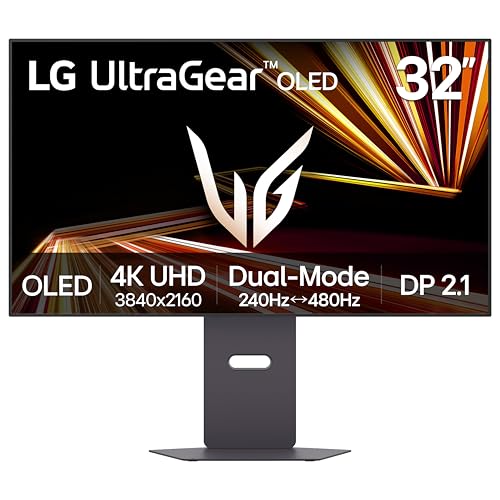
LG UltraGear 32GX870A-B
- Best for: Players who want one screen for competitive Valorant and high-resolution games.
- 32-inch 4K UHD (3840 x 2160) OLED panel
- Dual-mode: 4K UHD at 240Hz or Full HD at 480Hz
- 0.03ms response time
- FreeSync Premium Pro
Players who want one screen for competitive Valorant and high-resolution games.
A 32-inch screen needs a deep desk, and the Full HD mode is the one that suits ranked play. Confirm it is still sold before buying.
The 32GX870A-B is the most flexible monitor in this guide thanks to its dual-mode panel, which switches between 4K at 240Hz and Full HD at 480Hz. Valorant players can run the high-refresh Full HD mode for ranked matches, then switch to 4K for story-driven games or media without changing displays. The OLED panel answers in 0.03ms, FreeSync Premium Pro keeps frames steady, and DisplayHDR True Black 400 deepens dark scenes. USB Type-C and DisplayPort 2.1 round out a connection set built for modern systems.
Watch out for: A 32-inch screen needs a deep desk, and the Full HD mode is the one that suits ranked play. Confirm it is still sold before buying.
Which One Fits Your Situation
Chasing Ranked Climb
Players focused purely on climbing should take the ASUS TUF Gaming VG259QMR5A, since its overclocked 310Hz refresh rate and 0.3ms response give the fastest motion in this guide on a compact screen. The 24.5-inch size keeps the whole map inside the field of view, and the Fast IPS panel holds color steady during long sessions. It is the most direct tool for duels decided by reaction speed.
Long Sessions on a Sensible Setup
Players who grind for hours and want comfort alongside speed should choose the ViewSonic XG2431. Its ergonomic stand adjusts to eye level, its 240Hz panel keeps Valorant smooth, and its dual sync support works with either graphics card brand. It is the steady, no-fuss pick for nightly ranked sessions and long practice blocks.
Bigger Screen, Still Competitive
Players who want a larger display without losing competitive pace should pick the MSI MAG 274CF X24 or the AOC Q27GAZD. The MSI adds a curved 27-inch screen with AI Vision for dark corners, while the AOC trades the curve for QHD sharpness and OLED response. Choose the MSI for immersion and the AOC for clarity.
One Monitor for Everything
Players who also play story-driven games, watch films, or work on the same desk should take the LG UltraGear 32GX870A-B. Its dual-mode panel runs Valorant at high refresh rates in Full HD mode, then switches to 4K for everything else. It costs desk space, but it replaces the need for a second display entirely.
Common Mistakes
- Buying a 4K monitor for Valorant and then running it at a lower resolution, which wastes the panel and can soften the image.
- Choosing a large ultrawide screen that pushes the minimap and health bar to the edges of peripheral vision.
- Ignoring the graphics card, so the system never reaches the frame rates the monitor was bought to display.
- Turning on every motion feature at once without checking whether blur reduction and adaptive sync conflict on that model.
- Picking a monitor by refresh rate alone and ending up with a panel that smears in dark scenes where opponents hide.
Frequently Asked Questions
What refresh rate is best for Valorant?
A 240Hz monitor suits most Valorant players, because the game runs at high frame rates on modest hardware and the extra frames make tracking smoother. Players with a strong graphics card can benefit from faster panels, such as the 310Hz overclock on the ASUS TUF Gaming VG259QMR5A in this guide. Below 144Hz, fast peeks start to look choppy enough to hurt timing.
Is 1080p or 1440p better for Valorant?
1080p is the common competitive choice because it keeps frame rates high and the whole playfield compact on a 24-inch screen. 1440p sharpens distant targets and suits players who also use the monitor for work or single-player games, but it needs a stronger graphics card to hold high frame rates. Either works, so the choice depends on the graphics card and desk setup.
Does an OLED monitor help in Valorant?
OLED helps because its near-instant response time keeps fast movement crisp, and its deep blacks make opponents in dark corners easier to spot. The AOC Q27GAZD and LG UltraGear 32GX870A-B in this guide both use OLED panels with 0.03ms response times. Owners should still vary on-screen content, since static interface elements can leave lasting marks over time.
Do I need G-SYNC or FreeSync for Valorant?
Adaptive sync is worth having because it removes screen tearing when the frame rate dips during utility-heavy fights. G-SYNC compatibility suits NVIDIA graphics cards, while FreeSync Premium suits AMD cards, and several monitors in this guide support both standards. Check the listing for the exact standard and confirm the graphics card supports it before buying.
More from Amazon
Programs that pair well with the guide above. Offers and eligibility are set by Amazon and may change.
Free shipping on eligible items, Prime Video and more. Eligible new members can start with a free trial.
Start a Prime free trialAd-free music streaming. Eligible new subscribers can start with a free trial.
Try Music Unlimited freeA Prime membership for ages 18-24 with a trial period. Eligibility is set by Amazon.
See Prime for Young AdultsAudiobooks and podcasts to listen to on the go. Eligible new members can start with a free trial.
Try Audible freeAs an Amazon Associate we earn from qualifying purchases.
Write Your Review
No reviews yet. Be the first to share your experience!