

Our Short List of 3

- Best for: A one-cable desk that also needs wired Ethernet and a KVM hub built into the monitor.
- Size: 27 inches
- Resolution: 3840 x 2160
- Panel: IPS Black, 2000:1 contrast
- Brightness: 400 nits

- Best for: Photo and video creators who want Adobe RGB coverage and the strongest laptop charging in the lineup.
- Size: 27 inches
- Resolution: 3840 x 2160 (4K), IPS panel, 178-degree wide view
- Colour: 99 percent DCI-P3, 99 percent Adobe RGB
- Calibration: Delta E under 2, Calman Verified

- Best for: Designers on a Mac who want the HotKey Puck controller and a KVM for a two-computer desk.
- Size: 27 inches
- Resolution: 4K UHD
- Panel: IPS
- USB-C: 90W USB-C
All 5 Picks at a Glance
| Product | Specs | Action |
|---|---|---|
| Dell UltraSharp 27 4K USB-C Hub Monitor (U2723QE) |
| Check price on Amazon |
| ASUS ProArt Display 27-inch 4K HDR Professional Monitor (PA279CRV) |
| Check price on Amazon |
| BenQ PD2706U Mac-Ready Monitor 27-inch 4K UHD |
| Check price on Amazon |
 Samsung 27-Inch ViewFinity S8 (S80UD) 4K UHD Monitor |
| Check price on Amazon |
 LG 27UP850K-W 27-inch UltraFine 4K UHD IPS Monitor |
| Check price on Amazon |
Key takeaways
- Five 4K monitors with USB-C video and laptop charging, from a 96W creator display to a KVM hub monitor, each checked against its Amazon listing.
A USB-C 4K monitor promises the cleanest desk in computing: one cable from the laptop that carries the picture, the data and the charging. The catch is that the badge hides real differences. Some USB-C ports never carry video at all, charging wattage varies from pick to pick, and the hub extras behind the panel decide whether a separate dock still clutters the desk. Choosing well means reading the listing’s own figures rather than the marketing line.
This guide serves laptop owners building a one-cable desk, creators who need a colour-stated panel, and two-computer households sharing peripherals through a KVM. The five picks were chosen from the name and specs on each product’s Amazon page, and every one states 3840 x 2160 resolution with a USB-C port that carries video. They split by charging wattage, hub depth and colour intent, so the right choice depends on the desk, not a ranking.
Quick Picks
As an Amazon Associate we earn from qualifying purchases
| Product | Best for | Key spec from title |
|---|---|---|
| Dell UltraSharp 27 4K USB-C Hub Monitor (U2723QE) | One-cable desks needing Ethernet and a built-in KVM hub | USB-C with 90W power delivery |
| ASUS ProArt Display PA279CRV | Photo and video creators | DisplayPort over USB-C with 96W power delivery |
| BenQ PD2706U | Mac designers with two computers | 90W USB-C with KVM |
| Samsung ViewFinity S8 (S80UD) | Value docking desks | USB-C with 90W charging |
| LG 27UP850K-W | Lowest-cost 90W docking route | USB Type-C 90W power delivery |
How to Choose
Check the USB-C Wattage Against Your Laptop
Start with the number the listing states for USB-C power delivery. Four of these picks deliver 90W and one delivers 96W, and that figure decides whether the single cable can actually replace your laptop charger. A laptop that ships with a high-wattage adapter can still drain slowly under heavy load on a lower-wattage port, which quietly defeats the one-cable idea. Match the monitor’s stated wattage to your laptop’s charging requirement, and treat any listing that stays silent on wattage as an unknown rather than assuming it charges at full speed.
Confirm the USB-C Port Carries Video
A USB-C socket is not automatically a display input. Some monitors carry USB-C ports that move data and power only, so the class test is the listing’s own wording: DisplayPort Alt Mode, DisplayPort over USB-C, or a built-in KVM whose upstream is the USB-C port. Every pick here passes that test on its Amazon page. The cautionary example sits inside this very lineup’s family: Samsung’s S80D sibling looks near-identical to the S80UD pick but has no USB-C port at all, so read the exact model number before ordering.
Decide Which Hub Extras Your Desk Needs
The hub features are where these five separate. Only the Dell adds RJ45 Ethernet for a wired network drop at the desk. Three picks build in a KVM switch, so a keyboard and mouse plugged into the monitor follow whichever computer is active. The Dell and ASUS offer DisplayPort outputs for daisy-chaining a second screen, while the LG instead adds a built-in speaker for calls. List the peripherals your desk actually runs, then pay for the monitor whose stated ports cover them; extras you never plug in are just cost.
Match the Panel to Your Work
Panel intent splits the lineup into two camps. The ASUS and BenQ are creator panels: their listings state wide DCI-P3 and Adobe RGB coverage, low Delta E figures and factory calibration, which matters when the screen is the reference for finished photos and video. The Samsung and LG listings lead with sRGB-class coverage and HDR badges for general desk work, while the Dell competes on IPS Black contrast and hub depth instead. Every pick whose listing states a refresh rate sits at 60 Hz, so none of these is a high-refresh gaming panel; buy them for colour and docking, not frame rates.
The 5 Best Options
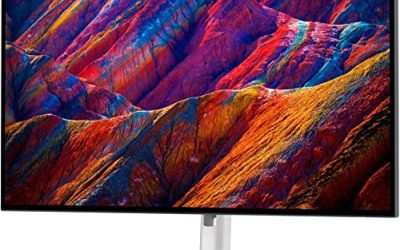
Dell UltraSharp 27 4K USB-C Hub Monitor (U2723QE)
- Best for: A one-cable desk that also needs wired Ethernet and a KVM hub built into the monitor.
- Size: 27 inches
- Resolution: 3840 x 2160
- Panel: IPS Black, 2000:1 contrast
- Brightness: 400 nits
A one-cable desk that also needs wired Ethernet and a KVM hub built into the monitor.
A near-identical 2-pack bundle listing exists under a different code, so confirm the listing is the single-monitor U2723QE before ordering.
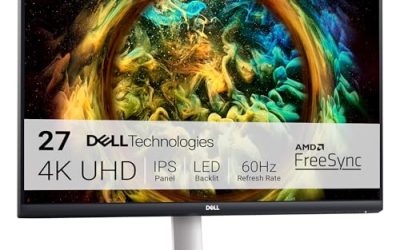
The Dell UltraSharp U2723QE is the hub flagship of this lineup: its USB-C upstream carries DisplayPort 1.4 Alt Mode video and up to 90W of power, while the monitor itself adds RJ45 Ethernet, a DisplayPort output and four USB 3.2 Gen 2 downstream ports. The 27-inch IPS Black panel runs at 3840 x 2160 with a 2000:1 contrast ratio and 400 nits of brightness, so text stays crisp and blacks sit deeper than on a standard IPS screen. For a desk built around one cable, it replaces a separate docking station outright.
ASUS ProArt Display 27-inch 4K HDR Professional Monitor (PA279CRV)
- Best for: Photo and video creators who want Adobe RGB coverage and the strongest laptop charging in the lineup.
- Size: 27 inches
- Resolution: 3840 x 2160 (4K), IPS panel, 178-degree wide view
- Colour: 99 percent DCI-P3, 99 percent Adobe RGB
- Calibration: Delta E under 2, Calman Verified
Photo and video creators who want Adobe RGB coverage and the strongest laptop charging in the lineup.
Daisy-chaining is over DisplayPort, not USB-C; it is a colour-work panel, not a high-refresh gaming pick.
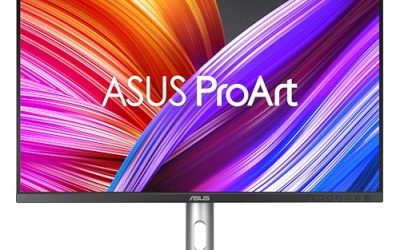
The ASUS ProArt PA279CRV is the creator pick: a 27-inch 4K IPS panel with 99 percent DCI-P3 and 99 percent Adobe RGB coverage, Delta E under 2 and Calman Verified calibration. Its USB-C port runs DisplayPort over USB-C with 96-watt Power Delivery, the strongest laptop charging in this lineup, and a DisplayPort output supports daisy-chaining a second monitor. A USB hub, HDMI input and ergonomic stand round out a desk tool aimed at photo and video work rather than fast-paced gaming.
BenQ PD2706U Mac-Ready Monitor 27-inch 4K UHD
- Best for: Designers on a Mac who want the HotKey Puck controller and a KVM for a two-computer desk.
- Size: 27 inches
- Resolution: 4K UHD
- Panel: IPS
- USB-C: 90W USB-C
Designers on a Mac who want the HotKey Puck controller and a KVM for a two-computer desk.
A second code for this model name circulates in roundup listing data, so check the listing carefully before ordering; the PD2706UA ergo-arm version is a different product.
The BenQ PD2706U is built for Mac-based design work: its listing leads with 90W USB-C, a built-in KVM and a USB hub, so one cable drives the 27-inch 4K IPS panel and charges the laptop. Colour figures are stated plainly on the listing: 99 percent sRGB, 95 percent P3, Delta E of 3 or less, DisplayHDR 400 and factory calibration under BenQ’s AQCOLOR program. The included HotKey Puck puts display settings on a physical dial, and the ergonomic stand adjusts through the workday.
Samsung 27-Inch ViewFinity S8 (S80UD) 4K UHD Monitor
- Best for: A value docking desk that wants KVM and 90W charging without the flagship hub price tier.
- Size: 27 inches
- Resolution: 3840 x 2160 (4K UHD)
- Refresh rate: 60 Hz
- Response time: 5 ms
A value docking desk that wants KVM and 90W charging without the flagship hub price tier.
Only one USB-C port; the near-identical S80D sibling (LS27D806EANXGO) has no USB-C at all, so check the exact model number LS27D802UANXGO before ordering.
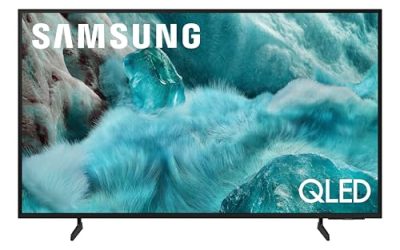
The Samsung ViewFinity S8 (S80UD) brings the docking formula down a price tier: a USB-C port with 90W charging and data transfer, a built-in KVM switch and a three-port USB hub. The 27-inch panel is 3840 x 2160 with HDR10, 99 percent sRGB coverage and a 350 cd/m² brightness rating, and the stand adjusts for height, tilt, swivel and pivot. A USB-C cable is included in the box, and Eye Saver Mode trims blue light for long reading sessions at the desk.
LG 27UP850K-W 27-inch UltraFine 4K UHD IPS Monitor
- Best for: The lowest-cost route into a 90W one-cable 4K desk with an adjustable stand and speakers.
- Size: 27 inches
- Resolution: 3840 x 2160 (4K UHD), IPS
- Refresh rate: 60 Hz
- Response time: 5 ms
The lowest-cost route into a 90W one-cable 4K desk with an adjustable stand and speakers.
This listing is the White finish; the older 27UP850-W is a separate listing, so do not merge the two when comparing pages.
The LG 27UP850K-W is the value route into this class: its listing states USB Type-C with 90W power delivery for the one-cable connection, alongside HDMI and DisplayPort inputs. The 27-inch UltraFine IPS panel runs 3840 x 2160 at 60 Hz with DisplayHDR 400, and a built-in speaker covers calls without extra desk gear. The stand adjusts for tilt, height and pivot, and this listing is the White finish, which suits lighter desk setups where a black bezel would stand out.
Which One Fits Your Situation
You Want Wired Ethernet at the Desk
If your router sits near the desk and Wi-Fi drops during calls, the Dell is the only pick here with RJ45 Ethernet built in, so the network cable lands on the monitor instead of a dongle. Its DisplayPort output also feeds a second screen, and the 90W USB-C upstream keeps the laptop charged while four downstream USB ports run your drives and peripherals.
You Edit Photos or Video on a Laptop
For photo and video work, start with the ASUS: its listing states 99 percent Adobe RGB coverage, Delta E under 2 and the strongest charging here at 96W. If your desk runs on a Mac and you prefer a physical settings dial, the BenQ answers with factory calibration, 95 percent P3 coverage and the HotKey Puck, at the same one-cable convenience.
Two Computers Share One Desk
A work laptop and a personal machine sharing one keyboard, mouse and screen is exactly what a built-in KVM solves. Three picks state one: the Dell, the BenQ and the Samsung. Plug the peripherals into the monitor once, and they follow whichever computer the KVM selects, while each machine still gets its picture and, over USB-C, its charging from the same panel.
You Want the Cleanest One-Cable Setup for Less
If the goal is simply a tidy one-cable desk without paying for hub extras, the LG is the value entry: 90W USB-C charging, an adjustable stand and a built-in speaker for calls. Step up to the Samsung only if a KVM switch or the included USB-C cable matters, since its panel figures otherwise sit close to the LG’s.
Common Mistakes
- Assuming every USB-C port carries video, when some are wired for data and power only; check the listing for DisplayPort Alt Mode or DisplayPort over USB-C wording.
- Ordering the Samsung S80D instead of the S80UD pick, since the near-identical sibling has no USB-C port at all; check the exact model number LS27D802UANXGO.
- Merging sibling listings, such as treating the older LG 27UP850-W as the same product as the 27UP850K-W pick.
- Expecting daisy-chaining to run over USB-C, when on the ASUS pick it runs over the DisplayPort output.
- Ignoring the stated wattage and ending up with a second charger cable on the desk because the monitor cannot keep the laptop charged under load.
Frequently Asked Questions
Does Every USB-C Monitor Port Carry Video?
No. A USB-C port can be wired for data and power only, with no video path. The listings that qualify here state the video link in words: DisplayPort Alt Mode, DisplayPort over USB-C, or a KVM switch whose upstream is the USB-C connection. If a product page never says how the picture travels, assume the port is not a display input.
How Much USB-C Wattage Does a Laptop Need From a Monitor?
Match the figure on your laptop’s own charger. Most thin laptops charge fully somewhere at or below the 90W that four of these picks state, and the ASUS goes further at 96W. A monitor that delivers less than the laptop expects may still charge it at idle, then lose ground during heavy work, so the stated wattage is a buying figure, not a footnote.
Can One of These Monitors Serve Two Computers?
Yes, with the three KVM picks: the Dell, the BenQ and the Samsung. Plug the keyboard and mouse into the monitor’s USB hub once, connect each computer to its own input, and the switch moves the peripherals to whichever machine is on screen. The computer on the USB-C input also draws its charging from the monitor, which keeps both desks to one panel.
Is 60 Hz Enough for Office and Creator Work?
For documents, browsing, photo editing and video timelines, yes: 60 Hz is the standard desktop rate, and every pick whose listing states a refresh rate uses it. None of these five is a high-refresh gaming panel. Note that the ASUS listing does not state a refresh figure at all, so treat that specification as unconfirmed rather than filling it in from other models.
More from Amazon
Programs that pair well with the guide above. Offers and eligibility are set by Amazon and may change.
Free shipping on eligible items, Prime Video and more. Eligible new members can start with a free trial.
Start a Prime free trialAd-free music streaming. Eligible new subscribers can start with a free trial.
Try Music Unlimited freeA Prime membership for ages 18-24 with a trial period. Eligibility is set by Amazon.
See Prime for Young AdultsAudiobooks and podcasts to listen to on the go. Eligible new members can start with a free trial.
Try Audible freeAs an Amazon Associate we earn from qualifying purchases.
Write Your Review
No reviews yet. Be the first to share your experience!