

Key takeaways
- Four large monitors from 32 to 49 inches compared on size, resolution, panel and ports from their listings: Gigabyte's 4K M32U, Dell's curved S3221QS, LG's 34-inch ultrawide, and Samsung's 49-inch Odyssey OLED G9.
A large monitor is not one product but three different ideas wearing the same label. A 32-inch 4K screen is a sharper desk monitor. A 34-inch ultrawide is two documents side by side without a bezel. A 49-inch super-ultrawide is two monitors fused into one panel that wraps around you. The buying decision starts with which of those ideas matches your work and games, because resolution, desk depth and graphics card demands all change with the format. Every monitor in this guide is 32 inches or larger, as its listing states.
This guide is for buyers replacing a multi-monitor setup with one screen, home workers who live in wide documents and timelines, and gamers who want immersion a 27-inch panel cannot give. Sizes, resolutions, refresh rates and ports below come from each Amazon listing, including the exact panel sizes — 31.5 inches sold as 32, for example — so you can plan desk space honestly rather than from headline numbers.
Quick Picks
As an Amazon Associate we earn from qualifying purchases.
| Product | Best for | Key spec from title |
|---|---|---|
| Gigabyte M32U | 4K gaming and work on one 32-inch screen | 32-inch IPS, UHD 144Hz, USB-C KVM |
| Dell S3221QS | Movies and documents on a curved 4K panel | 32-inch curved 4K, built-in speakers |
| LG UltraGear 34GP83A-B | Ultrawide gaming and multitasking | 34-inch curved Nano IPS, 3440 x 1440 |
| Samsung Odyssey OLED G9 | Maximum immersion in a single panel | 49-inch QD-OLED, Dual QHD, 240Hz |
How to Choose
Pick the format before the brand
Format decides how a large monitor behaves all day. A 16:9 32-inch screen adds height as well as width, which suits documents, coding and 4K video. A 21:9 ultrawide like the 34-inch LG stretches the horizontal axis for timelines, spreadsheets and wide game scenes, at a resolution most graphics cards can drive. A 32:9 panel like the 49-inch Samsung replaces two monitors outright, but demands serious desk depth and a strong GPU. Write down the windows you keep open simultaneously; the honest count usually points at one format immediately.
Check that your graphics card can feed the pixels
Large monitors multiply pixels quickly. The 4K models here carry roughly four times the pixels of a 1080p screen, the ultrawide sits between 1440p and 4K in load, and the 49-inch Dual QHD panel approaches 4K’s total count. A card that cruises at 1080p will struggle to hold high refresh rates at these resolutions in demanding games. For work alone, integrated graphics drive any of them at native resolution over the right cable. For play, match the monitor’s refresh ceiling to frame rates your card can actually reach at that pixel count.
Measure the desk, not just the diagonal
A 49-inch ultrawide is over 1.2 metres wide and its curve brings the ends forward, so viewing distance and desk depth matter as much as raw width. Even the 32-inch models need more clearance than buyers expect once a full stand is involved, and several of these listings include height-adjustable stands with substantial feet. Check the listing’s dimensions, confirm your desk depth keeps the screen at a comfortable distance, and consider a VESA arm if the stand eats the workspace. A large monitor too close is worse than a smaller one at the right range.
Ports and extras decide the daily friction
At this size a monitor often becomes the desk’s hub. The Gigabyte below lists a USB-C KVM, letting a laptop connect with one cable and share peripherals. Built-in speakers, on the Dell, remove desktop speakers for calls and casual video. HDMI 2.1 matters for consoles and for reaching full refresh on some models, while DisplayPort remains the reliable route from a PC. List the devices that will connect weekly — work laptop, gaming PC, console — and check the port count in the listing against that list before anything else.
The 4 Best Options
Gigabyte M32U

The M32U is the sensible flagship of this group: a 32-inch class Super Speed IPS panel at 3840 x 2160, running 144Hz with a 1ms MPRT figure and FreeSync Premium Pro. Its USB-C KVM connection is the practical highlight, switching a work laptop and gaming PC across one screen and one set of peripherals. Height adjustment is included. It suits the mixed desk better than any other model here — sharp enough for all-day text, fast enough for serious play — and it is the easiest recommendation for a buyer who wants one large screen to do everything without an exotic format.
Specs
- Panel: 32-inch SS IPS (31.5-inch viewable), flat
- Resolution: 3840 x 2160 (UHD 4K)
- Refresh rate: 144Hz
- Response time: 1ms (MPRT)
- Sync: AMD FreeSync Premium Pro
- Ports: HDMI, DisplayPort, USB-C
- Extra: KVM switch, height adjustable stand
- Model: M32U-SA
Best for: One 4K screen shared between gaming and laptop work.
Watch out for: Driving 4K at 144Hz in new games needs a strong graphics card; budget for the GPU honestly.
ASIN: B083GRVFXN
Dell S3221QS

Dell’s curved 32-incher is the media and documents pick. The VA panel bends at 1800R around a 3840 x 2160 resolution, runs at 60Hz with a 4ms response figure, and covers a wide color range quoted in its listing. Built-in speakers remove a separate purchase for calls and video, and FreeSync smooths casual gaming. This is not the screen for competitive play; it is the screen for a home office that watches as much as it types, and for readers who find a gentle curve easier on the eyes across a long document day than a flat panel of the same width.
Specs
- Panel: 32-inch VA, curved 1800R, ultra-thin bezel
- Resolution: 3840 x 2160 (4K UHD)
- Refresh rate: 60Hz
- Response time: 4ms
- Color: 90% DCI-P3 and 99% sRGB as listed
- Sync: AMD FreeSync
- Ports: HDMI and DisplayPort
- Audio: built-in speakers
Best for: Documents, films and general use on a curved 4K screen.
Watch out for: The 60Hz ceiling rules it out for fast gaming; look at the Gigabyte if play matters.
ASIN: B08G8WMRRP
LG UltraGear 34GP83A-B
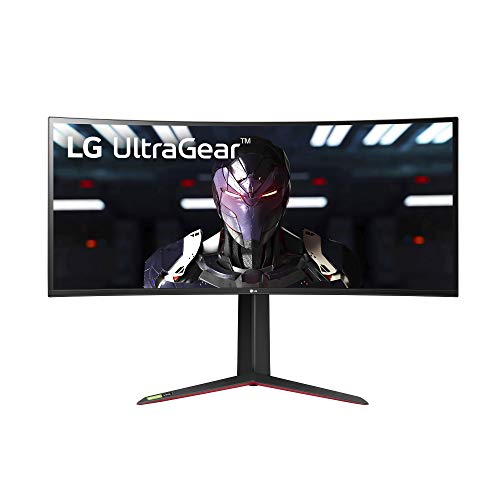
The 34GP83A-B is the ultrawide gamer’s route into large screens: a 34-inch curved Nano IPS panel at 3440 x 1440, running at 160Hz in its overclocked mode with a 1ms response figure, plus G-SYNC Compatible and FreeSync Premium badges in its listing. The 21:9 frame holds two working windows comfortably and gives racing and flight games a peripheral sweep a 16:9 screen cannot. It asks less of the graphics card than the 4K models while feeling substantially bigger than a 27-inch monitor, which is exactly the middle path many buyers are looking for.
Specs
- Panel: 34-inch Nano IPS, curved
- Resolution: 3440 x 1440 (QHD ultrawide, 21:9)
- Refresh rate: 160Hz (overclocked)
- Response time: 1ms
- Sync: NVIDIA G-SYNC Compatible, AMD FreeSync Premium
- Series: UltraGear gaming line
- Model: 34GP83A-B
Best for: Ultrawide gaming and side-by-side multitasking at 34 inches.
Watch out for: Some games and most streamed video do not fill 21:9, leaving black bars at the sides.
ASIN: B08DWD38VX
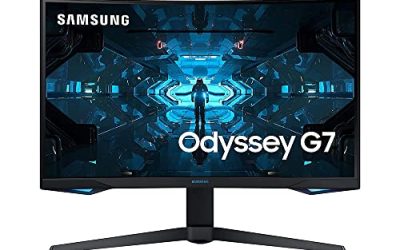
Samsung Odyssey OLED G9

The Odyssey OLED G9 is the maximalist option: a 49-inch QD-OLED panel at Dual QHD 5120 x 1440, curving around the viewer and refreshing at 240Hz with a 0.03ms response figure in its listing. As a smart gaming monitor it also carries built-in streaming apps, so the screen can play video with no PC attached. It replaces a dual-monitor battlestation with one unbroken surface and suits simulation rigs and multitaskers who live in four windows at once. The demands are equally maximal: desk depth, graphics card power, and care with static images on an OLED panel.
Specs
- Panel: 49-inch QD-OLED, curved
- Resolution: 5120 x 1440 (Dual QHD, 32:9)
- Refresh rate: 240Hz
- Response time: 0.03ms
- Sync: AMD FreeSync Premium Pro, G-Sync Compatible
- Platform: smart gaming monitor with built-in apps
- Processor: Neo Quantum Processor Pro as listed
- Model: G95SC (LS49CG954SNXZA)
Best for: Replacing two monitors with one immersive 49-inch panel.
Watch out for: OLED panels need care with static content, and the desk footprint is the largest here by far.
ASIN: B0C48D7Q22
Which One Fits Your Situation
You want one screen for work and gaming, without drama
Take the Gigabyte M32U. The 4K panel is sharp for text, 144Hz covers serious play, and the KVM makes a two-computer desk painless. It is the least specialised and most capable monitor in this guide, and the one least likely to be replaced when your setup changes, because nothing about its format is a compromise you have to explain.
Your desk is for documents, calls and evening films
Take the Dell S3221QS. The curved 4K panel, wide listed color coverage and built-in speakers make a calm, complete home office screen, and its price class is usually gentler than the gaming models. Give up the high refresh rate knowingly: for reading, writing and watching, this monitor’s strengths are the ones you will use every hour.
You multitask in wide windows and game after hours
Take the LG 34GP83A-B. The ultrawide frame is the productivity sweet spot — two full windows, no bezel — and 160Hz Nano IPS gaming is a genuine evening upgrade over any 60Hz panel. It also keeps the pixel count within reach of a mid-range graphics card, which neither 4K model here can promise.
You are rebuilding a battlestation around one screen
Take the Odyssey OLED G9. Nothing else here changes the room the way a 49-inch OLED curve does, and for simulation, racing and sprawling strategy games the immersion is the entire point. Go in with eyes open about desk depth, GPU requirements and OLED care habits, and it delivers the single-screen endgame the other formats only approach.
Common Mistakes
- Buying a 49-inch ultrawide for a shallow desk and sitting far too close to it.
- Pairing a 4K 144Hz monitor with a graphics card that can only feed it at 60 frames.
- Assuming ultrawide support in every game and streaming service you use.
- Ignoring stand depth and VESA options until the monitor crowds out the keyboard.
- Leaving static taskbars and dashboards on an OLED screen all day without precautions.
Frequently Asked Questions
Is 32 inches too big for a desk monitor?
Not for most desks, provided the viewing distance is around arm’s length or more. A 32-inch 4K screen like the two here keeps text sharp at that range, and the extra height helps documents. The problems start with shallow desks under about 60cm deep, where any 32-inch model crowds the viewer; a wall mount or monitor arm solves it by reclaiming the stand’s footprint.
Ultrawide or 4K: which is better for productivity?
It depends on your windows. Ultrawide, like the 34-inch LG, excels at two or three documents side by side and at timelines. A 4K 16:9 screen, like the Gigabyte or Dell, gives more vertical room and sharper text per window, and suits single-document work and photo editing. Count how you actually arrange your screen for a week; the pattern, not the specification sheet, decides.
Can one large monitor really replace two smaller ones?
Yes, and the 49-inch Samsung here is built exactly for that, offering the width of two 27-inch 1440p screens with no centre bezel. Window management software replaces the physical separation, and games gain an uninterrupted view. What you lose is the ability to angle screens independently or keep one for a call while the other works full-screen, which some people miss more than they expect.
Do I need HDMI 2.1 on a large monitor?
Only for specific sources. A gaming PC is best served by DisplayPort on all four models here. HDMI 2.1 matters if a current console must reach its high-refresh modes, or if your laptop’s only full-bandwidth output is HDMI. Check the listing’s port list against your devices; for a PC-only desk, the absence of HDMI 2.1 is not a practical limitation.
More from Amazon
Programs that pair well with the guide above. Offers and eligibility are set by Amazon and may change.
Free shipping on eligible items, Prime Video and more. Eligible new members can start with a free trial.
Start a Prime free trialAd-free music streaming. Eligible new subscribers can start with a free trial.
Try Music Unlimited freeA Prime membership for ages 18-24 with a trial period. Eligibility is set by Amazon.
See Prime for Young AdultsAudiobooks and podcasts to listen to on the go. Eligible new members can start with a free trial.
Try Audible freeAs an Amazon Associate we earn from qualifying purchases.
Write Your Review
No reviews yet. Be the first to share your experience!