

Key takeaways
- Find the best monitors for designers with wide DCI-P3 and Adobe RGB coverage, factory calibration and 4K IPS panels from ASUS, BenQ, Dell and LG compared.
Choosing a designer monitor is rarely about resolution alone. Two 4K panels can look identical on a spec sheet yet render the same brand red or skin tone quite differently, because one covers a wider colour gamut and arrives calibrated while the other does not. The real decision is how much gamut coverage and factory accuracy your work actually demands, and whether you are paying for headline resolution you do not need instead.
This guide is for graphic designers, illustrators, photographers and video editors who need colour they can trust for client delivery. Every model below was selected from its Amazon listing name and stated specifications, prioritising stated DCI-P3, Adobe RGB or sRGB coverage, factory calibration figures and IPS or IPS Black panels at 4K.
Quick Picks
As an Amazon Associate we earn from qualifying purchases
| Product | Best for | Key spec from title |
|---|---|---|
| ASUS ProArt Display PA279CRV | Print and photo work needing Adobe RGB as well as DCI-P3 | 99 percent DCI-P3/Adobe RGB, ΔE < 2, Calman Verified |
| BenQ PD2705U | Mac-based designers who deliver mainly in sRGB and Rec.709 | 99 percent sRGB, 99 percent Rec.709, Delta E ≤ 3, Factory Calibrated |
| BenQ PD3225U | Designers who want a larger 32-inch canvas for layout work | 98 percent P3, 100 percent sRGB & Rec.709, DeltaE ≤2 |
| Dell UltraSharp U2725QE | Designers who also need a high-contrast docking display | 99 percent DCI-P3 and Display P3, IPS Black |
| LG 27UP850-W | Designers who want 4K DCI-P3 coverage with USB-C simplicity | DCI-P3 95 percent Color Gamut, VESA DisplayHDR 400 |
How to Choose
Colour gamut coverage
Gamut tells you which colours a panel can actually show, and the right target depends on your delivery format. Web and interface work lives in sRGB, video work is usually graded in DCI-P3 or Rec.709, and print preparation benefits from Adobe RGB coverage. A listing that states 99 percent DCI-P3 and 99 percent Adobe RGB, like the ASUS ProArt PA279CRV, suits mixed print and video pipelines. A panel stating 99 percent sRGB and 99 percent Rec.709, like the BenQ PD2705U, is narrower on paper but precisely matched to screen-only delivery. Match the stated percentages to your output first, rather than chasing the largest number.
Factory calibration and Delta E
Delta E describes how far displayed colours sit from their intended values, with lower figures meaning smaller, harder-to-see errors. Listings in this guide state figures ranging from Delta E less than 1.5 on the Dell UltraSharp U2725QE to Delta E ≤ 3 on the BenQ PD2705U, alongside claims such as Calman Verified and a factory calibration report. Those statements matter because they describe the individual unit leaving the factory, not just the model line. If colour sign-off is part of your job, favour a model whose listing names both a Delta E figure and a verification or report.
Resolution and pixel density
All five monitors here use 3840 x 2160 resolution, but size changes how that resolution feels in daily design work. At 27 inches, 4K produces very fine text and interface elements, which helps with detailed illustration and photo retouching at close viewing distances. At 32 inches, as on the BenQ PD3225U, the same pixel count spreads across a larger canvas, giving timelines, palettes and multi-page layouts more physical room while keeping type comfortably readable without scaling. Neither size is inherently more accurate. Choose based on desk depth, viewing distance and whether you prefer density or sheer workspace.
Connectivity and colour modes
A designer monitor often doubles as a laptop dock, so check what a single cable actually carries. Several listings here combine USB-C video with power delivery, ranging from 65W on the BenQ PD2705U to 96W on the ASUS ProArt PA279CRV, plus USB hubs and, on the BenQ models, a KVM switch for sharing peripherals between two computers. Colour modes matter just as much: dedicated sRGB, Rec.709, DCI-P3, CAD/CAM and Darkroom presets let you constrain the panel to the space you are delivering in, instead of relying on a wide-gamut default for every task.
The 5 Best Options
ASUS ProArt Display PA279CRV

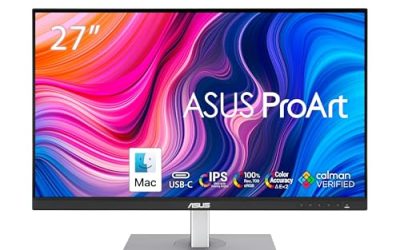
If your portfolio moves between print proofs and video timelines, this is the most balanced starting point in the group. Its listing pairs full Adobe RGB coverage with equally strong DCI-P3 coverage, so a layout prepared for press and a cut graded for online video can share one screen without constant second-guessing. The Calman Verified factory calibration to Delta E < 2 suits designers who need dependable colour straight from the box, while USB-C with 96W power delivery keeps a laptop desk tidy and daisy-chaining supports a second display later.
Specs
- 27-inch 4K UHD (3840 x 2160) IPS panel with 178° wide-view angle
- Wide colour gamut with 99 percent DCI-P3 and 99 percent Adobe RGB coverage
- 100 percent sRGB coverage stated in listing description
- Calman Verified and factory pre-calibrated to Delta E < 2
- USB-C with 96W Power Delivery, DisplayPort, HDMI and USB hub
- VESA DisplayHDR 400 stated in listing description
- Daisy-chain support and ergonomic stand
Best for: Designers splitting work between print, photography and video who need Adobe RGB and DCI-P3 on one 27-inch panel.
Watch out for: Confirm the USB-C cable in the box and your laptop’s power requirement, since full 96W delivery depends on using a suitable cable and port.
ASIN: B0BQPSX5CR
BenQ PD2705U

Mac-centred designers who deliver for screens rather than print will feel most at home here. BenQ positions this DesignerVue model around AQCOLOR accuracy for sRGB and Rec.709 work, which maps neatly onto web design, interface work and online video. Factory calibration with a stated Delta E of ≤ 3 and Uniformity Technology address the two complaints screen designers raise most often: off-target colour and uneven brightness across the panel. The included HotKey Puck G2 and KVM switch also make it practical for a desk shared between a laptop and a desktop.
Specs
- 27-inch 4K (3840 x 2160) IPS panel
- AQCOLOR technology with 99 percent sRGB and 99 percent Rec.709 coverage
- Delta E ≤ 3, factory calibrated, with Uniformity Technology
- HDR10 support
- USB-C with 65W Power Delivery, HDMI, DisplayPort and USB hub
- KVM switch and HotKey Puck G2
- Designer modes including CAD/CAM, Animation and Darkroom as stated in listing description
Best for: MacBook-based designers and video editors whose final output is sRGB or Rec.709 and who switch between two computers.
Watch out for: Check that 65W USB-C charging is enough for your laptop under load, and note the listing does not state a DCI-P3 percentage for this model.
ASIN: B096B3PBFZ
BenQ PD3225U

Layout designers, art directors and anyone laying out spreads or large canvases will appreciate the extra physical space here. Moving to a 32-inch panel gives tool palettes, reference images and the document itself room to coexist without constant zooming, while the IPS Black panel and its higher stated contrast help shadow detail stay legible. The colour claims are aimed squarely at Mac workflows, with 98 percent P3 coverage alongside full sRGB and Rec.709, factory calibration to Delta E ≤ 2, and Thunderbolt connectivity with daisy-chaining for a clean two-screen studio setup.
Specs
- 32-inch 4K UHD IPS Black panel (3840 x 2160)
- AQCOLOR with 98 percent P3, 100 percent sRGB and 100 percent Rec.709 coverage
- Delta E ≤ 2 with factory calibration and Uniformity Technology
- Thunderbolt monitor connection with USB-C 85W Power Delivery
- USB hub, daisy-chain support and KVM switch
- HDR10 and VESA DisplayHDR 400 stated in supporting listing details
Best for: Designers who want a single large 4K canvas for layout, branding and presentation work, especially in a Mac-based studio.
Watch out for: Measure your desk depth before ordering, because a 32-inch panel needs more viewing distance, and confirm your Mac model supports Thunderbolt daisy-chaining if you plan a second screen.
ASIN: B0CT441B25
Dell UltraSharp U2725QE

Designers whose monitor must also anchor a busy desk of drives, tablets and a second computer should look closely at this Dell. Its listing leads with an enhanced IPS Black panel, a stated 3000:1 contrast ratio and 99 percent DCI-P3 with Display P3 coverage, a combination aimed at deeper blacks than conventional IPS usually manages. Dell also states factory calibration to Delta E less than 1.5 in the listing bullets, the tightest figure in this guide. A 120Hz refresh rate and extensive hub connectivity round out a panel built for long, mixed creative and administrative days.
Specs
- 27-inch 4K (3840 x 2160) enhanced IPS Black panel
- 99 percent DCI-P3 and Display P3 coverage stated in listing description
- Factory calibration to Delta E less than 1.5 stated in listing bullets
- 3000:1 contrast ratio and 120Hz refresh rate stated in listing description
- 450 cd/m² image brightness in product information
- Ambient light sensor and ComfortView Plus stated in listing description
- Thunderbolt hub connectivity with USB ports
Best for: Designers who want high contrast, the tightest stated Delta E in this group and a monitor that doubles as a central docking hub.
Watch out for: Verify which seller fulfils the listing and which exact port layout you receive, because hub monitors are often listed in several bundle configurations.
ASIN: B0F18Q2GPN
LG 27UP850-W

Designers who want a straightforward 4K upgrade with wide-gamut colour, without committing to a specialist pro line, are the natural audience for this LG. The listing states DCI-P3 95 percent coverage on an IPS panel, enough to grade online video and edit photographs with considerably more colour range than a basic sRGB office screen. VESA DisplayHDR 400, a three-side virtually borderless design and a height, pivot and tilt adjustable stand make it easy to slot into an existing setup, and USB-C keeps a laptop connection down to one cable for picture and data.
Specs
- 27-inch UHD (3840 x 2160) IPS display
- DCI-P3 95 percent colour gamut stated in listing title
- VESA DisplayHDR 400
- USB-C connectivity stated in listing title
- 3-side virtually borderless display
- Height, pivot and tilt adjustable stand
Best for: Designers stepping up from a basic office monitor who want stated DCI-P3 coverage and USB-C in a clean 27-inch design.
Watch out for: The listing title does not state a factory Delta E figure, so if documented calibration is essential, compare its claims carefully against the ProArt and BenQ models above.
ASIN: B08YJMMYBX
Which One Fits Your Situation
You design for print as well as screens
Pick the ASUS ProArt Display PA279CRV. It is the only model here whose listing states both 99 percent DCI-P3 and 99 percent Adobe RGB, which covers press preparation and video work on the same panel. Its Calman Verified calibration to Delta E < 2 also gives you a documented starting point before soft-proofing.
You work on a MacBook and deliver for the web
Choose the BenQ PD2705U. Its stated 99 percent sRGB and 99 percent Rec.709 coverage matches web and online video delivery exactly, and its Mac-compatible positioning, 65W USB-C connection and KVM switch suit a laptop that comes and goes from the desk. The HotKey Puck G2 makes switching colour modes quick during reviews.
You need the biggest practical canvas
Go with the BenQ PD3225U. The 32-inch 4K panel gives layouts, mood boards and timelines more physical room than any 27-inch option here, while 98 percent P3 coverage and Delta E ≤ 2 factory calibration keep that larger view colour-managed. Thunderbolt daisy-chaining also leaves a clear path to a matched second screen.
Your desk is also your docking station
Select the Dell UltraSharp U2725QE. Beyond its 99 percent DCI-P3 coverage and IPS Black contrast, it is presented as a Thunderbolt hub monitor, so peripherals and charging consolidate into the display. That matters when a drawing tablet, backup drives and a work laptop all compete for ports throughout the working day.
Common Mistakes
- Buying on resolution alone and ignoring the gamut percentages actually stated on the listing, then discovering the panel cannot show the colour space you deliver in.
- Assuming every wide-gamut monitor is calibrated, when some listings state gamut coverage without any Delta E figure or calibration report.
- Leaving a wide-gamut panel in its default mode for sRGB web work, which can make colours look oversaturated compared with what clients see.
- Overlooking USB-C power delivery wattage, so a laptop charges slowly or drains under load despite being connected by a single cable.
- Choosing a 32-inch panel for a shallow desk without checking viewing distance, making corners and toolbars uncomfortable to scan.
Frequently Asked Questions
Do designers really need Adobe RGB coverage?
Only if print is part of your workflow. Adobe RGB aligns more closely with CMYK print output, so packaging, editorial and photo-print work benefits from a listing that states it, such as the ASUS ProArt PA279CRV at 99 percent. If everything you ship appears on screens, full sRGB coverage with good calibration is usually the more relevant specification.
What Delta E figure should I look for?
Lower is better, because Delta E measures the distance between displayed and intended colour. The listings here range from less than 1.5 to ≤ 3. For client-facing colour decisions, favour a model that states a figure of 2 or below and names its verification method, and remember that a stated average still describes factory condition, not your room lighting.
Is 27 inches or 32 inches better for design work?
Both sizes here run the same 3840 x 2160 resolution, so the choice is about density versus space. A 27-inch panel packs pixels more tightly, suiting detailed retouching at close range. A 32-inch panel spreads the same canvas wider, which helps multi-window layouts and presentations. Desk depth and viewing distance should decide, not resolution.
Can one USB-C cable replace a separate dock?
Often, yes, provided the wattage matches your laptop. Listings here state USB-C power delivery from 65W to 96W alongside video and hub ports for peripherals. Check your laptop’s charging requirement first, confirm the cable supports video and data, and remember that daisy-chaining a second monitor depends on your computer’s Thunderbolt support.
More from Amazon
Programs that pair well with the guide above. Offers and eligibility are set by Amazon and may change.
Free shipping on eligible items, Prime Video and more. Eligible new members can start with a free trial.
Start a Prime free trialAd-free music streaming. Eligible new subscribers can start with a free trial.
Try Music Unlimited freeA Prime membership for ages 18-24 with a trial period. Eligibility is set by Amazon.
See Prime for Young AdultsAudiobooks and podcasts to listen to on the go. Eligible new members can start with a free trial.
Try Audible freeAs an Amazon Associate we earn from qualifying purchases.

Write Your Review
No reviews yet. Be the first to share your experience!