

Key takeaways
- Key specs: dual tower, six heat pipes, two 120 mm fans, about 157 mm tall.
- Who it is for: builders with a 6-core to 12-core chip who want strong cooling at a low price.
- Pros: excellent cooling per unit of cost, easy to fit, broad socket support including AM5 and LGA 1851.
- Cons: fan noise is noticeable under load, and it blocks the side fan bracket because of its height.
The best CPU cooler for the Fractal Design North is a tower air cooler no taller than 165 mm, such as the Noctua NH-D15 or Thermalright Peerless Assassin 120 SE, or a 360 mm all-in-one liquid cooler mounted in the front. The North’s official clearance is 170 mm for the CPU cooler, but that figure drops to 145 mm if you install the optional side fan bracket, and a top radiator is limited to 240 mm. Those three numbers decide almost every cooler choice for this case.
People searching for a “CPU mount” for the North are usually trying to answer one of two questions: which cooler fits, and how should it be mounted. This guide covers both, with exact clearances, a comparison table of seven coolers, a worked fit calculation and the installation mistakes that cause problems in this particular case. Case dimensions come from Fractal Design’s manual and reviews by TechPowerUp and Club386; cooler heights come from the manufacturers’ specifications. Prices are described by tier only.
Our top picks

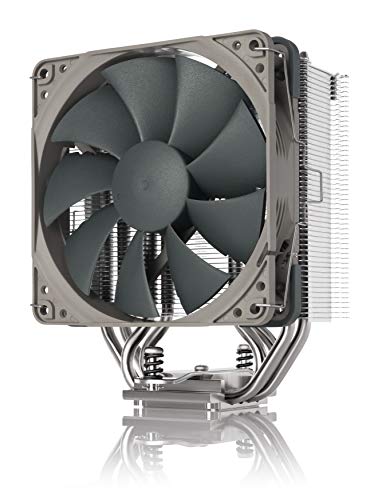
As an Amazon Associate we earn from qualifying purchases at no extra cost to you.
Fractal Design North Clearances at a Glance
| Dimension | Limit | Notes |
|---|---|---|
| CPU air cooler height | 170 mm | Without the side fan bracket |
| CPU air cooler height with side bracket | 145 mm | Bracket blocks taller towers |
| Front radiator | Up to 360 mm | Supported sizes include 120, 140, 240, 280 and 360 mm |
| Top radiator | Up to 240 mm | About 35 mm of memory height clearance, per TechPowerUp |
| Rear fan or radiator | 120 mm | Single exhaust position |
| Maximum GPU length | 355 mm, or 300 mm with a front radiator | A front radiator costs graphics card space |
One review site claims the top position takes a 280 mm radiator, but Fractal’s manual and Club386 both point to 240 mm, so treat 240 mm as the safe figure.
Quick Comparison of the Seven Best Coolers
| Cooler | Type | Height or size | Fits North? | Best for | Tier |
|---|---|---|---|---|---|
| Thermalright Peerless Assassin 120 SE | Dual-tower air | About 157 mm | Yes, without the side bracket | Best value | Budget |
| DeepCool AK620 | Dual-tower air | 157 to 160 mm (162 mm with the digital display) | Yes, without the bracket | Best mid-range air | Budget to mid-range |
| Noctua NH-U12A | Single-tower air | 158 mm | Yes, without the bracket | Best quiet single tower | Premium |
| Noctua NH-D15 | Dual-tower air | 165 mm | Yes, confirmed fit | Best proven air cooler | Premium |
| Noctua NH-D15 G2 | Dual-tower air | 168 mm | Yes, very tight, without the bracket | Best maximum air cooling | Premium |
| Arctic Liquid Freezer III 360 | 360 mm AIO | 360 mm radiator | Yes, front or top (see notes) | Best cooling for hot CPUs | Mid-range |
| Arctic Liquid Freezer III 240 | 240 mm AIO | 240 mm radiator | Yes, top mount | Best top-mounted AIO | Budget to mid-range |
The Peerless Assassin row deserves a clarification. At about 157 mm it fits the 170 mm limit comfortably, but it exceeds the 145 mm limit when the side fan bracket is installed, so it works only if you leave the bracket off.
Air Cooler or AIO: Which Suits the North?
The North is a mesh-front case with wood-accented panels, built to move air with quiet fans. Its mesh front panel suits both approaches. Air coolers are simpler and cannot leak or suffer pump failure, and the case’s 170 mm limit is generous enough for the best dual-tower models. An AIO gives better cooling for hot processors, such as the Core Ultra 9 285K or the Ryzen 9 9950X, and leaves the CPU area free for tall memory modules and an easier build.
A practical rule is to match the cooler to the processor’s sustained power. For chips drawing up to roughly 125 W, such as the Ryzen 7 9700X (65 W TDP) or Ryzen 5 9600X, a quality single or dual tower is plenty. For 170 W and higher chips running long all-core loads, a 280 mm or 360 mm AIO keeps boost clocks stable and noise lower.
Best Value Air Cooler: Thermalright Peerless Assassin 120 SE
The Peerless Assassin 120 SE is a dual-tower cooler with two 120 mm fans and a height of about 157 mm, comfortably inside the North’s 170 mm limit. It is the cooler most builders recommend when a budget matters, and it is a good match for 65 W to 125 W processors. A white version and ARGB variants exist, but the plain black model suits the North’s understated look best.
- Key specs: dual tower, six heat pipes, two 120 mm fans, about 157 mm tall.
- Who it is for: builders with a 6-core to 12-core chip who want strong cooling at a low price.
- Pros: excellent cooling per unit of cost, easy to fit, broad socket support including AM5 and LGA 1851.
- Cons: fan noise is noticeable under load, and it blocks the side fan bracket because of its height.
Best Mid-Range Air Cooler: DeepCool AK620
The DeepCool AK620 is a dual-tower cooler listed at about 157 mm tall, with 160 mm for the Zero Dark edition and 162 mm for the version with a digital display. All of these sit under the North’s 170 mm ceiling. It has a sturdy mounting kit and handles a 12-core Ryzen or a Core Ultra 7 without drama, as long as you leave the optional side bracket off.
- Key specs: dual tower, six heat pipes, two 120 mm fans, 157 to 162 mm tall depending on variant.
- Who it is for: builders who want a dependable, quiet-enough cooler that is easy to find.
- Pros: strong cooling, solid build, easy installation.
- Cons: wide fins can crowd the first memory slot if you use tall modules, and the digital version needs extra clearance.
Best Quiet Single Tower: Noctua NH-U12A
The Noctua NH-U12A is a single-tower cooler with two 120 mm fans and a height of 158 mm. It is shorter than the NH-D15 family, so it fits the North without drama and leaves more room around the memory slots. For builders who value low noise above maximum cooling, it pairs well with 8-core and 12-core processors up to about 125 W.
- Key specs: single tower, seven heat pipes, two 120 mm fans, 158 mm tall.
- Who it is for: quiet-PC builders with a mid-power CPU.
- Pros: low noise, excellent mounting hardware, long warranty and a reputation for durability.
- Cons: premium pricing, and a dual-tower cooler will outperform it on a 170 W chip.
Best Proven Air Cooler: Noctua NH-D15
The Noctua NH-D15 is 165 mm tall, and builder guides specifically confirm that it fits in the North, which makes it the safe choice for a maximum-performance air-cooled build. With dual towers and two fans, it handles 170 W processors in a case with front intake airflow. It is also wide, so check that your memory modules are not too tall for the front tower position, and leave the side bracket off.
- Key specs: dual tower, six heat pipes, two 140 mm fans, 165 mm tall.
- Who it is for: enthusiasts who want the best air cooling with a confirmed fit.
- Pros: excellent cooling and noise levels, extremely durable, broad compatibility.
- Cons: large footprint, premium pricing and a first memory slot that can be tight with tall RAM.
Best Maximum Air Cooling: Noctua NH-D15 G2
The NH-D15 G2 is the successor design, 168 mm tall according to retail specification comparisons. That leaves only 2 mm of margin inside the North’s 170 mm limit, so it technically fits but demands care. The case’s side panel must close without pressing on the heatsink, and you should confirm the exact cooler variant you buy, because height can differ slightly between versions.
- Key specs: dual tower, offset fan layout, 168 mm tall.
- Who it is for: builders who want the strongest air cooling available and are comfortable with a tight fit.
- Pros: the highest air-cooling capability here, quiet operation.
- Cons: tight clearance, premium pricing, and no side bracket.
Best AIO for Hot CPUs: Arctic Liquid Freezer III 360
A 360 mm AIO is the best way to cool a 170 W to 250 W processor in the North. The Arctic Liquid Freezer III 360 is widely respected for cooling performance and value. The North can take a 360 mm radiator in the front or at the top: the manual lists 360 mm at the front, and a top-mounted radiator preserves graphics card length. Builder guides generally recommend the front position for 360 mm models because the 240 mm top limit applies to the roof.
- Key specs: 360 mm radiator, three 120 mm fans, 38 mm thick radiator, integrated VRM fan on the pump block.
- Who it is for: owners of the Ryzen 9 9950X, Ryzen 9 9950X3D or Core Ultra 9 285K.
- Pros: very strong cooling, good value, pump block fan helps the VRM area.
- Cons: a front radiator limits the graphics card to about 300 mm, and the radiator plus fans adds roughly 50 mm to 65 mm of depth.
Best Top-Mounted AIO: Arctic Liquid Freezer III 240
If you want the cooling advantage of liquid without giving up GPU length, a 240 mm AIO in the roof is the compromise. The Arctic Liquid Freezer III 240 fits the top position’s 240 mm limit and handles chips up to roughly 125 W to 170 W. The main caution is memory height: TechPowerUp lists only about 35 mm of clearance under the top radiator, so low-profile memory modules are the sensible choice.
- Key specs: 240 mm radiator, two 120 mm fans, integrated VRM fan.
- Who it is for: builders with a long graphics card and a mid-to-high power CPU.
- Pros: keeps the front clear for GPU length, strong cooling for the cost.
- Cons: memory clearance is tight, and a 240 mm radiator cools less than a 360 mm unit.
Worked Fit Calculation
Take a build with a Ryzen 9 9900X, the Noctua NH-D15 and a 336 mm graphics card. The cooler height is 165 mm against a 170 mm limit, so you have 5 mm of margin with the bracket removed. The graphics card is 336 mm against a 355 mm limit, so you have 19 mm of margin. Now add a front 360 mm radiator instead: the GPU limit falls to 300 mm, and a 336 mm card no longer fits, even though the AIO would cool better. In that case, you either choose a shorter card or mount the AIO in the top position.
A second example: a builder wants the side fan bracket to cool a hot graphics card and has a 157 mm cooler. The bracket cuts clearance to 145 mm, which is 12 mm short, so the cooler will not fit. The choices are to drop the bracket, pick a cooler under 145 mm, or switch to an AIO and keep the bracket for the GPU airflow.
Decision Matrix
| Your build | Best cooler | Reason |
|---|---|---|
| 65 W chip, small budget | Peerless Assassin 120 SE | More cooling than needed at a low cost |
| Ryzen 7 or Core Ultra 7, balanced noise | DeepCool AK620 or Noctua NH-U12A | Fits easily, strong enough for 125 W |
| Hot 170 W chip, air only | Noctua NH-D15 | Confirmed fit and top air cooling |
| Long graphics card (over 300 mm) | Top-mounted 240 mm AIO or an air cooler | Keeps the front free |
| Hot 250 W Intel chip | 360 mm AIO in front | Highest cooling capacity the case allows |
| Want side fan bracket for GPU airflow | AIO or cooler under 145 mm | The bracket cuts clearance from 170 mm to 145 mm |
How to Mount a CPU Cooler in the North
- Build the motherboard outside the case first. Install the CPU, memory and cooler backplate on the table. This avoids dropping screws and lets you see the clearance before the board goes in.
- Check the socket hardware. AM5 boards use a factory backplate and bracket that most coolers reuse, while LGA 1851 boards use the LGA 1700-style mounting pattern. Confirm the cooler’s kit lists your socket before buying.
- Apply thermal paste. A pea-sized dot in the centre of the processor’s heat spreader is enough for most coolers. Too much paste can ooze onto the socket.
- Tighten the screws in a cross pattern. Turn each one a little at a time so pressure spreads evenly, and stop when the spring-loaded screws bottom out.
- Remove or fit the side fan bracket deliberately. Decide in advance, because the bracket changes the 170 mm limit to 145 mm.
- Route the CPU fan header cable. Connect the fan to the CPU_FAN header and the pump to the pump header, then set a fan curve in the BIOS.
- Test before closing the panel. Check temperatures at idle, then run a stress test for ten minutes to confirm fans ramp up properly.
Airflow and Fan Setup for the North
The North pulls air through its mesh front and exhausts it at the rear and roof. With a tower cooler, keep two or three front intake fans and one rear exhaust fan; the tower’s fans move air toward the back, in line with the case’s airflow. With a front-mounted AIO radiator, the fans should draw outside air through the radiator, so the CPU is cooled by the freshest air but the graphics card receives warmer air. With a top-mounted AIO, set the fans to exhaust, which keeps the front intake clean for the GPU.
A modest fan curve gets the best result: keep the case fans below a quiet threshold until the CPU passes about 60 degrees Celsius, then ramp them up. This avoids audible bursts during short load spikes.
Ownership Realities: Maintenance and Common Mistakes
- Dust: the front mesh filter needs cleaning every few months, since clogged mesh raises CPU and GPU temperatures together.
- Pump noise and lifespan: AIO pumps typically last five to seven years. Air coolers last as long as their fans, and fans are replaceable.
- Memory clearance: dual-tower coolers and top radiators can foul tall memory modules, so check the height of your memory before buying either.
- Mounting pressure: over-tightening can bend the motherboard slightly, and under-tightening causes high temperatures. Follow the cooler’s torque guidance.
- Re-pasting: replace the thermal paste every three to four years, or whenever you remove the cooler.
- Cable strain: leave 30 mm to 40 mm of space behind the graphics card for the power connector, so the cable does not bow against the side panel.
Frequently Asked Questions
What is the maximum CPU cooler height in the Fractal Design North?
The official maximum CPU cooler height is 170 mm. If you install the optional side fan bracket, that limit falls to 145 mm. Always measure the cooler including the fans before you order it.
Can the Fractal Design North fit a 360 mm AIO?
Yes. A 360 mm radiator fits in the front. Be aware that a front radiator reduces the maximum graphics card length from 355 mm to about 300 mm, and the radiator plus fans needs roughly 50 mm to 65 mm of depth.
Can I mount an AIO radiator in the top of the North?
Yes, but only up to 240 mm according to Fractal’s manual and Club386. Memory height clearance is limited to about 35 mm, so use low-profile modules if you choose this position.
Is the Noctua NH-D15 G2 too tall for the North?
It is rated at 168 mm, which sits just under the 170 mm limit. It fits with only a small margin and cannot be used with the side fan bracket. If you want an easier build, the NH-D15 at 165 mm is a safer choice.
Is air or liquid cooling better in the North?
Air is simpler, quieter at moderate loads and ideal for processors up to about 125 W. A 360 mm AIO is better for 170 W and higher chips. The North supports both well, so choose by your processor and your graphics card length.
Do I need a different mounting kit for AM5 or Intel’s LGA 1851?
Most current coolers include brackets for both. AM5 boards reuse the factory bracket in the box, and LGA 1851 uses the LGA 1700 hole pattern. Check the cooler’s compatibility list before buying, since older units may need a free mounting kit from the manufacturer.





Write Your Review
No reviews yet. Be the first to share your experience!