

Key takeaways
- Pros: low power draw, easy cooling, small cost
- Cons: limited 4K ability, fewer expansion options
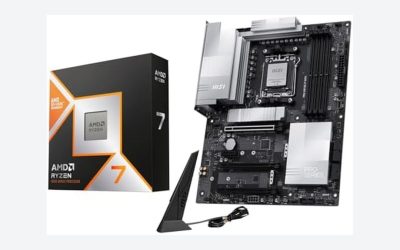
The best Ryzen 5 9600X build in 2026 pairs the 6-core Zen 5 chip with a B850 motherboard, 32GB of DDR5-6000 CL30 memory and a 16GB graphics card, then spends most of the remaining budget on the GPU rather than the processor. Per AMD’s specifications the 9600X has 6 cores and 12 threads, a 3.9 GHz base and 5.4 GHz maximum boost clock, 38MB of combined cache and a 65 W TDP, so it runs cool on an inexpensive air cooler and does not need a premium board.
This guide lays out seven complete builds around the 9600X, from a compact 1080p machine to a 1440p setup with a flagship-class GPU. For each one you get the parts, the reasoning and the trade-off, followed by a worked power calculation, a bottleneck check and the mistakes that cost builders money.
Our top picks


As an Amazon Associate we earn from qualifying purchases at no extra cost to you.
Quick Comparison of the Seven Builds
| Build | Best for | GPU class | Board class | Memory | PSU |
|---|---|---|---|---|---|
| 1. Value 1080p | Esports and budget gaming | Radeon RX 9060 XT 16GB | B850 micro-ATX | 32GB DDR5-6000 CL30 | 650 W Gold |
| 2. Balanced 1440p | Most gamers | GeForce RTX 5060 Ti 16GB | B850 ATX | 32GB DDR5-6000 CL30 | 750 W Gold |
| 3. High-refresh 1440p | Competitive and AAA | Radeon RX 9070 XT | B850 ATX | 32GB DDR5-6000 CL30 | 850 W Gold |
| 4. Quiet white build | Silent living-room PC | RX 9060 XT 16GB | B850 Wi-Fi ATX | 32GB DDR5-6000 | 750 W Gold |
| 5. Compact mini-ITX | Small desk setups | RTX 5060 Ti 16GB (2-fan) | B850 mini-ITX | 32GB DDR5-6000 | SFX 750 W |
| 6. Streaming and creator | Gaming plus recording | RTX 5070 Ti | B850 ATX | 64GB DDR5-6000 | 850 W Gold |
| 7. Upgrade path | Drop in a better CPU later | RX 9070 XT | X870E ATX | 32GB DDR5-6000 | 850 W Gold |
Core facts shared by every build: the 9600X uses the AM5 socket, supports DDR5 only and ships without a cooler. Motherboard and GPU names below are real current products or clearly described classes; check availability in your region before ordering.
Why the Ryzen 5 9600X Is a Strong Core for a 2026 Build
The 9600X is a 65 W part with a default socket power of about 88 W, so its heat output is modest compared with higher-tier chips. Zen 5 raised instructions per clock over the previous generation, which helps in games that depend on a few fast threads. Six cores are enough for current games, since most titles still scale mainly across four to six threads, but streamers and creators who run capture and editing software in the background will want a bigger chip, as covered in Build 6.
Because the chip does not include 3D V-Cache, it sits below the X3D models in the most CPU-limited games. At 1440p and above, where the graphics card is the limit, the difference is much smaller. That makes the 9600X an efficient choice when budget is better spent on the GPU.
Build 1: Value 1080p Esports Machine
Parts: Ryzen 5 9600X, a B850 micro-ATX board such as the ASRock B850M Pro RS WiFi, 2 x 16GB DDR5-6000 CL30 memory, a Radeon RX 9060 XT 16GB, a 1TB PCIe 4.0 NVMe drive, a 650 W 80 Plus Gold power supply, a Thermalright Peerless Assassin 120 SE air cooler and an airflow case.
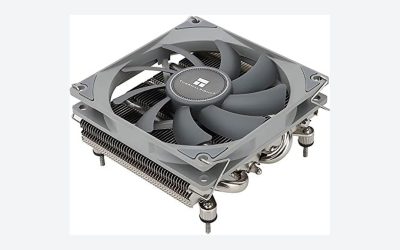
The RX 9060 XT 16GB uses a 128-bit bus with 16GB of GDDR6, a 160 W board power and a single 8-pin connector, with a minimum 450 W supply recommended by AMD. That keeps the power budget low. The Peerless Assassin 120 SE is a dual-tower cooler 155 mm tall with two 120 mm PWM fans, more than enough for a 65 W CPU.
Who it is for: players of esports titles who want high frame rates at 1080p and a few modern games at 1440p with upscaling. Trade-off: a micro-ATX board has fewer M.2 slots and USB ports, and the 128-bit memory bus limits the card at higher resolutions.
- Pros: low power draw, easy cooling, small cost
- Cons: limited 4K ability, fewer expansion options
Build 2: Balanced 1440p Gaming PC
Parts: Ryzen 5 9600X, ASUS TUF Gaming B850-Plus WiFi, 32GB DDR5-6000 CL30, GeForce RTX 5060 Ti 16GB, 1TB PCIe 4.0 NVMe, 750 W Gold power supply, Thermalright Peerless Assassin 120 SE, Lian Li Lancool 216 or similar mesh case.
The TUF board offers a 14+2+1 VRM with 80 A power stages, PCIe 5.0, Wi-Fi 7, 2.5Gb Ethernet and three M.2 slots, according to roundup spec data. That is far more VRM than a 65 W chip needs, which leaves room for a CPU upgrade. The RTX 5060 Ti 16GB uses a 128-bit bus with 16GB of GDDR7 (448 GB/s) and a 180 W rating, with a 600 W supply recommended; a 750 W unit gives margin.
Who it is for: the typical 1440p gamer who wants a fast, quiet system with DLSS support. Trade-off: the narrow memory bus means the card is not the pick for 4K.
- Pros: Wi-Fi 7, good VRM, 16GB VRAM
- Cons: board cost above entry level
Build 3: High-Refresh 1440p with a Radeon RX 9070 XT
Parts: Ryzen 5 9600X, MSI MAG B850 Tomahawk Max WiFi, 32GB DDR5-6000 CL30, Radeon RX 9070 XT, 2TB PCIe 4.0 NVMe, 850 W Gold power supply, Peerless Assassin 120 SE, Fractal Design North or Corsair 4000D Airflow.
The RX 9070 XT carries 16GB of GDDR6 on a 256-bit bus (up to 640 GB/s) with a 304 W board power. Reviewers rate the MSI Tomahawk Max as the best overall B850 board, citing 80 A power stages, Wi-Fi 7, PCIe 5.0 for graphics and storage, 5 Gbps Ethernet and a 20 Gbps front USB-C port. The processor matters more here: a 6-core chip can limit a card this fast in CPU-heavy titles at 1080p, but at 1440p ultra settings the GPU stays the bottleneck.
Who it is for: gamers targeting 1440p at 144 Hz or more. Trade-off: if you mostly play CPU-bound simulators, an X3D chip would extract more from this card.
- Pros: strong GPU, premium B850 board, easy upgrade path
- Cons: costs more, needs an 850 W supply for headroom
Build 4: Quiet White Build
Parts: Ryzen 5 9600X, Gigabyte B850 Aorus Elite WiFi7 (ICE white variant), 32GB DDR5-6000 in white, Radeon RX 9060 XT 16GB, 1TB NVMe, 750 W Gold power supply, a white NZXT H5 Flow or Fractal North, and the Peerless Assassin 120 SE in white.
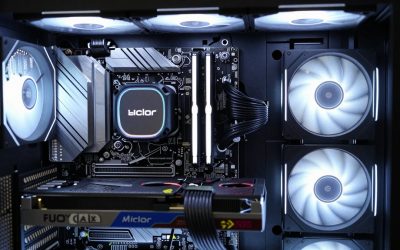
The Gigabyte board has a 14+2+2 power design, VRM and M.2 thermal guards, three M.2 slots, Wi-Fi 7, 2.5GbE and a five-year warranty per its roundup listings, and an ICE variant has the same specifications. Because both CPU and GPU are low-power parts, the fans can sit at low speed. A 65 W processor generates little heat, so a case with two 140 mm intake fans and a slow-turning exhaust is enough.
Who it is for: living-room and bedroom systems where noise matters. Trade-off: white components can cost more than black equivalents.
- Pros: very quiet, long board warranty
- Cons: limited choice and price premium for white parts
Build 5: Compact Mini-ITX Machine
Parts: Ryzen 5 9600X, a B850 mini-ITX board such as the ASUS ROG Strix B850-I Gaming WiFi, 32GB DDR5-6000 low-profile kit, a dual-fan RTX 5060 Ti 16GB, a 750 W SFX Gold power supply, a low-profile or 120 mm AIO cooler as the case allows, and a small-form-factor case.
The 65 W rating is the main reason the 9600X suits small cases: less heat means less airflow needed. Check card length against the case, because two-fan RTX 5060 Ti designs are usually shorter than 250 mm. Power supply wiring in a small case can crowd the board, so use short, sleeved cables.
Who it is for: desk and travel builds. Trade-off: mini-ITX boards cost more and have only two memory slots, so decide on 32GB at the start.
- Pros: compact, cool, quiet
- Cons: harder to build, fewer ports and slots
Build 6: Streaming and Creator Rig
Parts: Ryzen 5 9600X, ASUS TUF Gaming B850-Plus WiFi, 2 x 32GB DDR5-6000, GeForce RTX 5070 Ti, 2TB plus 2TB NVMe, 850 W Gold power supply, Arctic Liquid Freezer III 360 or a dual-tower air cooler, mesh case.
The RTX 5070 Ti has 16GB of GDDR7 on a 256-bit bus (896 GB/s) and 300 W board power. Its hardware video encoder handles streaming so the six CPU cores stay free for the game. A 64GB memory kit helps with video editing and browser-heavy workflows. If you edit video daily, consider the 9700X or 9950X builds below, which add cores for faster exports.
Who it is for: streamers who play at 1440p and want GPU encoding. Trade-off: encode-heavy work still prefers more CPU cores.
- Pros: strong GPU encoder, large memory, room for storage
- Cons: highest cost of the 9600X builds
Build 7: Upgrade-Path Build on X870E
Parts: Ryzen 5 9600X, MSI MAG X870E Tomahawk WiFi, 32GB DDR5-6000 CL30, Radeon RX 9070 XT, 2TB NVMe, 850 W Gold power supply, Peerless Assassin 120 SE, mid-tower with good airflow.
The idea is to start with an inexpensive chip and move to a Ryzen 7 9800X3D or 9950X later. AM5 is designed for long support, so a BIOS update is usually all a swap needs. The premium board adds more USB4 and PCIe lanes, helpful if you plan a capture card, extra NVMe drives and a fast network card. Spending more on the board only makes sense if you will use those extras.
Who it is for: buyers who expect to upgrade the processor in two years. Trade-off: you pay for features the 9600X does not use today.
- Pros: clear upgrade path, more connectivity
- Cons: higher upfront cost
How to Choose: Decision Matrix
| Your situation | Pick | Why |
|---|---|---|
| 1080p esports, tight budget | Build 1 | RX 9060 XT 16GB, 650 W supply |
| 1440p all-rounder | Build 2 | RTX 5060 Ti 16GB with DLSS |
| 1440p at 144 Hz plus | Build 3 | RX 9070 XT, 640 GB/s bandwidth |
| Noise-sensitive room | Build 4 | Low-power parts, slow fans |
| Very small desk | Build 5 | Mini-ITX, SFX supply |
| Streaming and editing | Build 6 | Hardware encoding, 64GB memory |
| Plan to upgrade CPU | Build 7 | X870E features, AM5 support |
Worked Power Calculation
Take Build 3. The RX 9070 XT draws up to 304 W. The 9600X reaches about 88 W at its default socket power. Add roughly 50 W for the board, memory, drives and fans: 304 + 88 + 50 = 442 W. Power supplies are most efficient between 40 and 70 percent load, so 442 W points to a supply of about 750 to 850 W once transients are included. AMD’s guidance for that card is about 750 W, which matches.
For Build 1 the figures are 160 + 88 + 40 = 288 W, so 650 W is generous and leaves room to upgrade the GPU. Choose ATX 3.1 units if you plan to use a card with a 12V-2×6 connector in the future.
Memory, Storage and Cooling Choices
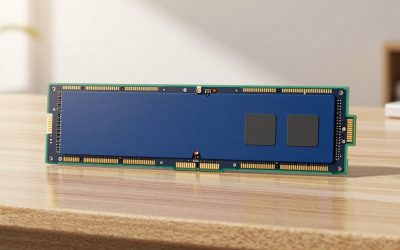
- Memory: DDR5-6000 with CL30 is the recommended sweet spot for Ryzen 9000, since it runs the memory controller and fabric in sync. Buy a single 2 x 16GB kit rather than mixing modules.
- Storage: a PCIe 4.0 NVMe drive is enough for games. PCIe 5.0 drives run hotter and add little in real-world game loading.
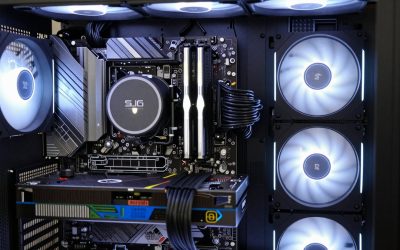
- Cooling: a 120 mm dual-tower air cooler handles 88 W easily. The Noctua NH-D15 G2 and Arctic Liquid Freezer III 360 are overkill for this chip but suit later upgrades to hotter processors.
- BIOS: boards sold early in the AM5 lifecycle may need an update for newer CPUs. Look for BIOS Flashback so you can update without a processor installed.
Is the 9600X Going to Bottleneck My GPU?
A bottleneck appears when the CPU cannot prepare frames as fast as the GPU can draw them. With a 9600X, this occurs mainly at 1080p with a card as fast as the RX 9070 XT or RTX 5070 Ti and in strategy or simulation titles. A quick test: lower the render resolution and see if the frame rate stops rising. If frames stay the same, the CPU is the limit. At 1440p and 4K the GPU is usually at 95 to 100 percent use, which means the processor is not holding it back.
Common Mistakes to Avoid
- Choosing DDR5 memory rated above 6000 MT/s without checking the board’s support list.
- Skipping the second memory channel by installing one stick.
- Buying an expensive X870E board for a 65 W chip with no upgrade plan.
- Forgetting that the 9600X has no stock cooler.
- Installing the graphics card with a single cable for two 8-pin sockets.
- Leaving EXPO disabled in the BIOS, so memory runs at a slow default speed.
Assembly and BIOS Setup Order
- Install the CPU and memory on the bare board first. The AM5 socket uses pins in the socket, so lower the processor straight down with no force and close the retention arm. Fitting memory in the second and fourth slots from the left (check the manual) enables dual-channel mode.
- Mount the cooler before the board goes into the case. Tower coolers such as the Peerless Assassin 120 SE are easier to fit on an open table, and you can check the memory clearance under the fan.
- Fit the NVMe drive and its heatsink. Use the slot nearest the CPU for the fastest link, and remove the protective film from the thermal pad.
- Install the board, then the power supply cables. Connect the 24-pin, the CPU 8-pin and the GPU leads, and route them behind the tray for airflow.
- Update the BIOS if needed. Newer boards ship with support for Ryzen 9000, but check the sticker or the vendor page. Use the Flashback button with a USB drive when a board will not post.
- Enable EXPO and Resizable BAR. EXPO sets the memory to its rated 6000 MT/s, and Resizable BAR lets the CPU access the full video memory at once, which helps some games.
- Install the chipset and graphics drivers from AMD or Nvidia, then run a stress loop for twenty minutes and watch temperatures. A 65 W chip on a dual-tower cooler should stay well below 75 degrees Celsius.
Upgrade Timeline: What to Replace First
The 9600X platform ages gracefully because the board and memory stay useful for years. The part that limits you first is usually the graphics card, followed by the processor. A sensible plan is to buy a 16GB card now, keep the 650 to 850 W supply, and move to a Ryzen 7 9800X3D or Ryzen 9 9950X when budget allows. The old 9600X can then be sold or reused in a secondary system. Storage is the cheapest upgrade of all; add a second M.2 drive when your library grows, since most B850 boards have three slots.
Also note that a case with two front intake fans and a rear exhaust leaves enough airflow headroom for both a hotter CPU and a 300 W GPU, so choose a mesh-front case at the start rather than a closed design you will outgrow.
Frequently Asked Questions
Is the Ryzen 5 9600X good enough for gaming in 2026?
Yes. Its Zen 5 cores and 5.4 GHz boost handle current games, and at 1440p the graphics card is the limit. If you play CPU-heavy simulations or want the highest frame rates at 1080p, an X3D model is stronger.
Does the 9600X come with a cooler?
No. You need to buy one. A 120 mm tower air cooler is plenty for its 65 W TDP.
Which motherboard should I pair with the 9600X?
A B850 board is the best match. It gives PCIe 5.0, Wi-Fi 7 on many models and enough power stages. X870E only helps if you need extra lanes and USB4.
How much memory do I need?
32GB of DDR5-6000 CL30 suits nearly all gaming builds. Choose 64GB for video editing or heavy multitasking.
Can I upgrade the CPU later?
Yes. AM5 boards usually accept newer Ryzen chips after a BIOS update, so you can move to a Ryzen 7 9800X3D or Ryzen 9 9950X without replacing the board.
What power supply wattage is right for these builds?
650 W suits 160 W GPUs, 750 W suits cards around 180 to 250 W, and 850 W suits 300 W cards like the RX 9070 XT and RTX 5070 Ti.


Write Your Review
No reviews yet. Be the first to share your experience!