

Key takeaways
- Run the pump at full speed in BIOS while testing, so you know the best temperature each tune can reach.
- Tighten the mounting screws evenly and in a cross pattern; uneven pressure can add several degrees on large heat spreaders.
- Re-seat the cooler if one core runs much hotter than the others.
- Mount the radiator as exhaust at the top where possible, so the CPU loop does not heat the air your graphics card breathes.
- Use a fan curve based on CPU or coolant temperature with a gentle slope instead of steep jumps, which prevents distracting rpm changes.
For overclocking in 2026, the ARCTIC Liquid Freezer III Pro 360 is the best AIO liquid cooler for most people, thanks to its 38 mm radiator, 600-3000 rpm fans and a pump-mounted VRM fan. The be quiet! Silent Loop 3 360 and DeepCool LT720 are the strongest alternatives when you want a rated 350 W of headroom or maximum fan airflow, and a top-tier dual-tower air cooler is the only realistic competitor if you want to skip liquid cooling entirely.
Our top picks


As an Amazon Associate we earn from qualifying purchases at no extra cost to you.
Quick comparison: AIO coolers for overclockers
| Pick | Why overclockers pick it | Radiator | Fan airflow | Pump | Warranty |
|---|---|---|---|---|---|
| ARCTIC Liquid Freezer III Pro 360 | Thick radiator plus VRM fan | 398 x 120 x 38 mm | 77 cfm, 6.9 mmH2O | 800-2800 rpm | 6 years |
| be quiet! Silent Loop 3 360 | 350 W manufacturer rating, refill port | 397 x 120 mm (52 mm with fans) | 76.7 cfm, 3.96 mmH2O | Up to 3500 rpm | 3 years |
| DeepCool LT720 | Strongest fans for the cost | 402 x 120 x 27 mm | 85.85 cfm, 3.27 mmH2O | 3100 rpm | 5 years |
| Corsair iCUE LINK TITAN 360 RX RGB | Software control of pump and fans | 396 x 120 x 27 mm | 73.5 cfm, 4.33 mmH2O | Up to about 3000 rpm | 6 years |
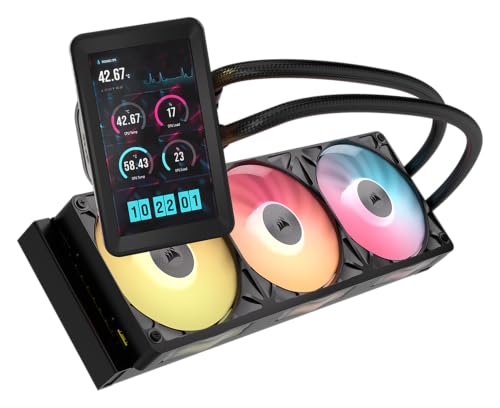
| Lian Li HydroShift II LCD-C 360TL | Highest airflow, live temperature readout | 400 x 122 x 24 mm | 90.1 cfm, 3.97 mmH2O | 2000-2500 rpm | 6 years |
| ID-COOLING FX360 INF | 350 W rating at a budget | 396 x 120 x 27 mm | 58 cfm, 1.94 mmH2O | Up to 2900 rpm | 3-5 years |
| Noctua NH-D15 G2 (air alternative) | No pump, low noise | Dual tower, 168 mm tall | 91.58 cfm (two 140mm fans) | None | 6 years (Noctua) |
Figures are taken from manufacturer pages and spec sheets. Companies rate their coolers differently, so use the numbers to compare hardware, not to predict an exact temperature on your processor.
What overclocking changes about AIO selection
At stock settings, a cooler only needs to handle what the CPU’s power limit allows. Overclocking raises that ceiling: all-core manual overclocks, raised power limits and Precision Boost Overdrive can add 50 to 100 W on top of stock, and nearly all of it ends up as heat in a small area of silicon. That changes the buying priorities in four ways.
- Thermal mass and radiator thickness rise in importance. Short bursts of load are absorbed by coolant and metal, so thicker radiators keep temperatures steadier during stability runs.
- Fan static pressure beats raw airflow. Dense radiator fins resist airflow, so fans rated above about 3.5 mmH2O hold up better when pushed to high rpm.
- Pump speed control matters. Being able to run the pump at 100 percent during tuning, then lower it for daily use, helps in both stability testing and noise.
- VRM cooling gets more attention. Pushing voltage and power limits heats the motherboard power stage. A cooler that takes away the large tower heatsink also removes some airflow over those components.
Best overall for overclocking: ARCTIC Liquid Freezer III Pro 360
According to ARCTIC’s spec sheet, this cooler uses three P12 Pro fans from 600 to 3000 rpm, a 38 mm aluminium radiator, a copper cold plate with micro-skived fins and a pump that spans 800 to 2800 rpm. A small VRM fan in the removable pump cover runs from 400 to 2500 rpm. Reviewers describe it as the benchmark for 2026 on both AMD and Intel flagship chips, and it is typically strongest when you cap noise rather than temperature. It supports LGA1851, LGA1700, AM5 and AM4 and has a six-year warranty.
Overclocking fit: excellent for manual tuning on 12- and 16-core chips where sustained power runs between 200 and 300 W. Trade-offs: the 63 mm radiator and fan stack needs a large case, the fans are loud at full speed and there is no display.
Best rated headroom and serviceability: be quiet! Silent Loop 3 360
be quiet! rates the Silent Loop 3 360 at up to 350 W of heat dissipation. The pump runs to 3500 rpm, three Silent Wings 4 fans deliver about 76.7 cfm, and a refill port lets you top up coolant, which matters for a loop that is going to run hot for years. Published noise is 19.8 dB(A) at 50 percent, 31.9 at 75 and 38.8 at 100 percent. The 397 x 120 x 52 mm radiator-with-fans dimension, 400 mm tubing and a three-year warranty are the downsides.
Overclocking fit: strong for people tuning quietly, such as overclockers in a bedroom or studio. Trade-offs: the shorter warranty and shorter hoses make large cases awkward.
Best cooling for the cost: DeepCool LT720
DeepCool’s LT720 is a 360mm loop built around fans that reach 85.85 cfm at up to 2250 rpm and 32.9 dB(A), with a 3100 rpm pump, 410 mm tubes and a five-year warranty. The radiator is 402 x 120 x 27 mm, standard thickness, so it fits more cases than the ARCTIC. DeepCool lists compatibility with AM5, AM4 and LGA1700, and some retailers list LGA1851, so verify the bracket in the box before assuming support.
Overclocking fit: a smart choice for a 200-250 W tune when you do not want to pay for lighting or a screen. Trade-offs: less VRM airflow and fewer software features.
Best for tuning with software: Corsair iCUE LINK TITAN 360 RX RGB
The TITAN 360 RX RGB gives you per-fan and pump control from iCUE, so you can write a fan curve tied to coolant temperature rather than CPU temperature, a technique that smooths out noisy fan ramps during bursty workloads. The radiator is 396 x 120 x 27 mm, the three RX120 fans reach around 2100 rpm, and the pump peaks near 3000 rpm. Corsair does not publish a wattage rating; independent measurements with a Core i7-14700K reported more than 250 W of cooling. A TITAN II revision also exists, so match reviews to the exact name on the box.
Overclocking fit: good for tuners who like software-driven curves. Trade-offs: the price premium over equivalent plain-PWM loops.
Best airflow plus telemetry: Lian Li HydroShift II LCD-C 360TL
The TL version of Lian Li’s HydroShift II uses 90.1 cfm fans at up to 2600 rpm, a slim 24 mm radiator and a 2.1-inch IPS display that can show CPU temperature live. The pump runs at 2000-2500 rpm, which is lower than rivals, so the fans do the heavy lifting. Having the temperature on the pump head is handy when you are making BIOS changes and checking results in an open test bench.
Overclocking fit: good for open benches and glass-panelled builds. Trade-offs: it is the highest priced pick, and the slim radiator holds less coolant than thick ones.
Best budget with a 350 W claim: ID-COOLING FX360 INF
ID-COOLING gives the FX360 INF a 350 W rating on the product page, though independent measurements with a Core i7-14700K reported closer to 259 W. The 396 x 120 x 27 mm radiator, 2900 rpm Gen 7 pump and three 300-2000 rpm fans keep the cost low. Airflow of 58 cfm and 1.94 mmH2O static pressure are the weakest numbers here, which explains the gap between the claim and the measurement.
Overclocking fit: sound for mild overclocks on 8- and 12-core chips. Trade-offs: a flagship all-core overclock will push it to its limit.
Air alternative: Noctua NH-D15 G2
If your overclock tops out around 200 W, a top-end air cooler is a legitimate alternative. The NH-D15 G2 uses eight 6 mm heatpipes, two 140mm NF-A14x25r G2 fans at up to 1500 rpm (about 91.6 cfm), measures 168 mm tall and 1525 g with fans, and offers 59 mm of RAM clearance in single-fan mode. Because it has no pump, it has no mechanical failure point other than fans, and it keeps airflow over the motherboard. Above roughly 250 W, 360mm AIOs usually pull ahead.
How much overclocking headroom do you actually have?
Know your thermal limits
AMD Ryzen 7000 and 9000 chips are designed to run near their maximum junction temperature of 95 C under boost, so a lower temperature simply lets boost clocks sustain a little longer; it is not a sign of danger. Intel Core Ultra 200S and recent Core i9 parts allow roughly 100 to 105 C before throttling, according to Intel’s specifications. In both cases, a stronger cooler adds sustained boost rather than a hard clock increase.
Worked example: converting watts to temperature
If a 360mm cooler has a thermal resistance of about 0.15 C per watt between the CPU and the room air at moderate fan speed, a 250 W load would sit around 37.5 C above ambient. With 22 C room air that is roughly 60 C at the cooler, and the processor’s internal temperature adds more on top because of the small contact area. Dropping to a cooler with 0.20 C per watt would add 12.5 C at the same power. Those two numbers show why 250 W loads separate premium coolers from budget ones, while 120 W loads separate them very little.
Stability testing and VRMs
When you tune voltage, run a long stress test and monitor both CPU temperature and VRM temperature if your board exposes it. A cooler with a VRM fan, such as the ARCTIC, reduces power-stage temperatures on boards with small heatsinks; on boards with thick heatsinks, case airflow does the same job.
Installation tips for overclocked systems
- Run the pump at full speed in BIOS while testing, so you know the best temperature each tune can reach.
- Tighten the mounting screws evenly and in a cross pattern; uneven pressure can add several degrees on large heat spreaders.
- Re-seat the cooler if one core runs much hotter than the others.
- Mount the radiator as exhaust at the top where possible, so the CPU loop does not heat the air your graphics card breathes.
- Use a fan curve based on CPU or coolant temperature with a gentle slope instead of steep jumps, which prevents distracting rpm changes.
Decision matrix: match the AIO to your overclocking goal
| Your goal | Typical sustained power | Best match | Reason |
|---|---|---|---|
| Mild undervolt or PBO on an 8-core gaming chip | 90-140 W | Noctua NH-D15 G2 or a 240mm AIO | Heat is modest, so noise matters more than raw capacity |
| PBO and curve tuning on a 12- or 16-core Ryzen | 180-230 W | ID-COOLING FX360 INF or DeepCool LT720 | Standard 360mm area handles the load at moderate rpm |
| Raised power limits on a Core Ultra 9 or Core i9 | 230-300 W | ARCTIC Liquid Freezer III Pro 360 or be quiet! Silent Loop 3 360 | Thick radiator or 350 W rating gives margin |
| Open-bench benchmarking and BIOS tuning | 250-320 W bursts | Lian Li HydroShift II LCD-C 360TL | Highest airflow and live temperature readout |
| Software-driven curves and lighting sync | 150-250 W | Corsair iCUE LINK TITAN 360 RX RGB | Coolant-temperature fan curves in iCUE |
Settings that matter more than the cooler
An AIO cannot rescue an inefficient tune. Before buying a bigger loop, check four settings, because each can save more heat than a cooler upgrade adds. First, undervolting or applying a negative curve offset often cuts 10 to 30 W at the same clocks on Ryzen processors. Second, lowering the long-duration power limit on Intel boards stops the CPU from drawing 253 W or more continuously when the performance gain is a few percent. Third, turning off aggressive motherboard auto-overclock features removes unnecessary voltage. Fourth, enabling XMP or EXPO memory profiles can raise memory-controller voltage slightly, so confirm temperatures after you apply them.
Fan and pump settings for tuning sessions
While testing, set the pump to 100 percent and the radiator fans to a fixed 70 to 80 percent of their maximum speed. This removes fan-curve noise from your results, so you can compare one tune against another. After you settle on a configuration, return to a curve that stays below about 1000 rpm until the CPU passes 65 C. This gives a quiet desktop and a ramp that only arrives when the workload justifies it.
Common overclocking cooling mistakes
- Using the radiator as intake without checking GPU temperatures. A front-mounted radiator preheats the air that reaches the graphics card.
- Trusting one reading. Short bursts often show 90 C spikes that are normal; watch the average and the sustained temperature over a ten-minute run.
- Ignoring mounting pressure. Uneven screw tension on LGA1851 and LGA1700 frames is a frequent cause of one hot core.
- Skipping pump cable checks. A pump plugged into a header that does not provide full voltage can run slowly and raise temperatures in every workload.
- Buying on peak numbers. A maximum fan speed that you cannot tolerate is not usable capacity, so judge each cooler at the rpm where noise is acceptable to you.
Ownership: how an overclocked AIO ages
Hotter coolant accelerates permeation through the tubing and wear on the pump bearings, so overclocked loops tend to age a little faster than stock ones. Features that offset this include longer warranties (six years on the ARCTIC, Corsair and Lian Li coolers in this guide), refill ports like the one on the Silent Loop 3, and replaceable fans on every model listed. Watch for gurgling sounds, rising idle temperatures or a pump rpm reading that bounces, and check those signs every few months. Many users treat an AIO as a five-year part and plan a replacement, rather than expecting a decade of service.
Frequently Asked Questions
Is a 360mm AIO necessary for overclocking?
For flagship 12- to 24-core processors, yes in most cases. For 6- and 8-core chips, a 240mm or 280mm AIO, or a high-end air cooler, usually provides enough headroom for a mild overclock.
Is liquid cooling better than air for overclocking?
At sustained loads above roughly 250 W, 360mm AIOs generally lead. Below 200 W, premium air coolers like the Noctua NH-D15 G2 come within a few degrees at similar noise.
Does overclocking void my AIO warranty?
Cooler manufacturers warrant the hardware, not CPU settings, so overclocking does not void an AIO warranty, but the CPU maker’s terms may differ. Check the terms for your processor.
Which AIO is best for a Ryzen 9 or Core Ultra 9?
The ARCTIC Liquid Freezer III Pro 360, be quiet! Silent Loop 3 360 and DeepCool LT720 all suit these chips. Choose by case clearance, noise tolerance and warranty length.
How often should I replace thermal paste on an overclocked CPU?
Most modern pastes last several years under normal conditions. Replace it when you remove the cooler or if temperatures climb at the same fan speed and load.
Does a bigger radiator always give lower temperatures?
No. Fan quality, radiator thickness and mounting quality matter as much, and a thick 280mm with strong fans can beat a thin 360mm with weak ones.
Should I overclock at all on a modern Ryzen or Core Ultra chip?
Modern processors already boost close to their limits, so manual all-core overclocks often give small gains for much more heat. Most users get better results from a good cooler, a tuned memory profile and a mild undervolt than from fixed high clocks. Treat manual overclocking as a hobby with real heat and voltage costs, and increase settings in small steps.
How do I know my AIO is limiting my overclock?
If the CPU reaches its maximum temperature within seconds of starting a stress run while fans and pump are already at full speed, the cooler is the limit. If temperatures are moderate but clocks still drop, the cause is more likely a power limit, voltage ceiling or motherboard VRM setting.




Write Your Review
No reviews yet. Be the first to share your experience!