

Our Short List of 3

- View on Amazon: https://www.amazon.com/dp/B0BSLVLS4P

- View on Amazon: https://www.amazon.com/dp/B0CRDB8G1G
- View on Amazon: https://www.amazon.com/dp/B0979CMH5R
All 3 Picks at a Glance
| Product | Specs | Action |
|---|---|---|
| 1. Acer Nitro 5 AN515-58-525P — Balanced 144Hz Pick With a Strong CPU |
| Check price on Amazon |
| 2. ASUS TUF Gaming A15 FA506NC-ES51 — Newer Platform With DDR5 |
| Check price on Amazon |
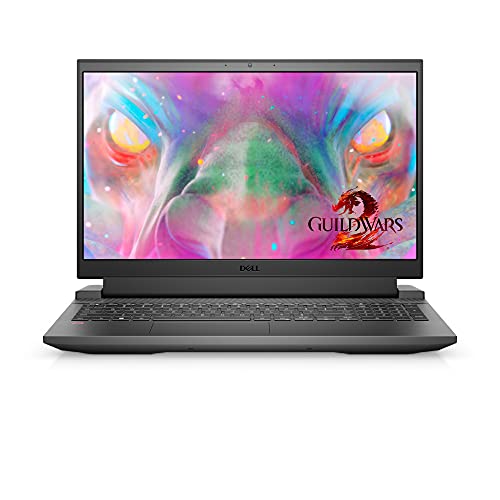
| 5. Dell G15 5511 — Simple, Sturdy Route Into 120Hz Play |
| Check price on Amazon |
Key takeaways
- An RTX 3050 laptop guide for esports at 1080p, covering reported frame rates in Valorant, Counter-Strike 2 and Fortnite, DLSS, TGP, CPU pairing and 144Hz displays.
An RTX 3050 laptop is good for competitive play at 1080p, where published figures put lighter esports titles well above 100 frames per second and often close to or beyond a 144Hz display limit. The strongest pick types are higher-wattage models with a modern six-core or better CPU, a 144Hz panel, and 16GB of memory in dual-channel configuration, because those details decide whether high frame rates stay steady in busy rounds. Models with low GPU wattage, a single 8GB memory stick, or a 60Hz screen leave much of that esports advantage unused.
For a player whose library centres on Valorant, Counter-Strike 2, League of Legends, Rocket League, Dota 2, Apex Legends, and Fortnite on competitive settings, the RTX 3050 sits in a useful middle ground. It is an entry point into RTX graphics in a laptop, built on NVIDIA Ampere architecture, with ray tracing cores, tensor cores for DLSS, and either 4GB or 6GB of GDDR6 video memory depending on the version inside a given machine. DLSS can lift frame rates in supported games without dropping resolution as sharply as a plain render scale reduction, and the platform also suits recording, clipping, and streaming a match while playing.
Expectations need to stay tied to resolution. At 1080p, this GPU class makes sense. At 1440p, settings compromises grow quickly. Every laptop here pairs the RTX 3050 with a high-refresh 1080p screen for that reason, and the difference between a satisfying purchase and a disappointing one rarely comes down to the GPU name. It comes down to wattage, cooling, CPU speed, memory layout, and panel response.
Our top picks
How to Choose an RTX 3050 Laptop for Esports
Two laptops can both carry the RTX 3050 name and deliver different results in the same game. NVIDIA allows makers to configure this GPU across a wide power range, and makers then pair it with different CPUs, cooling, memory layouts, and screens. Checking four areas matters more than the headline graphics name.
GPU Wattage and TGP
Total Graphics Power, shortened to TGP, is the most important hidden variable in an RTX 3050 laptop. Lower-power versions suit thinner chassis and quieter running, while higher-power versions hold higher clock speeds for longer during a match. In GPU-bound moments, such as a Fortnite late-game build fight or a smoke-heavy execute in Counter-Strike 2, that sustained clock difference shows up as a higher, steadier frame rate.
Some listings note Dynamic Boost on top of a base figure, shifting power between CPU and GPU depending on workload. A listing that states TGP clearly is easier to judge than one that hides it. Cooling goes with wattage: a higher TGP inside a chassis with weak fans will throttle under sustained load, so dual-fan designs with rear or side exhausts tend to hold performance better across a long session.
CPU Pairing
Esports titles at 1080p on competitive settings are often limited by the CPU rather than the GPU. Lower settings reduce graphics load, frame targets rise into the hundreds, and the processor must feed the GPU, run game logic, handle voice chat, and manage background tasks at once. A slow quad-core chip can cap frame rates even when the RTX 3050 has headroom left.
A modern six-core or eight-core H-series Intel processor or a Ryzen 5 or Ryzen 7 HS processor is the sensible pairing. Single-core speed matters for peak frame rates in Valorant and Counter-Strike 2, while core count helps when Discord, a browser, and recording software run alongside the game. A newer Core i5 or Ryzen 5 generally handles this workload better than an older higher-tier chip. The picks below range from a Core i5-11400H in the oldest design to a Core i5-12450HX and a Ryzen 5 7535HS in newer ones.
Display Refresh Rate and Response
A high frame rate only helps if the screen can show it. For this GPU class, a 15.6-inch 1920 by 1080 panel at 144Hz is the natural match, and one model below uses 120Hz, which still suits competitive play well. A 60Hz panel would waste the main strength of these machines, because frames beyond the refresh limit cannot appear as distinct images.
Response time affects how clearly moving targets read during fast mouse flicks, and a slow panel can look smeared even at high refresh. Adaptive sync, listed as G-SYNC on the Lenovo below, reduces tearing without fixed synchronisation that can add latency. Capping frame rates slightly below the panel maximum, combined with variable refresh, gives smoother pacing in practice.
RAM and Storage
Memory layout quietly shapes esports performance. A single 8GB stick runs in single-channel mode and can hold back frame rates and cause stutter in CPU-sensitive titles, while 16GB across two sticks gives full bandwidth and room for background applications. Several listings here ship with 8GB and remain usable, yet a second matching stick is the most effective upgrade an owner can make. Models shipping with 16GB or more avoid that step. DDR4 appears in the Acer, HP, and Dell configurations, while DDR5 appears in the ASUS and Lenovo configurations, but channel count and capacity matter more than that distinction.
For storage, a 512GB NVMe solid-state drive is the sensible minimum for Windows, launchers, and a handful of large titles. A 1TB drive, as fitted to the Lenovo pick, suits players who keep several large games installed at once,.
What Esports Frame Rates Look Like at 1080p
Published benchmark roundups for this GPU class report a consistent pattern at 1080p. In one widely cited set of results at high settings, Counter-Strike 2 was reported at around 170 frames per second, Valorant at around 150 frames per second, Dota 2 at around 118 frames per second, and Fortnite at around 110 frames per second. Other published tables report Valorant in the 160 to 170 range, and results on competitive or lowered settings report Valorant and Counter-Strike 2 well beyond 200 frames per second in lighter scenes. Those spreads reflect different TGP levels, CPUs, memory layouts, and settings between the laptops used to gather the figures.
Valorant and League of Legends are reported far above a 144Hz limit on almost any healthy configuration, so CPU and memory decide the final figure more than the GPU. Counter-Strike 2 is heavier, with smoke effects pulling averages down, yet reported results still place it in high-refresh territory at 1080p. Fortnite splits by settings: competitive settings are reported much higher than Epic settings, and published Epic figures land closer to 60 to 70 frames per second with DLSS involved. Apex Legends, Overwatch 2, and Rocket League follow the same pattern in published results: comfortable high-refresh play on competitive settings, with heavier settings pulling results toward the refresh limit.
DLSS changes the maths in supported games. Instead of rendering at full 1080p, the game renders at a lower internal resolution and uses tensor cores to reconstruct an image close to native sharpness. Quality mode tends to suit 1080p best, since lower modes have fewer pixels to work from and can soften distant targets. Native rendering suits the lightest titles, where frame rates are already high, while DLSS Quality suits heavier titles such as Fortnite in demanding modes or Warzone. NVIDIA Reflex, in supported titles, reduces system latency and can matter more than a small frame rate gain.
1. Acer Nitro 5 AN515-58-525P — Balanced 144Hz Pick With a Strong CPU
- View on Amazon: https://www.amazon.com/dp/B0BSLVLS4P
The Acer Nitro 5 AN515-58-525P pairs the RTX 3050 with an Intel Core i5-12500H, a twelve-core processor that gives this configuration real headroom in CPU-sensitive esports titles. That pairing is why this model leads the list: in Valorant and Counter-Strike 2, where the processor often sets the ceiling at competitive settings, the 12500H is a stronger partner than older chips in competing designs, and it handles recording and voice applications alongside a match without strain.
The display is a 15.6-inch Full HD IPS panel at 144Hz, storage is a 512GB PCIe Gen 4 solid-state drive, and connectivity includes Killer Wi-Fi 6. The dual-fan Nitro chassis helps during longer sessions. The clear compromise is memory: 8GB of DDR4 is the specification most likely to hold back frame rates and cause uneven pacing here. Adding a second 8GB stick is straightforward on this chassis and turns the machine into a properly balanced esports laptop. Buyers who do not want to open a new laptop should weigh the HP and Lenovo picks, which ship with more memory fitted.
Best suited to: players focused on Valorant and Counter-Strike 2 who want strong CPU headroom and plan to add a second memory stick.
2. ASUS TUF Gaming A15 FA506NC-ES51 — Newer Platform With DDR5
- View on Amazon: https://www.amazon.com/dp/B0CRDB8G1G
The ASUS TUF Gaming A15 FA506NC-ES51 combines the RTX 3050 with an AMD Ryzen 5 7535HS, 8GB of DDR5 memory, and a 512GB PCIe Gen 4 NVMe solid-state drive behind a 15.6-inch Full HD 144Hz display. The Ryzen 5 7535HS is a modern six-core chip with strong single-core pace for esports, and DDR5 gives this design a newer foundation than the DDR4 machines in the group.
TUF models are built around durability and cooling, which matters in the third hour of a session, when heat has built up and lesser designs trim clock speeds. Wi-Fi 6 is included, though wired Ethernet remains the better choice for ranked play whenever a cable is practical. Memory is the limiting specification at 8GB; a matching second stick unlocks dual-channel bandwidth and removes the most likely source of stutter. Compared with the Acer, the ASUS trades some multitasking core count for a newer platform and a sturdy chassis, and it will appeal to players who prefer an AMD processor.
Best suited to: players who want a newer DDR5 and Ryzen platform in a durable chassis, with a memory upgrade planned.
3. HP Victus 15 — Ready for Ranked Play Without an Upgrade Step
The HP Victus configuration listed here pairs an Intel Core i5-12450H with the RTX 3050, 16GB of memory, and a 512GB PCIe solid-state drive, behind a 15.6-inch Full HD 144Hz display. That memory figure is the headline: with 16GB fitted from the factory, this machine avoids the most common weakness of the segment and is ready for competitive play, voice chat, and a browser running together without an immediate upgrade project.
The i5-12450H is an eight-core processor that suits esports titles well, providing high, steady frame delivery at competitive settings in Valorant, League of Legends, and Counter-Strike 2. The Victus design is also restrained, with a plain lid and a Performance Blue finish in this listing that looks at home in a classroom or office. Panel brightness is modest, a common trait at this level, while the backlit keyboard, Wi-Fi 6, HDMI, and USB-C ports cover desk use and an external monitor well. For a buyer who wants the fewest compromises on day one, this configuration makes a strong case.
Best suited to: players who want 16GB of memory and a 144Hz screen in a clean, understated design, with no upgrade needed before playing.
- View on Amazon: https://www.amazon.com/dp/B0DFK1JFBG
4. Lenovo LOQ 15 — Generous Memory and Storage With G-SYNC
The Lenovo LOQ 15 configuration here is the most generously specified of the group: an Intel Core i5-12450HX, the RTX 3050, 32GB of memory, and a 1TB PCIe solid-state drive, with a 15.6-inch Full HD 144Hz display carrying G-SYNC support. The HX processor is a high-power mobile chip, and sustained CPU clock speed during long sessions is exactly what separates a steady frame rate from one that drifts downward as a machine warms up.
The 32GB capacity removes memory as a concern even with recording and streaming software running, and the 1TB drive removes storage juggling for large libraries. G-SYNC on the internal panel smooths pacing when a demanding fight pulls the frame rate below the refresh ceiling, without tearing. LOQ, Lenovo gaming line below Legion, takes a practical approach to design. The trade is size and weight, which matters for daily carrying and little for desk use. For desk-based competitive play, this is the most complete specification here.
Best suited to: desk-based players who want the strongest CPU power class in the group, abundant memory and storage, and adaptive sync on the internal screen.
- View on Amazon: https://www.amazon.com/dp/B0FH9MVRQ4
5. Dell G15 5511 — Simple, Sturdy Route Into 120Hz Play
- View on Amazon: https://www.amazon.com/dp/B0979CMH5R
The Dell G15 5511 is the oldest design in this group, pairing an Intel Core i5-11400H and 8GB of DDR4 memory with the RTX 3050 with 4GB of GDDR6 video memory, a 512GB solid-state drive, and a 15.6-inch Full HD display at 120Hz. The reason to consider it is simplicity: the G15 line is a straightforward, solidly built gaming laptop, and 120Hz still delivers most of the competitive benefit of a high-refresh screen.
The i5-11400H remains capable in esports titles. Valorant and League of Legends are reported far above 120 frames per second on this GPU class even with modest processors, and Counter-Strike 2 at competitive settings stays in high-refresh territory. Limits show up sooner in heavier titles and busy multitasking, and 8GB carries the same single-channel caveat as the Acer and ASUS picks, so a second stick is the first upgrade to plan. Panel brightness and colour coverage are basic, and the chassis is bulky compared with the Victus, but those are visible compromises a buyer can judge easily.
Best suited to: players focused on lighter esports titles who want a sturdy, simple machine and accept a 120Hz panel and a later memory upgrade.
Comparison Table
| Model | CPU | GPU and Video Memory | Display | Memory | Storage |
|---|---|---|---|---|---|
| Acer Nitro 5 AN515-58-525P | Intel Core i5-12500H | RTX 3050, 4GB GDDR6 | 15.6-inch FHD IPS, 144Hz | 8GB DDR4 | 512GB PCIe Gen 4 SSD |
| ASUS TUF Gaming A15 FA506NC-ES51 | AMD Ryzen 5 7535HS | RTX 3050, GDDR6 | 15.6-inch FHD, 144Hz | 8GB DDR5 | 512GB PCIe Gen 4 NVMe SSD |
| HP Victus 15 | Intel Core i5-12450H | RTX 3050, GDDR6 | 15.6-inch FHD, 144Hz | 16GB | 512GB PCIe SSD |
| Lenovo LOQ 15 | Intel Core i5-12450HX | RTX 3050, GDDR6 | 15.6-inch FHD, 144Hz, G-SYNC | 32GB | 1TB PCIe SSD |
| Dell G15 5511 | Intel Core i5-11400H | RTX 3050, 4GB GDDR6 | 15.6-inch FHD, 120Hz | 8GB DDR4 | 512GB SSD |
The Lenovo leads on memory, storage, and processor power class, the HP is the balanced factory configuration, the Acer needs a memory addition, the ASUS brings DDR5, and the Dell trades panel speed and processor generation for a simple, sturdy design.
Frequently Asked Questions
Is an RTX 3050 laptop enough for 144Hz esports play?
For the core esports library, yes, based on published figures. Valorant, League of Legends, Rocket League, and Counter-Strike 2 are reported at or well above 144 frames per second at 1080p on competitive settings for this GPU class, and Fortnite and Apex Legends reach high-refresh territory on competitive settings. Heavier titles and Epic or Ultra presets pull results lower.
Does the 4GB or 6GB version of the RTX 3050 matter?
It matters mainly for texture settings in heavier games. Esports titles at 1080p on competitive settings fit within 4GB in most cases, because those presets keep textures and effects modest. The 6GB version gives more headroom for higher textures and newer single-player games. GPU wattage and CPU pairing usually influence esports frame rates more.
Should DLSS be used in competitive games?
In the lightest titles, native rendering is usually preferable because frame rates are already high and clarity helps with distant targets. In heavier supported titles, DLSS in Quality mode holds a high frame rate without dropping overall resolution, and NVIDIA Reflex is worth enabling for lower latency. Use native rendering in Valorant style workloads and DLSS Quality in demanding Fortnite modes.
Is 8GB of RAM enough, or is 16GB necessary?
An 8GB laptop will launch and play esports titles, but a single stick limits bandwidth and can cause stutter when other applications run alongside the game. A 16GB dual-channel configuration is the recommended target, either fitted at purchase, as on the HP and Lenovo picks, or added later, as planned for the Acer, ASUS, and Dell picks.
How long will an RTX 3050 laptop stay relevant for esports?
Esports titles are built to run on a wide range of hardware and tend to keep modest requirements for years, which suits this GPU class well. A well-specified RTX 3050 laptop with 16GB of memory should remain comfortable for competitive play at 1080p through the current generation of major esports titles, provided settings adjust as those games evolve.
Disclosure: As an Amazon Associate, we earn from qualifying purchases.
More from Amazon
Programs that pair well with the guide above. Offers and eligibility are set by Amazon and may change.
Free shipping on eligible items, Prime Video and more. Eligible new members can start with a free trial.
Start a Prime free trialAd-free music streaming. Eligible new subscribers can start with a free trial.
Try Music Unlimited freeA Prime membership for ages 18-24 with a trial period. Eligibility is set by Amazon.
See Prime for Young AdultsAudiobooks and podcasts to listen to on the go. Eligible new members can start with a free trial.
Try Audible freeAs an Amazon Associate we earn from qualifying purchases.




Write Your Review
No reviews yet. Be the first to share your experience!