

Our Short List of 3


All 3 Picks at a Glance
| Product | Specs | Action |
|---|---|---|
| LG gram Pro 17, 17-Inch WQXGA IPS, Intel Core Ultra 9 285H, 32GB LPDDR5X, 1TB SSD, GeForce RTX 5050, Windows 11 Pro | Check price on Amazon | |
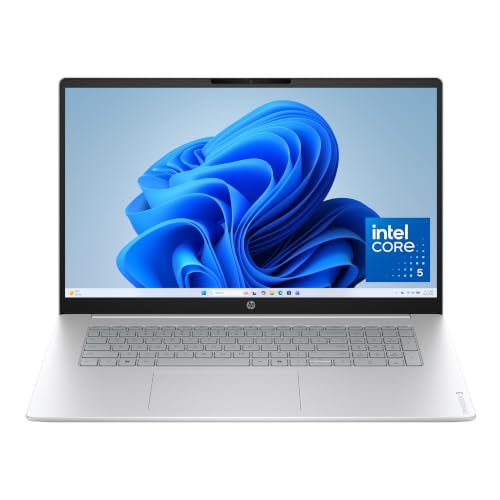
| HP OmniBook 3 17, 17.3-Inch FHD IPS, Intel Core 5 120U, 8GB DDR5, 512GB SSD, Windows 11 | Check price on Amazon | |
| ASUS Vivobook 17, 17.3-Inch FHD IPS, Intel Core 3 100U, 8GB DDR4, 512GB SSD, Windows 11 | Check price on Amazon |
Key takeaways
- Best laptops for stock trading: five large-screen laptops compared by display, memory, processor and multi-monitor ports, so you can keep charts in view.
A trading laptop lives or dies by its screen. Charts, watchlists, order tickets and news feeds all compete for the same pixels, and a cramped display turns a calm session into a scrolling contest. The five laptops in this guide all bring a 16-inch or 17-inch display, enough memory to hold a browser full of chart tabs beside a desktop trading app, and the ports to hang a second or third monitor off the side when one screen is not enough. None of the listings in this guide calls its laptop a trading machine, and this guide does not pretend otherwise. Trading fit is judged from the hardware in each listing: screen size and resolution, memory, processor, storage, battery and the video outputs that make a multi-monitor desk possible.
Every laptop here runs Windows 11 and a full desktop environment, so desktop trading apps run as they do on any office PC. A laptop with 8 GB of memory can hold a trading app and a browser, but it is the floor, not the ceiling, and the guide says so where it applies. The picks are ordered from the strongest evidence and the strongest all-round hardware down to the lightest-spec machine that still earns a place.
What to Look For
Screen size comes first. A 16-inch or 17-inch panel holds two chart windows side by side without squeezing the candlesticks into unreadable slivers, and a 16:10 panel adds vertical room for watchlists and order depth. Resolution matters next. A 1920 x 1200 panel is the baseline in this guide, and the one 2560 x 1600 panel here packs in noticeably more chart detail. Brightness matters for a desk near a window: 300 nits is the practical floor, and the one 250-nit panel in this guide is flagged as the dimmest of the five.
Memory is the second thing to check. A trading app, a browser with a dozen chart tabs, a spreadsheet and a messaging app all sit in memory at once, and 16 GB is the comfortable minimum for that mix. Two picks in this guide carry 32 GB, which leaves headroom for a second browser profile or a backtesting tool running in the background. Two picks carry 8 GB, which works for a lean setup with one trading app and a modest tab count, but leaves little slack.
Processor choice follows the same logic. A current Intel Core Ultra 5 or Core Ultra 7, or a Core 5 or Core 3 from the same generation, handles charting and data feeds without strain. Trading apps are light on graphics, so integrated graphics are enough for most desks, though the one pick with a discrete GPU in this guide also drives extra monitors with less fuss.
Ports decide how far the desk can grow. Thunderbolt 4 and USB-C with DisplayPort carry an external monitor, and HDMI adds a second one. A laptop with two video outputs plus its own panel runs a three-screen desk. Check the exact port list before buying, because two laptops with the same screen can differ in what they drive.
Battery life matters less at a desk and more on the move. A 50-plus watt-hour battery carries a trading session through a morning away from a socket, and the largest battery in this guide is the LG at up to 25 hours of claimed use. Weight matters the same way: a 3.26-pound 17-inch machine travels far better than a 5-pound one, and the guide lists weight where the listing states it.
Keyboard and build round out the list. A full keyboard with a numeric keypad speeds order entry, and a backlit keyboard helps in a dim room. A spill-resistant keyboard and a fingerprint reader are small comforts that show up on the business machines here.
Products
Lenovo ThinkPad T16 Gen 3, 16-Inch WUXGA Touchscreen, Intel Core Ultra 7 155U, 32GB DDR5, 512GB SSD, Windows 11 Pro
The ThinkPad T16 Gen 3 is the strongest all-round pick in this guide, and the one with the freshest stock evidence. Its 16-inch WUXGA touchscreen panel measures 1920 x 1200, an IPS panel with the 16:10 shape that gives chart columns room to breathe. The touchscreen is a bonus rather than a necessity: tapping a chart to zoom beats dragging a cursor across a crowded screen, and the panel supports it without a separate pen.
Memory is the headline here. 32 GB of DDR5 sits beside a 512 GB NVMe SSD, so a desktop trading app, a browser loaded with chart tabs, a spreadsheet and a messaging app can all stay open at once without the machine leaning on the drive. The Intel Core Ultra 7 155U is a 12-core chip, and the listing names Thunderbolt 4 among its ports, which carries an external monitor at full speed alongside HDMI for a second one. Windows 11 Pro ships on the machine, with a fingerprint reader and a backlit keyboard in the listing.
Two things deserve a note. First, this model number, 21MN0070US, is one of two T16 Gen 3 configurations sold on Amazon, and the other, 21MN005MUS, carries 16 GB of memory under a different code. Confirm the model number 21MN0070US and the 32 GB figure on the live listing before ordering, because the two listings look alike. Second, the listing states no battery capacity figure in the excerpts checked, so the guide gives none. Weight is not stated in the listing excerpts either. The 16-inch screen is the smallest in this guide, but the 32 GB of memory and the Thunderbolt 4 port make it the most capable desk machine here.
LG gram Pro 17, 17-Inch WQXGA IPS, Intel Core Ultra 9 285H, 32GB LPDDR5X, 1TB SSD, GeForce RTX 5050, Windows 11 Pro
The LG gram Pro 17 brings the sharpest screen in this guide and the lightest body for its size. Its 17-inch WQXGA IPS panel measures 2560 x 1600 with a 144 Hz refresh, so charts render with more detail than any 1920 x 1200 panel here, and scrolling through a long watchlist stays smooth. The anti-glare finish cuts reflections at a bright desk, which matters when the screen holds fine chart lines.
Inside, the Intel Core Ultra 9 285H is a 16-core chip, paired with 32 GB of LPDDR5X memory and a 1 TB NVMe SSD. That combination holds a heavy tab load and a desktop trading app with room to spare, and the GeForce RTX 5050 discrete GPU drives external monitors without leaning on the processor graphics. Wi-Fi 7 and Bluetooth 5.4 are in the listing, and the machine weighs 3.26 pounds, which is remarkably light for a 17-inch laptop. The listing claims up to 25 hours of battery life, the longest figure in this guide by a wide margin.
Two flags apply. First, the 144 Hz refresh is a gaming figure rather than a trading need, and the guide does not claim it improves charting; it is listed because the panel carries it. Second, some roundups name a different gram Pro 17 configuration, model 17Z90U-G.AU77U1 with an Ultra 7 chip, and that is not this listing. Confirm the Ultra 9 285H and 32 GB on the live listing. The listing names no numeric keypad detail in the excerpts checked, so the guide does not claim one. For a trader who wants the largest, sharpest screen in the lightest body, this is the pick.
HP EliteBook 660 G11, 16-Inch WUXGA IPS, Intel Core Ultra 5 125U, 16GB DDR5, 512GB SSD, Windows 11 Pro
The HP EliteBook 660 G11 is the business-class pick in this guide, built around the same 16-inch 1920 x 1200 IPS panel shape as the ThinkPad, with a different balance of hardware. Its Intel Core Ultra 5 125U is a 12-core chip, and 16 GB of DDR5 memory beside a 512 GB SSD is the comfortable minimum for a trading desk: one desktop trading app, a browser full of charts, and a spreadsheet, all open at once.
Connectivity is the strength here. The listing names two Thunderbolt 4 ports with USB-C and DisplayPort, two USB-A ports, HDMI 2.1, Ethernet and a headphone jack. Two Thunderbolt 4 ports plus HDMI give this machine the most flexible multi-monitor setup in the guide, and the Ethernet port is a quiet advantage for a desk where a wired connection beats wireless for a live data feed. A backlit keyboard with a numeric keypad, a fingerprint reader and a 5 MP camera are in the listing, and the machine weighs 3.85 pounds.
One flag matters. This is the factory configuration A6UC9UTABA, and a separate seller-upgraded listing of the same model carries 64 GB of memory under a different code. That upgraded listing is not the one linked here, and its stock evidence is far older. Confirm the model A6UC9UTABA and the 16 GB figure on the live listing. The listing states no battery capacity figure in the excerpts checked, so none is given. For a trader who wants the best port selection and a wired network option, this is the pick.
HP OmniBook 3 17, 17.3-Inch FHD IPS, Intel Core 5 120U, 8GB DDR5, 512GB SSD, Windows 11
The HP OmniBook 3 17 is the largest screen in this guide at the lowest weight penalty for its class, and the most affordable shape of machine here. Its 17.3-inch FHD IPS panel measures 1920 x 1080 at 300 nits, which is the brightness floor this guide treats as practical for a desk near a window. The Intel Core 5 120U is a 10-core chip that reaches up to 5.0 GHz, and 8 GB of DDR5 memory beside a 512 GB PCIe Gen4 SSD is enough for a lean trading setup: one desktop trading app and a modest number of browser tabs.
The 300-nit panel is brighter than the dimmest pick in this guide, and the machine weighs 4.43 pounds, which is reasonable for a 17.3-inch laptop. The listing names a backlit keyboard and Windows 11, and the 17.3-inch screen holds two chart windows side by side without the squeeze of a smaller panel.
The honest limit is memory. 8 GB is the floor in this guide, not the ceiling, and a trader who keeps dozens of chart tabs open beside a second app will feel the limit sooner than on the 16 GB and 32 GB picks. The listing states no Thunderbolt port and no numeric keypad detail in the excerpts checked, so the guide claims neither. Multi-monitor support rests on the standard video outputs the listing names, and the exact number of external monitors is not stated. For a trader who wants the biggest screen for the least money and runs a lean setup, this is the pick.
ASUS Vivobook 17, 17.3-Inch FHD IPS, Intel Core 3 100U, 8GB DDR4, 512GB SSD, Windows 11
The ASUS Vivobook 17 is the simplest machine in this guide, and the one with the freshest stock evidence. Its 17.3-inch FHD IPS-level panel measures 1920 x 1080, the largest screen size in the guide, and its 180-degree lay-flat hinge lets the screen fold flat on a desk, which is handy when sharing a chart with someone across the table. The Intel Core 3 100U is the lightest processor in this guide, and 8 GB of DDR4 memory beside a 512 GB PCIe 4.0 SSD is enough for a lean setup: one trading app, a browser, and little else running at once.
The machine weighs 4.63 pounds, the heaviest in this guide, so it suits a desk that stays put more than a bag that travels daily. The listing names a backlit keyboard, and the 250-nit panel is the dimmest in this guide, which is a real limit for a desk beside a bright window. The guide flags that plainly: if the desk faces a window, the 300-nit picks above are the better call.
Two more flags apply. First, the listing names no numeric keypad detail and no Thunderbolt port in the excerpts checked, so the guide claims neither. Second, 8 GB of DDR4 is the slowest memory in this guide, and the machine will feel the limit sooner than the DDR5 picks when the tab count climbs. For a trader who wants the biggest screen at the simplest spec and keeps the setup lean, this is the pick.
Comparison Table
| Laptop | Screen | Memory | Processor | Storage | Weight |
|---|---|---|---|---|---|
| Lenovo ThinkPad T16 Gen 3 | 16-inch, 1920 x 1200, touchscreen | 32 GB DDR5 | Intel Core Ultra 7 155U | 512 GB SSD | Not stated |
| LG gram Pro 17 | 17-inch, 2560 x 1600, 144 Hz | 32 GB LPDDR5X | Intel Core Ultra 9 285H | 1 TB SSD | 3.26 lb |
| HP EliteBook 660 G11 | 16-inch, 1920 x 1200 | 16 GB DDR5 | Intel Core Ultra 5 125U | 512 GB SSD | 3.85 lb |
| HP OmniBook 3 17 | 17.3-inch, 1920 x 1080, 300 nits | 8 GB DDR5 | Intel Core 5 120U | 512 GB SSD | 4.43 lb |
| ASUS Vivobook 17 | 17.3-inch, 1920 x 1080, 250 nits | 8 GB DDR4 | Intel Core 3 100U | 512 GB SSD | 4.63 lb |
Frequently Asked Questions
Do all five laptops run desktop trading apps?
Yes. Every pick in this guide runs Windows 11 with a full desktop environment, so desktop trading apps install and run as they do on any office PC. No pick here is a Chromebook, and no pick depends on a mobile app or a web-only workflow. The two 8 GB picks run a lean setup well, and the 16 GB and 32 GB picks leave more headroom for a browser full of chart tabs beside the trading app.
How many external monitors can these laptops drive?
The listings do not state an exact monitor count, so this guide gives none. What the listings do state is the port list. The ThinkPad T16 Gen 3 names Thunderbolt 4 plus HDMI, the EliteBook 660 G11 names two Thunderbolt 4 ports plus HDMI 2.1, and the LG gram Pro 17 names Thunderbolt 4 as well. A laptop with two video outputs plus its own panel can run a three-screen desk in principle, but the exact count depends on the dock or adapter used, so confirm it against the listing and the dock maker before buying.
Is 8 GB of memory enough for stock trading?
It is enough for a lean setup: one desktop trading app, a browser with a modest number of chart tabs, and little else. It is the floor in this guide, and the guide says so on both 8 GB picks. A trader who keeps dozens of tabs open, runs a spreadsheet beside the trading app, or leaves a backtesting tool running in the background will feel the limit, and the 16 GB EliteBook or either 32 GB pick is the better call for that workload.
How to Choose
Begin with the screen. A 17-inch panel holds more chart than a 16-inch one, and the 2560 x 1600 panel on the LG gram Pro 17 holds the most detail of all. If the desk sits near a window, cross the 250-nit Vivobook off the list and take a 300-nit pick or brighter. Then check memory against the way the desk actually runs: a lean setup with one app and a handful of tabs is fine on 8 GB, while a heavy tab load wants 16 GB or 32 GB. Then check ports against the monitor plan, because a second or third screen is the cheapest upgrade a trading desk ever gets, and the EliteBook 660 G11 has the most flexible port list here. Weight and battery matter only if the laptop travels; the LG gram Pro 17 is the lightest 17-inch machine in the guide by a wide margin, and its claimed battery life is the longest here. Confirm the exact model number and memory figure on the live listing before ordering, because several of these models sell in more than one configuration under similar-looking listings.
Disclosure: As an Amazon Associate, we may earn a commission from qualifying purchases made through links in this article, at no additional cost to you.
More from Amazon
Programs that pair well with the guide above. Offers and eligibility are set by Amazon and may change.
Free shipping on eligible items, Prime Video and more. Eligible new members can start with a free trial.
Start a Prime free trialAd-free music streaming. Eligible new subscribers can start with a free trial.
Try Music Unlimited freeA Prime membership for ages 18-24 with a trial period. Eligibility is set by Amazon.
See Prime for Young AdultsAudiobooks and podcasts to listen to on the go. Eligible new members can start with a free trial.
Try Audible freeAs an Amazon Associate we earn from qualifying purchases.
Write Your Review
No reviews yet. Be the first to share your experience!