

Our Short List of 3
All 3 Picks at a Glance
| Product | Specs | Action |
|---|---|---|
 HP DeskJet 2923 All-in-One Color Inkjet Printer | Check price on Amazon | |
 HP DeskJet 2855e Wireless All-in-One Color Inkjet Printer | Check price on Amazon | |
 Canon PIXMA TR4720 Wireless All-in-One Printer | Check price on Amazon |
Key takeaways
- Best printers under 100: four compact all-in-one inkjets from HP, Canon and Epson, compared on print speed, paper capacity, wireless features and ink handling.
A home printer does not need a big footprint or a long feature list to be useful. For school forms, boarding passes, recipes, homework, and the occasional color photo, a compact all-in-one inkjet covers the job: it prints, scans, and copies from one box, connects to a phone or laptop without cables, and sits on a shelf or a corner of a desk. This guide compares four such printers that fit a modest budget, all of them all-in-one inkjets sold on Amazon US, on the things that matter day to day: how fast they print, how much paper they hold, how they connect, and how they handle ink.
Every pick here is a printer first. Each one prints in color, scans, and copies. One of them also faxes. None of them needs a separate scanner, and each one works with the common mobile printing routes: the maker’s own app, Apple AirPrint, and Mopria for Android. The four models come from HP, Canon, and Epson, and share the same basic shape: a small inkjet with a flatbed scanner on top.
Before the picks, a note on how this guide treats the budget. “Under 100” is the intent of the search, so every model here was chosen as a budget model, and no money figure appears anywhere in this guide — not in the text, not in the table, and not in the questions at the end. When you open a link, confirm that the listing is the exact model named in the heading, and confirm that it shows a live buying option before you order.
What to look for
Print speed is the first number worth checking, and it is quoted in two ways. Inkjet makers quote pages per minute, written as ppm, for black and for color. Canon quotes images per minute, written as ipm, which is the same idea measured on a different test document. A black speed near 7 or 8 pages per minute and a color speed near 4 or 5 pages per minute is normal for a budget inkjet. Those are maximum figures, measured on plain text pages, so a page full of color photos will always take longer.
Paper capacity is the second thing to check. Budget all-in-ones in this guide hold 60 or 100 sheets in the input tray. A 60-sheet tray suits light use — a few pages a week, a form now and then. A 100-sheet tray suits a household that prints most days, because it needs refilling less often. A few models add an automatic document feeder, a tray on top that feeds a stack of pages through the scanner one by one.
Two-sided printing, also called duplex or auto duplex, prints on both sides of a sheet without you flipping the paper. It halves the paper a long document uses, and it is worth having if you print essays, reports, or manuals.
Wireless connection is the third thing to check. Every pick in this guide connects over Wi-Fi and through USB. The difference is in the details: some models use dual-band Wi-Fi, which can use either the 2.4 GHz band or the 5 GHz band, while one pick in this guide is limited to the 2.4 GHz band only, which the listing states plainly. Dual-band Wi-Fi is more flexible in a home where the router sits far from the printer, but a 2.4 GHz-only printer still works fine when the router signal reaches the room.
Ink handling is the fourth thing to check, and it is where budget printers differ most over time. Each pick uses cartridges from its own maker, and the cartridge numbers are part of the listing: HP 67 for the two HP picks, Canon PG-245 and CL-246 for the Canon pick, and Epson Claria 232 for the Epson pick. Each maker also runs an ink subscription that ships cartridges when the printer reports low ink, and each pick in this guide includes a trial of that subscription — three months on one model, six months on another. A trial can be useful, but it renews into a monthly plan unless you cancel it.
Size and display round out the list. Budget all-in-ones are compact, but they still need a flat surface with room for the paper tray at the back and the output tray at the front. A color display makes setup and copying easier, because it shows menus and ink levels, but a simple icon panel with a few buttons does the same job with less to learn.
HP DeskJet 2923 All-in-One Color Inkjet Printer
The HP DeskJet 2923 is the most recent of the four picks, and it is the one with the strongest stock evidence in this guide. Trackers checked one and two days before this guide was written show the listing in stock on Amazon US, with heavy daily volume. The printer is a compact all-in-one: it prints in color, scans, and copies, and it connects over dual-band Wi-Fi, USB, Apple AirPrint, Mopria, and wireless direct printing, so a phone, a tablet, or a laptop can send a job to it without a cable.
Print speed is up to 7.5 pages per minute in black and up to 5.5 pages per minute in color, which matches the other HP pick in this guide. The input tray holds 60 sheets, which suits light to moderate use — homework, forms, tickets, and the occasional photo. The printer uses HP 67 cartridges, black and tri-color, and it includes a six-month trial of the HP Instant Ink subscription, the longest trial among the four picks. After the trial, the subscription renews into a monthly plan unless you cancel it, so note the end of the trial if you do not want to keep it.
The body uses recycled plastics, by the maker’s own statement. HP AI print optimization is part of the listing: the software can remove unwanted content, such as ads on a web page, before printing, which saves paper on web printouts.
Two things to know before you buy. First, the 60-sheet tray means a household that prints every day will refill it often; if you print long documents, the Canon pick below holds 100 sheets and adds a document feeder. Second, listing copies disagree on the weight of this printer, so this guide quotes no weight figure for it. Confirm the exact model on the listing.
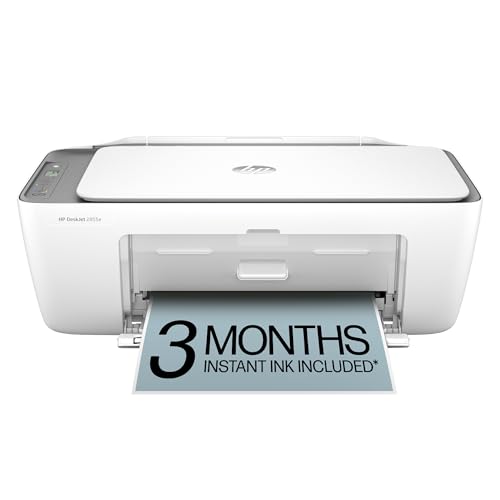
HP DeskJet 2855e Wireless All-in-One Color Inkjet Printer
The HP DeskJet 2855e is the sibling of the 2923, and the two share the same core numbers: up to 7.5 pages per minute in black, up to 5.5 pages per minute in color, a 60-sheet input tray, and HP 67 cartridges. It prints in color, scans, and copies, and it connects over Wi-Fi and through the HP App. Stock evidence is solid: a tracker checked one day before this guide was written shows strong recent volume for this model on Amazon US, and a mirror checked five days before shows it in stock, though not quite as fresh as the 2923.
The 2855e connects over the 2.4 GHz Wi-Fi band only, which the listing states plainly: “This printer is only 2.4 ghz capable.” In a home where the router is close, or where the 2.4 GHz band reaches the room well, that makes no practical difference. In a larger home where the printer sits far from the router, the 2923 with dual-band Wi-Fi is the more flexible choice. The 2855e includes a three-month trial of the HP Instant Ink subscription, half the length of the 2923 trial, and the same renewal note applies: it renews into a monthly plan unless you cancel it.
Color print resolution is up to 4800 x 1200 optimized dpi, which is the figure the listing gives for color output, and the printer handles borderless photos in the usual small sizes. The model number is 588S5A, which is worth checking on the listing, because the DeskJet line has several look-alike models.
One caution applies to this listing in particular. A renewed version of the same printer exists under a separate listing, and renewed units are not the same purchase as a new printer. The link in the heading goes to the new listing, but if you land on a page that says renewed or refurbished anywhere in the title, you are on the wrong listing.
Canon PIXMA TR4720 Wireless All-in-One Printer
The Canon PIXMA TR4720 is the most capable of the four picks, and the only one with a fax function. It prints, copies, scans, and faxes from one box, and it connects over wireless and USB. Print speed is 8.8 images per minute in black and 4.4 images per minute in color, the fastest black speed in this guide, and color resolution is up to 4800 x 1200 dpi. The input tray holds 100 sheets, the largest capacity in this guide, and a 35-page automatic document feeder sits on top for scanning or copying multi-page documents without lifting the lid for each page.
Auto two-sided printing is built in, so long documents print on both sides without manual flipping. That, plus the document feeder and the fax function, makes the TR4720 the best fit in this guide for a small home office or a household that handles paperwork every day. The printer works with the Canon PRINT app, supports Alexa for ink level checks and smart reordering, and runs the optional PIXMA Print Plan for ink management. It uses Canon PG-245 black and CL-246 color cartridges.
Stock evidence for this model is good: several printer roundups updated within the last week link this exact model to Amazon, and a Canon community thread notes it listed at Amazon. The listing copies checked disagree on the weight of the printer, so this guide quotes no weight figure for it. The dimensions also vary between listing copies, so measure the space where it will sit and leave room for the rear paper feed and the front output tray.
Two things to know before you buy. First, the TR4720 is the largest of the four picks, so it needs more desk space than the two HP models. Second, the ink plan and the Alexa features are optional: the printer works fine without them.
Epson Expression Home XP-4200 Wireless Color All-in-One Printer
The Epson Expression Home XP-4200 is the fourth pick, and it is the one with the weakest stock evidence in this guide, so check its listing first. A guide checked four days before this article was written shows it in stock on Amazon, and a tracker checked two days before lists an Amazon seller for it. That is enough to include it, but the most recent direct Amazon crawl for this model is older than the crawls for the other three picks, so confirm the live listing before you order — if it shows no buying option, the guide still stands on the other three printers.
The XP-4200 is an all-in-one color inkjet that prints, scans, and copies, with automatic two-sided printing and borderless photo printing. Print speed is 10 ISO pages per minute in black and 5 ISO pages per minute in color, the fastest color speed in this guide on the ISO measure. The input tray holds 100 sheets, matching the Canon pick, and the printer has a 2.4-inch color display, the only color display among the four picks, which makes menus, copying, and ink checks easier to read. It connects over Wi-Fi and Ethernet, the only pick in this guide with a wired Ethernet port, and it works with the Epson Smart Panel app for printing from a phone or tablet.
The printer uses Epson Claria 232 ink cartridges, and it includes a trial of the ReadyPrint Flex ink subscription. Like the other trials in this guide, it renews into a monthly plan unless you cancel it, so note the end of the trial. Check the model number C11CK65201 on the listing, because Epson sells several Expression Home models with similar names and different cartridge numbers.
Two things to know before you buy. First, the XP-4200 is the only pick here with Ethernet, which is useful if the printer sits next to a router and you prefer a wired connection, or if Wi-Fi in that room is weak. Second, the USB cable is not included in the box, according to the listing details, so if you plan to connect by USB, you will need a cable of your own.
Comparison table
| Printer | Functions | Print speed | Paper capacity | Wireless | Two-sided | Display |
|---|---|---|---|---|---|---|
| HP DeskJet 2923 | Print, scan, copy | Up to 7.5 ppm black, 5.5 ppm color | 60 sheets | Dual-band Wi-Fi, AirPrint, Mopria | Not stated | Icon LCD panel |
| HP DeskJet 2855e | Print, scan, copy | Up to 7.5 ppm black, 5.5 ppm color | 60 sheets | 2.4 GHz Wi-Fi only, HP App | Not stated | Icon LCD panel |
| Canon PIXMA TR4720 | Print, scan, copy, fax | 8.8 ipm black, 4.4 ipm color | 100 sheets | Wireless, USB, Alexa | Yes, auto | Not stated |
| Epson Expression Home XP-4200 | Print, scan, copy | 10 ISO ppm black, 5 ISO ppm color | 100 sheets | Wi-Fi, Ethernet, Epson Smart Panel app | Yes, auto | 2.4-inch color display |
Frequently asked questions
Do I need Wi-Fi on a budget printer?
Wi-Fi is worth having on almost any home printer, because it frees the printer from a single computer. With Wi-Fi, a phone, a tablet, or a laptop on the same network can send a job to the printer, and the printer can sit on a shelf instead of next to a desk. All four picks in this guide connect over Wi-Fi. The difference is in the band: the HP DeskJet 2923 uses dual-band Wi-Fi, while the HP DeskJet 2855e is limited to the 2.4 GHz band, which the listing states plainly. If the printer will sit far from the router, dual-band Wi-Fi is the safer choice. USB is still there on every pick as a fallback, and the Epson XP-4200 adds Ethernet for a wired connection.
Should I pick an inkjet or a laser printer for home use?
For a household that prints color documents and photos, an inkjet is the natural fit, and all four picks in this guide are inkjets. A monochrome laser suits a household that prints mostly black text and wants fast, crisp pages with no color at all, and laser toner does not dry out the way ink can when a printer sits unused for weeks. In this round, the laser models checked either sat above the budget band for this guide or lacked recent stock confirmation, so no laser pick is included here. If you print only black text and print every day, a laser is worth a separate look.
What should I plan for ink after I buy the printer?
Plan around the cartridge number, not the brand alone. The two HP picks use HP 67 cartridges, black and tri-color. The Canon TR4720 uses Canon PG-245 black and CL-246 color cartridges. The Epson XP-4200 uses Epson Claria 232 cartridges. Write the number down before you order, because a cartridge from a different model in the same brand will not fit. Each pick also includes a trial of its maker’s ink subscription — six months on the DeskJet 2923, three months on the DeskJet 2855e — and each trial renews into a monthly plan unless you cancel it. A household that prints rarely may do better buying cartridges as needed, since ink can dry out in a printer that sits unused.
How to choose
Begin with how much you print and what you print. If you print a few pages a week — school forms, tickets, recipes, the occasional photo — the HP DeskJet 2923 is the simplest fit: dual-band Wi-Fi, a 60-sheet tray, and the strongest stock evidence in this guide, plus the longest ink trial. If the printer will sit in the same room as the router and you want the same core numbers, the HP DeskJet 2855e gives you the same speed and tray on the 2.4 GHz band only, with a shorter trial — check the model number 588S5A and the new condition on the listing, because a renewed version exists under a separate listing.
If you handle paperwork every day, look at the Canon PIXMA TR4720. Its 100-sheet tray, 35-page document feeder, auto two-sided printing, and fax function cover the jobs the two HP models do not, and its black speed is the fastest in this guide. It is the largest of the four, so measure the desk space first. If you want a color display, a 100-sheet tray, and a wired Ethernet option, the Epson Expression Home XP-4200 is the pick — but check its listing first, because it has the weakest stock evidence in this guide, and if it shows no buying option, the guide still stands on the other three.
Whatever you choose, confirm the exact model number, a live buying option, and the cartridge number on the listing before you order.
Disclosure: As an Amazon Associate, we may earn a commission from qualifying purchases made through links in this article, at no additional cost to you.
More from Amazon
Programs that pair well with the guide above. Offers and eligibility are set by Amazon and may change.
Free shipping on eligible items, Prime Video and more. Eligible new members can start with a free trial.
Start a Prime free trialAd-free music streaming. Eligible new subscribers can start with a free trial.
Try Music Unlimited freeA Prime membership for ages 18-24 with a trial period. Eligibility is set by Amazon.
See Prime for Young AdultsAudiobooks and podcasts to listen to on the go. Eligible new members can start with a free trial.
Try Audible freeAs an Amazon Associate we earn from qualifying purchases.
Write Your Review
No reviews yet. Be the first to share your experience!