

Key takeaways
- How to choose a USB flash drive for everyday backup: five verified picks compared on capacity, connector, maker-rated speeds and build, plus buying checks.
A USB flash drive is still the simplest way to carry a working copy of your documents, photos and installers from one machine to another, and to keep a spare copy of everyday files within reach. It is not, on its own, a backup strategy: a single small drive can be lost, damaged or simply stop working, so anything that matters should also exist in at least one other place. Treated as one copy among several, though, a well-chosen drive is inexpensive insurance and a genuinely useful daily tool.
Choosing one well comes down to five decisions: how much capacity your files really need, which connector your computers actually have, which USB generation the drive uses, how to read the speed figures makers advertise, and which physical design suits the way you will carry it. This guide works through each decision, then lines up five name-brand drives — four at 256GB and one at 512GB — from a drive that stays plugged into a laptop to a metal-bodied drive built for a bag.
As an Amazon Associate, we earn from qualifying purchases.
Quick answer
For everyday backup, choose a name-brand USB 3.x drive with at least 256GB of capacity, the connector your computers actually use, and a maker-rated read speed that suits large folders. The five drives below cover compact stay-in ports, a metal carry design with a published write figure, and a roomy 512GB option for larger libraries.
SanDisk Ultra Fit USB 3.2 Flash Drive, 256GB

The Ultra Fit is built around one idea: plug it in and leave it there. Its plug-and-stay form factor sits nearly flush in a USB-A port, making it a sensible home for a standing copy of your documents on a laptop that rarely leaves the desk. SanDisk rates this drive at read speeds up to 400MB/s over USB 3.2 Gen 1 — a maker rating, not a measured result, as with every figure in this guide. The trade-off: the tiny body is easy to misplace once removed, with little casing to protect it in a loose pocket, so it suits a semi-permanent role better than daily travel. Check the model number in the table before ordering: SanDisk has sold more than one 256GB version of this drive under similar names.
| Brand | Product | ASIN | Key specs |
|---|---|---|---|
| SanDisk | Ultra Fit USB 3.2 Flash Drive, 256GB | B0BY2TT9TD | USB 3.2 Gen 1; maker-rated read speeds up to 400MB/s; plug-and-stay form factor; model SDCZ430-256G-GAM46 |
Samsung FIT Plus USB 3.1 Flash Drive, 256GB

Samsung’s FIT Plus is the other stay-in option here, in the same compact class as the Ultra Fit. The listing rates it at up to 300MB/s read over USB 3.1, and that is the figure to plan around; higher numbers quoted elsewhere for this model do not come from the listing, so they are not used here. The 256GB version is model MUF-256AB/AM. Like the SanDisk, it sits low in the port, suiting a laptop or desktop front panel where a longer drive would get knocked by a passing cable. Between the two compact picks, the differences are the rated speed and the housing shape; either holds a quiet, always-attached copy of everyday files.
| Brand | Product | ASIN | Key specs |
|---|---|---|---|
| Samsung | FIT Plus USB 3.1 Flash Drive, 256GB | B07D7Q41PM | USB 3.1; listing states read speeds up to 300MB/s; compact plug-and-stay design; model MUF-256AB/AM |
Samsung BAR Plus USB 3.1 Flash Drive, 256GB, Titan Gray
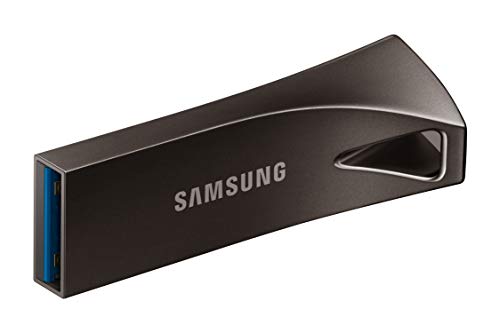
The BAR Plus takes the opposite approach to the FIT Plus: a full-size metal casing, in Titan Gray, built to be carried rather than parked. Samsung rates it at up to 400MB/s read over USB 3.1, again a maker figure. The metal body is the real point of this pick — it tolerates life in a bag better than a thin plastic stick, and the larger body is harder to lose than the mini drives above. The 256GB version is model MUF-256BE4/AM. For a routine built around movement — copying files at the office, carrying them home, refreshing the copy weekly — that sturdier shell is worth more than a small difference in rated speed.
| Brand | Product | ASIN | Key specs |
|---|---|---|---|
| Samsung | BAR Plus USB 3.1 Flash Drive, 256GB, Titan Gray | B07BPKL2D2 | USB 3.1; maker-rated read speeds up to 400MB/s; metal casing; model MUF-256BE4/AM |
Kingston DataTraveler Kyson USB Flash Drive, 256GB

The DataTraveler Kyson is the most transparent pick in this group about speeds: Kingston’s listing states up to 200MB/s read and up to 60MB/s write over USB 3.2 Gen 1, for model DTKN/256GB. A published write figure matters for backup use, because writing the copy is the slow direction — reading back is rarely the bottleneck. Both are maker ratings, so treat them as positioning, not a promise. The capless metal design removes the loose cap that so often disappears from cheaper sticks. If you want the maker’s claims in both directions before buying, the Kyson has the clearest spec sheet of the five.
| Brand | Product | ASIN | Key specs |
|---|---|---|---|
| Kingston | DataTraveler Kyson USB Flash Drive, 256GB | B08KHZY581 | USB 3.2 Gen 1; maker-rated up to 200MB/s read and 60MB/s write; capless metal design; model DTKN/256GB; UPC 740617309195 |
PNY Turbo Attaché 3 USB 3.2 Flash Drive, 512GB, Silver

The Turbo Attaché 3 is the capacity pick: 512GB in a silver USB 3.2 drive, model P-FD512TBOP-GE. PNY’s listing figure is up to 100MB/s, the most modest maker rating in this group, and that shapes its role. For an archive updated occasionally, capacity matters more than shaving minutes off a copy; for a large, frequently changing library, the slower rating will be felt on every refresh. Where this drive earns its place is as the second copy in a two-copy routine — a faster 256GB drive in the desk or laptop, and this roomier drive stored somewhere else, so a single accident cannot take both copies at once.
| Brand | Product | ASIN | Key specs |
|---|---|---|---|
| PNY | Turbo Attaché 3 USB 3.2 Flash Drive, 512GB, Silver | B0BF5VHLBZ | USB 3.2; listing figure up to 100MB/s; 512GB capacity; model P-FD512TBOP-GE; UPC 751492761039 |
How to Choose
Start with capacity, honestly assessed. A documents folder is usually a few gigabytes; a phone photo library can grow past 100GB, and video pushes it far higher. Add up what you plan to copy, then buy the next size up. For most everyday file sets, 256GB is the comfortable middle; step up when photos and video dominate.
Match the connector to your machines. All five drives here use USB-A, the familiar rectangular plug. If your laptop offers only USB-C ports, you will need an adapter, or should look at dual-connector drives instead. Check every machine the drive must serve first; a drive is useless at a port it cannot enter.
Read the USB generation labels calmly. USB 3.2 Gen 1 and USB 3.1, as used on these listings, describe the same class of connection under different naming generations. Practically, any of them is far quicker than an old USB 2.0 port, and a drive reaches its rated figures only when the port matches its generation.
Treat every speed figure as a maker rating. The numbers in this guide are the manufacturers’ own claims, from maker tests with large, sequential files. Real copying is usually slower: many small files or a long sustained write pull the pace down. Write speeds matter most for backup and are typically lower than read speeds — which is why the Kingston’s stated write figure stands out.
Buy the brand listing, and verify the drive on arrival. Counterfeit capacity is a real risk in this category: no-name listings advertising very large capacities are the classic vehicle for drives that report space they do not have. Buy the manufacturer’s own listing, confirm the model number, and when the drive arrives, format it and run a full-capacity check per the maker’s guidance before trusting it with files.
Plan the copies, not just the drive. Keep at least two copies of anything important, on different devices, ideally in different places, refreshed on a schedule you will actually keep. A flash drive is a copy, not a backup strategy.
Who Should Skip
Skip this category altogether if you need to back up an entire computer, a large video-editing library, or a media archive measured in terabytes; an external SSD, a desktop hard drive, or a cloud service fits that job far better. Skip these five picks if every machine you own has only USB-C ports and you do not want an adapter — dual-connector drives exist for exactly that setup. Never let any single small drive be the only copy of irreplaceable files. And if your work requires certified hardware encryption or formal compliance controls, look at dedicated encrypted drives instead; drives like these are built for convenience copies, not regulated data.
FAQ
Is a USB flash drive a reliable backup?
It is a reliable copy, which is a different thing. Flash drives can fail, wear out after heavy writing, or simply be lost. Used as one of at least two copies — the other on a computer, an external drive, or a cloud account — a flash drive is a sensible part of the routine. As the only copy of important files, it is a risk.
Should I choose 256GB or 512GB for everyday backup?
Measure your library first. If documents and a modest photo collection add up to well under 200GB, a 256GB drive leaves sensible headroom. If photos and phone video already fill most of that, or you want one drive to hold an archive as well as a working copy, choose 512GB. Capacity you never fill is wasted; capacity outgrown in six months is worse.
Why does my drive copy files more slowly than the speed on the listing?
The listed figures are maker ratings achieved under ideal conditions, usually with a single large file and an empty drive. Everyday copying involves many small files and sustained writes, which run slower. The port matters too: a USB 3.x drive in an older USB 2.0 port works only at the older port’s pace.
How can I check that a new drive really holds its stated capacity?
Buy the manufacturer’s listing and match the model number before ordering. When the drive arrives, format it, then run a full-capacity verification — writing data across the whole drive and reading it back — per the maker’s guidance, before putting the only copy of anything on it.
Final Verdict
For a drive that lives in a laptop, the SanDisk Ultra Fit and Samsung FIT Plus are near-interchangeable compact picks, separated mainly by rated speed. For a drive that travels, the Samsung BAR Plus adds a metal casing that suits bags and pockets. The Kingston DataTraveler Kyson is the pick for buyers who want a stated write figure as well as a read figure, and the PNY Turbo Attaché 3 is the roomy second copy at 512GB. Whichever you choose, buy the verified brand listing, check the drive on arrival, and keep at least one other copy of everything that matters — that habit, not any single drive, makes a backup trustworthy.
More from Amazon
Programs that pair well with the guide above. Offers and eligibility are set by Amazon and may change.
Free shipping on eligible items, Prime Video and more. Eligible new members can start with a free trial.
Start a Prime free trialAd-free music streaming. Eligible new subscribers can start with a free trial.
Try Music Unlimited freeA Prime membership for ages 18-24 with a trial period. Eligibility is set by Amazon.
See Prime for Young AdultsAudiobooks and podcasts to listen to on the go. Eligible new members can start with a free trial.
Try Audible freeAs an Amazon Associate we earn from qualifying purchases.






Write Your Review
No reviews yet. Be the first to share your experience!