

Key takeaways
- Compare five desk mats for home office and gaming desks, from wide leather pads to a double-sided cork design, with sizing and surface advice.
A desk mat is one of the simplest upgrades a home office or gaming desk can get. It gives your keyboard and mouse one continuous surface to sit on, keeps the keyboard from creeping across the desktop during long typing or gaming sessions, and puts a protective layer between your gear and the desk finish. Scratches from mouse feet, pen marks, mug rings and the daily slide of a keyboard all land on the mat instead of the desk itself. For anyone who spends the workday and the evening at the same desk, that adds up.
The five mats below cover the main ways people actually use a desk mat: a straightforward leather-look pad for a mid-size desk, a wide mat for a big dual-monitor setup, an organizer-style mat with a document hideaway and a magnetic cable holder, a non-slip backed pad that stays planted, and a compact double-sided mat that flips between leather and cork. Before you order any of them, measure your desk. Mat sizes look similar in photos, and the difference between a mat that fits and one that hangs off the edge is a tape measure, not a guess.
As an Amazon Associate, we earn from qualifying purchases.
Quick answer
Measure your desk first, then pick the surface you want to work on. The Aothia leather pad suits most mid-size desks, the Orbitkey adds a document hideaway and magnetic cable holder, the Gallaway covers wide desks, the Smead brings a non-slip faux suede backing, and the YSAGi flips between leather and cork.
Aothia Leather Desk Pad — the straightforward pick for most desks

The Aothia desk pad is the no-fuss option in this roundup: a PU leather surface in Black at 31.5 by 15.7 inches, sized to hold a full keyboard with room for mouse movement beside it. That footprint suits the typical home office desk, covering the working area under your hands without running under the monitor stand. The smooth leather-look surface gives an optical or laser mouse a consistent plane to track on, and it wipes clean when coffee or ink lands on it. This pick is pinned to one specific listing, so check that the size and color on the product page match the Black 31.5 by 15.7 inch version before ordering, since the same brand sells many other sizes and colors as separate listings.
| Brand | Product | ASIN | Key specs |
|---|---|---|---|
| Aothia | Leather Desk Pad | B09X6T1RLM | PU leather surface; 31.5″ x 15.7″; Black |
Orbitkey Desk Mat — for desks that double as paperwork central

The Orbitkey desk mat is built for people whose desk collects paper. Its vegan leather top sits over a recycled PET felt underside, and the design includes a document hideaway for sliding papers and notes out of sight under the top layer, plus a magnetic cable holder that keeps a charging cable parked where you left it instead of sliding behind the desk. This is the Large size in Black. The exact measurements matter with any mat, so confirm the dimensions on the product page against your desk before ordering rather than assuming the Large label matches your space. If your desk is part workstation, part inbox, this is the mat organized around that reality.
| Brand | Product | ASIN | Key specs |
|---|---|---|---|
| Orbitkey | Desk Mat, Large | B08T368XSS | Vegan leather top; recycled PET felt underside; document hideaway; magnetic cable holder |
Gallaway Leather Desk Mat — the wide option for big desks
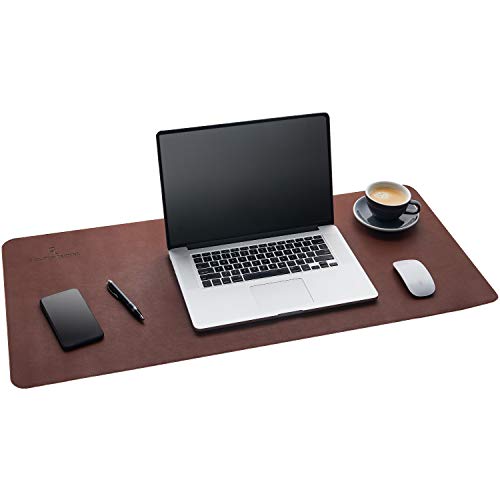
At 36 by 17 inches, the Gallaway is the widest mat in this guide, and that width is its whole point. It suits dual-monitor setups and anyone who wants a full-size keyboard, a generous mousing area and still room for a notebook beside the keyboard, all on one surface. The PU leather finish in Dark Brown brings a warmer tone than the black pads in this roundup, which suits wood desks and traditional office furniture. The trade-off is depth: 17 inches of mat needs a desk that can spare it while still leaving room for a monitor stand behind. Measure your desk’s depth before choosing this one, and it rewards the space with a work surface that never runs out mid-sentence or mid-game.
| Brand | Product | ASIN | Key specs |
|---|---|---|---|
| Gallaway | Leather Desk Mat | B07QT81VRS | PU leather; 36″ x 17″; Dark Brown |
Smead Desk Pad — the one that stays where you put it

The Smead desk pad pairs a vegan leather surface with a non-slip faux suede backing, and that backing is the story. A mat that grips the desktop stays planted when the keyboard gets pushed around during the day, so the edges stay aligned and the surface under your mouse stays consistent. This is the Medium size at 31.5 by 15.7 inches in Sandstone, model 64831, a lighter color that brightens a desk compared with the black pads above. The working surface wipes clean like the other leather-look pads here. If a drifting, bunching desk pad is the annoyance you are solving, the backing on this one is the feature to prioritize.
| Brand | Product | ASIN | Key specs |
|---|---|---|---|
| Smead | Desk Pad, Medium (64831) | B0CKLSG5M8 | Vegan leather surface; non-slip faux suede backing; 31.5″ x 15.7″; Sandstone |
YSAGi Double-Sided Desk Pad — two surfaces in one compact mat

The YSAGi pad is double-sided: PU leather on one face and eco cork on the other, so flipping it over changes the feel of the desk. Use the smooth leather side when you want easy mouse glide, or the cork side when you want a more textured, grippy feel under the keyboard. At 23.6 by 13.7 inches in Black and Cork, it is the compact option here, sized for smaller desks, laptop workstations and writing surfaces where the larger mats would crowd everything else. The listing describes the surface as waterproof, so spills sit on top rather than soaking in; wipe them up promptly and follow the maker’s care directions. As with the Aothia, this pick is one exact listing, and other sizes from the same brand are separate listings with different dimensions.
| Brand | Product | ASIN | Key specs |
|---|---|---|---|
| YSAGi | Double-Sided Desk Pad | B0C9Q9DK42 | PU leather and eco cork, double-sided; 23.6″ x 13.7″; Black + Cork; waterproof surface |
How to Choose
Measure the desk first. Note the width and depth of the area you actually work on. The mat needs to fit your keyboard plus the mouse travel you use, while leaving room behind it for a monitor stand or laptop. A mat should lie completely flat on the desk; one that overhangs the front edge will curl, catch on chair arms and wear unevenly. The sizes in this guide run from 23.6 inches wide for compact desks to 36 inches wide for large ones, so the tape measure decides which group you are shopping in.
Think about mouse tracking. A mouse tracks best on a smooth, consistent surface. Leather-look pads like the Aothia, Gallaway and Smead give that consistency across the whole mat, which matters if you use wide, low-sensitivity mouse movements in games: the pointer stays on the same surface instead of crossing from pad to bare desk. A heavily textured surface feels different under the mouse, which is why the YSAGi’s two sides are a real choice rather than a gimmick — pick the face that suits how you move.
Check keyboard stability. A mat only helps if it stays put. Backings designed to grip, like the Smead’s faux suede underside, keep the pad and everything on it from drifting during the day. On a very slick desktop, backing matters more than surface material.
Match care to your habits. Leather-look surfaces generally wipe clean with a damp cloth, and cork has its own care needs; in every case, clean the mat the way its maker directs and let it dry flat. If you eat and drink at the desk daily, easy cleaning is not a minor feature.
Pin the exact variant. Several brands here sell many sizes and colors as separate listings. Confirm the size, color and model on the product page match the version described in this guide before ordering.
Who Should Skip
Skip a desk mat if your desk is small enough that even a compact 23.6 inch pad would crowd the workspace — a bare desk beats a mat folded over the edge. Skip these picks if what you really want is a thick, cushioned wrist rest, because all five are flat pads that support the desk surface, not your wrists. Skip them if you already have a mouse pad setup you are happy with and no desk-protection concerns; a mat is a surface and protection upgrade, not a performance accessory. And skip ordering altogether until you have measured: sizing is the whole decision with a desk mat, and guessing is how mats end up returned.
FAQ
What size desk mat do I need?
Measure the width of your keyboard and add the mouse travel you use beside it, then check that against your desk’s depth so the mat does not run under the monitor stand or off the front edge. Mid-size desks usually land near the 31.5 inch mats in this guide; wide desks can use the 36 inch Gallaway, and small desks are better served by the 23.6 inch YSAGi.
Are desk mats good for gaming?
Yes, mainly because of consistency. A desk mat keeps the mouse on one tracking surface through wide movements and keeps the keyboard stable during play, and the larger sizes here give low-sensitivity players room to move without running off a small mouse pad. The mat also protects the desk from the extra wear gaming sessions put on one spot.
How do I clean a desk mat?
Follow the maker’s directions for the specific mat. In general, leather-look surfaces wipe down with a damp cloth, spills should be cleaned promptly rather than left to sit, and the mat should dry flat before use. Avoid soaking any mat or using harsh cleaners unless the maker says they are safe for that material.
Will a desk mat protect my desk?
That is one of its main jobs. A mat takes the scratches, pen marks, mug rings and friction wear that would otherwise land on the desk finish, and it can be replaced far more easily than a desktop can be refinished. It protects the surface it covers; it does not add structural strength to the desk.
Final Verdict
For most home office desks, the Aothia is the simple answer: the right size, a clean look and a surface that suits work and play. Choose the Orbitkey if paperwork and loose cables are your desk’s real problem, the Gallaway if your desk is wide and you want the mat to match, the Smead if a sliding pad drives you to distraction, and the YSAGi if your desk is small or you like the idea of choosing between leather and cork day by day. Measure once, pick the surface you want to work on, and the mat quietly does its job from there.
More from Amazon
Programs that pair well with the guide above. Offers and eligibility are set by Amazon and may change.
Free shipping on eligible items, Prime Video and more. Eligible new members can start with a free trial.
Start a Prime free trialAd-free music streaming. Eligible new subscribers can start with a free trial.
Try Music Unlimited freeA Prime membership for ages 18-24 with a trial period. Eligibility is set by Amazon.
See Prime for Young AdultsAudiobooks and podcasts to listen to on the go. Eligible new members can start with a free trial.
Try Audible freeAs an Amazon Associate we earn from qualifying purchases.








Write Your Review
No reviews yet. Be the first to share your experience!