

Key takeaways
- The best HOTAS flight sticks for home flight simulators compared: five stick-and-throttle sets with key specs, control layouts and advice on choosing.
- Top Pick: Thrustmaster T.Flight Hotas X
- Runner-up: Thrustmaster HOTAS Warthog Flight Stick and Throttle
- Also consider: Logitech G X52 Pro Flight Control System
A HOTAS setup, short for hands on throttle and stick, replaces the keyboard-and-mouse scramble of flight simulation with two dedicated controllers: a joystick for pitch, roll and rudder, and a separate throttle quadrant for power and secondary controls. The result keeps your hands where they belong during takeoffs, approaches and combat maneuvers, with buttons and hat switches mapped directly under your fingers.
The five sets in this guide cover the full range of home simulator flying, from a compact entry-level pairing for a first desk setup to an all-metal replica of a real attack aircraft’s controls. They differ in sensor precision, programmable control counts, throttle design, build materials and desk space demanded, so the right choice depends on the simulators you fly and the aircraft you prefer.
As an Amazon Associate, we earn from qualifying purchases.
Quick answer
For most home simulator pilots, the Logitech G X52 is the balanced pick: a separate stick and throttle, a multifunction LCD, and deep programmability. Beginners with a smaller desk should start with the Thrustmaster T.Flight Hotas X, while dedicated simmers who want metal hardware and maximum controls should look at the Logitech G X56 or the Thrustmaster HOTAS Warthog set.
Thrustmaster T.Flight Hotas X

The T.Flight Hotas X is the simplest way into HOTAS flying. It pairs a joystick with a full-size detachable throttle, so you can run the two units together as one piece or separate them to sit either side of a keyboard. The stick offers five axes, including a twist rudder, with adjustable resistance so you can set how firmly it centers, and a wide hand rest plus a weighted base keep it planted on the desk during energetic maneuvering.
Twelve programmable buttons and a rapid-fire trigger cover the essentials most general-aviation and light combat flying requires, and an exclusive Mapping button makes reassigning functions quick. It connects to PC and PS3, and its footprint of roughly 10.39 x 9.53 x 10.43 inches suits smaller desks where a full-size separate throttle would crowd the workspace. For a first HOTAS that teaches the layout without overwhelming a new pilot, this is the natural starting point.
| Brand | Product | ASIN | Key specs |
|---|---|---|---|
| Thrustmaster | T.Flight Hotas X | B001V5QHSC | 5 axes; 12 programmable buttons; rapid-fire trigger; full-size detachable throttle; adjustable resistance; wide hand rest; weighted base; exclusive Mapping button; PC and PS3 compatible; 10.39 x 9.53 x 10.43 inches |


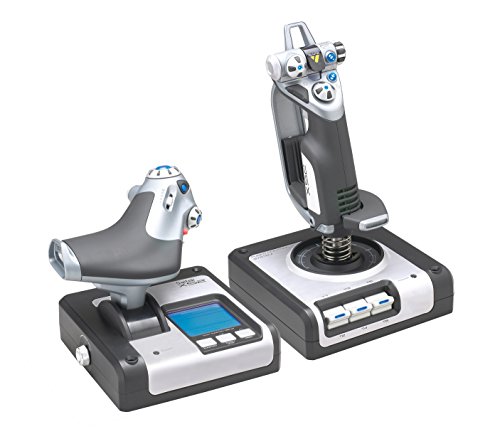
Logitech G X52
The X52 is the long-running mid-range standard, built around a separate stick and throttle joined by a multifunction LCD on the throttle unit that displays mode and profile information. Logitech lists a minimum of 105 programmable commands, so complex aircraft profiles fit comfortably, and the illuminated buttons and MFD stay readable in a darkened room during night flights.
The progressive throttle includes tension adjustment and detents for afterburner and idle positions, which makes setting precise power on jets and turboprops far easier than with a plain slider. The stick brings a two-stage metal trigger, two 8-way hat switches, a 3D rudder twist and a three-position rotary mode selector that triples the effective command set. A five-position handle adjustment helps the grip fit different hand sizes. It works with Windows 10, 8.1, 7, XP and Vista, measures 14.33 x 10.04 x 8.98 inches and weighs 4.85 pounds.
| Brand | Product | ASIN | Key specs |
|---|---|---|---|
| Logitech G | X52 Flight Control System | B01LY285ZH | Multifunction LCD; minimum 105 programmable commands; progressive throttle with tension adjustment and afterburner/idle detents; 2-stage metal trigger; 2 x 8-way hat switches; 3D rudder twist; 3-position rotary mode selector; illuminated buttons and MFD; 5-position handle adjustment; Windows 10, 8.1, 7, XP, Vista; 14.33 x 10.04 x 8.98 inches; 4.85 pounds |
Logitech G X52 Pro
The X52 Pro refines the standard X52 formula for pilots who fly several different aircraft and live inside their control profiles. The upgraded multifunction LCD shows in-game data in real time, and the illuminated buttons keep every control identifiable in low light. The stick and throttle remain separate units connecting over two USB leads, which suits cockpit layouts where the throttle sits well away from the stick.
Under the hand, the precision dual-spring centering mechanism with a metal cone gives the stick a firmer, more defined center feel than the standard model, which helps with the small corrections needed on final approach or in formation flying. Logitech describes it as compatible with most major flight simulation software and games, so it slots into existing setups without fuss. Choose the Pro over the standard X52 if the improved centering action and the more capable display matter more to you than keeping the setup simple.
| Brand | Product | ASIN | Key specs |
|---|---|---|---|
| Logitech G | X52 Pro Flight Control System | B01LZ1MQTL | LCD display; illuminated buttons; 2x USB; separate stick and throttle units; upgraded multifunction LCD shows in-game data in real time; precision dual-spring centering mechanism with metal cone; compatible with most major flight simulation software and games; PC |
Logitech G X56 H.O.T.A.S.
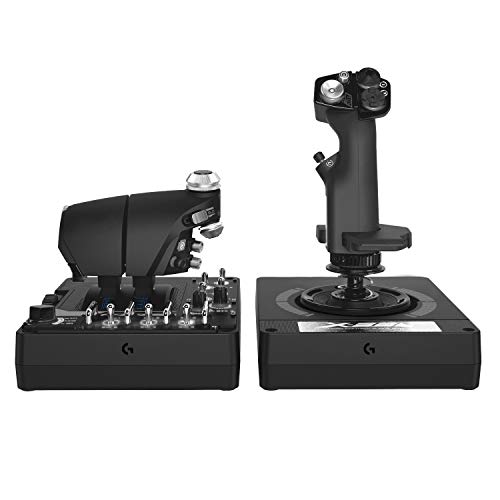
The X56 is built for modern jets and space simulators, where the control count never seems to be enough. Logitech lists 189+ programmable controls, with 13 axes, five hat switches and 31 programmable buttons spread over three modes. Mini analog thumb sticks on both units add true six-degrees-of-freedom control, which space sim pilots use for lateral and vertical thrusters and helicopter pilots use for fine trim work.
Aileron and elevator axes run at 16-bit resolution for smooth, precise inputs, and the stick ships with four spring options so you can tune centering tension to your preference. RGB lighting, twin USB connections and a black and gray finish complete a setup aimed at a permanent cockpit desk. The box contains the stick base, stick handle, throttle and a palm rest spacer. If your simulator of choice is a study-level jet or a capital-ship space sim, the X56 offers the control density those aircraft demand.
| Brand | Product | ASIN | Key specs |
|---|---|---|---|
| Logitech G | X56 H.O.T.A.S. | B079P6SSHP | 189+ programmable controls; 13 axes, 5 HATs and 31 programmable buttons over three modes; 4 spring options; RGB lighting; 2x USB; 16-bit aileron and elevator axis; mini analog thumb sticks for 6 degrees of freedom; black and gray finish; PC |
Thrustmaster HOTAS Warthog
The HOTAS Warthog is the flagship of this group: an official replica of the U.S. Air Force A-10C aircraft’s controls, sold as a combined set with the stick, a dual throttle system and a control panel. The joystick, throttle handles and bases are metal, giving the set a weight and solidity that plastic controllers cannot match, and the stick handle itself is detachable, just like the real aircraft’s.
Precision is the headline. The stick uses H.E.A.R.T HallEffect AccuRate Technology with 16-bit resolution, 65536 x 65536 values, across 19 action buttons and a point of view hat. The dual throttles run at 14-bit resolution with 16,384 values per throttle, include a locking system to join or separate the levers, and a pull and push idle/afterburner detent system with a disengageable afterburner detent, plus 17 action buttons on the throttle unit. Across the whole set there are 55 fully programmable action buttons, and the control panel adds five programmable LEDs and a friction wheel. Thrustmaster’s T.A.R.G.E.T software handles programming, and the set is USB and PC only.
| Brand | Product | ASIN | Key specs |
|---|---|---|---|
| Thrustmaster | HOTAS Warthog Flight Stick and Throttle | B00371R8P4 | Replica of the U.S. Air Force A-10C stick, dual throttle system and control panel; metal joystick, throttle handles and bases; 55 fully programmable action buttons in total; stick with 19 action buttons, point of view hat and detachable metal handle; H.E.A.R.T HallEffect AccuRate Technology, 16-bit resolution (65536 x 65536 values); throttles at 14-bit resolution (16,384 values per throttle) with locking system and pull and push idle/afterburner detents; 17 action buttons on the throttle unit; control panel with 5 programmable LEDs and friction wheel; T.A.R.G.E.T software; USB; PC only |
How to Choose
Start with the simulators and aircraft you actually fly. General aviation and casual flying need few controls, so an entry set like the T.Flight Hotas X covers the essentials. Study-level airliners, combat jets and space simulators reward the deep programmability of the X52 family and the X56, where mode selectors multiply every button.
Next, consider throttle design. A detachable or separate throttle lets you position it naturally at your left hand. Detents for idle and afterburner, found on the X52 and in a more elaborate form on the Warthog, make power management on jets far more precise, while dual throttles suit twin-engine aircraft.
Sensor resolution shapes how smooth your inputs feel. Higher bit counts on the main axes, such as the 16-bit resolution on the X56 and the Warthog stick, translate small hand movements more faithfully, which shows up most in helicopters and formation flying. Finally, measure your desk: the Warthog and the X52 both need real space, while the compact T.Flight Hotas X fits where they cannot.
Who Should Skip
Keyboard-and-mouse pilots who only fly occasionally in an arcade style will not use what a HOTAS offers, and console-only players should note that every set here is aimed at PC simulation, with the T.Flight Hotas X adding PS3 support only. If you have no desk space for separate stick and throttle units, a single compact joystick is a better fit. And if your simulator time is mostly airliner autopilot cruising, the extra buttons and detents of the flagship sets will go unused, so a mid-range set serves you better.
FAQ
Do I need rudder pedals with a HOTAS?
Not necessarily. Every set here provides rudder control through a twist axis on the stick, which is enough for most flying. Dedicated pedals add realism for helicopters and taildraggers, and all of these setups can be expanded with pedals later if you decide you want them.
Can I use these HOTAS sets for space simulators?
Yes. The same axes and programmable buttons map well to space flight, and the X56 is particularly suited to it because its mini analog thumb sticks provide six-degrees-of-freedom thruster control. Check your simulator’s control settings and assign the axes to match.
What is the difference between the X52 and the X52 Pro?
Both share the same overall layout of separate stick and throttle with a multifunction LCD. The Pro upgrades the display so it shows in-game data in real time and uses a precision dual-spring centering mechanism with a metal cone for a firmer, more defined center feel on the stick.
Is the HOTAS Warthog worth it for a beginner?
It is a lot of controller for a first setup: heavy metal construction, 55 programmable buttons and replica A-10C ergonomics. Beginners usually learn faster on a simpler set like the T.Flight Hotas X or the X52, then move to the Warthog when they know they want a dedicated replica cockpit.
Final Verdict
The Logitech G X52 remains the easiest recommendation for most home simulator pilots, balancing a separate throttle, a useful LCD and deep programmability. The T.Flight Hotas X is the right first HOTAS, the X52 Pro adds refinement for multi-aircraft flyers, and the X56 serves control-hungry jet and space sim pilots. At the top, the HOTAS Warthog’s metal construction and sensor precision make it the definitive replica set.
More from Amazon
Programs that pair well with the guide above. Offers and eligibility are set by Amazon and may change.
Free shipping on eligible items, Prime Video and more. Eligible new members can start with a free trial.
Start a Prime free trialAd-free music streaming. Eligible new subscribers can start with a free trial.
Try Music Unlimited freeA Prime membership for ages 18-24 with a trial period. Eligibility is set by Amazon.
See Prime for Young AdultsAudiobooks and podcasts to listen to on the go. Eligible new members can start with a free trial.
Try Audible freeAs an Amazon Associate we earn from qualifying purchases.


Write Your Review
No reviews yet. Be the first to share your experience!