

Key takeaways
- Compare five teleprompters for streaming and video work, from a complete unit with a built-in display to compact phone prompters, and what to check first.
- Top Pick: Elgato Prompter
- Runner-up: Desview T3 Teleprompter
- Also consider: Desview T12S Teleprompter
Reading a script while looking straight into the lens is what separates a polished stream or video from one where your eyes keep drifting to notes off camera. A teleprompter solves that by reflecting scrolling text in front of the lens, so you read your lines while appearing to speak directly to the viewer. The catch is that prompters come in two very different forms.
One pick in this guide is a complete unit with its own built-in display. The other four are beam-splitter hardware only: a frame, a sheet of angled glass, and a tray. Each of those four needs your own smartphone or tablet plus a prompting app to display the script, because none of them has a screen of its own. This guide compares five verified options and the checks to run before you buy.
As an Amazon Associate, we earn from qualifying purchases.
Quick answer
Start with the screen question. The Elgato Prompter is the only pick here with its own built-in display; the other four are beam-splitter hardware that needs your phone or tablet and an app. Then match the glass to your device size: phone-only at the small end, up to 12.9 inch tablets at the large end.
Elgato Prompter

The Elgato Prompter is the complete-unit option and the simplest starting point for a desk-based streaming setup. Instead of reflecting text from a tablet you supply, it has a built-in 9 inch display that connects to your PC or Mac over USB-C and behaves like a small extra monitor: you drag your script window onto it and read. Elgato’s Camera Hub software handles prompting, and Mac users also install the free DisplayLink software the listing calls for.
Because the display is built in, there is no tablet tray to size and no separate screen to charge or mount. It works with DSLR and mirrorless cameras, webcams, and smartphones, and step-up rings from 49 mm to 82 mm are included for lens mounting. One detail to plan around: using a smartphone as the camera itself requires a third-party adapter with a 1/4 inch thread, sold separately. At 690 g without accessories, it suits smaller desk arms and tripods.
| Brand | Product | ASIN | Key specs |
|---|---|---|---|
| Elgato | Prompter | B0CH3P9K1X | Built-in 9 inch display, 1024 x 600; USB-C connection to PC or Mac; works as a drag-and-drop monitor display; step-up rings 49-82 mm included; Windows 10 64-bit or macOS 11 or newer; 690 g without accessories |
Desview T3 Teleprompter

The Desview T3 is the compact bring-your-own-screen option for phone and small tablet users. It reflects text from a smartphone or tablet up to 10 inch, with a stated maximum device width of 170 mm, so check your tablet’s width rather than trusting the diagonal alone. Its 70/30 beam splitter glass uses a 26-layer optical coating.
Mounting is flexible for its size. DSLR and mirrorless cameras attach through the nine included lens adapter rings, and a phone clamp is included if the phone records instead. The listing supports horizontal shooting at focal lengths of 24 mm or greater, so test very wide lenses carefully for vignetting. A Bluetooth remote is included, and the free Desview app for iOS and Android scrolls the script. Remember that the screen and the script come from your own device: the T3 itself is hardware only.
| Brand | Product | ASIN | Key specs |
|---|---|---|---|
| Desview | T3 Teleprompter | B0953PXFNL | For smartphones and tablets up to 10 inch, max width 170 mm; 70/30 beam splitter glass with 26-layer coating; 9 lens adapter rings included; phone clamp included; Bluetooth remote and free app; horizontal shooting at 24 mm or longer |
Desview T12S Teleprompter
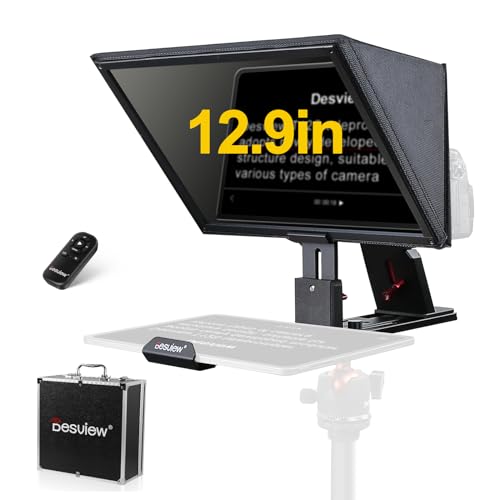
The Desview T12S is the step up for creators prompting from a large tablet. Its 12.9 inch beam splitter glass accepts tablets and iPads up to 12.9 inch, the largest device any pick here supports. The glass is coated with 26 layers and uses the same 70/30 split as the T3, reflecting enough text to read while passing most light through to the camera.
The build is aluminum alloy rather than plastic, and an aluminum carry case is included. It mounts DSLR cameras, mirrorless cameras, and camcorders, and the specifications accommodate lenses down to 24 mm wide angle. Control comes from the included Bluetooth remote working with the free Desview app on iOS and Android. Like the T3, the T12S has no display of its own: your tablet is the screen, so its size, brightness, and battery are part of your prompting setup.
| Brand | Product | ASIN | Key specs |
|---|---|---|---|
| Desview | T12S Teleprompter | B0C963FRBX | For tablets up to 12.9 inch; 12.9 inch beam splitter glass, 26-layer coating, 70/30 split; aluminum alloy build; aluminum carry case included; DSLR, mirrorless and camcorder compatible; Bluetooth remote and free app |
Glide Gear TMP 100 Teleprompter

The Glide Gear TMP 100 takes a different approach: an all-metal frame that needs no assembly and works with any prompting app you like. It accepts smartphones and tablets up to 10.5 x 8 inch, and its 70/30 beam splitter glass sits in a 6061 aluminum body with both 1/4″-20 and 3/8″-16 tripod threads, so it fits photo and video supports. A carry case is included.
Two cautions define this pick. First, Glide Gear specifically warns that it does not fit iPad Pro models, so measure your tablet against the 10.5 x 8 inch limit before ordering. Second, there is no app and no remote in the box: you supply your own phone or tablet and any third-party teleprompter app with a mirror-text mode, because reflected text reads backwards without it. For streamers who already have a favorite app, that simplicity is the appeal.
| Brand | Product | ASIN | Key specs |
|---|---|---|---|
| Glide Gear | TMP 100 Teleprompter | B019AJOLEM | For smartphones and tablets up to 10.5 x 8 inch; 70/30 beam splitter glass; 6061 aluminum body; no assembly required; carry case included; 1/4″-20 and 3/8″-16 tripod threads; does not fit iPad Pro models; no app or remote included |
AMBITFUL 7.5 Inch Mini Teleprompter

The AMBITFUL mini is the smallest, lightest pick here, built for phone-based recording at a desk. It is a 7.5 inch prompter weighing 350 g, and it works with smartphones and DSLR cameras only: the listing states plainly that it is not compatible with tablets, so tablet users should choose a Desview or Glide Gear pick instead.
Despite its size, the kit is complete for its niche. It includes a desktop tripod, a remote control, and app control on iOS and Android. Camera adapter rings from 49 mm to 77 mm are included, and camera use requires a 1/4 inch tripod thread mount. For phone-only recording this is the low-footprint option, but also the pick most likely to be outgrown if you move to a tablet later.
| Brand | Product | ASIN | Key specs |
|---|---|---|---|
| AMBITFUL | 7.5 Inch Mini Teleprompter | B087643MQ9 | 7.5 inch mini prompter; 350 g; smartphones and DSLR cameras only, not compatible with tablets; adapter rings 49-77 mm included; desktop tripod and remote control included; app control on iOS and Android |
How to Choose
Start with the screen decision, because it splits this guide in two. The Elgato Prompter carries its own display and plugs into your computer, which removes the tablet question entirely. Every other pick is glass and a frame: your phone or tablet is the display, and a prompting app scrolls the text. Confirm the app you plan to use can mirror its text, since reflected text is reversed.
Next, size the prompter to the device you will actually prompt from. Measure the width of your phone or tablet, not just its diagonal, and compare it with each pick’s limit: phone only for the AMBITFUL mini, up to 10 inch for the Desview T3, up to 10.5 x 8 inch for the Glide Gear TMP 100 with an explicit iPad Pro exclusion, and up to 12.9 inch for the Desview T12S.
Then check the camera side. Lens-ring mounts, like the rings bundled with the Elgato, Desview, and AMBITFUL picks, hang the prompter on the lens itself, so confirm your lens filter thread matches an included ring size. Also respect wide-angle limits: several picks state a minimum focal length, such as 24 mm or longer, and shooting wider risks catching the frame edges in shot. Finally, think about control: a Bluetooth remote lets you pause and adjust scroll speed without reaching for the screen, while the Glide Gear leaves app and remote choices entirely to you.
Who Should Skip
Skip this whole category if you rarely record scripted material: ad-libbed streams and short improvised clips do not need prompting hardware, and a simple outline near the camera works fine. Skip the bring-your-own-screen picks if you do not own a spare phone or tablet, because tying up your only phone as a prompt screen makes mid-recording checks awkward; the Elgato is the exception since it uses your computer instead. Skip the AMBITFUL mini if there is any chance you will prompt from a tablet, since it cannot take one at all. And skip the larger prompters if your camera lives on a small desk arm, because a 12.9 inch glass panel plus a full-size tablet adds real weight to a light support.
FAQ
Do I need a tablet to use a teleprompter?
Only for some models. Four of the five picks are beam-splitter hardware with no screen of their own, so they need your smartphone or tablet plus a prompting app. The Elgato Prompter is the exception: it has a built-in display that connects to a PC or Mac.
Will my tablet fit these prompters?
Check the width, not just the diagonal. The Desview T3 takes devices up to 10 inch with a 170 mm maximum width, the Glide Gear TMP 100 takes up to 10.5 x 8 inch and excludes iPad Pro models, and the Desview T12S takes tablets up to 12.9 inch. The AMBITFUL mini does not accept tablets at all.
Can I use a wide-angle lens with a teleprompter?
With care. Prompters sit in front of the lens, so very wide lenses can catch the frame or hood in the shot. Several picks state a minimum focal length, such as 24 mm or longer for the Desview models, so check your lens against the stated limit and frame a test shot before recording.
What app do I need for the scrolling text?
It depends on the pick. Desview and AMBITFUL support their own free apps with a Bluetooth remote, and the Elgato uses its Camera Hub software on your computer. The Glide Gear TMP 100 includes no app or remote, so choose any third-party app with a mirror-text mode.
Final Verdict
For most streamers recording at a desk, the Elgato Prompter is the easiest recommendation: the built-in display removes the tablet hunt, and the USB-C monitor approach fits the way streaming setups already work. If you already own a tablet, the Desview T12S gives you the largest prompting surface and a metal build, and the Desview T3 covers phones and smaller tablets. The Glide Gear TMP 100 suits creators who want durable hardware and their own choice of app, and the AMBITFUL mini is the tidy choice for phone-only recording. Match the glass to your screen and your lens, and any of these five will keep your eyes on the audience.
More from Amazon
Programs that pair well with the guide above. Offers and eligibility are set by Amazon and may change.
Free shipping on eligible items, Prime Video and more. Eligible new members can start with a free trial.
Start a Prime free trialAd-free music streaming. Eligible new subscribers can start with a free trial.
Try Music Unlimited freeA Prime membership for ages 18-24 with a trial period. Eligibility is set by Amazon.
See Prime for Young AdultsAudiobooks and podcasts to listen to on the go. Eligible new members can start with a free trial.
Try Audible freeAs an Amazon Associate we earn from qualifying purchases.


Write Your Review
No reviews yet. Be the first to share your experience!