
Our Short List of 3
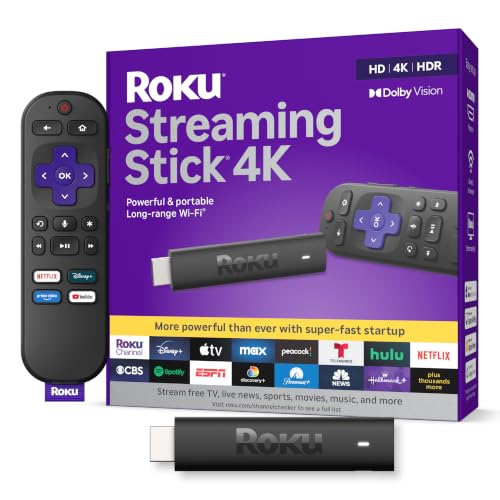
- Best for: Households that want the same simple, neutral streaming experience on every TV in the house, especially when buying several units at once.

- Best for: Alexa households and Prime Video subscribers who want the fastest Fire TV stick on every television.

- Best for: Google and Android households that want one strong box on the main TV, paired with Google TV devices in other rooms, plus smart home control from the couch.
All 4 Picks at a Glance
| Product | Specs | Action |
|---|---|---|
| 1. Roku Streaming Stick 4K — Best Overall for Multiple TVs |
| Check price on Amazon |
| 2. Amazon Fire TV Stick 4K Max — Best for Alexa Households |
| Check price on Amazon |
| 4. Google TV Streamer 4K — Best for Google TV and Smart Home Users |
| Check price on Amazon |
 5. Roku Ultra 2024 — Best Box-Style Roku for the Main TV |
| Check price on Amazon |
Key takeaways
- Find the best streaming device for multiple TVs. We compare 5 Roku, Fire TV, Apple TV and Google TV models for one consistent setup in every room of your home.
If your home has more than one television, buying a streaming device stops being a one-room decision. Every TV needs the same apps, the same logins, and ideally the same remote layout, so nobody relearns a menu when they change rooms. Finding the best streaming device for multiple TVs really means picking a system to repeat across the whole house.
One fact shapes every recommendation in this guide: a single stick or box cannot send its picture to several televisions at once. Each TV needs its own device in its own HDMI port. What you can standardize is the platform, the account, and the remote. Buy the same model for every room, sign in once per device, and every television behaves the same way.
The five picks below are all genuine streaming players from major platforms, with 4K support, a voice remote, and a broad app library. They differ in ecosystem, speed, and connectivity, so the right answer depends on which services you already pay for.
Disclosure: As an Amazon Associate, we earn from qualifying purchases.
How to Choose a Streaming Device for Multiple TVs
Standardize on one platform
Pick one ecosystem and use it everywhere. Roku, Fire TV, Apple TV, and Google TV each have their own home screen, app store, and remote, so mixing platforms means a different interface in every room. Standardizing also simplifies account management, because most streaming services let you sign in on several devices under one subscription, keeping watchlists, recommendations, and parental controls in one place. Before committing, check that your must-have apps are available. The major services are present on all four platforms, but niche and regional apps vary.
Match the device to each room, within the same family
Standardizing does not mean buying the identical model for every room. Use the stronger model on the main television and the cheaper stick on secondary screens. The main TV benefits from faster navigation, better Wi-Fi, and the highest picture and sound formats, while a bedroom or kitchen TV often needs only reliable 4K playback and a simple remote.
Wi-Fi strength matters more with several devices
Every additional device adds traffic to your home network, and several televisions streaming at once can expose a weak Wi-Fi setup. Look for dual-band Wi-Fi at a minimum, and prefer Wi-Fi 6 or Wi-Fi 6E on the main television if your router supports it. Devices with long-range Wi-Fi or an Ethernet port are valuable for televisions far from the router, such as a bedroom at the end of a hallway or a basement den. If one room buffers while others stream fine, the problem is usually signal strength in that room, and a device with an Ethernet option or a stronger radio is the practical fix.
Check picture and sound format support
Most modern televisions support 4K, HDR10, and often Dolby Vision, but not every streaming device supports every format. Dolby Vision and HDR10+ deliver the best picture on compatible sets, while Dolby Atmos support matters if any room has a soundbar or home theater system. A device that lacks a format your main TV supports will still work, but the picture or sound will fall back to a simpler standard.
Count the remotes and the accounts
A multi-TV household quickly accumulates remotes, so remote design deserves real attention. Voice remotes with TV power and volume buttons let one remote handle both the streamer and the television, removing the most common source of confusion for guests and children. Streaming subscriptions are separate from the hardware. Buying five devices does not mean paying for five subscriptions, because most services allow multiple simultaneous streams under one plan, though the exact number varies by service and plan tier.
Top Picks
1. Roku Streaming Stick 4K — Best Overall for Multiple TVs
- Best for: Households that want the same simple, neutral streaming experience on every TV in the house, especially when buying several units at once.
Households that want the same simple, neutral streaming experience on every TV in the house, especially when buying several units at once.
The Roku Streaming Stick 4K is the easiest device to standardize on across a house full of televisions. It hides behind any TV, plugs directly into an HDMI port, and its long-range Wi-Fi receiver is designed to hold a strong connection in rooms far from the router. For households buying three, four, or five units, its compact form and simple setup keep the total effort low, because there is no box to find shelf space for in each room.
The stick streams in 4K with Dolby Vision and HDR10+ over dual-band 802.11ac Wi-Fi, and the included voice remote controls TV power and volume as well as the Roku itself. The Roku platform is known for a neutral, app-first home screen that does not push one service over the others. It also works with Apple AirPlay and HomeKit, as well as Alexa and Google Assistant.
Key specs: 4K resolution with Dolby Vision and HDR10+; long-range dual-band Wi-Fi; voice remote with TV power and volume controls; model 3820R2; measures 3.7 by 0.8 by 0.45 inches and weighs 0.9 ounces; works with Apple AirPlay, HomeKit, Alexa, and Google Assistant; access to more than 350 free live TV channels through the Roku Channel.
Pros: Compact stick hides behind any TV and moves easily between rooms; long-range Wi-Fi suits distant bedrooms; neutral interface treats all streaming services equally; voice remote replaces the TV remote for everyday use; wide compatibility with voice assistants and AirPlay.
Cons: No Ethernet port, so a room with very weak Wi-Fi may need a different model; no Dolby Atmos support; the remote uses replaceable batteries rather than USB-C recharging.
2. Amazon Fire TV Stick 4K Max — Best for Alexa Households
- Best for: Alexa households and Prime Video subscribers who want the fastest Fire TV stick on every television.
Alexa households and Prime Video subscribers who want the fastest Fire TV stick on every television.
The Fire TV Stick 4K Max is the strongest choice for homes already invested in Alexa and Amazon services. As the top model in the Fire TV stick range, it adds Wi-Fi 6E support and double the storage of the standard Fire TV Stick 4K, with 16GB of built-in storage for apps and games. That extra storage matters in a multi-TV home, because each device accumulates the same set of apps, and running out of room for a new service on one television is an avoidable annoyance.
The included Alexa Voice Remote Enhanced supports voice search, TV controls, and the Ambient Experience, which turns an idle television into a display for photos and art. Fire TV integrates deeply with Prime Video and Alexa routines, so a household that already uses Echo speakers will find the stick fits naturally into daily routines. It streams in 4K with Dolby Vision and HDR10+, and it works with earlier Wi-Fi routers as well.
Key specs: 4K streaming with Dolby Vision and HDR10+; Wi-Fi 6E support; 16GB of storage, double the 8GB in the standard Fire TV Stick 4K; Alexa Voice Remote Enhanced included; Ambient Experience on idle screens; AI-powered Fire TV search; free and live TV without cable or satellite.
Pros: Wi-Fi 6E and 16GB of storage make it the most capable Fire TV stick for busy multi-TV homes; deep Alexa integration for voice control and smart home routines; Ambient Experience makes idle TVs more useful; strong performance for Prime Video and cloud gaming apps.
Cons: The home screen promotes Amazon content prominently, which may not suit households that prefer a neutral interface; the full benefit of Wi-Fi 6E requires a compatible router; some users may prefer a box-style player with an Ethernet port for the main TV.
3. Apple TV 4K Wi-Fi 64GB (3rd Generation, 2022) — Best Premium Pick
The Apple TV 4K is the premium option in this guide and the natural choice for households that live inside the Apple ecosystem. The 3rd generation Wi-Fi model with 64GB of storage runs tvOS on the A15 Bionic chip, which keeps navigation fast and app switching smooth even with a large library installed. Because every Apple TV in the house runs the same tvOS, the experience is identical from the living room to the bedroom.
Picture and sound support is comprehensive, with 4K resolution, Dolby Vision, HDR10+, and Dolby Atmos. The Siri Remote uses a touch-enabled clickpad with voice search through Siri. Apple TV integrates with Apple TV+, Apple Music, Apple Arcade, and Apple Fitness+, and it works as a HomeKit hub. It also supports AirPlay, so iPhone and iPad owners can send photos, videos, and music to any television. Note that this 64GB Wi-Fi model has no Ethernet port or Thread support; households that want wired networking should look at the 128GB Wi-Fi plus Ethernet version instead.
Key specs: Apple TV 4K Wi-Fi, 3rd generation, 2022 model; 64GB of storage; model MN873LL/A; A15 Bionic chip; 4K with Dolby Vision, HDR10+, and Dolby Atmos; Siri Remote included; tvOS with access to Apple TV+, Apple Music, Apple Arcade, and Apple Fitness+; AirPlay and HomeKit support.
Pros: Fast and polished tvOS interface that stays identical across every room; full Dolby Vision and Dolby Atmos support; excellent integration with iPhone, iPad, and Mac through AirPlay; doubles as a HomeKit hub; neutral home screen with no single service pushed above the rest.
Cons: Higher cost per unit makes equipping many rooms a larger investment than a stick-based setup; the 64GB Wi-Fi model has no Ethernet port; households without Apple devices will not get the full benefit of its ecosystem features.
Best for: Apple households that want the most polished streaming experience on every TV and are willing to invest more per room for it.
4. Google TV Streamer 4K — Best for Google TV and Smart Home Users
- Best for: Google and Android households that want one strong box on the main TV, paired with Google TV devices in other rooms, plus smart home control from the couch.
Google and Android households that want one strong box on the main TV, paired with Google TV devices in other rooms, plus smart home control from the couch.
The Google TV Streamer 4K is Google’s flagship streaming box and the successor to the Chromecast with Google TV. Unlike a stick, it is a small set-top box that sits on a shelf or media unit, which gives it room for a Gigabit Ethernet port alongside Wi-Fi. That wired option is valuable for a main television in a multi-TV home, because a wired connection frees up wireless bandwidth for the sticks in other rooms and delivers the most stable stream for 4K viewing.
Inside, the Streamer has 4GB of RAM and 32GB of storage, with a processor that Google describes as 22 percent faster than the previous generation, plus twice the memory. It streams in up to 4K HDR with Dolby Vision and Dolby Atmos, and the Google TV interface builds personalized recommendations from the household’s subscriptions and viewing history. The device doubles as a smart home hub with Matter and Thread support, and Chromecast support lets Android phone owners send content to any TV with a tap.
Key specs: Google TV Streamer 4K; up to 4K HDR with Dolby Vision and Dolby Atmos; 32GB of storage and 4GB of RAM; Gigabit Ethernet port plus Wi-Fi; model GRS6B; voice remote included; Matter and Thread smart home hub built in; Google TV interface with personalized recommendations; Chromecast built in.
Pros: Ethernet port gives the main TV the most stable connection in the house; generous 32GB of storage holds a large app library; doubles as a Matter and Thread smart home hub; Google TV recommendations pull together content from many services; Chromecast support suits Android households.
Cons: Box form factor needs shelf space, unlike a stick that hides behind the TV; an HDMI cable is required and sold separately; the smart home hub features are most useful in the main living area rather than in every bedroom.
5. Roku Ultra 2024 — Best Box-Style Roku for the Main TV
- Best for: Households that standardize on Roku and want their best device on the main TV, with cheaper Roku sticks covering the remaining rooms.
Households that standardize on Roku and want their best device on the main TV, with cheaper Roku sticks covering the remaining rooms.
The Roku Ultra 2024 is the flagship Roku player and the best match for the main television in a Roku-standardized home. It pairs the same neutral Roku interface found on the Streaming Stick 4K with the strongest connectivity in the Roku range, including Wi-Fi 6 and an Ethernet port. That combination makes it the right anchor device: put an Ultra on the living room TV for the most reliable connection, and use Streaming Stick 4K units in the bedrooms, and every screen still runs the same Roku system.
The Ultra streams in 4K with HDR10+, Dolby Vision, and Dolby Atmos, and it adds Bluetooth for private listening through headphones. Its rechargeable Voice Remote Pro has backlit buttons for dark rooms, hands-free voice control, a headphone jack, and a lost-remote finder, a practical feature when several similar remotes are spread across a house. A premium high-speed HDMI cable is included in the box.
Key specs: Roku Ultra 2024; model 4850R; 4K with HDR10+, Dolby Vision, and Dolby Atmos; Wi-Fi 6 and Ethernet port; Bluetooth for private listening; rechargeable Voice Remote Pro with backlit buttons, hands-free voice, and lost-remote finder; premium high-speed HDMI cable included.
Pros: Strongest Roku connectivity with Wi-Fi 6 and Ethernet for the main TV; rechargeable backlit remote with lost-remote finder is ideal in a multi-remote household; full Dolby Vision and Atmos support; same Roku interface as the stick, so the whole house stays consistent; HDMI cable included.
Cons: Box form factor needs shelf space and costs more per unit than a stick, so it is best used on one or two main TVs rather than in every room; overkill for a small secondary television that only needs basic 4K streaming.
Comparison Table
| Device | ASIN | Form Factor | Resolution and HDR | Connectivity | Storage | Best For |
|---|---|---|---|---|---|---|
| Roku Streaming Stick 4K | B09BKCDXZC | Stick | 4K, Dolby Vision, HDR10+ | Long-range dual-band Wi-Fi | Standard | Every room on a budget |
| Fire TV Stick 4K Max | B0BP9SNVH9 | Stick | 4K, Dolby Vision, HDR10+ | Wi-Fi 6E | 16GB | Alexa households |
| Apple TV 4K Wi-Fi 64GB (3rd Gen) | B0BJLDVJTC | Box | 4K, Dolby Vision, HDR10+, Dolby Atmos | Wi-Fi | 64GB | Apple households |
| Google TV Streamer 4K | B0D8WJYSF9 | Box | 4K HDR, Dolby Vision, Dolby Atmos | Wi-Fi, Gigabit Ethernet | 32GB | Google and smart home users |
| Roku Ultra 2024 | B0DF44RTTP | Box | 4K, HDR10+, Dolby Vision, Dolby Atmos | Wi-Fi 6, Ethernet, Bluetooth | Standard | Main TV in a Roku home |
Frequently Asked Questions
Do I need one streaming device per TV?
Yes. A streaming stick or box plugs into one television’s HDMI port and can only display on that screen. To equip several televisions, buy one device per TV, using the same platform in every room so the interface, accounts, and remotes stay consistent.
Can I use one streaming account on multiple TVs?
Yes, in most cases. Services such as Netflix, Disney+, Hulu, and Prime Video allow you to sign in on several devices under a single subscription. The limit that matters is the number of simultaneous streams, which varies by service and plan tier.
Is it better to buy the same model for every TV?
Buying the same model everywhere is the simplest approach and works well for sticks, which are affordable enough to repeat. A popular alternative is to use the platform’s flagship box on the main TV and its cheaper stick in secondary rooms. Both keep one interface across the house, so choose based on how much you want to spend per room and whether the main TV needs Ethernet.
What matters most: Wi-Fi or Ethernet?
For a single TV near the router, Wi-Fi is usually fine. For several televisions streaming at once, a wired Ethernet connection on at least the main device takes load off the wireless network and gives the most stable 4K stream. If a room buffers often, try a device with an Ethernet port or a stronger Wi-Fi radio.
Should I choose Roku, Fire TV, Apple TV, or Google TV?
Choose the platform that matches the devices and services your household already uses. Roku suits households that want a neutral interface. Fire TV suits Alexa and Prime Video users. Apple TV suits iPhone, iPad, and Mac owners. Google TV suits Android users and households that want smart home hub features. All four cover the major streaming apps, so ecosystem fit matters more than any single feature.
Conclusion
The best streaming device for multiple TVs is the one you can happily repeat in every room. For most households, that is the Roku Streaming Stick 4K, because its small size, long-range Wi-Fi, and neutral interface make it easy to install the same way on every television. Alexa households should look at the Fire TV Stick 4K Max, Apple households at the Apple TV 4K, and Google households at the Google TV Streamer 4K. Anchoring a Roku home with a Roku Ultra 2024 on the main TV gives the living room the strongest connection while the sticks cover the rest of the house.
Whatever platform you choose, standardize on it, check that your must-have apps are available, and make sure your home network can handle several streams at once. Do that, and every television in the house will feel like the same television.
More from Amazon
Programs that pair well with the guide above. Offers and eligibility are set by Amazon and may change.
Free shipping on eligible items, Prime Video and more. Eligible new members can start with a free trial.
Start a Prime free trialAd-free music streaming. Eligible new subscribers can start with a free trial.
Try Music Unlimited freeA Prime membership for ages 18-24 with a trial period. Eligibility is set by Amazon.
See Prime for Young AdultsAudiobooks and podcasts to listen to on the go. Eligible new members can start with a free trial.
Try Audible freeAs an Amazon Associate we earn from qualifying purchases.










Write Your Review
No reviews yet. Be the first to share your experience!