
Our Short List of 3
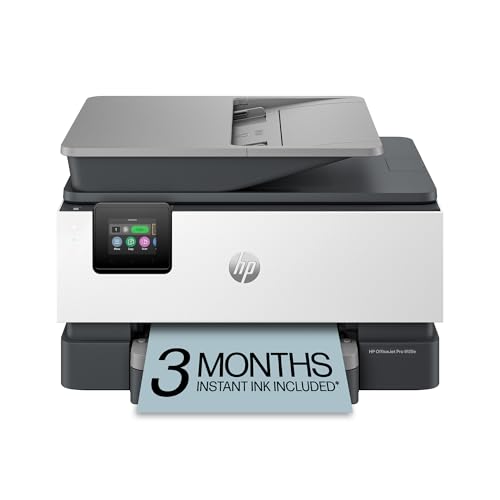
- Best for: Teachers who want one capable machine for worksheets, colour handouts, scanning and faxing, with a large paper tray and fast output.
- Type: Wireless colour inkjet all-in-one with print, scan, copy and fax
- Print speed: Up to 22 pages per minute in black and 18 pages per minute in colour
- Paper capacity: 250-sheet input tray
- Feeder: Automatic document feeder

- Best for: Teachers who want generous included ink, an automatic document feeder and fax in a single colour all-in-one, without managing ink bottles.
- Type: Wireless colour inkjet all-in-one with INKvestment Tank system
- Functions: Print, scan, copy and fax
- Ink: Up to one year of ink included in the box
- Duplex: Automatic two-sided printing

- Best for: Teachers who print mostly black-and-white worksheets, quizzes and reading passages at home and want the fastest, cheapest text output.
- Type: Wireless compact monochrome laser printer
- Print speed: Up to 36 pages per minute
- Paper capacity: 250-sheet input tray
- Duplex: Automatic two-sided printing
All 4 Picks at a Glance
| Product | Specs | Action |
|---|---|---|
| 1. HP OfficeJet Pro 9125e — Best All-Round Home Teaching Printer |
| Check price on Amazon |
| 3. Brother MFC-J4335DW INKvestment Tank — Best for High-Yield Colour |
| Check price on Amazon |
| 4. Brother HL-L2460DW — Best Monochrome Laser for Worksheet Volume |
| Check price on Amazon |
 5. Canon PIXMA TR4720 — Best Compact Budget All-in-One |
| Check price on Amazon |
Key takeaways
- Find the best printers for teachers at home, from quiet lasers for worksheets to ink tank models for colour classroom materials, compared on listing specs.
Teaching does not stop when the school day ends: lesson plans get finished at the kitchen table and worksheets get printed the night before. A teacher working from home needs a printer that fits that reality — compact, quiet, simple to use from a laptop or a phone, and economical enough that a class set does not feel like a luxury.
The best printers for teachers at home are not the same as the big machines in a school office. A home printer prints in smaller batches, often late in the evening, and shares space with everything else in the house. This guide compares five printers that suit home teaching work, based on the specifications stated in their Amazon listings: a monochrome laser for worksheets, a refillable ink tank printer for affordable colour, and versatile colour all-in-ones.
Disclosure: As an Amazon Associate, we earn from qualifying purchases.
How to Choose a Printer for Teaching at Home
Start with what you actually print at home
If most home printing is black text — worksheets, reading passages, quizzes, answer keys, permission slips — a monochrome laser is hard to beat. Toner never dries out or clogs during a holiday break, pages come out crisp and dry, and the cost per page stays low. If colour is a regular part of the work — charts, maps, reward certificates, illustrated handouts — an inkjet or ink tank printer earns its place.
Treat automatic duplex as a near-essential
Two-sided printing saves paper, halves the thickness of a thirty-page packet, and keeps handouts manageable. Every printer in this guide offers automatic two-sided printing, which means the machine flips the page itself instead of asking you to re-feed the stack by hand.
Match the ink or toner system to the school year
Home teaching printing is bursty: heavy weeks before exams and quiet weeks during holidays, and a printer that sits unused for a month should still work when term restarts. Lasers handle idle periods best, since toner does not dry out, while ink tanks handle heavy colour use best, since refillable reservoirs make each colour page far cheaper than a cartridge. Cartridge inkjets sit in between: usually the cheapest machines to buy, good at colour, and the most expensive per page. A tank system pays for itself over a school year of daily colour; occasional colour suits a cartridge all-in-one.
Check the scanner, the feeder and the connection
Teachers scan and copy almost as much as they print. A flatbed scanner copies pages from bound textbooks and student workbooks that cannot go through a feeder, while an automatic document feeder scans a multi-page handout in one pass. Wireless printing matters just as much: the printer should accept jobs from a laptop, a Chromebook and a phone without a cable hunt. A small display on the front panel also helps, because it makes walk-up copying possible without opening a laptop.
Mind the footprint and the running costs
A home printer lives where people live, so measure the desk before buying and remember that a printer needs clearance above it for the scanner lid. The purchase is the smallest part of what a printer costs over a school year. Tank printers and laser printers usually win on running costs, while cartridge printers win on the initial outlay. Before deciding, look at the cartridge or bottle system each model uses and how many pages the included ink or toner is rated for.
The 5 Best Printers for Teachers at Home
1. HP OfficeJet Pro 9125e — Best All-Round Home Teaching Printer
- Best for: Teachers who want one capable machine for worksheets, colour handouts, scanning and faxing, with a large paper tray and fast output.
- Type: Wireless colour inkjet all-in-one with print, scan, copy and fax
- Print speed: Up to 22 pages per minute in black and 18 pages per minute in colour
- Paper capacity: 250-sheet input tray
- Feeder: Automatic document feeder
Teachers who want one capable machine for worksheets, colour handouts, scanning and faxing, with a large paper tray and fast output.
The HP OfficeJet Pro 9125e is the most complete single machine in this guide, and the best all-round choice for a teacher who wants one printer to handle everything at home. It is a wireless colour inkjet all-in-one that prints, scans, copies and faxes, with an automatic document feeder and automatic two-sided printing stated in its listing.
Key specifications from the listing:
The 250-sheet tray holds a full ream between refills, so a class set prints without stopping to reload paper. The automatic document feeder scans multi-page handouts in one pass, and speeds of up to 22 pages per minute in black keep a morning print run short.
The main trade-off is running cost: as a cartridge inkjet, the 9125e costs more per colour page than a tank printer. It is also larger than the compact models below, so it needs a proper desk or a sturdy shelf.
Pros:
Cons:
2. Epson EcoTank ET-2850 — Best for Low-Cost Colour Printing
The Epson EcoTank ET-2850 is the pick for teachers who print a lot of colour at home and want the running costs to stay low. Instead of cartridges, it uses refillable ink tanks topped up from bottles, and the listing describes it as a cartridge-free supertank printer with print, scan and copy functions and automatic two-sided printing.
ASIN: B096N85ZHW — Check on Amazon
Key specifications from the listing:
- Type: Wireless colour all-in-one with refillable ink tanks
- Functions: Print, scan and copy
- Duplex: Automatic two-sided printing
- Connectivity: Wireless with mobile printing
- Ink system: Refillable EcoTank reservoirs using Epson 502 ink bottles
- Included ink yield: Listed at up to 14,000 pages in black and 5,200 pages in colour from the included bottles
- Print speed: Around 10.5 pages per minute in black and 5 pages per minute in colour, per retailer listing material
Colour posters, charts and illustrated worksheets become routine rather than rationed, because each colour page costs far less than it would from a cartridge printer, and the included ink covers a very large number of pages.
The trade-off is speed: tank inkjets print more slowly than lasers, so a thirty-page class set takes longer here than on the laser picks below. There is also no automatic document feeder, so multi-page scanning is done one sheet at a time on the flatbed.
Best for: Teachers who print colour visuals, posters and illustrated handouts regularly and want the lowest cost per colour page.
Pros:
- Refillable tanks make colour printing far cheaper per page
- Large included ink yield covers many pages before a refill
- Print, scan and copy in one wireless unit
- Automatic two-sided printing
Cons:
- Slower than a laser for large black-and-white class sets
- No automatic document feeder for multi-page scanning
- Higher upfront outlay than a basic cartridge printer
3. Brother MFC-J4335DW INKvestment Tank — Best for High-Yield Colour
- Best for: Teachers who want generous included ink, an automatic document feeder and fax in a single colour all-in-one, without managing ink bottles.
- Type: Wireless colour inkjet all-in-one with INKvestment Tank system
- Functions: Print, scan, copy and fax
- Ink: Up to one year of ink included in the box
- Duplex: Automatic two-sided printing
Teachers who want generous included ink, an automatic document feeder and fax in a single colour all-in-one, without managing ink bottles.
The Brother MFC-J4335DW is a colour inkjet all-in-one built around Brother’s INKvestment Tank system, which pairs large ink cartridges with a tank-style design to stretch the time between replacements. Its listing states up to one year of ink in the box, along with duplex printing and wireless mobile and cloud printing.
Key specifications from the listing:
The MFC-J4335DW suits a teacher who wants colour without committing to bottles or a subscription. The in-box ink covers months of home teaching work, the automatic document feeder handles multi-page scanning and copying, and fax is included for school paperwork. Voice-assistant compatibility and cloud printing mean jobs can be sent from a phone or a Chromebook.
The main limitation is that this is still a cartridge-based system, even if the cartridges are high-yield: over a full school year of heavy colour printing, a true tank printer like the EcoTank above will usually work out cheaper per page, and large black-and-white runs are slower than on a laser.
Pros:
Cons:
4. Brother HL-L2460DW — Best Monochrome Laser for Worksheet Volume
- Best for: Teachers who print mostly black-and-white worksheets, quizzes and reading passages at home and want the fastest, cheapest text output.
- Type: Wireless compact monochrome laser printer
- Print speed: Up to 36 pages per minute
- Paper capacity: 250-sheet input tray
- Duplex: Automatic two-sided printing
Teachers who print mostly black-and-white worksheets, quizzes and reading passages at home and want the fastest, cheapest text output.
The Brother HL-L2460DW is the worksheet engine of this guide: a compact monochrome laser printer that does one job, black-and-white printing, quickly and cheaply. It is the right pick for the teacher whose home printing is mostly text and who wants pages that come out fast, dry and crisp.
Key specifications from the listing:
At 36 pages per minute, a class set that would take several minutes on an inkjet finishes in about a minute here. The 250-sheet tray holds a full ream, toner does not dry out or clog during holiday breaks, and the machine is compact for a laser.
The limitation is obvious: it prints no colour at all, and it has no scanner or copier, so copying a textbook page or scanning marked work requires another device. For many teachers that is an acceptable trade, because the laser handles the bulk of the workload — the black-and-white text that makes up most of a school week.
Pros:
Cons:
5. Canon PIXMA TR4720 — Best Compact Budget All-in-One
- Best for: Teachers with a small desk, a light to moderate printing load, and a need for fax and an automatic document feeder in one compact machine.
- Type: Wireless colour inkjet all-in-one for home use
- Functions: Print, copy, scan and fax
- Feeder: Automatic document feeder
- Duplex: Automatic two-sided printing
Teachers with a small desk, a light to moderate printing load, and a need for fax and an automatic document feeder in one compact machine.
The Canon PIXMA TR4720 is the smallest and simplest machine in this guide, and the best choice for a teacher with limited desk space or a light printing load. It is a wireless colour all-in-one that prints, copies, scans and faxes, with an automatic document feeder and automatic two-sided printing stated in its listing.
Key specifications from the listing:
The TR4720 earns its place through completeness in a small package: an automatic document feeder, fax and duplex printing, handling a colour worksheet, a scanned permission slip or a copied textbook page without a second device. Its compact footprint fits a crowded desk, and wireless printing keeps the setup simple.
The trade-offs follow from the size and the cartridge system: print speeds are the slowest in this guide, the paper tray is smaller than the 250-sheet trays on the HP and Brother laser picks, and cartridge costs per page are higher than the tank or laser options. For light to moderate home use, those compromises are easy to live with.
Pros:
Cons:
Comparison Table
| Printer | Type | Key Strength | Duplex | ADF | Best For |
|---|---|---|---|---|---|
| HP OfficeJet Pro 9125e | Colour inkjet all-in-one | Large tray, fast, fax and touchscreen | Yes | Yes | All-round home teaching |
| Epson EcoTank ET-2850 | Ink tank colour all-in-one | Lowest colour cost per page | Yes | No | Regular colour printing |
| Brother MFC-J4335DW | INKvestment colour all-in-one | Up to one year of ink in box | Yes | Yes | Colour with feeder and fax |
| Brother HL-L2460DW | Monochrome laser | Fastest black-and-white output | Yes | No | Worksheet volume |
| Canon PIXMA TR4720 | Colour inkjet all-in-one | Compact, fax and feeder in one box | Yes | Yes | Small desks, light use |
Which One Fits Your Situation
If one printer must do everything at home, take the HP OfficeJet Pro 9125e: its large tray, automatic feeder, fax and fast output cover the widest range of teaching jobs.
If colour is the main job, the Epson EcoTank ET-2850 wins on long-term running costs for heavy colour use, while the Brother MFC-J4335DW suits teachers who prefer cartridges with a generous in-box supply, an automatic feeder and fax.
If most home printing is black text, the Brother HL-L2460DW is the most efficient choice: it prints a class set faster than any inkjet here, and toner never clogs over a holiday. If space or a light workload decides the matter, the Canon PIXMA TR4720 is the sensible pick, doing everything in a compact body.
Frequently Asked Questions
What is the best printer for a teacher working from home?
It depends on what is printed most. For mostly black-and-white worksheets, a monochrome laser such as the Brother HL-L2460DW is the fastest and cheapest to run. For regular colour work, an ink tank printer such as the Epson EcoTank ET-2850 keeps the cost per colour page low. For one machine that does everything, the HP OfficeJet Pro 9125e is the most complete option in this guide.
Should a teacher buy a laser or an inkjet printer for home use?
Laser suits text-heavy work: it is faster, toner does not dry out during holidays, and the cost per black-and-white page is low. Inkjet suits colour work: it prints posters, charts and illustrated handouts that a monochrome laser cannot.
How important is automatic two-sided printing for teachers?
Very important. Handouts are usually two-sided, and automatic duplex halves paper use and keeps a thirty-page packet manageable. Every printer in this guide offers it.
Do these printers work with Chromebooks and phones?
Yes, according to their listings. All five models offer wireless printing and mobile printing, so jobs can be sent from a laptop, a Chromebook or a phone without a cable. The Brother and HP models also list voice-assistant compatibility.
What is the difference between an ink tank printer and a cartridge printer?
A tank printer such as the Epson EcoTank ET-2850 stores ink in refillable reservoirs topped up from bottles, so the cost per page is low. A cartridge printer uses replaceable cartridges that cost more per page but keep the machine itself cheaper to buy. The Brother MFC-J4335DW sits between the two, using high-yield cartridges with a generous in-box supply.
How can a teacher keep printing costs down at home?
Print two-sided by default, use draft quality for everyday worksheets, and match the machine to the job: laser for black text, tank for colour.
Conclusion
The best printers for teachers at home are the ones that fit the way teaching actually happens after school: small batches late in the evening, a mix of black-and-white worksheets and colour visuals, and a desk shared with the rest of household life. The HP OfficeJet Pro 9125e is the strongest all-round choice, the Epson EcoTank ET-2850 is the cheapest way to print colour regularly, the Brother MFC-J4335DW pairs generous included ink with a feeder and fax, the Brother HL-L2460DW is the fastest option for text volume, and the Canon PIXMA TR4720 is the compact answer for small desks.
Choose by the work, not by the machine: count the colour pages, count the class sets, measure the desk, and pick the printer whose strengths line up with the teaching week ahead.
More from Amazon
Programs that pair well with the guide above. Offers and eligibility are set by Amazon and may change.
Free shipping on eligible items, Prime Video and more. Eligible new members can start with a free trial.
Start a Prime free trialAd-free music streaming. Eligible new subscribers can start with a free trial.
Try Music Unlimited freeA Prime membership for ages 18-24 with a trial period. Eligibility is set by Amazon.
See Prime for Young AdultsAudiobooks and podcasts to listen to on the go. Eligible new members can start with a free trial.
Try Audible freeAs an Amazon Associate we earn from qualifying purchases.









Write Your Review
No reviews yet. Be the first to share your experience!