
Our Short List of 3


All 4 Picks at a Glance
| Product | Specs | Action |
|---|---|---|
| 1. HP DeskJet 2855e — Best Simple All-in-One for Light Home Printing | Check price on Amazon | |
| 2. Canon PIXMA TR4720 — Best All-in-One with Fax and a Document Feeder | Check price on Amazon | |
| 3. Brother MFC-J1010DW — Best for Clear Controls and Two-Sided Printing | Check price on Amazon | |
 4. Epson EcoTank ET-2800 — Best for Low Ink Costs and Frequent Printing | Check price on Amazon |
Key takeaways
- Find the best printers for seniors with large buttons, simple setup, wireless printing from a phone, and low ink costs. Compare four easy all-in-one picks.
Finding the best printers for seniors should not feel like a technology exam. The right printer turns on with a clear button, loads paper without a struggle, prints from a phone with one or two taps, and does not demand a new ink cartridge every few weeks. It should print letters, forms, recipes, photos of grandchildren, and medical paperwork clearly, in large readable text, without wasting paper on failed attempts.
Many printers today are built for busy offices, with small touchscreens and menus buried three levels deep. A senior-friendly printer favours physical buttons, a simple phone app, and a clear screen that shows what is happening in plain words.
This guide compares four all-in-one printers that suit seniors well: the HP DeskJet 2855e, the Canon PIXMA TR4720, the Brother MFC-J1010DW, and the Epson EcoTank ET-2800. Each prints, copies, and scans, works wirelessly with phones and computers, and has a different strength.
How to Choose a Printer for a Senior
Start with ease of use, not speed
Print speed matters far less at home than simplicity does. A printer that prints a little more slowly but always works is better than a fast printer that regularly loses its wireless connection. Look for a printer with a small number of clearly labelled buttons, a display that is easy to read, and a setup process that can be finished with a phone app in a few guided steps. If a family member will help with the first setup, choose a model whose app is well known, because that makes help over the phone much easier.
Look for large, clear controls
Small touchscreens with tiny text can be hard to read and easy to tap by mistake. A printer with physical buttons, a simple icon display, or a colour screen with large text is usually a better fit. The control panel should make the most common jobs obvious: print, copy in black, copy in colour, and scan. A dedicated button for cancelling a job is a real advantage, because it gives the user a clear way out when the wrong document starts printing.
Paper loading matters too: a rear feed is easier to see and fill, while a front tray keeps paper protected. A 60-sheet tray suits light use, while a 100-sheet or 150-sheet tray suits someone who prints more often.
Wireless printing from a phone is essential
Most seniors now use a smartphone or tablet at least some of the time. A printer that supports wireless printing from Apple and Android devices, through services such as AirPrint or Mopria, removes the need for cables and makes printing a photo or an email attachment much simpler. The companion app should allow printing, scanning, and checking ink levels from the phone.
Most home printers in this class work on a 2.4 GHz wireless network only, so check that the home router offers one, or ask a family member to help with setup.
Think about ink costs over a year
The purchase cost of a printer is only part of the story. Ink cartridges are the ongoing expense, and they vary widely. Some printers use small cartridges that need replacing often, while others use larger cartridges or refillable ink tanks that cost more at first but last far longer. For a senior who prints only a few pages a week, a standard cartridge printer with an optional ink delivery plan can be the simplest route. For someone who prints many pages every week, a refillable tank printer can work out cheaper over a year or two, because the ink bottles last for thousands of pages.
Ink delivery subscriptions send new ink before the old cartridge runs out, but they add a monthly commitment some seniors would rather avoid. Estimate monthly page volume first, then choose the ink system that matches it.
Size, weight, and support
A printer for a senior should fit comfortably on a desk or side table, without blocking a walkway or requiring heavy lifting. Compact all-in-one printers are usually light enough to move for cleaning, while larger models are heavier and better left in one place. Measure the space before buying, and leave room at the front for paper to come out and at the top for the scanner lid to open fully.
When a printer jams, good support matters. Large brands offer phone support, online guides, and widely available ink, and a model a family member already knows is easier to get help with.
Top Picks
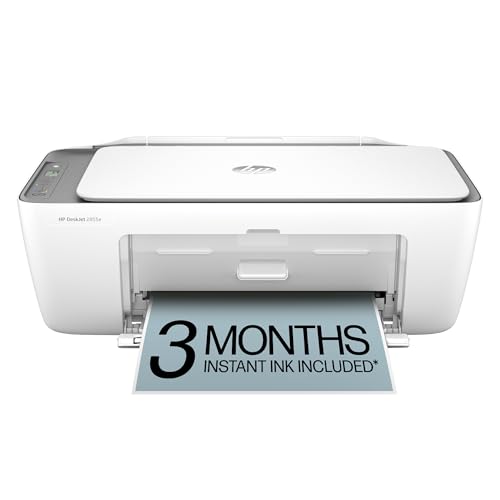
1. HP DeskJet 2855e — Best Simple All-in-One for Light Home Printing
The HP DeskJet 2855e is a compact wireless all-in-one that prints, copies, and scans, and it is one of the easiest models in this guide to set up. Its white, compact body fits on a small desk or shelf, and its icon display uses simple symbols for wireless status, ink, and copying, rather than a complicated menu. The HP Smart app guides setup from a phone, and once it is connected, printing from a phone, tablet, or computer is straightforward.
This printer is designed for light home printing: letters, forms, recipes, and occasional colour photos. It prints in colour and in black, copies from the flatbed scanner, and scans documents to a phone or computer through the app. The 60-sheet input tray is modest, so it suits someone who prints a few pages at a time rather than long reports. Its print speeds are modest, at up to 7.5 pages per minute in black and 5.5 pages per minute in colour, which is fine for one or two pages at a time.
A senior-friendly feature is the included trial of HP Instant Ink when activated with HP+: it monitors ink levels and sends new cartridges before they run out. After the trial, a monthly fee applies unless cancelled, or standard HP 67 cartridges can be bought instead.
There is no automatic two-sided printing or document feeder, so double-sided pages are turned over by hand and multi-page copying is done one page at a time. Wireless is limited to 2.4 GHz networks. Even so, for a senior who wants a small, simple printer for everyday documents, the DeskJet 2855e is a sensible choice.
HP DeskJet 2855e Wireless All-in-One Color Inkjet Printer
2. Canon PIXMA TR4720 — Best All-in-One with Fax and a Document Feeder
The Canon PIXMA TR4720 is a versatile all-in-one that adds two features many seniors still need: a built-in fax and an automatic document feeder. It prints, copies, scans, and faxes, which makes it a good fit for someone who still sends or receives faxes for medical offices, banks, or government forms, or who regularly copies multi-page documents. The document feeder holds several pages at once, so a stack of papers can be copied or scanned without lifting the lid for every page.
Setup is guided, and the printer supports wireless printing from phones, tablets, and computers, including mobile printing and voice assistant connections. It uses Canon PG-275 black and CL-276 colour cartridges, which are widely available, and it supports automatic two-sided printing, which saves paper on longer documents. Print speeds are up to 8.8 pages per minute in black and 4.4 pages per minute in colour, and the 100-sheet paper capacity is generous for a home printer of this size.
The control panel uses physical buttons and a small display, which many older users find easier than a large touchscreen. It can also produce borderless photos up to letter size.
At around 12 to 13 pounds, it is heavier than the HP DeskJet 2855e, so it is best placed once and left there. Even so, for a senior who needs fax, a document feeder, and two-sided printing in one simple machine, the PIXMA TR4720 offers the most complete feature set in this guide.
Canon PIXMA TR4720 All-in-One Wireless Printer
3. Brother MFC-J1010DW — Best for Clear Controls and Two-Sided Printing
The Brother MFC-J1010DW is a compact wireless colour inkjet all-in-one that stands out for its clear 1.8-inch colour display and straightforward controls. The display shows menus and ink levels in colour, which is easier to read than a small monochrome screen, and the printer supports printing from phones and tablets through the Brother Mobile Connect app, as well as AirPrint and Mopria. It also works with voice assistants for ink level notifications and smart reordering.
This Brother model prints, copies, scans, and faxes, and it includes automatic two-sided printing and a 20-page automatic document feeder. That combination is useful for copying multi-page letters, scanning insurance paperwork, or printing longer documents without wasting paper. Print speeds are faster than the other models here, at up to 17 pages per minute in black and 9.5 pages per minute in colour, and the 150-sheet paper tray means less frequent refilling. The maximum paper size is legal size, which suits longer forms.
It connects by wireless, Wi-Fi Direct, or USB, so it can work even if the home network is unreliable. The Brother Page Gauge shows ink use, and the optional Refresh subscription can deliver ink automatically, although standard LC401 cartridges can also be bought.
At around 16 pounds, it is heavier than the simplest models and needs a stable desk. A fragile old photograph should be copied on the flatbed rather than through the feeder. Overall, the MFC-J1010DW is the best pick here for a senior who wants a clear display, fast two-sided printing, and a generous paper tray.
Brother MFC-J1010DW Wireless Color Inkjet All-in-One Printer
4. Epson EcoTank ET-2800 — Best for Low Ink Costs and Frequent Printing
The Epson EcoTank ET-2800 takes a different approach to ink. Instead of small cartridges, it has large refillable ink tanks that are filled from bottles. One set of ink can last for up to two years of typical home use, or around 4,500 black pages and 7,500 colour pages, according to Epson. That makes it the best choice in this guide for a senior who prints often, prints many photos, or is tired of buying cartridges every few weeks. The ink tanks are visible on the front of the printer, so it is easy to see at a glance when a colour is getting low.
The ET-2800 is a wireless colour all-in-one that prints, copies, and scans, with a small colour display and simple buttons. The rear paper feed handles thicker paper and card, useful for greeting cards or craft projects. It is available in black or white.
Filling the tanks is designed to be mess-free, with bottles that only fit the correct tank, but the first fill does take a little more time than snapping in a cartridge, so a family member may want to help with the initial setup. After that, refilling is infrequent, which is the main advantage. The printer does not have an automatic document feeder or automatic two-sided printing, so multi-page copying is done on the flatbed, and double-sided pages are turned over by hand.
For a senior who prints regularly, the EcoTank ET-2800 can be the most economical printer in this guide over a year or more, because the cost per page is far lower than with cartridge printers. For a very light user, a cartridge printer may still be simpler, because tank ink should be used regularly. But for a busy household, the ET-2800 is an excellent long-term choice.
Epson EcoTank ET-2800 Wireless Color All-in-One Printer
Comparison Table
| Printer | Best For | Functions | Display | Document Feeder | Two-Sided Printing | Ink System |
|---|---|---|---|---|---|---|
| HP DeskJet 2855e | Simple light home printing | Print, copy, scan | Icon LCD | No | No | HP 67 cartridges, optional Instant Ink |
| Canon PIXMA TR4720 | Fax and multi-page copying | Print, copy, scan, fax | Small display with buttons | Yes | Yes | Canon PG-275 and CL-276 cartridges |
| Brother MFC-J1010DW | Clear controls and fast two-sided printing | Print, copy, scan, fax | 1.8-inch colour display | Yes, 20 pages | Yes | Brother LC401 cartridges, optional Refresh |
| Epson EcoTank ET-2800 | Low ink costs and frequent printing | Print, copy, scan | Small colour display | No | No | Refillable ink tanks, Epson 522 bottles |
Frequently Asked Questions
What is the easiest printer for a senior to use?
The easiest printer is usually a compact all-in-one with physical buttons, a clear display, and a phone app that guides setup step by step. The HP DeskJet 2855e is the simplest model in this guide. The Brother MFC-J1010DW is also easy to use, while the Canon PIXMA TR4720 adds fax and a document feeder.
Should a senior buy an inkjet or a laser printer?
For most seniors, an inkjet all-in-one is the better choice, because it prints in colour, copies and scans, and is usually smaller and cheaper than a colour laser printer. A black-and-white laser printer suits a senior who prints only black text and wants very low maintenance, but it cannot print colour photos.
How can a senior print from a phone or tablet?
Most modern printers support wireless printing without a cable. On an Apple device, use AirPrint from the share menu. On an Android device, use the printer maker’s app, such as HP Smart, Canon PRINT, Brother Mobile Connect, or Epson Smart Panel. The phone and printer need to be on the same home network for setup, and after that printing usually takes only a few taps.
How can ink costs be kept low?
Print in black and white when colour is not needed, use draft mode for everyday documents, and use print preview to print only the pages needed. Consider an ink delivery plan if printing is regular. For frequent printing, a refillable tank printer such as the Epson EcoTank ET-2800 can reduce ink costs substantially, because one set of ink bottles lasts for thousands of pages.
What should I do if the printer will not connect to Wi-Fi?
Turn the printer off and on again, and check that the phone or computer is connected to the home wireless network. Make sure the printer is within range of the router and that the correct network name and password were entered, remembering that most of these printers use a 2.4 GHz network only. If it still will not connect, run setup again in the printer app, or connect with a USB cable as a temporary solution.
Conclusion
The best printers for seniors are the ones that stay out of the way and simply work. A clear display, a small number of buttons, wireless printing from a phone, and ink that is easy to buy and replace matter far more than print speed or extra features that will never be used. For light, everyday printing, the HP DeskJet 2855e is the simplest and most compact choice. For a senior who still needs fax and a document feeder, the Canon PIXMA TR4720 is the most complete all-in-one. For clear controls, fast two-sided printing, and a generous paper tray, the Brother MFC-J1010DW is hard to beat. And for frequent printing with very low ink costs, the Epson EcoTank ET-2800 is the best long-term value.
Before buying, think about how the printer will actually be used: how many pages a week, whether photos or fax matter, and who will help with setup. Choose the model that matches those needs and place it where it is easy to reach.
Disclosure: As an Amazon Associate, we earn from qualifying purchases.
More from Amazon
Programs that pair well with the guide above. Offers and eligibility are set by Amazon and may change.
Free shipping on eligible items, Prime Video and more. Eligible new members can start with a free trial.
Start a Prime free trialAd-free music streaming. Eligible new subscribers can start with a free trial.
Try Music Unlimited freeA Prime membership for ages 18-24 with a trial period. Eligibility is set by Amazon.
See Prime for Young AdultsAudiobooks and podcasts to listen to on the go. Eligible new members can start with a free trial.
Try Audible freeAs an Amazon Associate we earn from qualifying purchases.









Write Your Review
No reviews yet. Be the first to share your experience!