
Our Short List of 3
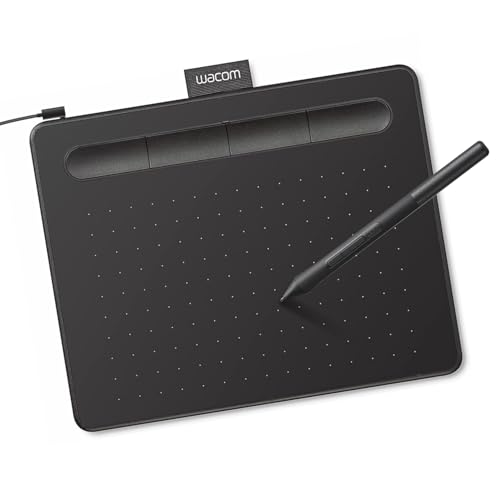
- Best for: A first-time buyer who wants the most guided, least surprising setup.
- Model CTL-4100, wired USB connection
- Active area 6.0 x 3.7 in
- Battery-free Wacom Pen 4K, 4,096 pressure levels
- 2540 lpi resolution, 133 pps reading speed

- Best for: Beginners with a small desk who still want tilt and higher pressure figures.
- Active area 6.3 x 3.9 in (160 x 100 mm)
- Battery-free PW100 pen, 8,192 pressure levels
- Pen tilt support stated in the listing title
- 5080 LPI pen resolution
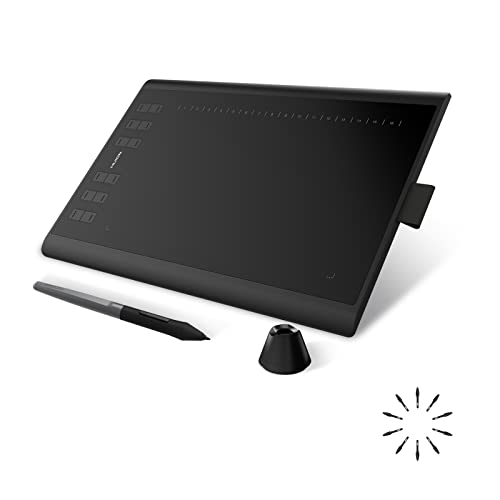
- Best for: Beginners on a large monitor who draw with elbow-led strokes and many shortcuts.
- Active area 10 x 6.25 in
- Battery-free stylus, 8,192 pressure levels
- Tilt response stated on the listing
- 12 customized hard keys and 16 soft keys
All 4 Picks at a Glance
| Product | Specs | Action |
|---|---|---|
| Wacom Intuos Small |
| Check price on Amazon |
| Huion Inspiroy H640P |
| Check price on Amazon |
| Huion Inspiroy H1060P |
| Check price on Amazon |
 Wacom Intuos Small Bluetooth |
| Check price on Amazon |
Key takeaways
- Compare four beginner pen tablets from Wacom and Huion by active area, pen pressure, shortcut keys and connection to pick a first tablet with confidence.
A first pen tablet asks you to learn one new skill before any art happens: drawing on a blank pad while your eyes stay on the computer screen. That makes the real decision less about headline pen figures and more about fit — an active area that matches your monitor, a pen that never needs charging, and controls simple enough that you keep drawing instead of fiddling with settings during your first weeks.
This guide is for new artists, students and hobbyists buying their first tablet for drawing, painting or photo touch-ups. Every pick is a screenless pen tablet taken from its Amazon listing, chosen because the listing states the details a beginner has to judge: active area in inches, pressure levels, a battery-free pen, shortcut keys, and the exact systems it connects to.
Quick Picks
As an Amazon Associate we earn from qualifying purchases.
| Product | Best for | Key spec from title |
|---|---|---|
| Wacom Intuos Small | The safest first tablet | 4,096 levels, battery-free Pen 4K |
| Huion Inspiroy H640P | Compact desks and travel | 8,192 levels, 6 hot keys |
| Huion Inspiroy H1060P | Bigger strokes, more keys | 10 x 6.25 in area, 12 + 16 keys |
| Wacom Intuos Small Bluetooth | A desk without cables | Bluetooth plus USB, 15-hour battery |
How to Choose
Match the Active Area to Your Screen
The active area is the rectangle your pen can reach, and it maps onto your monitor. A 6-inch pad paired with a large desktop display turns small hand movements into long cursor jumps, which feels twitchy when you are learning line control. Laptop users usually settle well on a 6-inch area, while a 24-inch or larger monitor feels calmer with a 10-inch pad. Check the inches printed in the listing rather than the diagonal badge on the box, because the two numbers describe different things.
Read the Pen Figures That Matter
Every pen in this guide is battery-free, so it works whenever you pick it up and never interrupts a session for charging. Pressure levels shape how line weight responds to your hand: 4,096 levels already cover sketching and painting comfortably, and 8,192 adds finer control at very light touches. Tilt support, where a listing states it, lets brushes shade when you lean the pen like a pencil. Treat these as comfort features for learning, not as a ladder you must climb before your first drawing.
Count the Shortcut Keys You Will Use
Shortcut keys hold commands such as undo, brush size and zoom, so your pen hand keeps moving. Four keys cover the basics for most beginners, six give you room to grow, and a long bank of hard and soft keys suits people who already know their software habits. More keys only help if you assign them during the first week; an unused row is just extra width on your desk. Look for keys you can set per application, as the listings here allow.
Check Connection and System Support
Three of these tablets connect by USB cable, and one adds Bluetooth for a wire-free desk. Before ordering, confirm your machine in the listing text: the picks below cover Windows, Mac, Chromebook, Linux and Android in different mixes, and none of them draws on an iPhone or iPad. Windows and Mac users also need the maker driver from the listing instructions, while Chromebooks pair with the wired models directly. A five-minute check here prevents the most common first-tablet disappointment of all.
The 4 Best Options
Wacom Intuos Small
- Best for: A first-time buyer who wants the most guided, least surprising setup.
- Model CTL-4100, wired USB connection
- Active area 6.0 x 3.7 in
- Battery-free Wacom Pen 4K, 4,096 pressure levels
- 2540 lpi resolution, 133 pps reading speed
A first-time buyer who wants the most guided, least surprising setup.
Windows and Mac use needs the Wacom driver, and the listing notes internet access is required to download it.
The Intuos Small is the tablet many art teachers hand to a new student, and its listing shows why: the Pen 4K is battery-free with 4,096 pressure levels, four ExpressKeys sit within thumb reach, and the 6.0 by 3.7 inch active area suits a laptop screen without crowding a small desk. Wacom states the model plainly as one designed for people getting into drawing, painting or photo editing, and the box bundles a choice of creative software, which gives a beginner something guided to open on day one.
Huion Inspiroy H640P
- Best for: Beginners with a small desk who still want tilt and higher pressure figures.
- Active area 6.3 x 3.9 in (160 x 100 mm)
- Battery-free PW100 pen, 8,192 pressure levels
- Pen tilt support stated in the listing title
- 5080 LPI pen resolution
Beginners with a small desk who still want tilt and higher pressure figures.
The listing states it is not suitable for iPhone or iPad, so Apple-only households should look elsewhere.
The H640P packs figures usually found on larger tablets into a slim 6.3 by 3.9 inch pad: 8,192 pressure levels, pen tilt support and six press keys along the side. Its PW100 pen is battery-free, the tablet weighs 277 grams, and Huion lists support for Windows, Mac, Linux and Android phones, so it can follow you from a desk to a couch with an OTG connection. The box adds a drawing glove and spare nibs in the pen holder, small extras that matter when everything is new.
Huion Inspiroy H1060P
- Best for: Beginners on a large monitor who draw with elbow-led strokes and many shortcuts.
- Active area 10 x 6.25 in
- Battery-free stylus, 8,192 pressure levels
- Tilt response stated on the listing
- 12 customized hard keys and 16 soft keys
Beginners on a large monitor who draw with elbow-led strokes and many shortcuts.
One crawl of this listing showed no featured offers available, so confirm a live buying option on the page before ordering.
The H1060P is the step-up pick that still belongs in a beginner guide: a 10 by 6.25 inch active area gives your arm room for longer strokes, and the key bank runs to 12 hard keys plus 16 soft keys for people who learn shortcuts quickly. It keeps the same battery-free pen approach with 8,192 levels and tilt response, works with Mac, Windows and Android, and ships with OTG adapters in the box. On a bigger monitor this is the pad that feels least cramped after the first month.
Wacom Intuos Small Bluetooth
- Best for: Laptop users who want a tidy, movable setup for drawing anywhere in the house.
- Model CTL4100WLK0, Bluetooth and USB-A connection
- Active area 6.0 x 3.7 in
- Battery-free Wacom Pen 4K, 4,096 pressure levels
- 4 customizable ExpressKeys
Laptop users who want a tidy, movable setup for drawing anywhere in the house.
The tablet battery needs up to 3.5 hours to recharge, so keep the USB cable nearby for long sessions.
This version of the Intuos Small removes the cable from your desk. The listing pairs Bluetooth with a USB fallback, keeps the same battery-free Pen 4K with 4,096 levels and four ExpressKeys, and gives the built-in battery up to 15 hours of use between charges. The active area stays at 6.0 by 3.7 inches, so it suits laptop drawing at a kitchen table or in a classroom where a cable would snag. Chromebook, Windows, Mac and Android support matches the wired model, including the bundled software choice.
Which One Fits Your Situation
You Draw at a Laptop on a Small Desk
Pick the Wacom Intuos Small or the Huion Inspiroy H640P. Both keep the footprint near a paperback book, and their 6-inch active areas map sensibly onto a 13 to 15 inch laptop screen. The Intuos adds bundled software guidance, while the H640P answers with more pressure levels, tilt and two extra keys. Either one leaves room on the desk for the laptop itself, a sketchbook and a drink.
You Learn on a Chromebook or a Phone
Choose the wired Wacom Intuos Small for a school Chromebook, since its listing names Chrome OS support directly and setup is a single cable. For Android phone drawing, the Huion Inspiroy H640P or H1060P fit better: both listings state Android support, and the H1060P even bundles the OTG adapters. None of these tablets pairs with an iPhone or iPad, so check your device list before you order.
You Already Know You Will Draw for Hours
Take the Huion Inspiroy H1060P. The wider active area lets long lines come from your arm instead of your wrist, which stays comfortable over a long evening, and the deep key bank means your other hand rarely travels back to the keyboard. It is the only pick here that still feels roomy once your software panels, brushes and reference windows are all open at once.
You Hate Cables on Your Desk
The Wacom Intuos Small Bluetooth is the one pick built for you. It keeps the beginner-friendly Intuos layout, swaps the tether for Bluetooth with a listed 15 hours of battery, and still includes the cable for charging or a wired fallback. It suits shared desks and classrooms where the tablet gets packed away between sessions and pulled out only when it is time to draw.
Common Mistakes
- Buying the smallest pad for a very large monitor, then fighting twitchy cursor jumps on every line.
- Skipping the driver install on Windows or Mac and blaming the tablet when pressure does nothing.
- Judging tablets by pressure levels alone, when active area and pen comfort shape your first month more.
- Throwing away the spare nibs hidden in the pen or pen holder, then having none when the first nib wears.
- Expecting a screen on the tablet; these are pen tablets, so your eyes stay on the computer display while you draw.
Frequently Asked Questions
Do these tablets work without a computer?
No. All four are pen tablets with no screen or system of their own, so each one connects to a computer, Chromebook or Android phone and shows your drawing on that device display. The Huion models add phone support through OTG, and the Bluetooth Intuos can sit across the room, but a host device is always part of the setup.
Which size should a beginner pick?
Match the pad to your screen. A 6-inch active area feels right beside a laptop, while a 10-inch area suits a large desktop monitor and longer strokes. Bigger is not automatically better: an oversized pad on a small desk pushes your keyboard away and tires your shoulder. The listings print active area in inches, so measure your desk space first.
Do the pens need charging or batteries?
None of the four pens does. Each listing describes a battery-free pen that draws power from the tablet surface, so the pen is ready whenever you are and weighs little in the hand. The one battery in this guide belongs to the Bluetooth Intuos tablet itself, which the listing puts at up to 15 hours between charges.
Can I use one of these with a Chromebook?
Yes, with the right model. The wired Wacom Intuos Small lists Chrome OS support and connects by USB with no driver hunt, which makes it the simple school pick. The Bluetooth Intuos also names Chromebook support in its listing. Huion lists Windows, Mac, Linux and Android for its two tablets here, so Chromebook users should stay with Wacom.
More from Amazon
Programs that pair well with the guide above. Offers and eligibility are set by Amazon and may change.
Free shipping on eligible items, Prime Video and more. Eligible new members can start with a free trial.
Start a Prime free trialAd-free music streaming. Eligible new subscribers can start with a free trial.
Try Music Unlimited freeA Prime membership for ages 18-24 with a trial period. Eligibility is set by Amazon.
See Prime for Young AdultsAudiobooks and podcasts to listen to on the go. Eligible new members can start with a free trial.
Try Audible freeAs an Amazon Associate we earn from qualifying purchases.









Write Your Review
No reviews yet. Be the first to share your experience!