

Key takeaways
- Five printers picked for craft work — 12x12 scrapbook pages, sticker sheets, cardstock cards and wide-format art prints — with the listing specs that matter.
The real decision when buying a printer for crafting is not print speed or office features. It is whether the machine will feed the paper you actually craft with — thick cardstock, glossy sticker sheets, 12×12 scrapbook pages — without jamming, skewing or leaving a white border where you wanted edge-to-edge color. Plenty of well-regarded home printers fail that test, because they were designed around plain letter paper.
This guide is for scrapbookers, sticker and printable sellers, card makers and crafters who sell art prints at markets or online. Every printer below was chosen from the paper handling, ink system and maximum print size stated on its Amazon product page, not from office specs that say nothing about craft work.
Quick Picks
As an Amazon Associate we earn from qualifying purchases.
| Product | Best for | Key spec from title |
|---|---|---|
| Canon PIXMA TS9521Ca | Scrapbook pages and card makers | Borderless 12 x 12 inch printing |
| Epson EcoTank ET-2800 | Weekly sticker and printable batches | Cartridge-free supertank, scan and copy |
| Canon PIXMA iX6820 | Posters and large art prints | Borderless photo printing up to 13 x 19 |
| Epson EcoTank ET-15000 | Craft businesses needing scan and copy | Prints up to 13 x 19 inches, with fax |
| Epson EcoTank Photo ET-8550 | Photo-quality prints and fine art | 6-color wide-format supertank printer |
How to Choose
Cartridge ink or refillable tanks
Ink is the running decision behind every craft printer. Cartridge machines like the two Canons below use individual color tanks, so you replace only the color that runs dry, and print quality on glossy media is their strength. Refillable EcoTank models replace cartridges with bottles you pour into built-in tanks, which suits crafters who print full-color sticker sheets or patterned paper every week and would burn through cartridges quickly. Neither system is automatically better: cartridges favor occasional, quality-first printing, while tanks reward steady volume. Check which ink family a model uses before buying, because the two are never interchangeable.
Paper path and cardstock handling
Craft media is thicker and stiffer than office paper, and the paper path decides whether it feeds straight or crumples. A rear feed slot matters because it gives heavy cardstock, watercolor paper and sticker sheets a flatter route through the printer instead of forcing a tight U-turn from a front cassette. Before choosing, match your thickest stock against the media types named on the listing, and treat “cardstock” in a product’s highlights as the green light. If a listing only mentions plain paper and envelopes, that printer is likely to struggle with the stock your projects depend on.
Maximum print size and borderless output
Size is where craft printers genuinely separate. A standard home printer stops at letter or legal paper, which rules out 12×12 scrapbook layouts and anything poster-like. Wide-format models print up to 13 x 19 inches, and the Canon TS9521Ca goes further for scrapbookers by offering borderless printing at exactly 12 x 12 inches. Borderless support also varies by size: a printer may print edge-to-edge photos at 4 x 6 yet leave margins at larger sizes. Confirm both the maximum sheet size and the borderless sizes on the listing, because trimming borders off finished cards and prints gets old very quickly.
Color setup and how you send files
Four-color printing is fine for patterned paper, labels and most stickers, but crafters printing photographs or art for sale benefit from extra inks: the ET-8550 adds photo black and gray for smoother shading, and Canon’s five-tank systems separate pigment black for text from dye black for images. Connectivity shapes your workflow just as much. Wi-Fi lets a laptop, tablet or phone send files from anywhere in the craft room, AirPrint simplifies printing from an iPad, and an SD card slot or touchscreen helps when you print stored designs without a computer at all.
The 5 Best Options
Canon PIXMA TS9521Ca

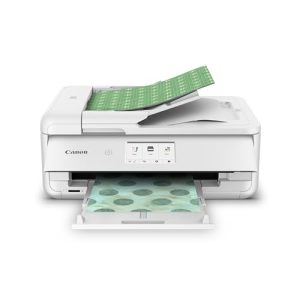
Canon built this all-in-one specifically as a crafter’s printer, and the listing shows it: borderless 12 x 12 inch printing for scrapbook pages, support for paper up to 11 x 17 inches, built-in printable patterns, and an automatic document feeder for copying oversized artwork. The 4.3-inch touchscreen, SD card slot and Bluetooth make it easy to print stored designs straight from the machine. If your projects start on square scrapbook paper or you make cards in batches, this is the most purpose-built option here.
Specs
- Print, scan and copy all-in-one
- Maximum print resolution 4800 x 1200 dpi
- Print speed 15 ipm
- 4.3-inch touchscreen
- Auto 2-sided printing
- Borderless prints up to 12 x 12 inches
- Handles paper up to 11 x 17 inches
- Bluetooth, Wi-Fi and SD card slot
- Item model number 2988C052
Best for: Scrapbookers and card makers who print on 12×12 paper.
Watch out for: It uses ink cartridges rather than refillable tanks, so heavy weekly printing costs more to feed than an EcoTank.
ASIN: B0CX69SZMB
Epson EcoTank ET-2800

The ET-2800 is the straightforward tank printer for crafters who print often and are tired of cartridge swaps mid-project. Its refillable tanks take Epson 522 ink bottles, and the box includes a 65 mL black bottle plus 65 mL each of cyan, magenta and yellow, so a sticker or printable business can get moving immediately. Print, scan and copy functions cover digitizing artwork as well as producing it, and Wi-Fi keeps it off your desk if the craft room is short on space. This is the pick for volume over fancy media handling.
Specs
- Print, scan and copy all-in-one
- Cartridge-free refillable ink tanks
- Uses Epson 522 ink bottles
- Includes 65 mL black and 65 mL each cyan, magenta, yellow bottles
- Wireless Wi-Fi printing
- Item model number C11CJ66201 (Black)
Best for: Sticker, label and printable sellers printing every week.
Watch out for: Maximum paper size is standard home-printer territory, so it cannot do 12×12 scrapbook pages or wide-format prints.
ASIN: B096N8DN2H
Canon PIXMA iX6820

The iX6820 is a single-function wide-format printer, and that focus is its appeal: borderless photo printing up to 13 x 19 inches, five individual ink tanks, and cardstock handling called out in its listing highlights. Without a scanner or fax hardware, the body stays comparatively simple, and wireless printing with AirPrint and cloud compatibility means designs can come from a phone, tablet or laptop. Crafters selling posters, large art prints or oversized planner inserts get genuine wide-format output here without paying for all-in-one extras they will never open.
Specs
- Print-only wide-format inkjet
- Borderless photo printing up to 13 x 19 inches
- Five individual ink tanks
- Wireless, AirPrint and cloud compatible
- Cardstock handling listed in product highlights
- Dimensions 23.0 x 12.3 x 6.3 inches
- Item model number 8747B002
Best for: Art print and poster sellers who only need printing.
Watch out for: There is no scanner or copier, so digitizing hand-drawn artwork means using a phone app or a separate scanner.
ASIN: B00HM0IVDY
Epson EcoTank ET-15000

The ET-15000 pairs wide-format output with a full office-style all-in-one feature set: printing up to 13 x 19 inches, scanning, copying and fax, plus Ethernet alongside Wi-Fi for a shared craft studio. Its EcoTank system uses Epson 502 bottles, and the box includes a 127 mL black bottle with 70 mL each of cyan, magenta and yellow. Print speeds reach up to 17 ppm, and auto 2-sided printing helps with booklets and double-sided inserts. For a small craft business that prints big and also ships paperwork, it covers both desks at once.
Specs
- Print, scan, copy and fax all-in-one
- Prints up to 13 x 19 inches
- Cartridge-free EcoTank with Epson 502 ink
- Includes 127 mL black and 70 mL each color ink bottles
- Ethernet and Wi-Fi connectivity
- Print speed up to 17 ppm
- Auto 2-sided printing
Best for: Small craft businesses printing wide formats plus paperwork.
Watch out for: It is a large machine, and its four-color ink set is tuned for documents and graphics rather than gallery-grade photos.
ASIN: B084TV6NTZ
Epson EcoTank Photo ET-8550

The ET-8550 is the quality-first pick: a 6-color Claria ET Premium ink system that adds photo black and gray to the usual four colors, giving smoother gradients and better black-and-white prints on glossy and art papers. It prints borderless up to 13 x 19 inches, includes six 70 mL ink bottles in the box, and adds a scanner, copier, Ethernet and a 4.3-inch color touchscreen. Crafters selling photographic prints, fine-art reproductions or premium invitations get the widest color range here, with tank refills instead of photo-printer cartridges.
Specs
- Print, scan and copy all-in-one
- 6-color ink system including photo black and gray
- Uses Epson 552 ink bottles, six 70 mL bottles included
- Borderless printing up to 13 x 19 inches
- 4.3-inch color touchscreen
- Ethernet and Wi-Fi connectivity
- Print speed up to 16 ppm
Best for: Photographers and artists selling high-quality prints.
Watch out for: The six-ink system means six bottles to manage, and the printer itself is a 24.5 lb unit that needs a sturdy, permanent spot.
ASIN: B08R5M2HDH
Which One Fits Your Situation
You scrapbook with 12×12 pages
Choose the Canon PIXMA TS9521Ca. It is the only printer in this guide offering borderless printing at exactly 12 x 12 inches, so finished layouts come out edge-to-edge without trimming. Its built-in patterns, ADF for oversized copies and touchscreen controls are all aimed at paper crafting rather than office work, which makes it the natural home for a scrapbook desk.
You print sticker sheets every week
Choose the Epson EcoTank ET-2800. Weekly full-color sheets are exactly the workload cartridge printers punish, while the ET-2800’s refillable tanks and included 522 ink bottles keep a sticker or printable shop running without constant swaps. The built-in scanner also helps when you digitize hand-drawn designs before turning them into printable files.
You sell posters and large art prints
Start with the Canon PIXMA iX6820 if printing is all you need: borderless 13 x 19 output and five ink tanks in a print-only body. If your stall or shop also scans artwork, copies invoices and prints packing paperwork, step up to the Epson EcoTank ET-15000 instead, which keeps the same 13 x 19 ceiling while adding scan, copy, fax and tank ink.
You print photos that must look lab-made
Choose the Epson EcoTank Photo ET-8550. Its six-color ink set, with dedicated photo black and gray, produces the smooth skin tones and neutral black-and-white prints that four-color machines flatten. Borderless output up to 13 x 19 inches means the same printer handles small photo orders and large display prints for your craft fair booth.
Common Mistakes
- Buying a printer with no rear feed, then fighting curled, jammed cardstock that was forced through a front cassette.
- Assuming any home printer takes 12×12 scrapbook paper, when most stop at letter size and cannot print that format at all.
- Picking a cartridge printer for high-volume sticker or patterned-paper printing, so ink changes interrupt every production run.
- Expecting borderless printing at every size, when many models only print edge-to-edge at small photo sizes.
- Filling a brand-new standard printer with sublimation ink without checking: these five ship as standard inkjet printers, and converting one is a separate decision with warranty consequences.
Frequently Asked Questions
Can these printers handle thick cardstock?
Most can, within the media limits on each listing. The Canon iX6820 calls out cardstock handling directly, and models with a rear feed path cope best because thick sheets travel straighter. Always load heavy stock a few sheets at a time, select the cardstock media type in the driver, and check the listing’s supported media before ordering specialty paper in bulk.
Is a tank printer or a cartridge printer better for crafting?
It depends on volume. Refillable tank models like the EcoTank ET-2800, ET-15000 and ET-8550 suit crafters printing full-color pages every week, because bottles replace many cartridge cycles. Cartridge models like the two Canons suit lighter, quality-first workloads and start printing with less setup. Match the ink system to how often you actually print, not how often you hope to.
What printer do I need for 12×12 scrapbook paper?
You need a printer that accepts paper at least 12 inches wide. In this guide that is the Canon PIXMA TS9521Ca, which prints borderless at 12 x 12 inches, or a 13 x 19 wide-format model such as the iX6820, ET-15000 or ET-8550 printing with borders or trimmed edges. A letter-size printer cannot take 12×12 stock at all, regardless of its other features.
Can I use one of these printers for sublimation?
Not out of the box. All five printers here ship with standard inkjet ink for paper and photo media, and sublimation requires sublimation ink plus transfer paper and a heat press. Some crafters convert certain EcoTank models, but that is an off-label modification that can void the warranty. If sublimation is your main craft, choose a printer sold for that purpose instead.
More from Amazon
Programs that pair well with the guide above. Offers and eligibility are set by Amazon and may change.
Free shipping on eligible items, Prime Video and more. Eligible new members can start with a free trial.
Start a Prime free trialAd-free music streaming. Eligible new subscribers can start with a free trial.
Try Music Unlimited freeA Prime membership for ages 18-24 with a trial period. Eligibility is set by Amazon.
See Prime for Young AdultsAudiobooks and podcasts to listen to on the go. Eligible new members can start with a free trial.
Try Audible freeAs an Amazon Associate we earn from qualifying purchases.



Write Your Review
No reviews yet. Be the first to share your experience!