

Key takeaways
- Compare tablets sold with keyboards included, from Chromebook detachables to Fire and Galaxy bundles, by screen, storage, keyboard type and fit.
Buying a tablet with a keyboard sounds simple until you discover that many listings sell the tablet alone and treat the keyboard as a separate, expensive add-on. The real decision is whether the keyboard is actually in the box or bundle you are paying for, how it attaches, and whether the operating system behind it matches the work you plan to do, from school documents to office files to email on a train.
This guide is for students, remote workers, travellers, and households that want one purchase to arrive ready for typing. The picks below were chosen from product names and specifications on the Amazon pages, limited to tablets sold with a keyboard included or as an official keyboard bundle.
Quick Picks
As an Amazon Associate we earn from qualifying purchases
| Product | Best for | Key spec from title |
|---|---|---|
| Lenovo Chromebook Duet 11 (83HH0002US) | Compact everyday carry for school and travel | 10.9-inch 2K touchscreen, 128GB flash memory |
| Lenovo IdeaPad Duet 5 Chromebook | Larger-screen Chromebook typing and viewing | 13.3-inch FHD OLED touch display, detachable keyboard |
| Samsung Galaxy Tab S9 FE+ with Book Cover Keyboard Bundle | Big Android screen for notes and split-screen work | 12.4-inch display, 256GB storage |
| Amazon Fire HD 10 Tablet and Keyboard Case Bundle | Simple email, reading, and light documents at home | 10.1-inch tablet, 32GB, keyboard case bundle, 2023 release |
How to Choose
Confirm the Keyboard Is Actually Included
Start by reading the exact bundle wording, not the photos. Many tablet photos show a keyboard that is sold separately, and accessory listings can look identical to a full tablet bundle at a glance. Look for phrases such as detachable keyboard included, built-in media listing the keyboard, or a named bundle that pairs the tablet with its book cover or keyboard case. Check the model number in the title against the box contents where the listing gives them. If the listing only says keyboard compatible or keyboard sold separately, it does not belong in this category, however good the tablet itself may be.
Match the Operating System to Your Work
Chrome OS, Android, and Fire OS handle documents in noticeably different ways. Chrome OS suits browser-based school and office work, with a desktop-style browser and straightforward file handling for Google services. Android tablets such as the Galaxy option lean on mobile apps, split-screen layouts, and pen-friendly note tools, which can be excellent for reading and annotation but different from a laptop workflow. Fire OS focuses on Amazon services, reading, video, and lighter apps, so the available app selection matters more. Decide which accounts and file types you use daily, then pick the system that opens them without workarounds.
Weigh Screen Size Against Portability
A larger display makes split-screen work and long documents easier to read, but it also makes the combined tablet and keyboard heavier in a bag and wider on a small tray table. The 13.3-inch Duet 5 and the 12.4-inch Galaxy give more room for two windows side by side. The 10.9-inch Duet 11 and the 10.1-inch Fire HD 10 are easier to hold one-handed once the keyboard comes off and simpler to slip into a small backpack. Think about where typing will actually happen. A device that stays on one desk can be bigger; one that moves between classrooms, sofas, and flights benefits from staying compact.
Check How the Keyboard Attaches and Stands
Detachable keyboards connect in different ways, and that changes daily use. Pogo-pin and magnetic folio keyboards draw power from the tablet and pair instantly when attached, so there is no separate charging routine. Bluetooth keyboard cases need their own charging and pairing, but they can sometimes be used at a distance from the screen. Also check the stand design. A kickstand built into a back cover works well on a desk but can feel less stable on a lap, while a folio case that props the screen from below behaves differently again. Match the design to your usual seat and surface.
The 4 Best Options
Lenovo Chromebook Duet 11 (83HH0002US)

This compact detachable suits students and travellers who want a proper keyboard without carrying a full laptop. The listing lists a 10.9-inch 2K touchscreen, a MediaTek Kompanio 838 processor, and 128GB of flash memory, which together fit browser-based lessons, documents, and video calls in a small bag. Because the keyboard is listed in the built-in media for this model, the package arrives as a working 2-in-1 rather than a tablet waiting for an accessory order. Its size also makes pure tablet use comfortable when the keyboard is left behind.
Specs
- Display: 10.9-inch 2K touchscreen
- Processor: MediaTek Kompanio 838
- Memory: 4GB LPDDR4X RAM
- Storage: 128GB flash memory
- Model: 83HH0002US
- Included media listed: Keyboard
- Note from title: Stylus not included
Best for: Students and commuters who want the smallest complete Chromebook package in this guide.
Watch out for: Confirm you do not need a stylus in the box, because the title for this configuration states the stylus is not included.
Lenovo IdeaPad Duet 5 Chromebook
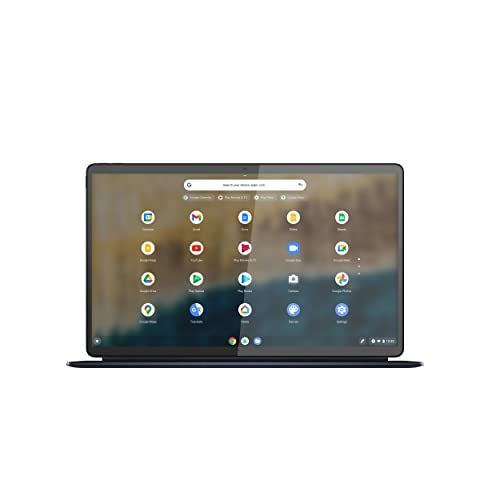
Choose this model when screen quality and typing room matter more than squeezing into the smallest bag. The Amazon title lists a 13.3-inch FHD OLED touch display, a Snapdragon SC7180 processor, and a detachable fabric folio keyboard, so the same device moves from laptop-style writing to a large tablet for reading and video. The listing describes up to 15 hours of battery life and stylus support, which suits long study days away from a socket. For buyers already living in Chrome OS and Google services, it offers the most spacious Chromebook experience among these picks.
Specs
- Display: OLED 13.3-inch FHD touch display
- Processor: Snapdragon SC7180
- Memory: 4GB RAM
- Storage: 64GB storage
- Graphics: Qualcomm Adreno Graphics
- Operating system: Chrome OS
- Colour listed: Abyss Blue
- Keyboard: Detachable fabric folio keyboard
- Battery life listed: Up to 15 hours
Best for: Writers, students, and home workers who want a larger OLED screen with a detachable keyboard.
Watch out for: Check the storage figure on the exact listing before ordering, because Duet 5 configurations vary and this verified configuration lists 64GB.
Samsung Galaxy Tab S9 FE+ with Book Cover Keyboard Bundle

This bundle fits Android users who want a large canvas for notes, reading, and two apps at once, plus a keyboard made for the tablet rather than a generic Bluetooth board. The deal listing for this exact bundle identifies a 12.4-inch Galaxy Tab S9 FE+ with 256GB of storage and a Book Cover Keyboard included. That storage figure is the highest in this guide, which helps buyers who keep large offline libraries, course files, or downloaded media on the device itself. It is the pick for an Android-first workflow built around a big screen.
Specs
- Display: 12.4-inch display
- Storage: 256GB
- Product type: Android tablet
- Bundle contents named in listing: Book Cover Keyboard
- Model family: Galaxy Tab S9 FE+
Best for: Android users who want the largest storage and a big screen for split-screen study or work.
Watch out for: Verify the bundle wording at checkout, because the same tablet is also sold on its own without the Book Cover Keyboard.
Amazon Fire HD 10 Tablet and Keyboard Case Bundle

This bundle is for households that want typing for email, homework, and web forms without moving to a full laptop or a premium tablet system. The Amazon page for the bundle lists a 10.1-inch 1080p display, an octa-core processor, and 3GB of RAM, with the keyboard case included as part of this specific bundle rather than bought later. The tablet page also lists up to 13 hours of battery life and 5 MP front and rear cameras. It works best inside the Amazon and Fire app ecosystem, for reading, video, and lighter everyday tasks.
Specs
- Display: 10.1-inch 1080p display, 1920 x 1200, 224 ppi
- Processor: Octa-core processor, 2x Arm Cortex-A76 up to 2.05 GHz and 6x Arm Cortex-A55 up to 2 GHz
- Memory: 3GB RAM
- Storage for this bundle: 32GB internal storage, micro-SD slot for up to 1TB additional storage
- Battery life listed: Up to 13 hours
- Cameras: 5 MP front and rear-facing cameras with 1080p HD video recording
- Generation: 13th generation, 2023 release
- Ports listed: USB-C connector, micro-SD slot
- Bundle: Tablet with keyboard case
Best for: Home users who mainly read, stream, browse, and type email or short documents.
Watch out for: Check that the apps you need are available for Fire OS before choosing it, because its app selection differs from standard Android tablets.
Which One Fits Your Situation
You Carry Your Device Between Classes or Trains All Day
Pick the Lenovo Chromebook Duet 11. Its 10.9-inch screen and detachable folio design keep the whole kit compact, while the 128GB of flash memory listed gives room for offline documents and downloads. Chrome OS also suits school accounts and browser-based assignments, so the device can move from note-taking in one room to homework somewhere else without changing how you work or carrying a separate keyboard.
You Type Long Documents at a Desk or Kitchen Table
The Lenovo IdeaPad Duet 5 Chromebook fits better here. The 13.3-inch OLED display gives documents and web pages more breathing room, and the detachable fabric folio keyboard turns it into a spacious writing setup for extended sessions. The battery figure in the listing also supports a full day away from the charger. When the writing is done, removing the keyboard leaves a large tablet for reading, recipes, or video at the same table.
You Live in Android Apps and Keep Lots of Files Offline
Choose the Samsung Galaxy Tab S9 FE+ bundle. The 12.4-inch screen leaves space for a document beside a browser or note app, and the 256GB storage named for this bundle is the roomiest option here for downloaded courses, media, and project files. The included Book Cover Keyboard means the typing setup is designed for this exact tablet, rather than adapted from a universal case that may fit the ports or camera less precisely.
You Want a Shared Family Tablet That Can Also Handle Email
The Fire HD 10 keyboard case bundle makes sense for a shared household device. One person can read or watch video in tablet mode, then attach the keyboard case for messages, school portals, or online forms. Its listed display, cameras, and storage expansion suit everyday family use, provided the household is comfortable with the Fire app ecosystem and does not depend on apps that only appear on other platforms.
Common Mistakes
- Assuming a keyboard in the product photo is included, when the listing text says it is sold separately or only lists compatibility.
- Buying a tablet-only configuration of a model that also has a bundle version, then discovering the official keyboard costs a separate order.
- Choosing an operating system for its hardware alone without checking whether your school, work, or reading apps actually run on it.
- Ignoring how the stand works, so a kickstand design bought for lap use on a sofa turns out to be awkward in that exact spot.
- Forgetting stylus and storage differences between configurations of the same model name, which can change what arrives in the box.
Frequently Asked Questions
Does a tablet with a keyboard replace a laptop completely?
For browser work, documents, email, and video calls, these keyboard bundles can cover most daily tasks. The limit is software rather than typing. If you rely on a specific desktop program, a particular file format workflow, or heavy multitasking across many windows, check that the tablet operating system offers a version or web alternative before treating it as your only computer.
Is a detachable keyboard better than a Bluetooth keyboard case?
Neither is automatically better. A detachable keyboard made for the tablet usually attaches magnetically, aligns precisely, and needs no separate pairing, which suits frequent switching between modes. A Bluetooth keyboard case can work with the screen propped separately and may feel more flexible on odd surfaces. The deciding factors are how often you remove the keyboard and whether you want to charge a second device.
How much storage do I need on a tablet with a keyboard?
That depends on offline habits more than typing. Buyers who work mainly in cloud documents and streaming can manage with the smaller configurations listed here. Anyone downloading course videos, large reading libraries, or project files for travel should favour the larger storage option or confirm that the model accepts expandable storage, as the Fire HD 10 listing does through its micro-SD slot.
What should I check in the listing just before ordering?
Read the title, model number, storage figure, and box contents one final time on the exact configuration selected. Colour and storage options on the same page can change what is included, and some variants of these tablets are sold without a keyboard. Confirm the bundle or included-keyboard wording still appears for the variant in your basket before completing the purchase.
More from Amazon
Programs that pair well with the guide above. Offers and eligibility are set by Amazon and may change.
Free shipping on eligible items, Prime Video and more. Eligible new members can start with a free trial.
Start a Prime free trialAd-free music streaming. Eligible new subscribers can start with a free trial.
Try Music Unlimited freeA Prime membership for ages 18-24 with a trial period. Eligibility is set by Amazon.
See Prime for Young AdultsAudiobooks and podcasts to listen to on the go. Eligible new members can start with a free trial.
Try Audible freeAs an Amazon Associate we earn from qualifying purchases.



Write Your Review
No reviews yet. Be the first to share your experience!