

Our Short List of 3
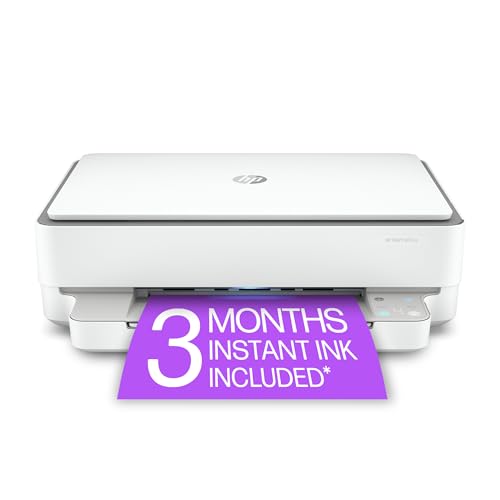
- Best for: families printing homework, photos, and forms from several Apple devices
- Functions: print, scan, copy
- Mobile printing: Apple AirPrint, HP app, Mopria
- Print speed: up to 10 ppm black and 7 ppm color
- Color resolution: up to 4800 x 1200 optimized dpi

- Best for: homes printing lots of color pages, school projects, and craft work from Apple devices
- Functions: print, scan, copy
- Mobile printing: AirPrint and Epson Smart Panel app
- Ink: refillable EcoTank bottles, up to 4,500 pages black and 7,500 color per set
- Print speed: 10 ppm black and 5 ppm color

- Best for: a shared desk that prints often and scans multi-page documents
- Functions: print, copy, scan, fax
- Mobile device compatibility: AirPrint and Mopria
- Print speed: up to 17 ppm black and 9.5 ppm color
- Automatic duplex printing
All 3 Picks at a Glance
| Product | Specs | Action |
|---|---|---|
| HP ENVY 6055e |
| Check price on Amazon |
| Epson EcoTank ET-2800 |
| Check price on Amazon |
| Brother MFC-J1010DW |
| Check price on Amazon |
Key takeaways
- Four AirPrint printers that work across iPhone, iPad and Mac, from a compact home all-in-one to a refillable tank model and a fast office machine.
Printing from an iPhone or iPad leaves no room for workarounds: Apple mobile devices cannot load a printer driver, so a machine either speaks AirPrint or it stays invisible to the print menu. Macs are more forgiving, yet they still find AirPrint models on the network with no extra software. The real choice is what sits behind that connection — cartridge inkjet, refillable tank, scanning depth, and paper handling — because every device in the house will share the one machine you buy.
This guide serves households and small offices built around Apple gear. Each pick below earned its place because its own Amazon listing names Apple AirPrint, and because its title or spec block states the functions, speeds, and paper handling quoted here. The four machines split into a compact family all-in-one, a fax-ready home office model, a refillable tank printer for heavy color work, and a quicker Brother built for shared desks.
Quick Picks
As an Amazon Associate we earn from qualifying purchases
| Product | Best for | Key spec from title |
|---|---|---|
| HP ENVY 6055e | Everyday family printing from phones and a Mac | Print, scan, copy with auto 2-sided printing |
| Canon PIXMA TR4720 | A home office that still sends faxes | AirPrint plus a 20-sheet auto document feeder |
| Epson EcoTank ET-2800 | Heavy color printing with rare ink refills | Cartridge-free refillable ink tanks |
| Brother MFC-J1010DW | Fast pages on a shared small-office desk | Up to 17 ppm black with AirPrint |
How to Choose
Confirm AirPrint Is Named in the Listing
Wireless on the box is not the same promise as AirPrint in the spec block. An iPhone or iPad can only send a job through AirPrint or a vendor app, and the app path adds an account, extra steps, and another thing to fix after a system update. Open the listing and find Apple AirPrint written in the mobile printing line, as each model in this guide has it. Check the exact model number as well, because sibling variants in the same series sometimes drop the feature while keeping a near-identical name and shell.
Pick Cartridges or Refillable Tanks
Your monthly page count should settle the ink question before anything else. Cartridge machines such as the HP ENVY 6055e and Canon PIXMA TR4720 suit homes that print in bursts, since the ink sits sealed until a job arrives. A refillable tank model like the Epson EcoTank ET-2800 flips the math for steady color work: its listing quotes up to 4,500 black and 7,500 color pages from one bottle set. Think about how often you print photos, schoolwork, and handouts, then match the ink system to that rhythm instead of to one busy week.
Match the Scanner and Feeder to Your Paperwork
A flatbed lid handles single sheets, photos, and book pages well, yet it turns a twenty-page signed agreement into twenty separate lifts. An auto document feeder changes that job completely: the Canon PIXMA TR4720 and Brother MFC-J1010DW each list a 20-sheet feeder, so stacked pages scan or copy while you do something else. Fax still matters in some home offices too, and both of those models keep a fax function where the HP and Epson drop it. Count your multi-page scans in a normal month before deciding the feeder is optional.
Check Wi-Fi Bands and Wired Fallbacks
Every Apple device in the house reaches the printer through the network, so connection details decide daily reliability. Dual-band Wi-Fi, listed for the HP ENVY 6055e, gives the printer a 5 GHz option on crowded home networks, while the Canon PIXMA TR4720 runs on 2.4 GHz only, which reaches further through walls but shares spectrum with many neighbors. A USB port on all four models offers a wired fallback for one Mac even when the router misbehaves. Place the printer near the router if you can, and confirm the band your network uses is the band the listing states.
The 4 Best Options
HP ENVY 6055e
- Best for: families printing homework, photos, and forms from several Apple devices
- Functions: print, scan, copy
- Mobile printing: Apple AirPrint, HP app, Mopria
- Print speed: up to 10 ppm black and 7 ppm color
- Color resolution: up to 4800 x 1200 optimized dpi
families printing homework, photos, and forms from several Apple devices
the listing states this printer works only with cartridges carrying HP chips and blocks others, and HP+ activation ties it to an HP account and HP ink — read that section before setup.
Choose the ENVY 6055e if your household prints a bit of everything from mixed devices and wants the least friction doing it. Its listing pairs Apple AirPrint with dual-band Wi-Fi, so an iPhone, an iPad, and a MacBook can all send jobs with no driver hunt. Print, scan, and copy cover the family workload, automatic two-sided printing trims paper use on school reports, and borderless output up to letter size handles photos without a white frame. The 100-sheet tray suits weekly bursts rather than daily volume, which matches how most homes actually print across a month.
Canon PIXMA TR4720
Pick the PIXMA TR4720 when a home office needs the full four-function set, fax included, in one compact body. The listing states AirPrint for driver-free printing from iOS devices, and the 20-sheet auto document feeder scans or copies stacked pages up to legal size without hand feeding. Automatic two-sided printing covers letter documents, the front tray holds 100 sheets, and the hybrid ink system runs on just two cartridges, which keeps swaps simple. Speeds are modest beside office machines, yet for a desk that sends forms, scans contracts, and prints color handouts each week, the balance fits well.
Specs
- Functions: print, copy, scan, fax
- Mobile printing: AirPrint and Mopria Print Service
- Print speed: 8.8 ipm black and 4.4 ipm color
- Print resolution: up to 4800 x 1200 dpi
- Auto document feeder: 20 sheets, up to legal size
- Paper handling: 100-sheet front paper tray
- Connectivity: Wi-Fi 802.11b/g/n (2.4 GHz) and Hi-Speed USB
- Ink system: two cartridges, PG-275 black and CL-276 color
Best for: a home office that faxes, scans stacked pages, and prints from iPhone and Mac
Watch out for: this listing is a seller bundle that adds a connection cable and a software kit to the printer, and its Wi-Fi is 2.4 GHz only — confirm both points on the listing before ordering.
ASIN: B09K9FDF9M — View on Amazon
Epson EcoTank ET-2800
- Best for: homes printing lots of color pages, school projects, and craft work from Apple devices
- Functions: print, scan, copy
- Mobile printing: AirPrint and Epson Smart Panel app
- Ink: refillable EcoTank bottles, up to 4,500 pages black and 7,500 color per set
- Print speed: 10 ppm black and 5 ppm color
homes printing lots of color pages, school projects, and craft work from Apple devices
two-sided jobs need manual page flipping since the listing lists duplex as simplex only, and there is no auto document feeder for stacked scans.
Take the EcoTank ET-2800 if color pages flow through your home every week and cartridge swaps have become a chore. Instead of cartridges, it fills from EcoFit ink bottles, and the listing quotes up to 4,500 pages in black and 7,500 in color from a single bottle set. AirPrint is named in the listing summary, so iPhones and iPads print without a driver, and the flatbed scanner with a color display covers everyday copying. There is no document feeder and no automatic two-sided printing, so this machine rewards volume on single-sided color work rather than paperwork handling.
Brother MFC-J1010DW
- Best for: a shared desk that prints often and scans multi-page documents
- Functions: print, copy, scan, fax
- Mobile device compatibility: AirPrint and Mopria
- Print speed: up to 17 ppm black and 9.5 ppm color
- Automatic duplex printing
a shared desk that prints often and scans multi-page documents
the listing caps print resolution on Mac at 3600 x 1200 dpi, below its Windows figure, and a renewed version of this model also circulates — check which condition the listing in front of you describes.
Choose the MFC-J1010DW when a small office or busy home desk needs pages out quickly and shares one machine among several people. Its listing names AirPrint in the mobile device compatibility line, and the print engine runs up to 17 ppm in black, the fastest figure in this guide. A 150-sheet tray and a 20-page auto document feeder cut down on refills and hand feeding, automatic duplex printing handles two-sided reports, and Wi-Fi Direct lets a guest device connect without joining the main network. The 1.8-inch color display keeps daily jobs manageable from the machine itself.
Which One Fits Your Situation
Your Family Prints Mostly From Phones
If nearly every job begins on an iPhone or iPad — homework sent from a couch, a form photographed and printed, a boarding pass at the door — the HP ENVY 6055e fits best. AirPrint plus dual-band Wi-Fi keeps it visible to every handset, the flatbed covers one-off scans, and automatic two-sided printing quietly trims paper use on school reports.
You Print Hundreds of Color Pages a Month
For craft projects, classroom handouts, and photo-heavy weeks, the Epson EcoTank ET-2800 earns its place. One bottle set covers thousands of color pages per the listing, so heavy months stop revolving around cartridge swaps. Accept the trade: no feeder and manual two-sided printing, in exchange for ink that lasts through a school term.
A Small Office Shares One Machine
When three or four people send jobs all day, the Brother MFC-J1010DW handles the load best here. Its 17 ppm black speed, 150-sheet tray, and 20-page feeder suit shared queues, Wi-Fi Direct helps visiting laptops connect, and AirPrint keeps the office iPhones and Macs printing with no per-machine setup on each desk.
You Still Fax and Scan Stacks of Paper
If signed contracts, intake forms, and the odd fax still cross your desk, the Canon PIXMA TR4720 is the match. It keeps all four functions in one compact body, feeds 20 sheets at a time for scanning or copying, and prints from an iPhone through AirPrint while the Mac uses the same network path.
Common Mistakes
- Buying on the word wireless alone, then finding the listing never names AirPrint and the iPhone cannot see the printer at all.
- Picking a cartridge model for heavy weekly color printing, so ink swaps land mid-project again and again.
- Skipping the document feeder to save a little money, then hand-feeding every page of each multi-page scan for years.
- Placing the printer far from the router on a weak signal, which shows up as jobs that stall or vanish from the queue.
- Ignoring the ink terms in the listing, such as chip-locked cartridges or a subscription prompt during setup, until they surprise you later.
Frequently Asked Questions
Does every wireless printer work with an iPhone?
No. An iPhone can only print through AirPrint or the maker’s own app, and the app route adds accounts and extra steps. A listing that says wireless but never names AirPrint may still leave the phone unable to find the printer. Check the mobile printing line for Apple AirPrint before you buy.
Can I print from a Mac without installing anything?
With an AirPrint model on the same network, yes in most cases. The Mac finds the printer on its own and adds it with no separate driver package to download. Each pick in this guide names AirPrint in its listing, which is exactly the feature that makes that no-install path work.
Do these printers also work with Windows and Android devices?
Yes. All four models connect over Wi-Fi and USB, and their listings name Mopria or a maker app for Android printing alongside AirPrint. A mixed household can share one machine: Apple devices use AirPrint, Android devices use Mopria or the app, and a Windows PC connects through the network or a cable.
What should I check if the printer keeps dropping off the network?
Begin with placement and band. A printer far from the router, or one limited to 2.4 GHz on a congested network, drops more often than a dual-band model near the router. Every model here also keeps a USB port, so one Mac can stay wired while you sort out the wireless side.
More from Amazon
Programs that pair well with the guide above. Offers and eligibility are set by Amazon and may change.
Free shipping on eligible items, Prime Video and more. Eligible new members can start with a free trial.
Start a Prime free trialAd-free music streaming. Eligible new subscribers can start with a free trial.
Try Music Unlimited freeA Prime membership for ages 18-24 with a trial period. Eligibility is set by Amazon.
See Prime for Young AdultsAudiobooks and podcasts to listen to on the go. Eligible new members can start with a free trial.
Try Audible freeAs an Amazon Associate we earn from qualifying purchases.










Write Your Review
No reviews yet. Be the first to share your experience!