
Key takeaways
- Compare the 3 best MSI laptops for work, study and gaming: the Prestige 16 AI+ Evo, the everyday Modern 15 and the RTX 4050 Thin GF63, and pick your match.
MSI builds laptops for almost every kind of buyer, from slim ultrabooks that travel well to gaming machines with dedicated graphics, so the hard part is not finding an MSI laptop but finding the one that fits how you actually work and play. The brand splits its lineup into clear families: Prestige and Modern machines aim at office work, study and everyday use, while Thin and Katana models bring dedicated graphics for gaming and heavier creative tasks. Knowing which family matches your day makes the choice far simpler.

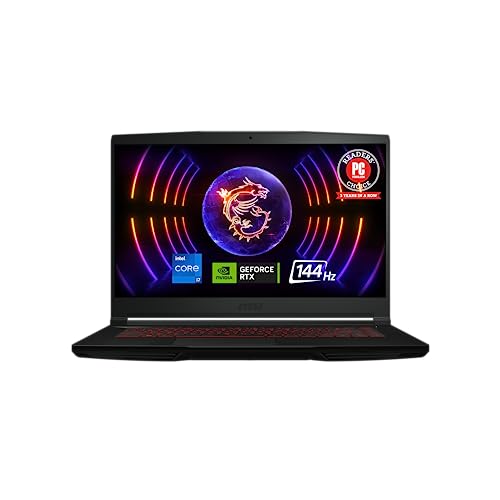
This guide covers three MSI laptops that span those families: a premium Prestige ultrabook with a sharp OLED screen, an affordable Modern 15 for everyday computing, and a Thin GF63 gaming laptop with an RTX 4050 graphics card. Each pick below was chosen from the name and specifications stated on its Amazon page, so you can compare screen, processor, memory and storage side by side and settle on the machine that suits your routine.
Quick Picks
As an Amazon Associate we earn from qualifying purchases
| Product | Best for | Key spec from title |
|---|---|---|
| MSI Prestige 16 AI+ Evo | Work, travel and long days | 16-inch UHD+ OLED, Ultra 7-258V, 32GB RAM, 2TB SSD |
| MSI Modern 15 | Everyday computing and study | 15.6-inch FHD, Core i5-1235U, 16GB RAM, 1TB SSD |
| MSI Thin GF63 12VE-066US | Gaming and creative work | 15.6-inch 144Hz FHD, Core i7-12650H, RTX 4050, 16GB RAM |
How to Choose
Match the family to your day
MSI groups its laptops by purpose, and the family name tells you most of what you need to know. Prestige machines are slim ultrabooks built for office work, meetings and travel, with bright high-resolution screens and long battery life in mind. Modern laptops are everyday machines for browsing, documents, streaming and study, with enough power for daily tasks and none of the weight or noise of a gaming chassis. Thin and Katana models add dedicated graphics for games and creative software. Begin by naming your main use, then look only at the family built for it, and you will avoid paying for graphics power you never use or buying a slim machine that struggles with your workload.
Weigh screen size against portability
A 16-inch screen gives you more room for documents, timelines and side-by-side windows, and it suits a desk or a home office where the laptop rarely moves. A 15.6-inch screen is the middle ground, large enough for comfortable work and still easy to carry in a bag. Every extra inch adds weight and bulk, and the Prestige in this guide weighs about 3.3 pounds while the two 15.6-inch models sit just over 4 pounds, so the difference is one you will feel on a commute. Think about where the laptop will live most days, and choose the smallest screen that still lets you work without squinting or constant scrolling.
Check memory and storage before the processor
Shoppers often fixate on the processor name, yet memory and storage shape everyday speed just as much. Sixteen gigabytes of RAM keeps browsing, office apps and video calls smooth at the same time, while 32GB suits heavy multitasking, large photo libraries and creative software. Storage matters too: a 512GB drive fills fast once games and media pile up, while 1TB or 2TB gives you room to grow without juggling files. All three picks here use fast NVMe solid-state storage, so the practical question is capacity, not speed. Pick the memory and storage that fit your next few years, not just today, because both are harder to change later on most slim laptops.
Mind the graphics card and the ports
Integrated graphics handle office work, streaming and light photo editing without trouble, and they keep the laptop cooler, quieter and lighter. A dedicated card such as the RTX 4050 is the dividing line for gaming and for video editing, 3D work and other graphics-heavy tasks, because it takes that load off the processor. Ports deserve the same attention: a full-size HDMI connection makes hooking up a monitor simple, USB-C covers modern docks and chargers, and a card reader helps photographers move files quickly. Check the ports on the listing against the gear you already own, so a missing connection does not turn into an adapter you must carry everywhere.
The 3 Best Options
1. MSI Prestige 16 AI+ Evo B2VMG-058US
The Prestige 16 AI+ Evo is the pick for buyers who want a premium work machine that still travels well. Its 16-inch UHD+ OLED screen shows crisp text and deep contrast, which suits long writing sessions, spreadsheets and photo work, while the magnesium-aluminum chassis keeps the whole package at about 3.3 pounds. Inside, the Intel Core Ultra 7-258V processor and 32GB of memory handle heavy multitasking, and the 2TB drive leaves room for large files and projects. Wi-Fi 7, a fingerprint reader and Windows 11 Pro round out a machine built for office days, client meetings and working from anywhere.
Specs
- 16-inch UHD+ OLED display, 3840 x 2400 resolution
- Intel Core Ultra 7-258V processor with Intel Arc graphics
- 32GB LPDDR5 RAM
- 2TB NVMe SSD
- Windows 11 Pro
- Wi-Fi 7, HDMI, fingerprint reader, backlit keyboard
- 3.31 pounds; magnesium-aluminum chassis; Stellar Gray
Best for: Professionals and frequent travellers who want a light, sharp-screened ultrabook for office work and creative tasks.
Watch out for: The OLED screen and slim chassis suit work and media, not demanding games, and the 16-inch size needs a roomy bag.
ASIN: B0DVF1FL5M
2. MSI Modern 15
The Modern 15 is the straightforward everyday laptop in this lineup, and it covers the basics without fuss. Its 15.6-inch Full HD screen is a comfortable size for documents, video calls and streaming, while the Intel Core i5-1235U processor and 16GB of memory keep everyday multitasking smooth. A 1TB drive holds plenty of documents, photos and apps, and the backlit keyboard, Wi-Fi 6 and SD card reader cover the features most people reach for daily. At about 4 pounds it is easy enough to carry between rooms, classes and coffee shops, making it a solid fit for students and home offices.
Specs
- 15.6-inch FHD display, 1920 x 1080 resolution
- Intel Core i5-1235U processor, 10 cores, up to 4.4 GHz
- Intel Iris Xe integrated graphics
- 16GB RAM
- 1TB PCIe SSD
- Windows 11 Home
- Wi-Fi 6, Bluetooth 5.2, backlit keyboard, micro SD reader
- 720p HD webcam; 65W power supply; 3-cell 39 WHr battery; 4 pounds
Best for: Students and home users who need a reliable everyday laptop for study, office apps and streaming.
Watch out for: Integrated graphics suit everyday tasks, not demanding games, and this listing is a seller-upgraded configuration, so check the listing details before buying.
ASIN: B0D3KRWCYL
3. MSI Thin GF63 12VE-066US
The Thin GF63 brings dedicated graphics to the lineup at a friendly size and weight. Its NVIDIA GeForce RTX 4050 graphics card and 144Hz Full HD screen suit gaming sessions and smooth motion in video work, while the Intel Core i7-12650H processor keeps demanding apps moving. Sixteen gigabytes of memory and a 512GB NVMe drive cover games and everyday software, and the Cooler Boost 5 system with two fans and six heat pipes is built to keep temperatures in check during long sessions. At about 4.1 pounds it stays portable for a gaming laptop, so it works as both a play machine and a daily driver.
Specs
- 15.6-inch FHD display, 1920 x 1080 resolution, 144Hz refresh rate
- Intel Core i7-12650H processor
- NVIDIA GeForce RTX 4050 graphics, 6GB GDDR6
- 16GB DDR4 RAM
- 512GB NVMe SSD
- Windows 11 Home
- Type-C USB 3.2 Gen 1; Cooler Boost 5 with 2 fans and 6 heat pipes
- 4.1 pounds
Best for: Gamers and creators who want dedicated graphics in a portable 15.6-inch laptop.
Watch out for: The 512GB drive fills quickly with large games, so plan for extra storage or regular cleanouts.
ASIN: B0BT3CD75G
Which One Fits Your Situation
You work in an office or travel often
Pick the Prestige 16 AI+ Evo. Its light magnesium-aluminum body, sharp OLED screen and 32GB of memory suit long workdays, presentations and working from hotels or client sites. The fingerprint reader and Windows 11 Pro add the security and tools office life calls for, and the 2TB drive means your files travel with you.
You need a laptop for study and everyday tasks
Pick the Modern 15. Its 15.6-inch screen, 16GB of memory and 1TB of storage cover classes, assignments, video calls and streaming without fuss. The backlit keyboard helps in dim rooms, and the SD card reader is handy for moving photos from a camera. It is the simplest choice here, and the one that asks the least of your bag and your desk.
You play games or edit video
Pick the Thin GF63. The RTX 4050 graphics card and 144Hz screen are built for gaming and smooth video work, and the Core i7 processor handles editing and streaming alongside play. Its cooling system is made for long sessions, and the 15.6-inch size still fits in a bag for gaming on the move.
You want one laptop for everything
Pick the Thin GF63 if games and creative work are part of the mix, or the Prestige 16 AI+ Evo if work and travel matter most. The Thin GF63 covers play and productivity in one machine, while the Prestige trades graphics power for a lighter body and a sharper screen. Either way, match the machine to the task you do most, not the one you do once in a while.
Common Mistakes
- Buying a gaming laptop for office work and carrying its weight, noise and shorter battery life to meetings where a slim Prestige would serve better.
- Choosing integrated graphics for gaming or video editing, then finding the machine stutters on the very tasks you bought it for.
- Picking the smallest storage size to save money, then running out of room once games, photos and large files pile up.
- Ignoring the ports on the listing and discovering your monitor, dock or camera needs an adapter you do not own.
- Skipping the screen specs and ending up with a dim or low-resolution panel that makes long workdays harder on your eyes.
Frequently Asked Questions
Which MSI laptop is best for office work?
The Prestige 16 AI+ Evo is the strongest office pick in this guide. Its slim magnesium-aluminum body travels well, the 16-inch OLED screen keeps text sharp through long documents, and 32GB of memory with a 2TB drive handles heavy multitasking. The fingerprint reader and Windows 11 Pro suit shared offices and business use.
Are MSI Modern laptops good for students?
Yes, the Modern 15 suits student life well. Its 15.6-inch screen is comfortable for reading and writing, 16GB of memory keeps research and video calls running together, and the 1TB drive holds coursework and media. The backlit keyboard helps with late-night study, and the weight is manageable in a backpack.
Can the MSI Thin GF63 handle modern games?
Yes, the Thin GF63 is built for gaming, with an RTX 4050 graphics card and a 144Hz Full HD screen that keep motion smooth. The Core i7 processor and 16GB of memory support demanding titles and streaming at the same time. Keep in mind the 512GB drive fills fast with large games, so plan your storage.
How much RAM do I need in an MSI laptop?
For most buyers, 16GB of RAM is the right baseline, covering browsing, office apps, study and streaming without slowdowns. Choose 32GB if you edit video, work with large files or keep many apps open at once, as the Prestige in this guide does. Storage matters too, so pair your memory choice with at least 1TB if you keep games or large media libraries.
More from Amazon
Programs that pair well with the guide above. Offers and eligibility are set by Amazon and may change.
Free shipping on eligible items, Prime Video and more. Eligible new members can start with a free trial.
Start a Prime free trialAd-free music streaming. Eligible new subscribers can start with a free trial.
Try Music Unlimited freeA Prime membership for ages 18-24 with a trial period. Eligibility is set by Amazon.
See Prime for Young AdultsAudiobooks and podcasts to listen to on the go. Eligible new members can start with a free trial.
Try Audible freeAs an Amazon Associate we earn from qualifying purchases.









Write Your Review
No reviews yet. Be the first to share your experience!