
Our Short List of 3
All 3 Picks at a Glance
| Product | Specs | Action |
|---|---|---|
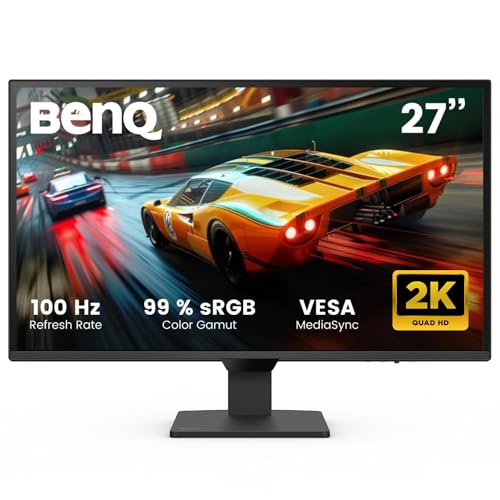 1. BenQ GW2790Q — Best Overall Study Monitor | Check price on Amazon | |
 2. Dell S2722QC — Best 4K Monitor for Studying | Check price on Amazon | |
 3. BenQ GW2790QT — Best Eye-Care Monitor With USB-C | Check price on Amazon |
Key takeaways
- Find the best monitors for studying with sharp text, eye-care features, and ergonomic stands. Compare top picks for students and long study sessions today.
The best monitors for studying make long reading and writing sessions easier on your eyes and more productive. A good study monitor shows crisp text, keeps glare under control, and lets you adjust the screen to a comfortable height and angle. Students who spend hours on lecture notes, research papers, and online courses notice the difference quickly when they move from a small laptop screen to a well-chosen external display.
This guide explains what to look for in a study monitor and compares three strong options. Every pick below is a monitor suited to reading, writing, and research, with specifications taken from manufacturer listings and retailer product pages.
Why a Dedicated Monitor Helps You Study
A laptop screen forces you to hunch over a small display, and that posture adds up over a semester. An external monitor lets you sit upright, place the screen at eye level, and keep reference material open beside your main document. A larger screen also means less scrolling and less switching between windows, which helps you stay focused on the material instead of fighting the interface.
Text clarity matters more than anything else for study use. A monitor with a high pixel density renders letters with clean edges, so your eyes work less hard during long reading sessions. An IPS panel is a sensible choice because it keeps colors and contrast steady when you shift position in your chair, and a matte or anti-glare coating cuts reflections from desk lamps and windows.
Eye comfort features are worth real attention. Low blue light modes, flicker-free backlighting, and automatic brightness adjustment all reduce fatigue during evening study sessions. A monitor that can tilt, swivel, and change height is also important, since the most comfortable viewing angle is different for every desk and every person.
How to Choose a Monitor for Studying
Screen Size and Resolution
A 27-inch display is a sweet spot for most study desks. It is large enough to show two documents side by side but small enough to fit on a standard desk without crowding your books and notebooks. At 27 inches, a QHD resolution of 2560 by 1440 gives noticeably sharper text than a 1080p panel of the same size. A 4K panel of 3840 by 2160 is even sharper and is a good choice if your budget allows and your laptop can drive it.
A 24-inch monitor can work well in a small dorm room, but a 27-inch screen is usually the better investment because it handles split-screen work so much better. Screens larger than 27 inches are rarely necessary for studying and can force you to turn your head too much.
Panel Type
IPS panels are the best fit for study monitors. They offer wide viewing angles and consistent colors, which matters when you lean back to read or share the screen with a study partner. VA panels can offer deeper contrast, but their viewing angles are narrower. TN panels are best avoided for study use because their colors shift noticeably when you view them from above or below.
Eye-Care Features
Look for a monitor that lists low blue light and flicker-free technology in its specifications. Some monitors add a brightness sensor that adjusts the backlight to match the room, which helps when you study late at night or near a bright window. An anti-glare coating is also valuable, especially in rooms with overhead lighting.
Ergonomics and Adjustability
A study monitor should adjust in height, tilt, and swivel at minimum. Height adjustment lets you set the top of the screen at or just below eye level, which keeps your neck in a neutral position. A pivot function that rotates the screen into portrait orientation is a bonus for reading long documents and research papers.
Connectivity
Check what ports your laptop has before you buy. A USB-C port that carries video and charges your laptop over a single cable keeps a study desk tidy and is ideal for students who move between the library and a dorm room. HDMI and DisplayPort cover most other laptops and desktop computers. Built-in speakers are convenient for lectures and video calls, though they rarely replace a good pair of headphones.
Refresh Rate
A 60Hz refresh rate is perfectly fine for reading and writing. A 75Hz or 100Hz panel feels a little smoother when scrolling through long documents, and it costs little extra in this category. There is no need to pay for a high refresh rate gaming panel for study work.
Top Picks: Best Monitors for Studying
1. BenQ GW2790Q — Best Overall Study Monitor
The BenQ GW2790Q is a 27-inch QHD monitor built around eye comfort, which makes it a natural fit for long study sessions. Its IPS panel delivers 2560 by 1440 resolution, so text looks crisp and two windows sit comfortably side by side. The 100Hz refresh rate keeps scrolling smooth, and the 99 percent sRGB color coverage means charts, diagrams, and photos in textbooks look accurate.
Eye care is the headline feature here. The monitor includes low blue light technology, a flicker-free backlight, and Brightness Intelligence technology that adjusts the screen to suit the room. It also carries Eyesafe certification and includes a dedicated reading mode. The slim bezel design keeps the focus on the screen, and the stand supports tilt adjustment with VESA mounting available for an arm or wall mount.
Connectivity covers HDMI and DisplayPort, which suits most laptops and desktops. The monitor is a strong choice for students who want a sharp, comfortable display without paying for features they will never use.
View the BenQ GW2790Q on Amazon
2. Dell S2722QC — Best 4K Monitor for Studying
The Dell S2722QC brings 4K resolution to the study desk at a reasonable size. Its 27-inch IPS panel shows 3840 by 2160 pixels, which makes text exceptionally sharp and lets you fit a remarkable amount of material on screen. Research papers, spreadsheets, and lecture slides all benefit from the extra detail, and the 99 percent sRGB coverage keeps colors faithful.
The single-cable USB-C connection is the standout convenience feature. It carries video to the monitor and delivers up to 65 watts of charging power to a laptop, so a student can sit down, plug in one cable, and start working. The monitor also has two HDMI ports, a DisplayPort input, and a USB hub for a keyboard, mouse, or flash drive. Built-in dual speakers handle lectures and video calls without extra hardware.
The stand adjusts in height, tilt, and swivel, and the panel supports AMD FreeSync for smooth video playback. The anti-glare coating helps in bright rooms. Students who read dense academic text all day will appreciate how much easier 4K makes small fonts to read.
View the Dell S2722QC on Amazon
3. BenQ GW2790QT — Best Eye-Care Monitor With USB-C
The BenQ GW2790QT is the step-up sibling of the GW2790Q, adding USB-C connectivity and a fuller set of productivity features. It uses the same 27-inch QHD IPS panel with 2560 by 1440 resolution and 99 percent sRGB coverage, paired with Brightness Intelligence Gen2, low blue light, and flicker-free eye-care technology. A dedicated coding mode and reading mode adjust the display for different kinds of study material.
The USB-C port delivers up to 65 watts of power delivery, so it charges a laptop while carrying the video signal. A built-in USB hub, daisy-chain support for a second monitor, and an ergonomic stand with height, tilt, swivel, and pivot adjustment make it a flexible centerpiece for a study desk. Noise-cancelling microphones and built-in speakers are useful for online classes and group calls.
Students who want one monitor to handle lectures, writing, and video calls, with a single cable to their laptop, will find the GW2790QT a well-rounded choice.
View the BenQ GW2790QT on Amazon
Comparison Table
| Monitor | Size | Resolution | Panel | USB-C | Eye-Care Features | Best For |
|---|---|---|---|---|---|---|
| BenQ GW2790Q | 27 inch | 2560 x 1440 QHD | IPS | No | Low blue light, flicker-free, Brightness Intelligence | Best overall value |
| Dell S2722QC | 27 inch | 3840 x 2160 4K | IPS | Yes, 65W | Low blue light, anti-glare | Sharpest text |
| BenQ GW2790QT | 27 inch | 2560 x 1440 QHD | IPS | Yes, 65W | Low blue light, flicker-free, Brightness Intelligence Gen2 | Eye care with USB-C |
Setting Up a Study-Friendly Workspace
A good monitor is only part of a comfortable study setup. Place the screen about an arm’s length away, with the top of the display at or slightly below eye level. Keep the room lighting soft and indirect so it does not reflect off the screen, and consider a desk lamp that lights your notes rather than the display.
Take regular breaks using the 20-20-20 rule: every 20 minutes, look at something 20 feet away for 20 seconds. This simple habit reduces eye strain more than any monitor feature. Pair it with a comfortable chair and a keyboard at elbow height, and long study sessions become much easier to sustain.
If you share a desk with a roommate or study in a shared space, headphones and a monitor with a narrow bezel help you focus without disturbing others. A monitor arm can free up desk space for textbooks, and a second-hand monitor stand can lift the screen to the right height if the included stand does not adjust enough.
Frequently Asked Questions
What size monitor is best for studying?
A 27-inch monitor is the best size for most students. It is large enough for two documents side by side, fits on a standard desk, and pairs well with QHD or 4K resolution for sharp text. A 24-inch screen works in very small spaces, while larger screens are usually unnecessary for study work.
Is QHD or 4K better for reading and studying?
Both are good, and the difference comes down to budget and your laptop. QHD at 27 inches already renders text clearly and is easier for older laptops to drive. 4K makes small fonts noticeably sharper and fits more content on screen, which is helpful for research papers and spreadsheets. Either resolution is a clear upgrade from a 1080p panel at this size.
Do eye-care monitors really help with eye strain?
Eye-care features such as low blue light modes, flicker-free backlighting, and automatic brightness adjustment can reduce fatigue during long sessions, according to manufacturer descriptions and general ergonomic guidance. They work best alongside good habits: proper viewing distance, regular breaks, and sensible room lighting.
Do I need a USB-C monitor for studying?
A USB-C monitor is convenient but not essential. It lets you connect a laptop with a single cable that also charges it, which keeps a desk tidy. If your laptop has only HDMI, a standard monitor with HDMI input works just as well for studying. Check your laptop’s ports before choosing.
Can I use a study monitor with a laptop?
Yes. Connect the monitor with HDMI, DisplayPort, or USB-C, then set your laptop to extend the display rather than mirror it. This gives you two screens: the laptop for notes and the monitor for reading or writing. Most modern laptops support an external monitor at QHD or 4K resolution.
Conclusion
The best monitors for studying combine sharp text, comfortable viewing, and a stand that adjusts to your desk. The BenQ GW2790Q is the best overall value, with a crisp QHD IPS panel and strong eye-care features. The Dell S2722QC is the pick for students who want the sharpest possible text and a single-cable USB-C setup. The BenQ GW2790QT blends eye care, USB-C charging, and a fully ergonomic stand into one versatile package.
Whichever monitor you choose, set it at the right height, keep the lighting comfortable, and take regular breaks. A good display supports your study habits; the habits themselves do the rest.
Disclosure: As an Amazon Associate, we earn from qualifying purchases.
More from Amazon
Programs that pair well with the guide above. Offers and eligibility are set by Amazon and may change.
Free shipping on eligible items, Prime Video and more. Eligible new members can start with a free trial.
Start a Prime free trialAd-free music streaming. Eligible new subscribers can start with a free trial.
Try Music Unlimited freeA Prime membership for ages 18-24 with a trial period. Eligibility is set by Amazon.
See Prime for Young AdultsAudiobooks and podcasts to listen to on the go. Eligible new members can start with a free trial.
Try Audible freeAs an Amazon Associate we earn from qualifying purchases.










Write Your Review
No reviews yet. Be the first to share your experience!