
Our Short List of 3
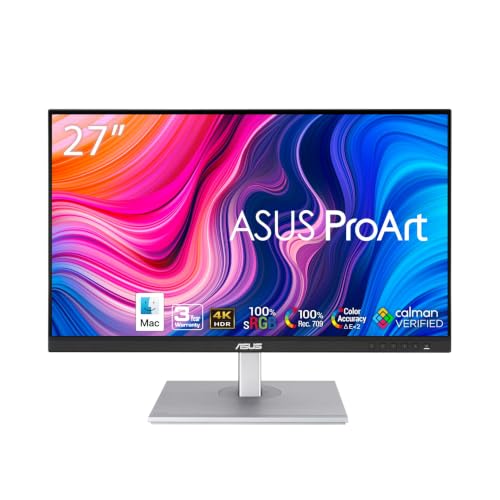
- Best for: Colour-critical photo and video editors who want the stated calibration claim alongside full sRGB and Rec.709 coverage.
- Panel: 27-inch IPS, 3840 x 2160 per listing
- Colour: 100% sRGB and 100% Rec.709 per title and bullets
- Calibration: Calman Verified, factory calibrated Delta E < 2 per listing
- Brightness: 350 cd/m2 per listing bullet

- Best for: Creators on a two-machine desk who want stated daisy-chaining and KVM switching at QHD with full sRGB coverage.
- Panel: 27-inch IPS, QHD 2560 x 1440 per listing
- Colour: 100% sRGB / Rec.709 per listing title
- HDR: HDR10 per listing title
- Connectivity: USB Type-C 65W, DisplayPort 1.4, DisplayPort Out for daisy-chain, HDMI 2.0, USB-B per listing fields

- Best for: Laptop-driven creator desks that want one USB-C cable carrying the picture and 90W of stated charging power.
- Panel: 27-inch IPS, 3840 x 2160 per technical details
- HDR: VESA DisplayHDR 400 per listing title
- Connectivity: USB Type-C with 90W power delivery per listing description; HDMI (2), DisplayPort, USB Type-C per the listing comparison table
- Sync: AMD FreeSync per listing fields
All 3 Picks at a Glance
| Product | Specs | Action |
|---|---|---|
| ASUS ProArt Display PA279CV 27″ 4K |
| Check price on Amazon |
| BenQ PD2705Q AQCOLOR 27″ QHD |
| Check price on Amazon |
| LG UltraFine 27UP850N-W 27″ 4K |
| Check price on Amazon |
Key takeaways
- Three monitors whose listings state real colour facts (gamut coverage, Delta E, calibration), compared on resolution, USB-C power and hub features.
Choosing a monitor for content creation is a decision about which colour claims you can verify. Every desk monitor markets itself at creators, but the listings separate cleanly into those that state a gamut coverage figure, a Delta E value or a calibration programme in their own fields, and those that offer only a label. This guide admits only the first kind.
The three monitors below each state their colour facts in captured listing fields: full sRGB and Rec.709 coverage on two of them, a factory calibration claim on one, a stated HDR certification on the third. The pool stops at three rather than borrow a fourth record whose code is not settled. Every pick was chosen from the names and specifications on its Amazon product page.
Quick Picks
As an Amazon Associate we earn from qualifying purchases.
| Product | Best for | Key spec from title |
|---|---|---|
| ASUS ProArt Display PA279CV 27″ 4K | Colour-critical photo and video editors who want the stated calibration claim alongside full sRGB and Rec.709 coverage. | 100% sRGB/Rec.709, Delta E < 2, Calman Verified |
| BenQ PD2705Q AQCOLOR 27″ QHD | Creators on a two-machine desk who want stated daisy-chaining and KVM switching at QHD with full sRGB coverage. | 100% sRGB/Rec.709, QHD, USB-C 65W, KVM |
| LG UltraFine 27UP850N-W 27″ 4K | Laptop-driven creator desks that want one USB-C cable carrying the picture and 90W of stated charging power. | VESA DisplayHDR 400, USB Type-C 90W power delivery |
How to Choose
Gamut coverage is the first stated fact to compare
Two of these listings state 100% sRGB and 100% Rec.709 coverage outright, in titles and bullets that agree with each other. The third rests its colour case on a stated VESA DisplayHDR 400 certification, a brightness-and-contrast standard rather than a gamut figure. Those are different kinds of claim, and a creator cutting between cameras or delivering to a colour-managed pipeline should weight the explicit gamut lines first and treat an HDR badge as a separate, narrower promise.
A calibration claim is stronger than a coverage claim
Coverage says what the panel can show; calibration says how accurately it shows it as shipped. Only one listing here states a calibration programme: Calman Verified with a factory Delta E under 2. The others state coverage without an accuracy figure in the captured fields. If your work is judged on colour fidelity out of the box, that stated Delta E line is the single most relevant sentence in this guide, and its absence elsewhere is information too.
4K and QHD at the same size change the working day
Two picks state 3840 x 2160 panels and one states 2560 x 1440, all at 27 inches. The 4K pair gives finer text, more timeline room and 1:1 inspection of high-resolution stills; the QHD pick asks less of the computer driving it and pairs its panel with daisy-chaining and KVM facts the others do not state. Choose by the machine and the desk first: resolution is a workflow commitment, not a trophy figure.
USB-C wattage and hub facts finish the desk
All three listings state USB-C, but the stated power delivery splits them: 65W on the ASUS and the BenQ, 90W on the LG. A hungry laptop notices that difference daily. Beyond power, the BenQ states a DisplayPort output for daisy-chaining and a KVM switch, and the ASUS states a four-port USB hub. List the cables your desk actually runs, then find the listing whose stated hub facts retire the most of them.
The 3 Best Options
ASUS ProArt Display PA279CV 27″ 4K
- Best for: Colour-critical photo and video editors who want the stated calibration claim alongside full sRGB and Rec.709 coverage.
- Panel: 27-inch IPS, 3840 x 2160 per listing
- Colour: 100% sRGB and 100% Rec.709 per title and bullets
- Calibration: Calman Verified, factory calibrated Delta E < 2 per listing
- Brightness: 350 cd/m2 per listing bullet
Colour-critical photo and video editors who want the stated calibration claim alongside full sRGB and Rec.709 coverage.
A captured crawl of this listing’s header read Currently Unavailable, and that signal is old: confirm a live offer on this code before anything else, because the whole entry depends on it.
The PA279CV carries the fullest colour statement in this group. Its title and bullets agree on 100% sRGB and 100% Rec.709 coverage, and it adds the group’s only calibration wording: Calman Verified, factory calibrated to Delta E under 2. Around that basis the listing states a 27-inch IPS panel at 3840 x 2160, DisplayPort over USB-C with 65W power delivery, DisplayPort, HDMI and a USB hub, Adaptive-Sync across 40-60Hz and a fully adjustable stand. For colour-critical stills and video work, this is the entry whose claims are stated most completely.
Watch out for: A captured crawl of this listing’s header read Currently Unavailable, and that signal is old: confirm a live offer on this code before anything else, because the whole entry depends on it.
BenQ PD2705Q AQCOLOR 27″ QHD
- Best for: Creators on a two-machine desk who want stated daisy-chaining and KVM switching at QHD with full sRGB coverage.
- Panel: 27-inch IPS, QHD 2560 x 1440 per listing
- Colour: 100% sRGB / Rec.709 per listing title
- HDR: HDR10 per listing title
- Connectivity: USB Type-C 65W, DisplayPort 1.4, DisplayPort Out for daisy-chain, HDMI 2.0, USB-B per listing fields
Creators on a two-machine desk who want stated daisy-chaining and KVM switching at QHD with full sRGB coverage.
Regional mirrors showed this model out of stock on their own storefronts, which is a mirror signal rather than an Amazon one: confirm the live Amazon offer, and never use the regional variant’s code for this pick.
The PD2705Q is the QHD member of the group, a 27-inch monitor at 2560 x 1440 whose title states 100% sRGB and Rec.709 coverage with HDR10 and USB-C at 65W. Its listing description names the specialised modes it carries (CAD/CAM, Darkroom, Animation and an M-Book mode among them) as listed mode names, and its included connections run to DisplayPort 1.4, a DisplayPort output for daisy-chaining, HDMI 2.0, USB-C and USB-B, with a KVM switch for two-machine desks. For a creator whose desk runs two computers, the stated switching and chaining facts are the case.
Watch out for: Regional mirrors showed this model out of stock on their own storefronts, which is a mirror signal rather than an Amazon one: confirm the live Amazon offer, and never use the regional variant’s code for this pick.
LG UltraFine 27UP850N-W 27″ 4K
- Best for: Laptop-driven creator desks that want one USB-C cable carrying the picture and 90W of stated charging power.
- Panel: 27-inch IPS, 3840 x 2160 per technical details
- HDR: VESA DisplayHDR 400 per listing title
- Connectivity: USB Type-C with 90W power delivery per listing description; HDMI (2), DisplayPort, USB Type-C per the listing comparison table
- Sync: AMD FreeSync per listing fields
Laptop-driven creator desks that want one USB-C cable carrying the picture and 90W of stated charging power.
The DCI-P3 gamut figure for this model rests on regional captures rather than the US listing: confirm the gamut line on the live US page before relying on it, and do not blend this listing with its predecessor model, whose stated wattage differs.
The 27UP850N-W is the single-cable pick. Its title states a 27-inch IPS 4K panel with VESA DisplayHDR 400 certification and USB Type-C, and the listing description states USB Type-C power delivery at 90W, the strongest stated charging figure in this group for a laptop-driven desk. The comparison table in its listing gives two HDMI ports, DisplayPort and USB Type-C, and AMD FreeSync is stated. Its colour case rests on the HDR certification in its own title; the wider gamut figure attached to this model in some regional captures is treated in its Watch out for line.
Watch out for: The DCI-P3 gamut figure for this model rests on regional captures rather than the US listing: confirm the gamut line on the live US page before relying on it, and do not blend this listing with its predecessor model, whose stated wattage differs.
Which One Fits Your Situation
Colour-critical editing with a calibration claim
Take the ASUS PA279CV: it alone states factory calibration to Delta E under 2 with Calman verification, alongside full sRGB and Rec.709 coverage at 4K. Confirm its live offer first, since an old crawl of its listing read unavailable; if the offer stands, this is the entry whose colour accuracy is promised in numbers rather than implied by a badge.
Two computers sharing one creator desk
Take the BenQ PD2705Q for its stated KVM switch and DisplayPort daisy-chain output, with full sRGB and Rec.709 coverage at QHD. One keyboard and mouse serve both machines, the second monitor chains from the first, and the specialised modes named in its description (CAD/CAM, Darkroom, Animation among them) cover the range of work a shared desk typically hosts across a week.
A laptop desk built around one cable
Take the LG 27UP850N-W: its listing states USB Type-C with 90W power delivery, the strongest stated charging figure here, carrying picture and power down one cable. Confirm the gamut line on the live US listing before leaning on it, and the stated DisplayHDR 400 certification and 4K panel do the rest of the case for a tidy creator desk.
Common Mistakes
- Treating a stale availability crawl as today’s stock, when one listing here carried an old Currently Unavailable header that only the live page can settle.
- Blending the LG 27UP850N-W with its predecessor model, whose listing states a different USB-C wattage, and quoting the wrong figure for the wrong code.
- Reading an HDR certification as a gamut coverage claim, when the listings that state coverage say so in percentages and the HDR badge certifies something else.
- Assuming a familiar fourth monitor belongs in this pool without checking its code, when unsettled codes are exactly why this guide stops at three.
- Comparing 4K and QHD panels at the same size as if resolution were free, ignoring the extra demand the 4K pair places on the computer driving them.
Frequently Asked Questions
Which monitor states a factory calibration claim?
The ASUS ProArt PA279CV. Its listing states Calman Verified calibration with a Delta E under 2, alongside 100% sRGB and 100% Rec.709 coverage. The BenQ states the same coverage figures without a Delta E line, and the LG’s colour case rests on its stated DisplayHDR 400 certification.
Which pick is QHD rather than 4K?
The BenQ PD2705Q, at a stated 2560 x 1440 on its 27-inch IPS panel. The ASUS PA279CV and the LG 27UP850N-W both state 3840 x 2160. The BenQ answers with desk features instead: a stated KVM switch and a DisplayPort output for daisy-chaining a second monitor.
Which monitor charges a laptop fastest on stated figures?
The LG 27UP850N-W. Its listing description states USB Type-C power delivery at 90W, against 65W stated for both the ASUS PA279CV and the BenQ PD2705Q. If one cable must carry picture and power to a demanding laptop, that stated gap is the deciding fact.
Why does this guide cover only three monitors?
Because the admission rule is a colour fact stated in the listing’s own captured fields, and the pool was held to records whose codes are settled. A fourth familiar model was left out over an unresolved code conflict rather than printed with a code this guide cannot stand behind.
More from Amazon
Programs that pair well with the guide above. Offers and eligibility are set by Amazon and may change.
Free shipping on eligible items, Prime Video and more. Eligible new members can start with a free trial.
Start a Prime free trialAd-free music streaming. Eligible new subscribers can start with a free trial.
Try Music Unlimited freeA Prime membership for ages 18-24 with a trial period. Eligibility is set by Amazon.
See Prime for Young AdultsAudiobooks and podcasts to listen to on the go. Eligible new members can start with a free trial.
Try Audible freeAs an Amazon Associate we earn from qualifying purchases.










Write Your Review
No reviews yet. Be the first to share your experience!