

Our Short List of 3
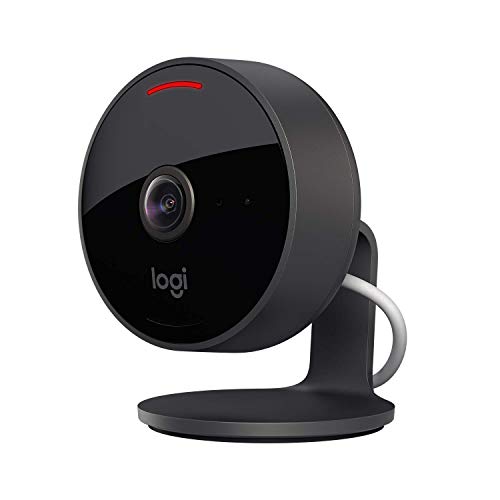
- Best for: Apple-only households that want the widest view and zero manufacturer cloud involvement.

- Best for: Homeowners with an existing outdoor light fitting who want light and camera in one Apple-only unit.

- Best for: Indoor coverage of a large room, especially if you already own or plan to add Aqara Zigbee sensors.
All 5 Picks at a Glance
| Product | Specs | Action |
|---|---|---|
| Logitech Circle View: the pure Secure Video camera |
| Check price on Amazon |
| Eve Outdoor Cam: the Secure Video floodlight |
| Check price on Amazon |
| Aqara Camera Hub G3: pan, tilt, and a smart home hub |
| Check price on Amazon |
 eufy Security Indoor Cam E220: pan-and-tilt with local storage |
| Check price on Amazon |
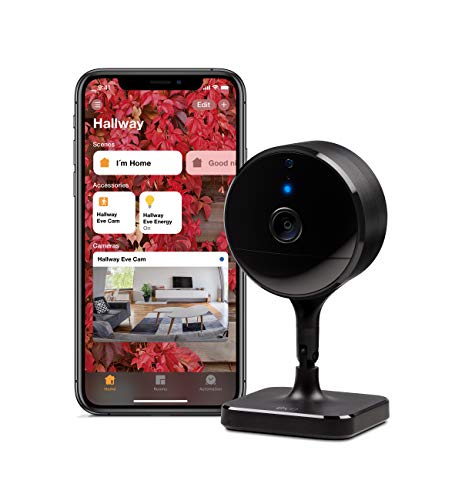 Eve Cam: the privacy-first indoor camera |
| Check price on Amazon |
Key takeaways
- The best HomeKit cameras with Secure Video support: five Apple Home cameras for indoors and out, with hub and iCloud+ requirements all explained clearly.
As an Amazon Associate, we earn from qualifying purchases made through links on this page.
A HomeKit camera is not just a security camera that happens to work with an iPhone. The models worth buying support HomeKit Secure Video, Apple’s camera platform that analyses footage on a home hub inside your house, encrypts recordings before they leave the building, and stores them in iCloud under your Apple account rather than on a camera maker’s servers. That design changes what you should shop for: there is no manufacturer cloud plan to compare, but there are two Apple requirements every buyer has to meet first, and they are covered in the buying notes below.
The five cameras in this roundup all support HomeKit Secure Video according to their manufacturers. They split into clear roles: one wired camera built exclusively for Apple’s platform, one hardwired floodlight camera for outdoors, two pan-and-tilt indoor models with very different extras, and one compact indoor camera from the most privacy-focused brand in the category. Every pick is a camera first and a HomeKit accessory second, so resolution, field of view, power source, and night performance are listed for each one alongside its Apple-specific behaviour.
One caution before the picks: HomeKit Secure Video standardises a lot. Recordings are capped at 1080p inside Apple Home even when a camera’s own sensor is sharper, detection of people, pets, vehicles, and packages is performed by your home hub rather than the camera, and recording history depends on your iCloud+ plan. The differences that matter are hardware, installation, and what each camera does outside Apple Home.
What to look for in a HomeKit camera
Confirm Secure Video, not just HomeKit. Plenty of cameras carry a Works with Apple HomeKit badge yet only expose a live stream and motion sensor to the Home app, with no recording. HomeKit Secure Video is the feature that adds encrypted recording, activity zones, and smart detection. Every camera below supports Secure Video per its manufacturer; if you shop beyond this list, look for the words Secure Video on the maker’s own product page, not only in marketplace listings.
Plan for a home hub. A HomePod, HomePod mini, or Apple TV is required for Secure Video recording, remote access, and the on-device analysis that tells a person from a pet or a passing car. Without a hub, a Secure Video camera is limited to local live viewing on your home network. The hub also has to stay powered and connected, so its placement matters as much as the camera’s.
Budget attention for iCloud+, not a camera subscription. Recording with Secure Video requires an iCloud+ plan, and the number of Secure Video cameras your plan covers grows with its storage tier. The footage itself does not count against your iCloud storage. None of the cameras below needs a separate manufacturer plan for Apple Home recording, although some brands charge for extra features inside their own apps, which is a different thing entirely.
Match the power source to the spot. There are no battery cameras in this roundup, because the current Secure Video range is dominated by powered models. Indoor picks run from USB adapters and are easy to place. Outdoor picks divide into a weatherproof camera on a long fixed cable and a floodlight camera that wires into an existing outdoor light fitting, which is a bigger installation job and may call for an electrician.
Know the 1080p ceiling. Secure Video records at up to 1080p. A 2K camera still earns its place if you also use the maker’s app, where the full resolution, local card recording, or extra AI features live, but inside Apple Home its picture will look much like a native 1080p model’s. Buy 2K for the app experience and the hardware, not for sharper iCloud recordings.
Check the second app. Some of these cameras are configured entirely inside Apple’s Home app and never ask for a brand account. Others must be set up in the manufacturer’s app first, which is also where firmware updates, pan-and-tilt controls, and local storage settings live. Decide beforehand whether you want a camera that exists only in Apple Home or one that straddles two ecosystems.
Logitech Circle View: the pure Secure Video camera
- Best for: Apple-only households that want the widest view and zero manufacturer cloud involvement.
Apple-only households that want the widest view and zero manufacturer cloud involvement.
The Circle View is the camera Logitech built for one platform only. It works exclusively with HomeKit Secure Video: there is no Logitech account, no Logitech cloud, and no companion app to install. You add it in Apple’s Home app and everything, from activity zones to face recognition, is handled by Apple. For a household that wants cameras without handing footage to another company, this is the cleanest arrangement available.
The hardware is a wired 1080p camera with a 180-degree diagonal field of view, the widest in this roundup, behind glass optics with wide dynamic range. The body is weather-resistant to IP64, so the same camera can sit on a shelf indoors or mount under an eave outdoors using the included wall bracket. Infrared night vision reaches up to 15 feet per Logitech, two-way talk is built in, and the camera runs from an indoor USB power supply on a fixed 10-foot cable. Privacy controls are physical as well as digital: the head tilts down to block the lens, and a rear switch cuts the camera off.
The limitations follow from the purity. Fifteen feet of infrared range is short for a large yard, the 1080p sensor has no higher-resolution mode hiding anywhere, and the fixed cable plus indoor power brick makes outdoor placement a planning exercise. There is also no local storage of any kind: if it is not recorded to iCloud, it is not recorded. Buyers who want a memory card fallback or a brand app should look at the Aqara or eufy picks instead.
Eve Outdoor Cam: the Secure Video floodlight
- Best for: Homeowners with an existing outdoor light fitting who want light and camera in one Apple-only unit.
Homeowners with an existing outdoor light fitting who want light and camera in one Apple-only unit.
Eve’s Outdoor Cam combines a 1080p Secure Video camera with a dimmable floodlight in a metal enclosure, and like every Eve product it is designed exclusively for Apple HomeKit. It replaces an existing outdoor light: the camera wires into the fitting’s live, neutral, and earth connections, and the floodlight itself becomes a HomeKit light that your other accessories and automations can switch. Eve rates the enclosure IP55 and publishes a 157-degree field of view, with infrared night vision for when the floodlight stays off.
Because the analysis runs on your home hub, the camera supports the full Secure Video detection set: people, pets, vehicles, and packages each trigger their own notification type, and recordings are end-to-end encrypted into iCloud with a 10-day history under iCloud+. A built-in motion sensor, two-way talk, and a light-boost mode that pushes the floodlight to full brightness when motion is detected round out a spec aimed squarely at driveways and front doors. Eve collects no footage and requires no Eve account for camera functions; the Eve app is optional and used for settings and firmware.
The honest drawback is installation. This is a hardwired fitting, not a camera you stick up in an afternoon, and it needs an existing wired light point where you want coverage. It is also a 2.4 GHz Wi-Fi device, and the camera is 1080p in a market where rivals advertise sharper sensors, even if Secure Video narrows that gap in practice. Treat it as part of a lighting upgrade and it makes sense; treat it as a casual add-on and it does not.
Aqara Camera Hub G3: pan, tilt, and a smart home hub
- Best for: Indoor coverage of a large room, especially if you already own or plan to add Aqara Zigbee sensors.
Indoor coverage of a large room, especially if you already own or plan to add Aqara Zigbee sensors.
The G3 is three devices in one enclosure: a 2K pan-and-tilt camera, a Zigbee 3.0 hub for Aqara sensors, and an infrared blaster that can drive a TV or air conditioner. Its camera records at 2304 by 1296 through a 110-degree lens, and the motorised mount pans 340 degrees and tilts 45 degrees, so one unit can sweep a whole room and track a person across it. Aqara builds in face and gesture recognition, two-way audio, and infrared night vision, and the camera doubles as the bridge that brings Aqara door, motion, and leak sensors into Apple Home.
In Apple Home the G3 works with HomeKit Secure Video, with the platform caveat stated earlier: recordings there are 1080p even though the sensor is 2K. The Aqara app is where the extra resolution, the gesture controls, and local recording to a microSD card of up to 128 GB live. Dual-band Wi-Fi and a USB-C power input are welcome at this level, and the hub functions keep working for your sensors regardless of which app you open day to day.
Limitations are mostly about divided loyalties. You need the Aqara app for setup, firmware, and several headline features, so the G3 does not suit buyers who want an Apple-only footprint. The 2K detail is real but invisible inside Apple Home recordings, and the indoor-only design has no weather resistance for porches or garages with damp air. As a camera plus hub bundle, though, nothing else in this roundup does as many jobs.
eufy Security Indoor Cam E220: pan-and-tilt with local storage
- Best for: A nursery, pet room, or living room where pan-and-tilt tracking and a local recording copy matter.
A nursery, pet room, or living room where pan-and-tilt tracking and a local recording copy matter.
The E220 is eufy’s plug-in indoor camera with a 2K sensor and a motorised mount that pans a full 360 degrees and tilts to follow movement across a room. On-device processing detects people and pets and drives the motion tracking, so the camera can turn to keep a subject in frame. It records locally to a microSD card, works without a HomeBase hub, and adds two-way audio and infrared night vision in a compact body powered over USB.
Apple support is genuine but layered. eufy confirms the E220 works with Apple HomeKit and Secure Video, with Secure Video recording requiring an iCloud+ plan; setup runs through the eufy Security app first, after which the camera is activated in Apple Home. Inside Apple Home the stream and recordings are 1080p, while the eufy app keeps the full 2K picture, the tracking controls, and the card recordings. That split personality is the E220’s defining trait: generous hardware, two interfaces, and feature access that depends on which door you walk through.
The constraints to accept are a 2.4 GHz-only Wi-Fi radio, an indoor-only housing, and a setup path that obliges you to keep the eufy app and account even if Apple Home is your daily driver. Buyers bothered by the Logitech and Eve models’ lack of local recording will see the microSD slot as the deciding feature here, and it is the only pick besides the Aqara with a card slot at all.
Eve Cam: the privacy-first indoor camera
- Best for: Bedrooms, nurseries, and home offices where an account-free, privacy-first indoor camera matters most.
Bedrooms, nurseries, and home offices where an account-free, privacy-first indoor camera matters most.
Eve Cam applies the same Apple-only formula as the Outdoor Cam to a small indoor camera. It is designed exclusively for HomeKit Secure Video: no Eve cloud, no account, no registration, and a presence-based privacy mode that can switch the camera off automatically when the household is home. The sensor is 1080p with a 150-degree field of view, infrared night vision reaches up to 5 metres, and a microphone and speaker handle two-way talk and sound-based alerts in the Home app.
Power comes from a USB supply with interchangeable plug adapters in the box, and a metal plate with adhesive or screws gives a simple magnetic wall mount. Recordings follow the standard Secure Video pattern, encrypted into iCloud with hub-based detection distinguishing people, pets, and vehicles. Because Eve builds only for Apple, the Home app is the whole experience; the optional Eve app adds settings and firmware updates but never becomes a second place your footage lives.
The compromises are a fixed lens with no pan or zoom, a 1080p ceiling that matches the platform but not the sharpest indoor rivals, and night vision range suited to a single room rather than a long hallway. Availability of this older model also fluctuates more than the others here, so check the listing carefully before planning a multi-room setup around it. For one or two rooms, its account-free design remains the point.
Comparison table
| Camera | Resolution | Field of view | Placement | Power | Local storage |
|---|---|---|---|---|---|
| Logitech Circle View | 1080p | 180 degrees | Indoor and outdoor, IP64 | Wired, USB supply, 10 ft cable | None, iCloud only |
| Eve Outdoor Cam | 1080p | 157 degrees | Outdoor floodlight, IP55 | Hardwired to light fitting | None, iCloud only |
| Aqara Camera Hub G3 | 2K sensor, 1080p in Secure Video | 110 degrees, pan 340 and tilt 45 | Indoor | USB-C adapter | microSD up to 128 GB |
| eufy Indoor Cam E220 | 2K sensor, 1080p in Secure Video | Pan 360 with tilt and tracking | Indoor | USB adapter | microSD |
| Eve Cam | 1080p | 150 degrees | Indoor | USB supply | None, iCloud only |
FAQ
Do I need iCloud+ for a HomeKit Secure Video camera?
For recording, yes. Live viewing works with a home hub alone, but Secure Video recording history requires an iCloud+ plan, and larger plans cover more cameras. The recordings do not consume your iCloud storage allowance.
Which devices work as a home hub?
A HomePod, HomePod mini, or Apple TV can act as the hub. The hub runs the person, pet, vehicle, and package analysis locally, enables remote access, and must stay on your home network for recording to work.
Are these cameras useful without any Apple devices?
Not really. Secure Video lives inside Apple’s Home app, setup uses an iPhone or iPad, and Eve and Logitech models in this roundup have no Android or web interface at all. The Aqara and eufy cameras do work in their own apps on other platforms, but their Apple features still need Apple hardware.
Does a 2K camera give sharper recordings in Apple Home?
No. Secure Video caps recording at 1080p, so the Aqara G3 and eufy E220 show their extra resolution only in their makers’ apps and local recordings. Judge them on hardware, tracking, and storage rather than on the 2K badge if Apple Home is your main screen.
Can these cameras record continuously?
Secure Video is event-based: cameras stream on demand and record clips when the hub detects relevant motion. None of the five is a continuous-recording NVR-style camera, and the two card-equipped models record motion events locally rather than an unbroken timeline.
Conclusion
Start with the platform decision, because it narrows the field fast. If you want a camera that exists only inside Apple Home, the Logitech Circle View covers indoor and outdoor spots with the widest view here, and the Eve Cam does the same job indoors with the strongest privacy posture. If the camera is also a lighting project, the Eve Outdoor Cam is the one hardwired floodlight built for Secure Video. Buyers who want a camera that does more than watch should take the Aqara G3 for its hub and pan-and-tilt hardware, or the eufy E220 for tracking plus a memory card copy of events. Whichever you choose, set up the home hub and iCloud+ plan first; with Secure Video, those two Apple pieces are the foundation every camera on this page stands on.
More from Amazon
Programs that pair well with the guide above. Offers and eligibility are set by Amazon and may change.
Free shipping on eligible items, Prime Video and more. Eligible new members can start with a free trial.
Start a Prime free trialAd-free music streaming. Eligible new subscribers can start with a free trial.
Try Music Unlimited freeA Prime membership for ages 18-24 with a trial period. Eligibility is set by Amazon.
See Prime for Young AdultsAudiobooks and podcasts to listen to on the go. Eligible new members can start with a free trial.
Try Audible freeAs an Amazon Associate we earn from qualifying purchases.










Write Your Review
No reviews yet. Be the first to share your experience!