

Our Short List of 3

- Best for: A buyer on a tight budget who plays competitive and older titles at 1080p.
- 15.6-inch FHD 120Hz display
- AMD Ryzen 5 6600H processor
- NVIDIA GeForce RTX 3050 (dedicated)
- 8GB DDR5 RAM

- Best for: A buyer who wants serious power and a large, sharp screen at home.
- 16-inch QHD+ 2560 x 1600 display, 165Hz, 3ms
- Intel Core i9-13900HX, 24 cores, up to 5.40 GHz
- NVIDIA GeForce RTX 4070, 8GB GDDR6 (dedicated)
- 16GB DDR5 RAM, 4800 MHz
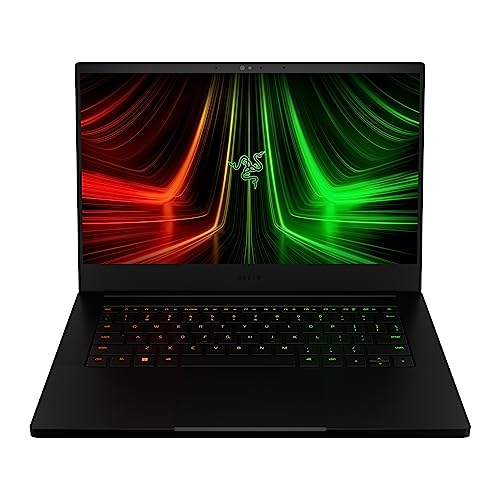
- Best for: A buyer who wants a premium, portable 14-inch gaming laptop.
- 14-inch QHD 165Hz display
- AMD Ryzen 9 5900HX, 8-core
- NVIDIA GeForce RTX 3070
- 16GB RAM
All 5 Picks at a Glance
| Product | Specs | Action |
|---|---|---|
| Lenovo IdeaPad Gaming 3 |
| Check price on Amazon |
| Dell G16 7630 Gaming Laptop |
| Check price on Amazon |
| Razer Blade 14 Gaming Laptop |
| Check price on Amazon |
 Lenovo LOQ 15.6″ Gaming Laptop |
| Check price on Amazon |
 Acer Nitro 16S AI Copilot+ PC Gaming Laptop |
| Check price on Amazon |
Key takeaways
- Compare five gaming laptops for school, work and play — RTX graphics, fast displays and big storage — and pick the machine that fits how you game today.
A gaming laptop has to do two jobs at once. It must run the games you actually play, and it must carry the rest of your day — classes, work, video calls, and the commute in between. Shoppers who pick by the graphics card name alone often end up with a machine that has a dim screen, cramped storage, or a battery that quits before lunch. The right choice balances the graphics card, the display, memory, storage, and weight, so the laptop fits your life as well as your game library.
This guide looks at five gaming laptops sold on Amazon, from a budget-friendly 2022 IdeaPad to a 16-inch machine with an RTX 4070. Every spec below comes from the product listing itself, with nothing invented. Whether you need a light 14-inch laptop or a big-screen desktop replacement, the sections below show what each machine does well and where it falls short.
Quick Picks
As an Amazon Associate we earn from qualifying purchases
| Product | Best for | Key spec from title |
|---|---|---|
| Lenovo IdeaPad Gaming 3 | Budget gaming and schoolwork | RTX 3050, 15.6″ FHD 120Hz |
| Dell G16 7630 | Big-screen power at home | RTX 4070, 16″ QHD+ 165Hz |
| Razer Blade 14 | Premium portable gaming | RTX 3070, 14″ QHD 165Hz |
| Lenovo LOQ 15.6″ | Everyday gaming with room to grow | RTX 4050, 15.6″ FHD 144Hz |
| Acer Nitro 16S AI | Newest graphics and AI features | RTX 5060, 16″ WUXGA 180Hz |
How to Choose
Match the Graphics Card to Your Games
The graphics card decides which games run smoothly, so it deserves the first look. An RTX 3050 handles popular competitive titles and older games well at 1080p, while an RTX 4070 or RTX 5060 gives you room for newer, more demanding releases at higher resolutions. A modest card paired with a good screen and enough memory often feels better day to day than a flagship card squeezed into a laptop with a dim display and a cramped drive. Check the exact model in the listing — RTX 4050, 4070, 5060, and 3070 are different chips with different results — and match it to the games you play most, not the games you might play one day.
Screen Size, Resolution, and Refresh Rate
The display is the part you look at every minute, so weigh it as heavily as the graphics card. A 14-inch screen keeps the laptop light and easy to carry, while a 16-inch panel gives you more room for games, documents, and side-by-side windows. Resolution matters too: a 1080p panel is sharp enough for most play, while a QHD+ panel shows finer detail but asks more of the graphics card. Refresh rate changes how motion feels — 120Hz and above make fast games look smoother than a plain 60Hz screen. Check the listing for the panel type as well: an IPS panel usually shows wider viewing angles and steadier colors than a basic TN panel.
Memory and Storage You Cannot Ignore
Memory and storage decide whether a gaming laptop feels fast or frustrating. Eight gigabytes of RAM is the floor for modern play — it runs most games, but it leaves little room for a browser, chat, and streaming tools open alongside. Sixteen gigabytes gives you breathing room and is the safer pick for anyone who multitasks. Storage works the same way: a 256GB drive fills up fast once you install two or three large games, while 512GB or 1TB lasts longer before you need to delete something. Check whether the listing mentions expansion slots, since some laptops let you add a second drive or more memory later, which can rescue a machine that would otherwise feel cramped within a year.
Weight, Battery, and the Fine Print
A gaming laptop is still a laptop, so weight and battery life matter on the move. A 14-inch machine near four pounds slips into a bag without a second thought, while a 16-inch model can weigh close to five pounds before you add the charger. Battery figures in listings describe light use, not gaming — expect far less playtime unplugged than the headline number suggests. Read the fine print too: some listings are third-party configured, which means memory and storage may differ from the factory build and the warranty may come from the seller rather than the brand. Check who stands behind the warranty, what the return window covers, and whether the listing states the exact configuration you will receive.
The 5 Best Options
Lenovo IdeaPad Gaming 3
- Best for: A buyer on a tight budget who plays competitive and older titles at 1080p.
- 15.6-inch FHD 120Hz display
- AMD Ryzen 5 6600H processor
- NVIDIA GeForce RTX 3050 (dedicated)
- 8GB DDR5 RAM
A buyer on a tight budget who plays competitive and older titles at 1080p.
Only 8GB of RAM and 256GB of storage — the drive fills up fast with large games. 2022 model; re-check the listing before buying.
The IdeaPad Gaming 3 is the entry point of this roundup, and it suits a buyer who wants to play without spending on a flagship. Its Ryzen 5 6600H and RTX 3050 handle popular competitive titles and older games at 1080p, and the 120Hz screen keeps motion smooth. The trade-offs are plain: 8GB of RAM and 256GB of storage are the listing’s own figures, so this machine suits someone who plays a small rotation of games and keeps a browser closed while playing. It is a 2022 model, so check the listing’s configuration carefully before you buy.
Watch out for: Only 8GB of RAM and 256GB of storage — the drive fills up fast with large games. 2022 model; re-check the listing before buying.
Dell G16 7630 Gaming Laptop
- Best for: A buyer who wants serious power and a large, sharp screen at home.
- 16-inch QHD+ 2560 x 1600 display, 165Hz, 3ms
- Intel Core i9-13900HX, 24 cores, up to 5.40 GHz
- NVIDIA GeForce RTX 4070, 8GB GDDR6 (dedicated)
- 16GB DDR5 RAM, 4800 MHz
A buyer who wants serious power and a large, sharp screen at home.
The 333-day-old listing needs a fresh check before buying; a 16-inch laptop suits a desk better than a bag.
The Dell G16 7630 is built for a buyer who wants a big screen and serious graphics power. Its Core i9-13900HX and RTX 4070 pair with a 16-inch QHD+ display at 165Hz, which suits demanding games and detailed work alike. Sixteen gigabytes of DDR5 memory and a 1TB SSD mean you can keep a large game library installed without juggling files. This is a laptop that mostly stays on a desk, so it fits a home setup better than a daily commute.
Watch out for: The 333-day-old listing needs a fresh check before buying; a 16-inch laptop suits a desk better than a bag.
Razer Blade 14 Gaming Laptop
- Best for: A buyer who wants a premium, portable 14-inch gaming laptop.
- 14-inch QHD 165Hz display
- AMD Ryzen 9 5900HX, 8-core
- NVIDIA GeForce RTX 3070
- 16GB RAM
A buyer who wants a premium, portable 14-inch gaming laptop.
2021 model — buy it for the build and screen, not the newest hardware.
The Razer Blade 14 is the premium portable pick, made for a buyer who wants flagship feel in a 14-inch body. Its Ryzen 9 5900HX and RTX 3070 sit inside a CNC aluminum chassis with Chroma RGB lighting, THX Spatial Audio, and vapor chamber cooling — the kind of build that feels as good as it looks. The 14-inch QHD display runs at 165Hz, and 16GB of RAM with a 1TB SSD covers most games and work without compromise. It is a 2021 model, so the value lies in the build and the screen rather than the newest parts.
Watch out for: 2021 model — buy it for the build and screen, not the newest hardware.
Lenovo LOQ 15.6″ Gaming Laptop
- Best for: A buyer who wants a modern mid-range laptop with upgrade room.
- 15.6-inch FHD (1920 x 1080) IPS anti-glare display, 144Hz, 300-nit, 100% sRGB
- AMD Ryzen 7 170, 8 cores, 16 threads, 3.2 GHz base, up to 4.75 GHz boost
- NVIDIA GeForce RTX 4050 Laptop GPU, 6GB GDDR6 (dedicated)
- 16GB DDR5 RAM (up to 64GB via dual SODIMM)
A buyer who wants a modern mid-range laptop with upgrade room.
Third-party-configured listing with a 1-year seller warranty — confirm the exact configuration before buying. Never assume a Lenovo factory warranty.
The Lenovo LOQ is the balanced middle pick, made for a buyer who wants modern parts and room to grow. Its Ryzen 7 170 and RTX 4050 drive a 15.6-inch FHD IPS display at 144Hz with 100% sRGB, and 16GB of DDR5 memory with a 512GB SSD covers most games comfortably. The listing also notes expansion room — memory up to 64GB and storage up to 2TB — so the machine can grow with your library. Read the listing carefully, though: this is a third-party-configured listing with a seller warranty, not a factory Lenovo configuration, so confirm the exact build before you buy.
Watch out for: Third-party-configured listing with a 1-year seller warranty — confirm the exact configuration before buying. Never assume a Lenovo factory warranty.
Acer Nitro 16S AI Copilot+ PC Gaming Laptop
- Best for: A buyer who wants the newest graphics hardware, a fast 180Hz screen, and AI features.
- 16-inch WUXGA 1920 x 1200 IPS display, 180Hz, 100% sRGB, 400-nit, 3ms overdrive
- AMD Ryzen AI 7 350, 8-core, up to 5 GHz
- NVIDIA GeForce RTX 5060 Laptop GPU, 8GB GDDR7 (dedicated)
- 16GB DDR5 RAM
A buyer who wants the newest graphics hardware, a fast 180Hz screen, and AI features.
4.8 lbs — heavier than the 14-inch picks; best on a desk.
The Acer Nitro 16S AI brings the newest graphics card in this guide, made for a buyer who wants the latest hardware and a large, fast screen. Its Ryzen AI 7 350 and RTX 5060 with 8GB of GDDR7 drive a 16-inch WUXGA display at 180Hz with 100% sRGB, and 16GB of DDR5 memory with a 1TB Gen 4 SSD keeps load times short. As a Copilot+ PC running Windows 11 Home, it also suits AI features and everyday work alongside gaming. At 4.8 pounds it suits a home desk more than a bag, but the screen and new hardware make it a strong pick for the years ahead.
Watch out for: 4.8 lbs — heavier than the 14-inch picks; best on a desk.
Which One Fits Your Situation
You Want the Cheapest Way Into PC Gaming
Pick the Lenovo IdeaPad Gaming 3. Its RTX 3050 and 120Hz screen handle the games most people actually play, and it is the budget pick of this guide. Accept the 8GB of RAM and 256GB of storage as the trade-off: install one or two games at a time and keep a browser closed while you play. If your budget is the deciding factor, this is the sensible place to begin.
You Want a Desktop Replacement That Stays Put
Pick the Dell G16 7630. The 16-inch QHD+ screen, the Core i9 processor, and the RTX 4070 give you serious power for demanding games, and the 1TB SSD holds a large library without juggling files. A 16-inch laptop suits a desk setup, so if your gaming happens in one place, the Dell turns that spot into a proper setup.
You Travel or Carry the Laptop Every Day
Pick the Razer Blade 14. At 14 inches with a CNC aluminum body, it is the easiest machine here to carry, and the QHD 165Hz screen and RTX 3070 still deliver a premium gaming experience. The 1TB SSD and 16GB of RAM cover work and play without compromise. If you want one laptop for the office, the classroom, and the game night after, the Blade 14 is the one that travels best.
You Want the Newest Parts and a Longer Runway
Pick the Acer Nitro 16S AI. Its RTX 5060 with GDDR7 memory, the Ryzen AI 7 chip, and the 180Hz screen are the newest graphics hardware in this guide, and the 1TB Gen 4 SSD gives you room for a growing library. As a Copilot+ PC it also suits AI features and everyday work. If you plan to keep the laptop for several years, the newest graphics hardware gives you the longest runway before an upgrade.
Common Mistakes
- Buying the biggest graphics card and ignoring the screen — a dim 60Hz panel wastes a strong GPU.
- Choosing 256GB of storage for a large game library — two or three big games can fill the drive.
- Assuming every listing is a factory configuration — some are third-party configured with a seller warranty, so read the fine print.
- Picking a 16-inch laptop for daily travel — the weight adds up fast once you include the charger.
- Judging a laptop by its model year alone — a 2021 or 2022 machine with a good screen and build can still be the right pick.
Frequently Asked Questions
Is 8GB of RAM enough for a gaming laptop?
Eight gigabytes runs most games, but it leaves little room for anything else. If you play with a browser, chat, and streaming tools open, 16GB feels far smoother. The IdeaPad Gaming 3 in this guide has 8GB, which suits a focused gaming session, while the other four laptops all carry 16GB. If you multitask while you play, choose 16GB from the beginning.
Do I need an RTX 4070 or newer for modern games?
No. An RTX 3050 handles popular competitive titles and older games well at 1080p, and an RTX 4050 covers most modern games at sensible settings. The RTX 4070 and RTX 5060 in this guide give you more headroom for demanding releases and higher resolutions. Match the card to the games you play most — a bigger card only helps if your games can use it.
What should I check before buying a third-party-configured laptop?
Read the listing for who configures the machine and who covers the warranty. A third-party-configured laptop may have memory and storage fitted by the seller, and the warranty may come from that seller rather than the brand. Confirm the exact screen size, panel type, memory, and storage, and check the return window. The Lenovo LOQ in this guide is one such listing, so its configuration deserves a careful read.
Is a 14-inch gaming laptop too small?
Not usually. A 14-inch screen keeps the laptop light and easy to carry, and a QHD panel at 165Hz shows plenty of detail. The Razer Blade 14 in this guide proves the point — it pairs a compact body with an RTX 3070 and a 1TB SSD. Choose 16 inches only if you want more screen room for documents and side-by-side windows, or if the laptop rarely leaves your desk.
More from Amazon
Programs that pair well with the guide above. Offers and eligibility are set by Amazon and may change.
Free shipping on eligible items, Prime Video and more. Eligible new members can start with a free trial.
Start a Prime free trialAd-free music streaming. Eligible new subscribers can start with a free trial.
Try Music Unlimited freeA Prime membership for ages 18-24 with a trial period. Eligibility is set by Amazon.
See Prime for Young AdultsAudiobooks and podcasts to listen to on the go. Eligible new members can start with a free trial.
Try Audible freeAs an Amazon Associate we earn from qualifying purchases.










Write Your Review
No reviews yet. Be the first to share your experience!