

Our Short List of 3

- Best for: Players who want a slim 16-inch laptop with one fast Thunderbolt 4 port for docking.
- NVIDIA GeForce RTX 4070 graphics
- Intel Core i9-14900HX processor
- 1x Thunderbolt 4 (up to 100W charging)
- HDMI 2.1 and UHS-II SD card reader

- Best for: High-end gaming and creative work on a 4K external monitor.
- NVIDIA GeForce RTX 5080, 16GB
- Intel Core Ultra 9 275HX, 24 cores
- 16.0″ WQXGA OLED display, 500 nits, 240Hz
- 32GB RAM, 1TB Gen 5 NVMe SSD

- Best for: Players with a large game library who travel with the laptop.
- 2TB PCIe NVMe SSD
- Thunderbolt 4 (Type-C)
- HDMI 2.1, USB 3.2 Type-C, SD reader
- Headphone/microphone combo jack
All 5 Picks at a Glance
| Product | Specs | Action |
|---|---|---|
| Razer Blade 16 (2024) |
| Check price on Amazon |
| Lenovo Legion Pro 7i Gen 10 |
| Check price on Amazon |
| ASUS ROG Zephyrus G16 |
| Check price on Amazon |
 MSI Raider GE68HX |
| Check price on Amazon |
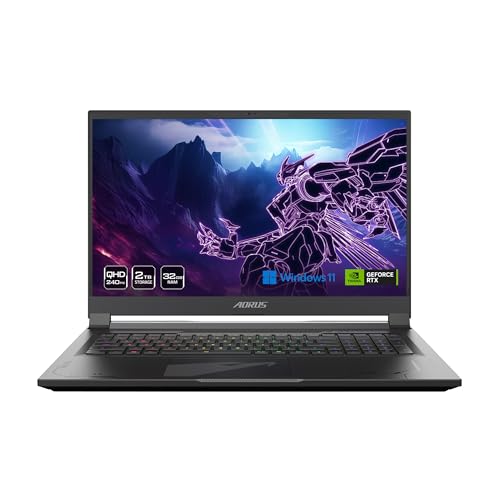 Gigabyte AORUS 17X |
| Check price on Amazon |
Key takeaways
- Five gaming laptops with Thunderbolt 4 ports, compared by graphics, display, storage and dock-ready connectivity so you can pick the right one.
Gaming laptops with Thunderbolt 4 let you connect a fast external drive, a high-refresh monitor, or a full dock through one USB-C port. The Lenovo Legion Pro 7i Gen 10 leads this list with its RTX 5080 graphics and OLED display, while the Razer Blade 16 suits buyers who want a thinner chassis with the same port. Every pick below names Thunderbolt 4 in its Amazon listing.
The real decision is not whether a gaming laptop has a USB-C port, but whether that port is Thunderbolt 4. Many gaming laptops carry USB-C ports that move data slowly or cannot drive an external monitor at full refresh, and the port label alone rarely tells you which kind you are getting. Thunderbolt 4 guarantees 40 Gbps bandwidth, support for two 4K displays or one 8K display, and charging through the same cable, which turns a laptop into a one-cable desktop when you sit down to play.
This guide is for players who dock at a desk, streamers who run capture hardware and storage off one hub, and anyone planning an external GPU or a dual-monitor setup later. Each laptop below was picked from its Amazon listing, which names Thunderbolt 4 outright rather than leaving the port type vague. Read the port notes in each pick, because two laptops can both list Thunderbolt 4 yet differ in how many ports they offer and what each one can power.
Quick Picks
As an Amazon Associate we earn from qualifying purchases
| Product | Best for | Key spec from title |
|---|---|---|
| Razer Blade 16 (2024) | Thin chassis with strong graphics | NVIDIA GeForce RTX 4070 |
| Lenovo Legion Pro 7i Gen 10 | Top-tier graphics and OLED display | NVIDIA GeForce RTX 5080, 16GB |
| ASUS ROG Zephyrus G16 | Large storage in a slim frame | 2TB PCIe NVMe SSD |
| MSI Raider GE68HX | Two Thunderbolt ports | Total Thunderbolt Ports: 2 |
| Gigabyte AORUS 17X | Big-screen desktop replacement | Thunderbolt 4 with Power Delivery |
How to Choose
Count the Thunderbolt 4 ports, not just the label
One Thunderbolt 4 port covers a dock or a single fast drive, but two ports let you run a dock and a direct-attached drive at the same time without a hub in between. The MSI Raider GE68HX on this list names two Thunderbolt ports in its spec table, while most thin laptops offer one. Check whether the listing says Thunderbolt 4 or only USB4: USB4 can match the speed, yet only Thunderbolt 4 guarantees the full feature set, including two 4K displays and wake-from-sleep behavior. If your desk setup needs a monitor, a drive, and a capture card at once, favor the laptop with more ports or budget for a powered dock.
Match the GPU to the monitor you will drive
The graphics card decides which external monitor makes sense. An RTX 4060 laptop such as the MSI Raider GE68HX pairs well with a 1440p display at high refresh, while the RTX 5080 in the Lenovo Legion Pro 7i Gen 10 is built for 4K panels and heavier creative work. Thunderbolt 4 can carry a 4K signal, yet the GPU still has to render every frame, so a weak card behind a strong port will still stutter at high resolution. Before you buy, decide the resolution and refresh of the monitor you already own or plan to add, then pick a GPU tier that can fill it.
Check charging wattage and display support
Thunderbolt 4 ports differ in how much power they deliver. The Razer Blade 16 listing notes up to 100W charging through its Thunderbolt 4 port, which tops up the battery during light work but cannot sustain full gaming load, so the main power brick still matters for long sessions. Also confirm how many displays the port can drive: the standard supports two 4K screens, yet a laptop maker can wire a port with fewer display lanes. Read the listing for the exact wording on charging wattage and display output, and treat a vague USB-C mention as a warning that the port may not do what you expect.
Weigh size, storage, and the rest of the port row
A Thunderbolt 4 port is only one part of the connection picture. The Gigabyte AORUS 17X adds Mini DisplayPort, three USB-A ports, and Ethernet beside its Thunderbolt 4 port, so a desk setup may need no dock at all, while thinner laptops lean on the single port for everything. Storage matters too: the ASUS ROG Zephyrus G16 lists a 2TB PCIe NVMe SSD, which holds a large game library without an external drive. Screen size pulls the other way — a 17-inch chassis stays put on a desk, while a 16-inch model travels more easily.
The 5 Best Options
Razer Blade 16 (2024)
- Best for: Players who want a slim 16-inch laptop with one fast Thunderbolt 4 port for docking.
- NVIDIA GeForce RTX 4070 graphics
- Intel Core i9-14900HX processor
- 1x Thunderbolt 4 (up to 100W charging)
- HDMI 2.1 and UHS-II SD card reader
Players who want a slim 16-inch laptop with one fast Thunderbolt 4 port for docking.
The single Thunderbolt 4 port means a dock handles multi-device setups; confirm it is still sold before buying.
Razer pairs an Intel Core i9-14900HX processor with NVIDIA GeForce RTX 4070 graphics in a 16-inch chassis that stays slim enough to carry every day. Its listing names one Thunderbolt 4 port with up to 100W charging, plus HDMI 2.1 and a UHS-II SD card reader, so a dock, a monitor, and camera media all connect without adapters. Wi-Fi 7 and Windows 11 Home round out a setup aimed at players who also edit video or stream. It suits buyers who want flagship build quality and a single fast port rather than a thick desktop replacement.
Lenovo Legion Pro 7i Gen 10
- Best for: High-end gaming and creative work on a 4K external monitor.
- NVIDIA GeForce RTX 5080, 16GB
- Intel Core Ultra 9 275HX, 24 cores
- 16.0″ WQXGA OLED display, 500 nits, 240Hz
- 32GB RAM, 1TB Gen 5 NVMe SSD
High-end gaming and creative work on a 4K external monitor.
Confirm the exact configuration matches the listing before ordering; confirm it is still sold before buying.
The Legion Pro 7i Gen 10 is the strongest graphics pick on this list, with an Intel Core Ultra 9 275HX processor and NVIDIA GeForce RTX 5080 graphics driving a 16-inch WQXGA OLED display at 240Hz. Its listing highlights Thunderbolt 4 for connecting peripherals, and the 32GB of RAM and 1TB Gen 5 NVMe SSD leave headroom for large games and editing projects. This is the laptop to choose when the external monitor is 4K and the workload mixes gaming with rendering or streaming.
ASUS ROG Zephyrus G16
- Best for: Players with a large game library who travel with the laptop.
- 2TB PCIe NVMe SSD
- Thunderbolt 4 (Type-C)
- HDMI 2.1, USB 3.2 Type-C, SD reader
- Headphone/microphone combo jack
Players with a large game library who travel with the laptop.
Check the graphics configuration on the listing, since the G16 ships in several tiers; confirm it is still sold before buying.
The Zephyrus G16 stands out for storage: its listing pairs a 2TB PCIe NVMe SSD with a Thunderbolt 4 Type-C port, HDMI 2.1, and an SD reader, so big game installs and fast external drives live side by side. The slim ROG chassis targets players who move between a desk and a bag, and the Thunderbolt 4 port makes the desk side a one-cable affair. It is a strong fit when the library is large and the laptop still needs to travel.
MSI Raider GE68HX
- Best for: Desk-first players who want two Thunderbolt ports for a dock plus a direct device.
- NVIDIA GeForce RTX 4060, 8GB
- Intel Core i9-13950HX processor
- 16″ Full HD+ display, 144Hz
- 32GB RAM, 1TB SSD
Desk-first players who want two Thunderbolt ports for a dock plus a direct device.
This is a 2023 model year configuration; confirm it is still sold before buying.
The Raider GE68HX is the only pick here whose spec table names two Thunderbolt ports, which frees one port for a dock while the other runs a fast drive or a second display. Its listing pairs an Intel Core i9-13950HX processor with NVIDIA GeForce RTX 4060 graphics, 32GB of RAM, and a 1TB SSD behind a 16-inch Full HD+ display at 144Hz. It suits a desk-first player who wants port flexibility without stepping up to the top graphics tier.
Gigabyte AORUS 17X
- Best for: Players who keep the laptop docked at a desk with wired networking and several peripherals.
- 1x Thunderbolt 4 (Supports Power Delivery)
- HDMI 2.1, Mini DP 1.4 (120Hz)
- 3x USB 3.2 Gen2 (Type-A), 1x RJ45
- Audio combo jack, DC in
Players who keep the laptop docked at a desk with wired networking and several peripherals.
The 17-inch frame is heavy to carry daily; confirm it is still sold before buying.
The AORUS 17X takes the desktop-replacement angle, with a 17-inch frame and the widest port row on this list. Its listing names one Thunderbolt 4 port with Power Delivery support, alongside HDMI 2.1, Mini DisplayPort 1.4, three USB 3.2 Gen2 Type-A ports, and an RJ45 Ethernet jack. That spread means a monitor, a wired network, and several peripherals can all plug in directly, with the Thunderbolt 4 port left free for a fast drive or a dock.
Which One Fits Your Situation
You dock at one desk every day
Pick the MSI Raider GE68HX. Two Thunderbolt ports let you leave a dock plugged into one while the other stays free for a fast drive or a second screen, and the RTX 4060 graphics handle 1440p gaming on the external monitor. The port count matters more here than raw graphics power, because the dock setup is the whole point.
You game and create on a 4K monitor
Pick the Lenovo Legion Pro 7i Gen 10. Its RTX 5080 graphics and OLED display are built for high-resolution play, and Thunderbolt 4 links the external 4K panel with one cable. The 32GB of RAM and 1TB Gen 5 SSD also suit editing and streaming alongside gaming, so one machine covers the full workload.
You travel and still want a dock at home
Pick the Razer Blade 16 or the ASUS ROG Zephyrus G16. Both are slim 16-inch laptops with a Thunderbolt 4 port that turns a home dock into a one-cable setup, and both travel well in a bag. Choose the Razer for its 100W Thunderbolt charging and SD reader, or the Zephyrus when the 2TB SSD matters more than anything else.
You want a laptop that never leaves the desk
Pick the Gigabyte AORUS 17X. Its 17-inch frame and full port row — Thunderbolt 4, HDMI 2.1, Mini DisplayPort, three USB-A ports, and Ethernet — cover a multi-monitor desk without a dock. The size is a drawback only if the laptop has to move, which it rarely does in this setup.
Common Mistakes
- Assuming every USB-C port is Thunderbolt 4 — check the listing for the exact words, since many gaming laptops ship USB-C ports with slower speeds or no display output.
- Buying a Thunderbolt 4 laptop for a 4K monitor without checking the GPU — the port can carry the signal, but a weaker card still struggles at high resolution.
- Forgetting that Thunderbolt charging may not cover gaming load — the Razer Blade 16 listing notes up to 100W, which suits light work, not full-power play.
- Skipping the port count — one Thunderbolt 4 port plus a hub works, yet two ports keep a dock and a drive connected at once.
- Ignoring the rest of the port row — Ethernet, HDMI, and USB-A ports can remove the need for a dock entirely.
Frequently Asked Questions
Is Thunderbolt 4 the same as USB-C?
No. USB-C describes the shape of the connector, while Thunderbolt 4 is a standard that guarantees 40 Gbps bandwidth, support for two 4K displays, and charging through the same port. A laptop can have a USB-C port without Thunderbolt 4, so always check that the listing names Thunderbolt 4 outright before you buy.
Can Thunderbolt 4 run an external GPU?
Yes, in principle. Thunderbolt 4 supplies 40 Gbps, which is enough for an external GPU enclosure to drive a monitor, though the link is slower than an internal slot, so some graphics performance is lost. Check that the laptop listing names Thunderbolt 4 and that the enclosure supports your card before pairing them.
Do I need a Thunderbolt 4 dock, or will any USB-C dock work?
A USB-C dock works for basic monitors and peripherals, but only a Thunderbolt 4 dock uses the full 40 Gbps link for fast drives, dual 4K displays, and higher charging. If you already own a USB-C dock, it will still connect — you simply will not get the top speeds the port allows.
How many Thunderbolt 4 ports should a gaming laptop have?
One port is enough when a single dock handles everything, which suits most desk setups. Two ports help when you want a dock and a fast drive or a second display connected directly at the same time. The MSI Raider GE68HX on this list names two Thunderbolt ports, while the other picks offer one.
More from Amazon
Programs that pair well with the guide above. Offers and eligibility are set by Amazon and may change.
Free shipping on eligible items, Prime Video and more. Eligible new members can start with a free trial.
Start a Prime free trialAd-free music streaming. Eligible new subscribers can start with a free trial.
Try Music Unlimited freeA Prime membership for ages 18-24 with a trial period. Eligibility is set by Amazon.
See Prime for Young AdultsAudiobooks and podcasts to listen to on the go. Eligible new members can start with a free trial.
Try Audible freeAs an Amazon Associate we earn from qualifying purchases.










Write Your Review
No reviews yet. Be the first to share your experience!