

Key takeaways
- The best dual extruder 3D printers for two-color and two-material prints, compared by build volume, nozzle heat, and auto leveling before you buy.
A dual extruder 3D printer carries two filaments into a single print. That second filament can be a second color, a second material, or a support material that washes away in water, which opens up parts that a single-nozzle machine cannot make in one pass. The two main designs are IDEX, where two independent heads move on separate carriages, and a single nozzle fed by two filaments. IDEX machines can also run duplicate mode, printing two copies of one part at the same time, or mirror mode, printing a left and a right copy together.

The dual extruder shelf on Amazon US is thin in 2026. Many of the best-known IDEX machines now sell direct from the maker, and several older models have left Amazon US shelves. Two familiar names stay out of this guide: the Snapmaker J1s, which US retailers now list as discontinued or unavailable, and the base Tenlog TL-D3 Pro, whose listing shows no buying option. The Bambu Lab H2D, a dual-nozzle machine, sells through the maker’s own store and did not surface with a verified Amazon US listing in this check. What remains are three machines with live Amazon US listings and a stated dual extruder design, each checked against its listing and recent stock signals. This guide compares them by build volume, nozzle heat, bed, auto leveling, and enclosure, so you can match the machine to the parts you plan to print.
What to Look for
IDEX or single nozzle
An IDEX machine gives each filament its own head and carriage. One head can sit parked while the other prints, so the idle nozzle cannot drip onto the part, and duplicate mode doubles output for small parts. A single nozzle fed by two filaments costs less and wastes less hardware, but the nozzle must purge between colors, which adds time and waste, and it cannot print two parts at once. If you want clean two-material parts or two copies at once, IDEX is the stronger design.
Build volume in each mode
Read the build volume twice. IDEX machines quote a full volume for one head and a smaller volume for duplicate and mirror modes, because each head needs its own half of the bed. The FlashForge in this guide drops from 200 mm wide to 95 mm in duplicate mode, so check the mode you will actually use before you judge a machine by its headline volume.
Nozzle heat and materials
Nozzle heat sets the materials you can print. A 240°C ceiling covers PLA, PETG, ABS, HIPS, and PVA support, which is enough for most two-color and two-material work. A 300°C ceiling adds nylon and other high-heat filaments. Soluble PVA support needs a machine that holds its heat steady and a dry spool, since PVA absorbs moisture from the air and prints poorly once it has sat open on a shelf.
Enclosure
An enclosed machine holds warm air around the part, which keeps ABS and ASA from warping and lifting at the corners. An open frame works well for PLA and PETG and runs cooler, which suits long PLA prints. If ABS is a regular material for you, pick the enclosed machine.
Auto leveling and bed
Auto leveling maps the bed before each print and adjusts the first layer as it goes, which matters more with two nozzles, since both must sit at the same height above the bed. A glass bed gives a flat, smooth first layer; a magnetic PEI sheet releases parts with a flex and grips well when hot. Check whether the bed is glass, PEI, or magnetic before you order, since each one suits different filaments.
Direct drive or Bowden
Direct drive puts the extruder motor on the head, which grips flexible filament like TPU with more control. Bowden feeds filament through a tube from a motor on the frame, which lightens the head and suits fast moves, but it struggles with soft filaments. For TPU supports or flexible parts, direct drive is the safer pick.
Runout sensor and resume
A filament runout sensor pauses the print when a spool runs dry, and resume after power loss picks the print up where it stopped. Both matter on long two-material prints, where a failed print wastes two spools instead of one.
Slicer support
Check that your slicer handles two extruders well. Cura, PrusaSlicer, and OrcaSlicer all support dual extrusion, with prime towers, ooze shields, and per-extruder settings. A machine with a ready profile in one of those slicers saves hours of tuning.
FlashForge Creator Pro 2
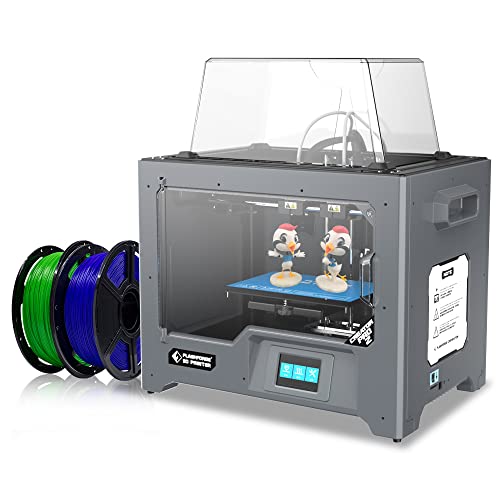
The FlashForge Creator Pro 2 is the classic IDEX machine in this guide, and the only enclosed pick. Its independent dual extruder system runs four print modes: mirror mode for left and right copies, duplicate mode for two copies of one part, soluble support mode for complex shapes with PVA supports, and multi-material mode for two different materials in one object. The metal frame and acrylic covers hold warm air around the part, which suits ABS printing, and the 3.5 inch touchscreen keeps controls visible while a print runs.
The listing states two extruders with 0.4 mm nozzles, a nozzle ceiling of 240°C, a heated platform up to 120°C, and a build volume of 200 x 148 x 150 mm. That volume shrinks in the twin-head modes: duplicate mode gives 95 x 148 x 150 mm and mirror mode gives 80 x 148 x 150 mm. Supported filaments are PLA, Pearl PLA, PVA, ABS, ABS Pro, and HIPS. The box holds two free spools of PLA filament, two spool holders, spare platform stickers, and a tool bag, so the machine is ready to run once the small assembly is done. The listing states a print speed of 10 to 100 mm/s and a net weight of 14.8 kg.
This is the smallest build volume in the guide, and the 240°C nozzle ceiling rules out nylon and polycarbonate, so check your material list before you order. No auto leveling is stated in the listing, so expect to level the bed by hand. The Creator Pro 2 launched in 2020, which makes it the oldest design here, but its enclosed frame and four print modes still cover the core dual extrusion jobs. Confirm the exact model FFCP2 on the live listing.
Sovol SV04
The Sovol SV04 is the large-format IDEX pick in this guide, with the biggest build volume of the three at 300 x 300 x 400 mm. Its two independent direct drive metal extruders run four printing modes: single, dual, copy, and mirror. That means one head can print the part while the other prints supports, or both heads can print two copies of one part at the same time. The listing states a 32-bit silent motherboard and auto leveling, which helps when two nozzles must share one bed height.
Direct drive suits flexible filament better than a Bowden feed, since the motor sits on the head and grips the filament close to the nozzle. The open frame keeps the machine simple to watch and service, and the large bed suits tall parts and batch runs of small parts in duplicate mode. The listing states the model SV-SV04.
Two flags need a live check before ordering. The freshest Amazon-tied evidence for a new unit is thin: one tracker shows a used unit only, and a direct open of the listing was blocked, so confirm that the listing shows a buying option for a new unit and the exact model SV-SV04. Speed figures also differ across sources, so no speed figure is claimed here. With those checks done, the SV04 is the pick for buyers who need the largest bed and true IDEX duplication.
LNL3D Vulcan
The LNL3D Vulcan is an upgraded take on the Tenlog TL-D3 Pro base, built by LNL with auto leveling added. Its two BMG extruders feed two independent heads, with a nozzle ceiling of 300°C, a TMC2209 silent mainboard, and a 600W power supply. The build volume is 295 x 300 x 320 mm, which sits between the FlashForge and the Sovol in this guide, and the high nozzle ceiling opens up nylon and other high-heat filaments that the 240°C FlashForge cannot run.
The Vulcan shares its Tenlog base with the TL-D3 Pro, so buyers should confirm they are looking at the LNL upgraded version with auto leveling, not the base Tenlog listing, and confirm the exact code B095RWJ5LW on the live listing. Evidence for this listing rests on mirrors only, with one mirror showing it in stock from the US store and another showing a sibling variant out of stock, so check the live listing for a buying option before ordering. The open frame suits PLA and PETG, while ABS work needs a warm, draft-free corner and care with bed adhesion. For buyers who want the highest nozzle heat in this guide with auto leveling included, the Vulcan is the pick.
Comparison Table
| Printer | Extruder design | Build volume (mm) | Nozzle ceiling | Bed | Auto leveling | Enclosure |
|---|---|---|---|---|---|---|
| FlashForge Creator Pro 2 | IDEX, two heads | 200 x 148 x 150 | 240°C | Heated alloy, 120°C | Not stated | Yes, acrylic covers |
| Sovol SV04 | IDEX, two heads | 300 x 300 x 400 | Not stated | Heated | Yes | No |
| LNL3D Vulcan | IDEX, two heads | 295 x 300 x 320 | 300°C | Heated | Yes | No |
Frequently Asked Questions
What is the difference between IDEX and a single-nozzle dual-feed printer?
IDEX gives each filament its own head on its own carriage, so one head can park while the other prints, and both heads can print at once in duplicate or mirror mode. A single-nozzle dual-feed printer pushes two filaments through one nozzle and must purge between colors, which adds time and waste, and it cannot print two parts at once. IDEX costs more and needs more tuning, since both nozzles must sit at the same height, but it gives cleaner two-material parts and doubles output for small parts.
Can a dual extruder printer print soluble supports?
Yes. One head prints the part in PLA or ABS while the other prints supports in PVA, which dissolves in water after the print finishes. That leaves clean overhangs and inner channels with no support marks to clean up by hand. Keep PVA dry: it absorbs moisture from the air, so store the spool sealed with desiccant and dry it before a long print. A direct drive head handles PVA better than a Bowden feed, since the soft filament has a shorter path to the nozzle.
Do I need an enclosed printer for ABS with two extruders?
An enclosure helps a lot. It holds warm air around the part, which keeps ABS and ASA from warping and lifting at the corners, and that matters more with two materials, since each one cools and shrinks at its own rate. An open frame can still print ABS with care: use a brim, keep the room warm and free of drafts, and let the bed heat soak before the first layer. If ABS is a main material for you rather than an occasional one, pick the enclosed machine.
How to Choose
Match build volume to your largest part, and check the volume in the mode you will actually use, since duplicate and mirror modes shrink the usable width on IDEX machines. If you only want two colors, any of the three machines here works, and IDEX gives cleaner color changes than a single nozzle. If you want two materials with soluble supports, pick a machine with a 240°C or higher ceiling and a direct drive head. If ABS or ASA is a regular material, pick the enclosed FlashForge Creator Pro 2. If you print large parts or batches of small parts, the Sovol SV04 has the largest bed in this guide, with the LNL3D Vulcan close behind and the highest nozzle ceiling of the three.
Measure your desk before ordering: the Creator Pro 2 is the most compact at 14.8 kg, while the SV04 is the largest and heaviest of the three. Check slicer support as well: Cura, PrusaSlicer, and OrcaSlicer all handle dual extrusion, and a ready profile for your machine saves hours of tuning. Finally, confirm the exact listing code before ordering — B08GJ44T6Q for the Creator Pro 2, B0CKL3XFZ4 for the SV04, and B095RWJ5LW for the Vulcan — and check that the listing shows a buying option for a new unit, since stock on dual extruder machines moves slowly and older listings can sit with no buying option.
Disclosure: As an Amazon Associate, we may earn a commission from qualifying purchases made through links in this article, at no additional cost to you.
More from Amazon
Programs that pair well with the guide above. Offers and eligibility are set by Amazon and may change.
Free shipping on eligible items, Prime Video and more. Eligible new members can start with a free trial.
Start a Prime free trialAd-free music streaming. Eligible new subscribers can start with a free trial.
Try Music Unlimited freeA Prime membership for ages 18-24 with a trial period. Eligibility is set by Amazon.
See Prime for Young AdultsAudiobooks and podcasts to listen to on the go. Eligible new members can start with a free trial.
Try Audible freeAs an Amazon Associate we earn from qualifying purchases.
Write Your Review
No reviews yet. Be the first to share your experience!