
Key takeaways
- Five 144Hz-plus QHD gaming monitors in the mainstream price tier, compared by panel, refresh rate, response time, sync and stand from listing specs.
As an Amazon Associate we earn from qualifying purchases.
Affiliate disclosure: This article contains affiliate links. If you buy through a link on this page, the site may earn a commission at no extra cost to you. Product selections are based on published specifications and listing information, not on commissions.

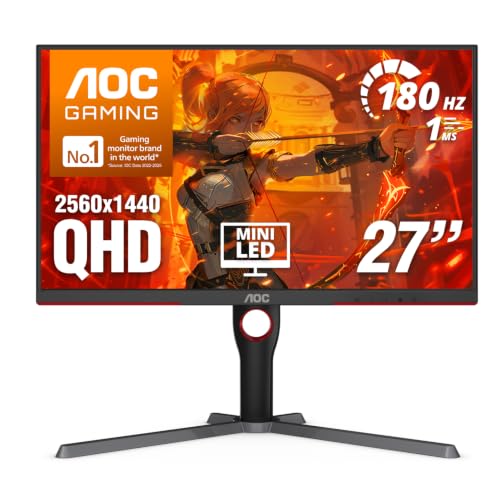
A 144Hz monitor is the point where PC gaming stops feeling like it is being held back by the display. Compared with a standard 60Hz screen, a 144Hz panel can draw more than twice as many frames per second, so camera pans stay readable, targets are easier to track, and input feels more directly connected to what happens on screen. The good news is that this tier is no longer a premium purchase. In the mainstream price bracket covered here, you can now get a 27-inch QHD panel — sharper than 1080p, easier for a mid-range graphics card to drive than 4K — running at 144Hz or faster, with adaptive sync and a low response-time rating as standard.
All five picks below are 27-inch, 2560 x 1440 gaming monitors that meet or beat 144Hz according to their listings. That shared baseline is deliberate: it keeps the comparison honest, so the differences that decide your purchase are the ones that actually matter — panel type, how far past 144Hz each screen goes, HDR hardware, stand adjustment, and extra features such as a KVM switch. Every specification in this guide comes from published listing and manufacturer information, and the final price and stock position should always be confirmed on the listing itself, because monitor pricing in this tier moves frequently.
Quick Comparison
| Pick | Panel | Resolution | Refresh rate | Response time | Adaptive sync | Standout feature |
|---|---|---|---|---|---|---|
| LG UltraGear 27GN800-B | 27-inch IPS | 2560 x 1440 | 144Hz | 1ms GtG | FreeSync Premium, G-SYNC Compatible | The straightforward 144Hz benchmark |
| ASUS TUF Gaming VG27AQ | 27-inch IPS | 2560 x 1440 | 165Hz | 1ms MPRT | G-SYNC Compatible | ELMB Sync motion-blur reduction |
| Gigabyte M27Q | 27-inch SS IPS | 2560 x 1440 | 165Hz, 170Hz overclocked | 0.5ms MPRT | FreeSync Premium | Built-in KVM switch and USB-C |
| Samsung Odyssey G5 | 27-inch VA, 1000R curved | 2560 x 1440 | 144Hz | 1ms as listed | FreeSync Premium | Curved VA contrast for immersion |
| AOC Q27G3XMN | 27-inch VA, Mini-LED | 2560 x 1440 | 180Hz | 1ms GtG | Adaptive-Sync | Mini-LED backlight, DisplayHDR 1000 |
How we chose these monitors
The first filter was refresh rate with evidence: each monitor had to show 144Hz or higher in its listing, not in a marketing nickname. The second filter was resolution. At 27 inches, QHD is the sweet spot for this budget — text stays crisp, games look noticeably sharper than at 1080p, and a mainstream graphics card can still push high frame rates in most titles with sensible settings. The third filter was value in this specific price tier: models whose current listings sit clearly above this bracket were left out, even when their specifications were attractive, because a recommendation you cannot buy within the stated budget is not a recommendation at all.
Panel variety was the final consideration. IPS panels dominate this list because they combine fast response with wide viewing angles and reliable color. But two VA-based picks earn their places for different reasons: the Samsung for curved, high-contrast immersion, and the AOC for a Mini-LED backlight that no IPS model here can match for HDR.
Best straightforward 144Hz pick: LG UltraGear 27GN800-B
The LG UltraGear 27GN800-B on Amazon is the monitor this category is named after: a 27-inch IPS panel at 2560 x 1440 running at exactly 144Hz, with a 1ms GtG response time as listed. If you want the classic high-refresh upgrade without paying for refresh headroom you may never use, this is the cleanest expression of it.
LG lists HDR10 support and 99 percent sRGB coverage for the panel, which makes it a comfortable screen for everyday work and media as well as games. Adaptive sync is covered on both sides, with AMD FreeSync Premium and NVIDIA G-SYNC Compatible certification in the listing, so screen tearing is handled whether your graphics card is from AMD or NVIDIA. Connectivity is standard for the class: two HDMI ports and one DisplayPort, plus a headphone output.
The compromises are equally clear from the specifications. The stand offers tilt adjustment only, so if you need height adjustment you will want a VESA monitor arm — the panel is VESA-mountable, which keeps that option open. There are no built-in speakers and no USB hub. None of that undermines the core proposition: 144Hz, QHD, IPS, and dual adaptive-sync support in a mainstream price tier. For a first high-refresh monitor, or a second screen for a dual-monitor desk, the 27GN800-B is the low-risk choice.
Choose this one if: you want exactly what the category promises — a proven 144Hz QHD IPS panel — and your desk setup does not depend on an adjustable stand.
Best for motion clarity features: ASUS TUF Gaming VG27AQ
The ASUS TUF Gaming VG27AQ on Amazon steps past the baseline with a 27-inch IPS QHD panel rated at 165Hz, which the listing notes also supports 144Hz operation. Its headline technology is ELMB Sync, ASUS’s Extreme Low Motion Blur Sync, which is designed to run motion-blur reduction together with adaptive sync rather than forcing you to choose between them.
A specification detail matters here: the VG27AQ’s 1ms figure is an MPRT rating, measured with the backlight strobing, not a GtG rating like the LG above. MPRT and GtG numbers are not directly comparable, so do not rank these monitors by that single digit. What you can take from the listing is that ASUS built this model around motion clarity, with G-SYNC Compatible adaptive sync for tear-free play.
The rest of the package is practical. The listing includes built-in speakers — modest, but useful for calls and casual video — and an ergonomic stand with height, tilt, swivel and pivot adjustment, which is a genuine step up from tilt-only designs. Connectivity covers DisplayPort and HDMI, and the panel is VESA-mountable. HDR support is listed as HDR10, though as with most monitors in this tier, treat HDR as a compatibility feature rather than a reason to buy; the panel’s brightness class is built for SDR gaming first.
Choose this one if: fast-paced shooters and racers are your main games, you value motion-clarity features and a fully adjustable stand, and you want refresh headroom above 144Hz without leaving the mainstream tier.
Best for gaming plus a work laptop: Gigabyte M27Q
The Gigabyte M27Q on Amazon is the most versatile monitor in this roundup. Its 27-inch Super Speed IPS panel runs at 2560 x 1440 with a 165Hz refresh rate that overclocks to 170Hz, and a 0.5ms MPRT response time as listed — again, an MPRT figure, so compare it with the ASUS on that basis, not with GtG ratings. FreeSync Premium handles adaptive sync, and the listing cites 92 percent DCI-P3 coverage with HDR readiness, giving it the widest color gamut claim among the IPS picks here.
What separates the M27Q is everything around the panel. It includes a built-in KVM switch, so one keyboard and mouse can control both a gaming PC and a second machine, and it offers USB-C connectivity with DisplayPort alt mode alongside DisplayPort 1.2, two HDMI 2.0 ports and a USB 3.0 hub. For a desk that doubles as a home office, that removes a separate dock or switch from the shopping list. The stand adjusts for height and tilt, and the on-screen display includes gaming tools such as a frame-rate counter and crosshair overlay, per the manufacturer’s materials.
The trade-offs are minor and mostly about expectations: the top refresh rate requires the overclock setting, and its HDR support is in the entry-level class common to this tier. Neither dents the value of a QHD panel that can anchor both a gaming rig and a work laptop.
Choose this one if: your monitor has to serve a gaming PC and a laptop, and you want KVM switching, USB-C and the fastest IPS refresh rate in this group.
Best for curved immersion: Samsung Odyssey G5
The Samsung Odyssey G5 on Amazon (model LC27G55TQWNXZA) takes the opposite approach to the IPS picks. Its 27-inch VA panel is curved at 1000R — a pronounced curve that wraps the edges of the image toward you — and runs at 2560 x 1440 and 144Hz with a 1ms response time as listed, plus FreeSync Premium and HDR10 support.
VA technology is the reason to pick it. A VA panel delivers deeper blacks and higher native contrast than the IPS models here, which suits atmospheric, story-driven games, racing titles and flight sims where dark scenes carry the mood. The curve reinforces that immersion at this size, filling more of your peripheral view than a flat panel does. Connectivity is DisplayPort and HDMI, as expected in this tier.
The compromises follow from the same technology. VA panels in this class can show more smearing in dark, fast-moving scenes than fast IPS panels, so dedicated competitive players are usually better served by the LG, ASUS or Gigabyte above. The stand is tilt-focused, so plan on the VESA mount if you need height adjustment. Judged on its own terms — cinematic single-player gaming on a mainstream budget — the Odyssey G5 offers a viewing experience none of the flat IPS picks replicate.
Choose this one if: contrast and immersion matter more to you than the last word in competitive motion clarity, and a curved screen appeals to you.
Best HDR hardware: AOC Q27G3XMN
The AOC Q27G3XMN on Amazon is the specification outlier of this group, in a good way. It pairs a 27-inch VA panel at 2560 x 1440 with a Mini-LED backlight using 336 local dimming zones, which supports a VESA DisplayHDR 1000 certification — a level of HDR hardware that is rare in this price tier, where most monitors offer HDR in name only. Its refresh rate is the highest here at 180Hz, with a 1ms GtG response time as listed and Adaptive-Sync support.
Local dimming is what makes that HDR rating meaningful: the backlight can brighten and darken in zones, so bright highlights and dark shadows can coexist in the same scene with far more contrast than an edge-lit panel can manage. For games and video with real HDR presentation, the Q27G3XMN is the only pick here built for it. Everyday specifications are solid too, with HDMI 2.0 and DisplayPort 1.4 inputs and a height-adjustable stand.
Set expectations in two places. As a VA panel, it shares the technology’s typical motion character in dark scenes, even with its fast GtG rating. And local dimming can produce some blooming around small bright objects on dark backgrounds — an inherent trait of zone-based backlights, not a defect. If HDR gaming is your priority in this budget, those are reasonable trades for hardware the other picks simply do not have.
Choose this one if: you play HDR titles or watch HDR video and want genuine local-dimming hardware, with the bonus of the highest refresh rate in this roundup.
Buying guide: what to check before you order
Match the monitor to your graphics card
A 144Hz QHD monitor only shows its advantage if your PC can produce frame rates to match. Esports and older titles reach high frame rates at 1440p on modest hardware, but demanding modern games may need reduced settings. Adaptive sync — FreeSync Premium, G-SYNC Compatible or Adaptive-Sync, all represented above — smooths the experience when frame rates fluctuate below the maximum, which is why it is effectively mandatory in this category. Check that your graphics card supports the sync standard your chosen monitor lists; in practice, most current cards work with most of these monitors over DisplayPort.
Use the right cable and port
High refresh rates at QHD generally require DisplayPort, or the specific HDMI version and settings a listing describes. Some monitors reach their top rate only over one input, and some reach their headline figure only with an overclock enabled in the on-screen menu — the Gigabyte above is an example. When your monitor arrives, set the refresh rate explicitly in your operating system’s display settings; a new high-refresh monitor commonly defaults to 60Hz until you change it.
Read response-time labels carefully
This roundup includes 1ms GtG, 1ms MPRT and 0.5ms MPRT figures, and they are not interchangeable. GtG measures pixel color transitions; MPRT measures perceived blur with backlight techniques. A smaller MPRT number does not automatically mean a faster panel than a 1ms GtG model. Use response time as a rough class indicator, and weigh panel type and refresh rate more heavily.
Do not pay for HDR labels alone
HDR10 support on an entry-level panel means the monitor can accept an HDR signal, not that it can display it with real impact. Brightness capability and local dimming decide that. In this group, only the AOC’s Mini-LED backlight and DisplayHDR 1000 certification describe substantial HDR hardware; treat the other picks as excellent SDR gaming monitors that also accept HDR input.
Plan the desk, not just the panel
Tilt-only stands are common in this tier. If you share a desk, sit high or low, or plan a multi-monitor layout, either choose a pick with height adjustment — the ASUS, Gigabyte and AOC here — or budget for a VESA arm, which every pick here supports. Also check port counts against your devices: consoles, a second PC or a laptop can quickly consume the two or three video inputs these monitors provide.
FAQ
Is 144Hz noticeably better than 60Hz for gaming?
Yes, for most players it is the single most felt upgrade in this category. Motion is smoother, panning the camera in a shooter or racer keeps the scene readable, and the delay between input and on-screen response shrinks. The benefit is largest in fast-paced games, but even desktop scrolling and strategy games feel more fluid. You do need frame rates to match, which is why pairing the monitor with adaptive sync and a capable graphics card matters.
Should I choose 144Hz, 165Hz or 180Hz?
Treat 144Hz as the threshold and anything above it as headroom. The step from 144Hz to 165Hz or 180Hz is real but smaller than the step from 60Hz to 144Hz, and it only appears when your PC can sustain those frame rates. In this roundup, the higher rates cost nothing extra to have — the ASUS, Gigabyte and AOC include them at the same tier — so choose on panel type, features and stand first, and let refresh rate break ties.
IPS or VA: which panel is better at this price?
IPS is the safer all-round choice: wide viewing angles, consistent color and fast response, which is why three of the five picks use it. VA earns its place when contrast is the priority — darker blacks for atmospheric games — or, in the AOC’s case, when it carries Mini-LED local dimming for HDR. VA’s weakness is smearing in dark, fast motion. Your game library should decide: competitive and mixed use points to IPS; cinematic single-player points to VA.
Can consoles use these 144Hz monitors?
Current consoles typically target up to 120Hz output, and several picks here note console support at QHD within their listings — the Gigabyte and Dell-class specifications in this segment commonly cite 120Hz at QHD over HDMI for compatible consoles. A 144Hz monitor will accept that signal happily; you simply will not use its full PC refresh rate from a console. Check the specific listing for the HDMI refresh limits of the model you choose.
Why are all the picks 27-inch QHD models?
Because at this budget, that combination is where the value concentrates. A 27-inch QHD panel is sharp enough that individual pixels disappear at a normal desk distance, large enough to feel like an upgrade, and light enough on the graphics card to sustain high frame rates. Smaller 1080p esports panels and larger 4K panels both exist in adjacent tiers, but they answer different questions — maximum frame rate at any cost, or maximum resolution — rather than the balanced one this category asks.
The short version
If you want the classic upgrade with no complications, take the LG UltraGear 27GN800-B. If motion-clarity features and a proper ergonomic stand matter, take the ASUS TUF Gaming VG27AQ. If the monitor must also run your work laptop, the Gigabyte M27Q and its KVM are the practical winner. For curved, high-contrast immersion, choose the Samsung Odyssey G5, and for the only genuine HDR hardware in the tier, choose the AOC Q27G3XMN. Every one of them clears 144Hz at QHD within a mainstream budget — the decision is about which strength you will use every day.
More from Amazon
Programs that pair well with the guide above. Offers and eligibility are set by Amazon and may change.
Free shipping on eligible items, Prime Video and more. Eligible new members can start with a free trial.
Start a Prime free trialAd-free music streaming. Eligible new subscribers can start with a free trial.
Try Music Unlimited freeA Prime membership for ages 18-24 with a trial period. Eligibility is set by Amazon.
See Prime for Young AdultsAudiobooks and podcasts to listen to on the go. Eligible new members can start with a free trial.
Try Audible freeAs an Amazon Associate we earn from qualifying purchases.










Write Your Review
No reviews yet. Be the first to share your experience!