
Our Short List of 3
All 4 Picks at a Glance
| Product | Specs | Action |
|---|---|---|
 Kqcibz Analyzer LPC Debug Card Kit (J04) | Check price on Amazon | |
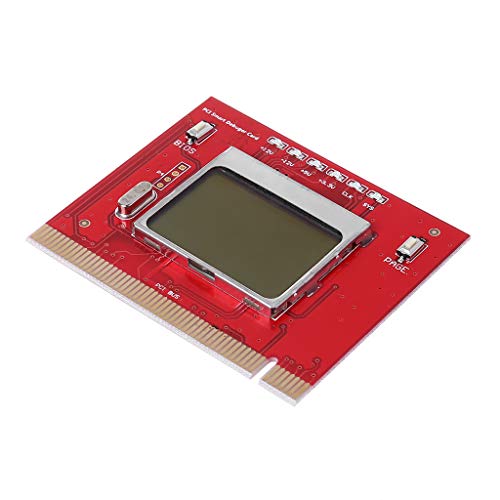 JAGTRADE PCI Motherboard Analyzer Diagnostic Tester | Check price on Amazon | |
 JAGTRADE 4 Digit Code PCI Motherboard Analyzer | Check price on Amazon | |
 JAGTRADE PCI & ISA Motherboard Tester Diagnostics Display | Check price on Amazon |
Key takeaways
- A motherboard POST card buying guide for PC builders and repair benches: 4-digit code displays, PCI and LPC interfaces and what the codes tell you.
A desktop that powers on but never shows a picture is one of the most frustrating faults on a repair bench. The fans spin, the drives light up, and yet the board gives you almost nothing to work with, especially now that many motherboards have dropped the old speaker beep codes. A POST card attacks that problem directly: it plugs into an expansion slot or a debug header and displays the checkpoint codes the BIOS works through during its power-on self-test. When the boot stalls, the last code tells you which stage the board reached, and that narrows the search considerably.
This guide covers five slot-in diagnostic cards for desktop motherboards, spanning the PCI, LPC and ISA interfaces found on boards from the last two decades. Three of the five picks come from a single brand family, JAGTRADE, because this is a commodity corner of the market where verifiable listings concentrate in a handful of no-name sellers. The value of a POST card lies in matching the interface to your board and reading the codes correctly, so the guide spends as much time on choosing and interpreting as on the cards themselves.
As an Amazon Associate, we earn from qualifying purchases.
Quick Answer
A motherboard POST card displays the checkpoint codes a BIOS steps through at startup, so a no-boot fault can be narrowed to the stage where the board stopped. Choose by interface first: PCI for older desktops, LPC for boards with a debug header, and PCI with ISA for retro hardware. The codes are BIOS-vendor specific, so read them against the board maker’s table.
GINTOOYUN PC Diagnostic 4-Digit Card (zbc-105)
The GINTOOYUN zbc-105 is the straightforward starting point in this group: a PCI card with a 4-digit display that shows the current and previous POST codes as the board works through its self-test. Having two code positions on screen matters, because the code before the stall tells you which test had just completed, and the stalled code tells you where the sequence broke down.
The card carries UPC 723508510399, also printed as 723508506866 on some packaging — worth checking when ordering, because this class is full of near-identical listings. Keep expectations aligned with the confirmed specification: this is a PCI card, with nothing extending it to PCI-E or LPC headers, so it belongs with boards that actually carry a PCI slot. Within that scope it is a clean, single-purpose tool for builders who want the classic slot-in card without kit extras.
| Brand | Product | ASIN | Key specs |
|---|---|---|---|
| GINTOOYUN | PC Diagnostic 4-Digit Card (zbc-105) | B08QRCDR9D | PCI interface; 4-digit POST code display; UPC 723508510399 |
Kqcibz Analyzer LPC Debug Card Kit (J04)
The Kqcibz analyzer card takes the other main route into a modern board: the LPC debug interface. Many recent motherboards have dropped both the PCI slot and the onboard debug display, yet still expose an LPC header for service tools. This card follows the TL631 Pro-style analyzer layout and is sold as a kit, identified by the kit code J04, suiting bench work where the card connects to a header rather than sitting in a slot.
Because it works through LPC, this is the pick aimed at newer boards that the PCI cards in this guide cannot plug into. That distinction is the whole decision: if your board has a documented LPC debug header, a card like this is the appropriate tool, and if it does not, no adapter claim should talk you into it. Treat it as a header-based analyzer for compatible boards, and confirm your board’s header pinout against the board maker’s documentation before ordering.
JAGTRADE PCI Motherboard Analyzer Diagnostic Tester
The first of the three JAGTRADE cards is a plain PCI motherboard analyzer and diagnostic tester, and its role is the basic one: slot it into a PCI slot, power the board, and watch the boot sequence from the card instead of guessing from fan behaviour. Cards of this type are the workhorses of small repair shops servicing the large installed base of PCI-era desktops.
The confirmed specification is plain: it is a PCI analyzer card, full stop. It will not help with a board that lacks a PCI slot, and it should be bought as a general bench tool for PCI systems rather than a match for one specific machine. If your boards are newer, the LPC pick above is the relevant one.
JAGTRADE 4 Digit Code PCI Motherboard Analyzer
The second JAGTRADE card pairs the PCI interface with a 4-digit code display, making it the closer equivalent to the GINTOOYUN pick for builders who prefer this seller’s version of the same idea. The 4-digit format shows the current checkpoint alongside the preceding one, and that pairing turns a frozen display into usable evidence: you see the last test the board passed and the point where the sequence stopped, rather than a single code with no context.
The card itself is compact, at approximately 55 x 48 x 15 mm per the listing copy, which helps on crowded test benches and in smaller cases. Beyond the display and dimensions, the confirmed specification stays modest, so judge this pick on the two things that matter for a PCI code card: that it fits the slot your board offers and that its display shows the code pair. The display is the reason to pick it over the plainer analyzer above.
JAGTRADE PCI & ISA Motherboard Tester Diagnostics Display
The third JAGTRADE card is the retro specialist of the five. Alongside PCI, it supports the ISA bus, and that second interface is its honest distinction: ISA slots disappeared from mainstream boards long ago, so anyone maintaining or restoring genuinely old hardware has few diagnostic options, and a card that still speaks ISA fills a real gap. The 4-digit diagnostics display offers a dual hex readout per the listing copy.
This pick also carries the extras the listing confirms: a built-in speaker and +5V, +12V and +3.3V indicators. The voltage indicators are genuinely useful, because a board that never reaches its first checkpoint may have a power delivery problem rather than a component fault, and the rail lights show that at a glance. None of that makes it the right buy for a modern system — there is no confirmed LPC or PCI-E support here — but for a bench that keeps ISA and early PCI machines alive, it is the most complete card in this guide.
How to Choose
Interface comes first, and it is not a preference — it is dictated by the board in front of you. A POST card only reports codes on a bus it can physically connect to, so check what your motherboard offers before anything else. Conventional PCI slots cover a long run of desktop boards and remain the most common fit. PCI-E slots look similar but are a different interface, and none of the cards in this guide claims PCI-E support, so do not assume a PCI card belongs in a PCI-E slot. Newer boards increasingly expose an LPC debug header instead, while ISA belongs to retro hardware.
Display format is the second decision. A 4-digit display showing the current code alongside the previous one is more informative than a 2-digit readout, because a stall is defined by where the sequence stopped relative to what it had just completed. Voltage indicators and a built-in speaker are secondary but practical: rail indicators can separate a power problem from a logic problem before any code appears.
The third point is interpretation, where buyers most often go wrong. POST codes are defined by the BIOS vendor, not by the card, and the AMI, Award and Phoenix tables differ, so the same hex code can point to different stages on different boards. Always read a code against the table for the BIOS fitted to the board, ideally from the board maker’s own manual. Treat any generic bundled code chart as a starting hint rather than an authority.
Finally, set the right expectation. A POST card narrows a no-boot fault to a boot stage; it does not identify the failed component by itself. A stall at a memory stage tells you where to look next — reseating modules, trying one stick — but the follow-up troubleshooting is still yours.
Who Should Skip
Skip this whole category if your motherboard already has an onboard debug display or diagnostic LEDs you actually use, since the card would only duplicate them. Skip it, too, if you work only on laptops: these are desktop slot and header tools, and nothing here is a laptop diagnostic solution.
Also skip if you are hoping a card will name the faulty part for you. It reports where the boot sequence stopped, and turning that into a repair still takes interpretation and part swapping. If you build one PC every few years and it has always booted, a POST card will sit in a drawer. And if your only systems are current boards with no PCI slot and no documented LPC header, none of these five cards can connect to them at all.
FAQ
What does a POST card actually tell you?
It displays the checkpoint codes the BIOS issues as it runs its power-on self-test, in order. When a board fails to boot, the display freezes at the last code reached, showing the stage where the sequence stopped — for example, before, during or after memory initialisation. That is a starting point for troubleshooting, not a complete diagnosis.
Will one of these cards work with every motherboard?
No. A card only works on an interface it physically matches: a PCI card needs a PCI slot, an LPC analyzer needs a board with a compatible debug header, and the ISA support in one pick here matters only for retro boards. Some modern boards offer no connection point for a card at all, so verify your board first.
Why does the same code mean different things on different boards?
Because the codes are assigned by the BIOS vendor, not standardised across the industry. AMI, Award and Phoenix firmware use different checkpoint tables, and board makers sometimes extend them. The card reports whatever the BIOS outputs; the meaning comes from the table for that specific BIOS, which is why the board maker’s documentation is the reference that counts.
Can a POST card pinpoint the exact failed component?
Not by itself. A stalled code tells you the boot stage that failed to complete, which narrows the suspect list — memory, graphics, storage controllers and so on — but several components can sit behind one stage. Confirming the fault still takes the usual steps: reseating, substitution and testing parts one at a time, guided by where the code stopped.
Final Verdict
For most benches working on PCI-era desktops, the GINTOOYUN zbc-105 is the sensible default: a confirmed PCI card with the 4-digit display that makes stall codes readable in context. The JAGTRADE 4-digit PCI card covers the same ground in a more compact body, and the plain JAGTRADE analyzer suits shops that just need a basic slot-in tester. Where boards are newer and expose an LPC header, the Kqcibz kit is the pick that fits, and for retro work the JAGTRADE PCI and ISA card stands alone thanks to its ISA support, voltage indicators and speaker. Match the interface to the board first and read the codes against the board maker’s own table — that discipline, more than the card itself, turns a frozen display into a fixed machine.
Product and ASIN Reference
| Product | ASIN |
|---|---|
| GINTOOYUN PC Diagnostic 4-Digit Card (zbc-105) | B08QRCDR9D |
| Kqcibz Analyzer LPC Debug Card Kit (J04) | B0CYZ3M38T |
| JAGTRADE PCI Motherboard Analyzer Diagnostic Tester | B0CS6FP493 |
| JAGTRADE 4 Digit Code PCI Motherboard Analyzer | B0CS66Q35L |
| JAGTRADE PCI & ISA Motherboard Tester Diagnostics Display | B0CS5Q5QFX |
More from Amazon
Programs that pair well with the guide above. Offers and eligibility are set by Amazon and may change.
Free shipping on eligible items, Prime Video and more. Eligible new members can start with a free trial.
Start a Prime free trialAd-free music streaming. Eligible new subscribers can start with a free trial.
Try Music Unlimited freeA Prime membership for ages 18-24 with a trial period. Eligibility is set by Amazon.
See Prime for Young AdultsAudiobooks and podcasts to listen to on the go. Eligible new members can start with a free trial.
Try Audible freeAs an Amazon Associate we earn from qualifying purchases.









Write Your Review
No reviews yet. Be the first to share your experience!