
Our Short List of 3

- Best for: Home offices that print color documents daily and scan two-sided pages each week.
- Print speed up to 22 ppm black and 18 ppm color
- 250-sheet input capacity with automatic duplex printing
- Automatic two-sided scanning with flatbed scanner
- Color print resolution up to 4800 x 1200 dpi
- Best for: Home offices that want Pro features in a compact body with a touchscreen.
- Print speed up to 20 ppm black and 10 ppm color
- 225-sheet maximum input capacity
- One-sided automatic document feeder with flatbed scanner
- Color touchscreen display

- Best for: Small offices that print in higher volume and want two paper trays.
- Print speed up to 24 ppm black and 20 ppm color
- Two paper trays for plain and specialty paper
- Automatic two-sided printing and scanning
- Automatic document feeder
All 5 Picks at a Glance
| Product | Specs | Action |
|---|---|---|
| HP OfficeJet Pro 9015e |
| Check price on Amazon |
| HP OfficeJet Pro 8135e |
| Check price on Amazon |
| HP OfficeJet Pro 9025e |
| Check price on Amazon |
 HP OfficeJet Pro 9135e |
| Check price on Amazon |
 HP OfficeJet 8015e |
| Check price on Amazon |
Key takeaways
- Compare the best HP OfficeJet printers for home and small offices, from compact all-in-one models to fast Pro picks with duplex printing and scanning.
Choosing among the best officejet printers comes down to how much paper moves through your home each week, how often you scan two-sided pages, and how much desk room you can give up. HP OfficeJet models share a familiar all-in-one shape, with print, scan, copy, and fax in one box, plus wireless links to phones and laptops. The five models below cover that range, from a compact pick for light home use to a Pro model with two paper trays and a large sheet capacity.
Each printer below prints in color, handles two-sided pages on its own, and works with the HP Smart app for printing and scanning from a phone. Differences show up in speed, paper capacity, feeder design, and display size. Use the comparison table to narrow the field, then read the full notes for the model that fits your routine.
Quick Picks
As an Amazon Associate we earn from qualifying purchases
| Product | Best for | Key spec from title |
|---|---|---|
| HP OfficeJet Pro 9015e | Everyday home office use | 22 ppm black, 18 ppm color |
| HP OfficeJet Pro 8135e | Compact Pro features | 20 ppm black, 10 ppm color |
| HP OfficeJet Pro 9025e | Higher volume small offices | 24 ppm black, 20 ppm color |
| HP OfficeJet Pro 9135e | Heavy two-sided scanning | 25 ppm black, 20 ppm color |
| HP OfficeJet 8015e | Light home printing | 18 ppm black, 10 ppm color |
How to Choose
Print Speed and Volume
Print speed shapes how long a long document takes to leave the tray. Black pages usually move faster than color pages, so compare both figures when you read a listing. A model rated at 20 pages per minute in black can clear a school report or a work memo in moments, while a slower color rate still suits photos and charts printed now and then. Think about your busiest week, not your calmest one. If several people share one printer, a faster black rate keeps the queue short and the morning routine calm.
Paper Capacity and Trays
Paper capacity decides how often you refill the tray. A 225-sheet tray suits a home that prints a few pages a day, while a 500-sheet setup with two trays suits a small office that prints forms, invoices, and handouts through the week. Two trays also let you keep plain paper in one tray and letterhead or photo paper in the other, so you switch paper types without unloading the tray. Measure the tray depth too, since a tall stack adds height to the printer body.
Scanning and Copying
A flatbed scanner handles books, cards, and single sheets, while an automatic document feeder moves a stack of pages through on its own. A single-pass feeder scans both sides of a page in one move, which saves time when you digitize contracts or tax papers. Check the feeder sheet count as well: a 35-sheet feeder suits occasional batches, while a larger feeder suits weekly filing. Copy speed matters less than scan design for most homes, since copies usually run a few pages at a time.
Connectivity and Display
Wireless printing lets every phone, tablet, and laptop in the house send jobs without a cable. Dual-band Wi-Fi helps the printer hold a steady link when the router sits in another room, and Ethernet gives a wired option for a desk that never moves. USB remains useful for a single computer that sits beside the printer. A color touchscreen makes copying and scanning simple without opening an app, while a smaller display still covers the basic jobs with a few taps.
The 5 Best Options
HP OfficeJet Pro 9015e
- Best for: Home offices that print color documents daily and scan two-sided pages each week.
- Print speed up to 22 ppm black and 18 ppm color
- 250-sheet input capacity with automatic duplex printing
- Automatic two-sided scanning with flatbed scanner
- Color print resolution up to 4800 x 1200 dpi
Home offices that print color documents daily and scan two-sided pages each week.
Its footprint is larger than the compact models below, so measure your desk before you order.
The HP OfficeJet Pro 9015e suits a home office that prints color documents most days and scans two-sided pages each week. It prints up to 22 pages per minute in black and 18 in color, with automatic two-sided printing and scanning built in. A 250-sheet input tray holds enough paper for a busy week, and wireless links plus Ethernet cover phones, laptops, and a desktop. HP 962 ink cartridges fit this model, and a 6-month Instant Ink trial comes with HP+ activation.
Watch out for: Its footprint is larger than the compact models below, so measure your desk before you order.
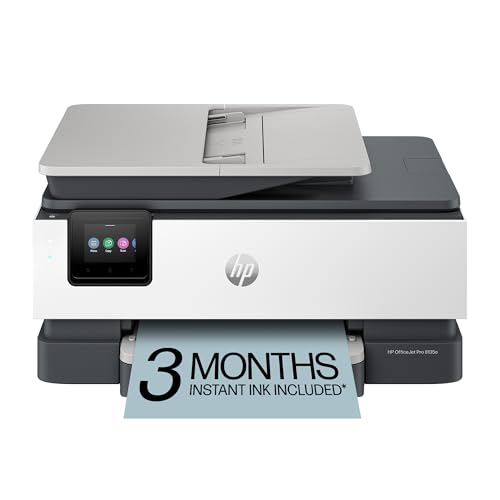
HP OfficeJet Pro 8135e
- Best for: Home offices that want Pro features in a compact body with a touchscreen.
- Print speed up to 20 ppm black and 10 ppm color
- 225-sheet maximum input capacity
- One-sided automatic document feeder with flatbed scanner
- Color touchscreen display
Home offices that want Pro features in a compact body with a touchscreen.
The feeder scans one side at a time, so two-sided originals take two passes.
The HP OfficeJet Pro 8135e is the compact Pro pick for a home office that wants modern features without a large footprint. It prints up to 20 pages per minute in black and 10 in color, with a 225-sheet paper capacity and a touchscreen for walk-up copying and scanning. A one-sided automatic document feeder handles multi-page originals, and duplex printing turns pages over on its own. It uses HP 923 ink cartridges and includes a 3-month Instant Ink trial, with wireless, Ethernet, and USB links for every device in the house.
Watch out for: The feeder scans one side at a time, so two-sided originals take two passes.
HP OfficeJet Pro 9025e
- Best for: Small offices that print in higher volume and want two paper trays.
- Print speed up to 24 ppm black and 20 ppm color
- Two paper trays for plain and specialty paper
- Automatic two-sided printing and scanning
- Automatic document feeder
Small offices that print in higher volume and want two paper trays.
It needs more desk room than the compact picks, and it works best with HP+ activated for the full ink trial.
The HP OfficeJet Pro 9025e fits a small office that prints in higher volume and wants two paper trays. It prints up to 24 pages per minute in black and 20 in color, the quickest black rate in this set, with automatic two-sided printing and a document feeder for multi-page scans. Dual-band Wi-Fi and Ethernet keep it linked to every computer in the room, and a color touchscreen puts copy and scan controls within reach. It uses HP 962 ink cartridges and includes a 6-month Instant Ink trial with HP+.
Watch out for: It needs more desk room than the compact picks, and it works best with HP+ activated for the full ink trial.
HP OfficeJet Pro 9135e
- Best for: Small offices with long print runs and frequent two-sided scanning.
- Print speed up to 25 ppm black and 20 ppm color
- 500-sheet paper capacity across two trays
- Single-pass two-sided automatic document feeder
- 4.3-inch color touchscreen
Small offices with long print runs and frequent two-sided scanning.
It is the largest and heaviest model here, so give it a firm desk and room to open the trays.
The HP OfficeJet Pro 9135e is the heavy-duty pick for a small office with long print runs and frequent two-sided scanning. It prints up to 25 pages per minute in black and 20 in color, with a 500-sheet paper capacity across two trays. A single-pass two-sided feeder scans both sides of a page in one move, and a 4.3-inch color touchscreen guides copy, scan, and fax jobs. It uses HP 936 ink cartridges and includes a 3-month Instant Ink trial, with Ethernet, USB, and dual-band Wi-Fi on board.
Watch out for: It is the largest and heaviest model here, so give it a firm desk and room to open the trays.
HP OfficeJet 8015e
- Best for: Light home printing and occasional color documents in a small room.
- Print speed up to 18 ppm black and 10 ppm color
- 225-sheet maximum input capacity
- Automatic document feeder with flatbed scanner
- Capacitive touchscreen display
Light home printing and occasional color documents in a small room.
Its color speed is modest, so long color jobs take a while to finish.
The HP OfficeJet 8015e is the plain compact pick for light home printing, school papers, and occasional color documents. It prints up to 18 pages per minute in black and 10 in color, with a 225-sheet paper capacity and automatic two-sided printing. An automatic document feeder and a touchscreen keep scanning and copying simple, while dual-band Wi-Fi links phones and laptops without a cable. It uses HP 910 ink cartridges and includes a 6-month Instant Ink trial, so a small household can keep it running with little fuss.
Watch out for: Its color speed is modest, so long color jobs take a while to finish.
Which One Fits Your Situation
Light Home Printing in a Small Room
Pick the HP OfficeJet 8015e when your printing is light and your desk is small. It covers color documents, school papers, and occasional scans without taking over the room. If you want a touchscreen and Pro features in the same small footprint, the HP OfficeJet Pro 8135e is the next rung up, with a similar 225-sheet tray and a modern wireless setup.
A Busy Family With School and Home Paperwork
Pick the HP OfficeJet Pro 9015e when several people share one printer and the page count climbs through the week. Its 250-sheet tray, two-sided scanning, and faster color rate handle homework, forms, and work documents in turn. The HP OfficeJet 8015e still works as a second printer for a bedroom or study corner, where light use suits its smaller tray.
A Home Office With Frequent Two-Sided Scanning
Pick the HP OfficeJet Pro 9015e for regular two-sided scanning, since its feeder handles both sides without manual flipping. When the stack grows longer each week, the HP OfficeJet Pro 9135e earns its place with a single-pass feeder that scans both sides in one move, plus a larger paper capacity that keeps long jobs moving.
A Small Office With Shared Printing
Pick the HP OfficeJet Pro 9025e when a small office shares one printer and prints through the day. Two paper trays and a fast black rate keep the queue moving, while the touchscreen lets anyone walk up and copy or scan. The HP OfficeJet Pro 9135e suits the same room when two-sided scanning and longer print runs matter more than a compact body.
Common Mistakes
- Buying a large Pro model for a few pages a week, when a compact model would fit your desk and your routine.
- Ignoring paper capacity, then refilling a small tray in the middle of a long print run.
- Placing the printer far from the router, then blaming the printer when wireless jobs drop.
- Ordering the wrong ink cartridge series for your model, since each OfficeJet uses its own HP cartridge line.
- Leaving duplex printing off in the driver, then printing single-sided pages by hand.
Frequently Asked Questions
Do All Five OfficeJet Printers Print, Scan, Copy, and Fax?
Yes, each model in this roundup is an all-in-one with print, scan, copy, and fax functions. The differences sit in speed, paper capacity, feeder design, and display size, not in the basic job list. Every pick also prints in color, handles two-sided pages, and links to phones and laptops over Wi-Fi, so the choice comes down to volume and scanning habits.
Can I Print From a Phone Without a Cable?
Yes, all five models support wireless printing from phones and tablets through the HP Smart app, plus direct wireless links such as AirPrint and Mopria on supported devices. Keep the printer on the same Wi-Fi network as your phone, or use Wi-Fi Direct where the model offers it. A USB cable still works for a single computer beside the printer.
Which Ink Cartridges Fit Each Model?
Each model uses its own HP cartridge series, so check the model number before you order spares. The HP OfficeJet Pro 9015e and the HP OfficeJet Pro 9025e use HP 962 cartridges, the HP OfficeJet Pro 8135e uses HP 923 cartridges, the HP OfficeJet Pro 9135e uses HP 936 cartridges, and the HP OfficeJet 8015e uses HP 910 cartridges. High-yield XL versions exist for several of these series.
How Do I Choose Between the 9015e and the 9135e?
Choose the HP OfficeJet Pro 9015e for a home office with steady daily printing and regular two-sided scanning, since it covers the common jobs in a mid-size body. Choose the HP OfficeJet Pro 9135e when print runs grow longer and two-sided scanning turns into a weekly chore, since its single-pass feeder, 500-sheet capacity, and faster black rate suit heavier shared use.
More from Amazon
Programs that pair well with the guide above. Offers and eligibility are set by Amazon and may change.
Free shipping on eligible items, Prime Video and more. Eligible new members can start with a free trial.
Start a Prime free trialAd-free music streaming. Eligible new subscribers can start with a free trial.
Try Music Unlimited freeA Prime membership for ages 18-24 with a trial period. Eligibility is set by Amazon.
See Prime for Young AdultsAudiobooks and podcasts to listen to on the go. Eligible new members can start with a free trial.
Try Audible freeAs an Amazon Associate we earn from qualifying purchases.










Write Your Review
No reviews yet. Be the first to share your experience!