
Our Short List of 3
- Best for: Shared home offices that fax and scan two-sided documents regularly
- Printer type: Color inkjet, all-in-one
- Functions: Print, scan, copy, fax
- Print speed: 22 ppm black, 18 ppm color
- Scanner: Slide-off glass with dual-pass two-sided automatic document feeder

- Best for: Small offices printing text-heavy color documents with fax and batch scanning
- Printer type: Color laser, all-in-one
- Functions: Print, scan, copy, fax
- Document feeder: 50-sheet automatic feeder, scans double-sided documents in one pass
- Paper capacity: 250 sheets, plus 1-sheet multipurpose tray

- Best for: A single Mac household needing every function in a compact footprint
- Printer type: Color inkjet, all-in-one
- Functions: Print, copy, scan, fax
- Print speed: Up to 17 ppm black, 9.5 ppm color
- Print resolution: Mac 3600 x 1200 dpi, Windows up to 6000 x 1200 dpi
All 3 Picks at a Glance
| Product | Specs | Action |
|---|---|---|
| HP OfficeJet Pro 9125e |
| Check price on Amazon |
| Canon Color imageCLASS MF665Cdw |
| Check price on Amazon |
| Brother MFC-J1010DW |
| Check price on Amazon |
Key takeaways
- Compare five multifunction printers for Mac that print, scan and copy, with Mac support, duplex printing and document feeders checked per listing.
The real decision with a multifunction printer for a Mac is not raw print speed. It is whether one machine genuinely prints, scans and copies from macOS without a workaround, and whether the Mac support is stated for the exact model you are ordering rather than assumed from the brand. Listings vary by variant, and a printer that prints happily from a Mac over AirPrint may still need the maker’s app for scanning, so the functions line and the operating system line both matter.
This guide is for Mac households replacing separate printer and scanner units, home offices that fax occasionally, and small teams sharing one machine between several Apple computers. Every pick below is an all-in-one whose Amazon listing states print, scan and copy functions, with Mac or AirPrint support named in the listing data for that model.
Quick Picks
As an Amazon Associate we earn from qualifying purchases.
| Product | Best for | Key spec from title |
|---|---|---|
| HP OfficeJet Pro 9125e | Busy home offices that also fax | Print, scan, copy and fax with document feeder |
| Brother MFC-J1360DW Work Smart 1360 | Everyday family printing and scanning | Automatic duplex printing and 1.8-inch color display |
| Epson EcoTank ET-3850 | Heavy color printing with bottled ink | Cartridge-free supertank with scanner, copier and feeder |
| Canon Color imageCLASS MF665Cdw | Small offices wanting color laser output | All-in-one with copier, scanner and fax |
| Brother MFC-J1010DW | Compact desks and light home use | Duplex printing with mobile and cloud print |
How to Choose
Confirm Mac Support on the Exact Listing
Start with the compatibility evidence, not the brand reputation. The clearest listings state Mac figures directly, the way the two Brother inkjets here print separate Mac print resolutions alongside the Windows ones. AirPrint support is the next strongest signal, because it is Apple’s own driverless route for printing from macOS. If a listing names neither Mac, macOS nor AirPrint, treat compatibility as unproven for that variant, however familiar the model family looks, and check the maker’s support page for your macOS version before ordering.
Match the Function List to Your Paperwork
Multifunction covers a range of machines, so read the functions line literally. All five printers here print, scan and copy, but fax is only named on some listings: the HP and the Canon include fax hardware, while the Epson listing lists copy and scan as its additional functions, with no fax. A document feeder matters just as much if you scan contracts or school forms in batches. The Canon feeds fifty sheets and scans both sides in one pass, while the compact Brother manages twenty pages, which suits occasional rather than daily batches.
Choose Ink or Toner by Page Pattern
Your monthly pattern should decide the print engine. The EcoTank replaces cartridges with refillable bottles, which suits households printing color pages every week and tired of small cartridges running dry mid-job. Cartridge inkjets like the HP and the two Brothers fit steadier, lighter output and start as smaller, simpler machines. The Canon laser takes toner cartridges instead and suits text-heavy offices that print in bursts, then leave the machine idle without worrying about ink drying in a printhead. Match the engine to the rhythm, not to habit.
Check the Scan Path Back to Your Mac
Printing is only half of a multifunction purchase. Look at how scans travel back: through a document feeder, off a flatbed for books and fragile originals, and into an app or cloud destination your Mac already uses. The HP scans both sides through its feeder in a dual pass, the Brother pair pair a flatbed with a twenty-page feeder, and the Epson adds Ethernet for a wired, shared position. If scanning is the job you do most, feeder capacity and two-sided handling deserve more weight than a small gap in print speed.
The 5 Best Options
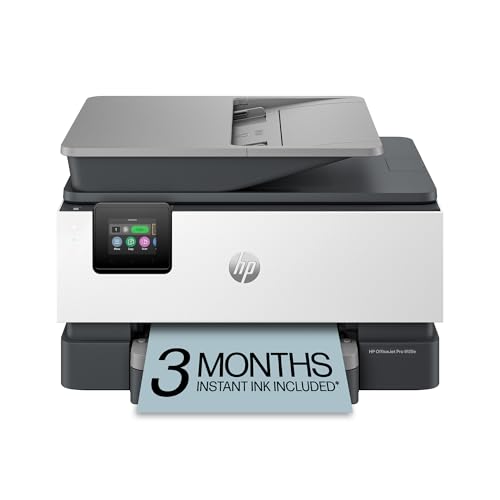
HP OfficeJet Pro 9125e
- Best for: Shared home offices that fax and scan two-sided documents regularly
- Printer type: Color inkjet, all-in-one
- Functions: Print, scan, copy, fax
- Print speed: 22 ppm black, 18 ppm color
- Scanner: Slide-off glass with dual-pass two-sided automatic document feeder
Shared home offices that fax and scan two-sided documents regularly
Read the HP+ and Instant Ink terms in the listing before setup, since enrollment choices made at installation affect how the printer accepts ink
This is the pick for a Mac-based home office that still sends faxes and scans two-sided paperwork most weeks. The listing names all four functions in its title, pairs them with a feeder that scans both sides, and holds a full ream-sized stack so shared printing does not stall on refills. Color speed suits client documents and school projects alike, while Ethernet gives a fixed network position if Wi-Fi in your office is crowded. It is the most office-minded machine here, in size as well as in features.
Brother MFC-J1360DW Work Smart 1360
Brother’s newer Work Smart model suits families who print from a mix of Macs, phones and a shared laptop and want the Mac support written into the specifications. Its listing prints a separate Mac resolution figure, which is exactly the kind of variant-level evidence worth looking for, and it adds a document feeder and flatbed for homework, forms and photo scanning. Page Gauge monitoring through the companion app helps you see ink use coming instead of discovering an empty cartridge on the morning a document is due.
Specs
- Printer type: Color inkjet, all-in-one multifunction
- Print resolution: Mac 1200 x 3600 dpi, Windows up to 1200 x 6000 dpi
- Duplex: Automatic two-sided printing
- Scanner: Flatbed with 20-page single-sided automatic document feeder
- Display: 1.8-inch color display
- Connectivity: Wireless, Wi-Fi Direct, USB 2.0
- Mobile printing: AirPrint and Mopria, Brother Mobile Connect app
- Ink: LC501 series cartridges
- Maximum media size: 8.5 x 14 inches
Best for: Families printing and scanning from several Apple devices at home
Watch out for: The feeder takes twenty single-sided pages, so long two-sided scan batches still need manual flipping
ASIN: B0FGC43YCL
Epson EcoTank ET-3850
Pick the EcoTank when your Mac household prints color constantly and cartridge swaps have become the running annoyance. The listing describes a cartridge-free supertank machine with a scanner, copier, document feeder and Ethernet, and the box includes full bottles of black and color ink rather than small starter cartridges. A 250-sheet tray and automatic two-sided printing keep long documents moving, and the wired Ethernet option suits a printer that lives in one shared spot. Households that print rarely should think harder, because bottled ink rewards regular use.
Specs
- Printer type: Color inkjet, all-in-one cartridge-free supertank
- Additional functions: Copy, scan
- Print resolution: 4800 x 1200 dpi
- Copy speed: Up to 15.5 ppm black and white
- Duplex: Automatic
- Paper handling: 250-sheet capacity, maximum media size 8.5 x 14 inches
- Scanner type: Flatbed, with auto document feeder
- Connectivity: Wireless, Ethernet, USB
- Included ink: 502 Black bottle (127 mL) and 502 Cyan, Magenta and Yellow bottles (70 mL)
Best for: High-volume color printing at home without cartridge replacements
Watch out for: The listing names copy and scan as the additional functions and no fax, so fax users should choose the HP or the Canon instead
ASIN: B096N7TXR1
Canon Color imageCLASS MF665Cdw
- Best for: Small offices printing text-heavy color documents with fax and batch scanning
- Printer type: Color laser, all-in-one
- Functions: Print, scan, copy, fax
- Document feeder: 50-sheet automatic feeder, scans double-sided documents in one pass
- Paper capacity: 250 sheets, plus 1-sheet multipurpose tray
Small offices printing text-heavy color documents with fax and batch scanning
This is a full-size office machine, so confirm the footprint and weight fit your desk or stand before ordering
The Canon is the laser option for a small office that wants crisp text, a real fax line and a feeder that digests two-sided stacks in a single pass. Its listing describes an all-in-one with copier, scanner and fax, a 250-sheet cassette plus a multipurpose tray for envelopes and letterhead, and a fifty-sheet feeder for scanning. Toner suits offices that print in heavy bursts separated by quiet weeks. Measure the desk first, because a color laser multifunction is a substantially larger commitment than the inkjets above.
Brother MFC-J1010DW
- Best for: A single Mac household needing every function in a compact footprint
- Printer type: Color inkjet, all-in-one
- Functions: Print, copy, scan, fax
- Print speed: Up to 17 ppm black, 9.5 ppm color
- Print resolution: Mac 3600 x 1200 dpi, Windows up to 6000 x 1200 dpi
A single Mac household needing every function in a compact footprint
The 150-sheet tray and twenty-page feeder are sized for light home use, not shared-office volume
The smaller Brother is the straightforward choice for one Mac on a compact desk, where the machine prints homework, returns labels and the occasional form, and scans a few pages at a time. Its listing is unusually explicit for this class, printing separate Mac resolution figures and listing print, copy, scan and fax as its functions, so there is little guesswork about what the variant does. A twenty-page feeder covers light batches, duplex printing saves paper on long documents, and cloud printing through the app suits households that send jobs from phones as often as from the Mac.
Which One Fits Your Situation
A Home Office Shared by Several Macs
Choose the HP OfficeJet Pro 9125e. Its 250-sheet tray, two-sided feeder scanning and full fax support handle the mixed workload of a shared office, and Ethernet gives every Mac on the network a stable route to it. The Canon is the alternative if most of that shared output is text rather than color graphics.
Color Printing Every Week, Mostly at Home
Choose the Epson EcoTank ET-3850. Bottled ink fits a household that prints worksheets, photos and project pages constantly, and the feeder plus flatbed cover scanning without a second device. If your color printing is occasional instead, one of the cartridge Brothers below will be the simpler ownership pattern for most family paperwork and light scanning.
A Small Team Sending Faxes and Scanning Contracts
Choose the Canon Color imageCLASS MF665Cdw. The fifty-sheet feeder scans double-sided originals in one pass, the fax hardware is built in rather than app-based, and toner keeps text sharp through bursty office weeks. Just confirm the desk space and a sturdy stand first, since it is the largest and heaviest machine in this guide.
One Mac, One Small Desk, Every Function Covered
Choose the Brother MFC-J1010DW for the lightest footprint with fax included, or the MFC-J1360DW if you prefer the newer Work Smart model with ink monitoring through its app. Both state Mac resolution figures in their listings and pair a flatbed with a twenty-page feeder, which is enough for typical home paperwork.
Common Mistakes
- Assuming every model in a printer family supports Mac the same way, instead of checking the operating system or AirPrint line on the exact variant’s listing.
- Buying a multifunction printer for faxing without confirming fax appears in that listing’s functions, since some all-in-ones here only add copy and scan.
- Judging scanning by the flatbed alone and ignoring feeder capacity, then hand-feeding a forty-page contract one sheet at a time.
- Choosing a refill-tank printer for a household that prints a few pages a month, when a cartridge machine fits that rhythm better.
- Setting up a subscription ink or HP+ option during installation without reading its terms, then being surprised by the ink rules that follow.
Frequently Asked Questions
Does AirPrint Support Mean Scanning Works From a Mac Too?
Not automatically. AirPrint covers driverless printing from macOS, while scanning usually travels through the maker’s app or the Mac’s built-in scanning tools, depending on the model. Check the listing’s mobile and app features for the printer you choose, and confirm the scan route for your macOS version on the maker’s support page before relying on it for daily paperwork.
Which of These Printers Can Actually Send a Fax?
The HP OfficeJet Pro 9125e and the Canon imageCLASS MF665Cdw name fax in their listings and ship with fax hardware, and the Brother MFC-J1010DW lists fax among its functions. The Epson EcoTank ET-3850 listing names copy and scan as its additional functions, with no fax. If faxing matters, pick from the models that state it rather than assuming every all-in-one includes it.
Inkjet or Laser for a Mac Home Office?
Choose by rhythm. Inkjet models here, especially the EcoTank, suit frequent color printing and photos mixed into documents. The Canon laser suits text-heavy offices that print in bursts and leave the machine idle between them, since toner does not dry out. Both types print from a Mac; the difference is how your pages are spread across the month.
How Do I Check a Printer Still Supports My macOS Version?
Open the listing for the exact model and look for a Mac, macOS or AirPrint line, then compare it with the macOS version shown in your Mac’s settings. If the listing gives a Mac resolution figure or names AirPrint, that is variant-level evidence. For older or very new macOS releases, confirm on the maker’s support page, because driver and app support changes over time.
More from Amazon
Programs that pair well with the guide above. Offers and eligibility are set by Amazon and may change.
Free shipping on eligible items, Prime Video and more. Eligible new members can start with a free trial.
Start a Prime free trialAd-free music streaming. Eligible new subscribers can start with a free trial.
Try Music Unlimited freeA Prime membership for ages 18-24 with a trial period. Eligibility is set by Amazon.
See Prime for Young AdultsAudiobooks and podcasts to listen to on the go. Eligible new members can start with a free trial.
Try Audible freeAs an Amazon Associate we earn from qualifying purchases.










Write Your Review
No reviews yet. Be the first to share your experience!