
Key takeaways
- Find the best TVs with VRR for tear-free gaming on PS5, Xbox Series X and PC, with 120Hz and 144Hz picks, HDMI 2.1 and low input lag.
The best TVs with VRR make fast games feel noticeably smoother, because the screen refreshes in step with the console or graphics card instead of on a fixed schedule. When a game drops from 120 frames per second to 90, a TV without variable refresh rate can show a torn frame or a stutter at the worst possible moment. A TV with VRR adjusts on the fly, so motion stays clean even when the frame rate is not perfectly steady.
That matters more now than it did a few years ago. Current consoles target 120 frames per second in performance modes, PC graphics cards push well past that in competitive titles, and many games use unlocked frame rates that wander during busy scenes. VRR turns that wandering frame rate from a visible problem into something you barely notice. Paired with a 120Hz or faster screen, HDMI 2.1, and a proper game mode, it is one of the clearest upgrades a gamer can buy.
This guide explains how VRR works, which standards to look for, and how to avoid the common traps, then compares four 55-inch 4K TVs that all support VRR and are listed on Amazon US. Every pick below also has strong HDR and a modern smart platform. The differences are in panel type, brightness, VRR range, and how many HDMI 2.1 ports you get.
What VRR Does, in Plain Terms
A traditional TV refreshes at a fixed rate, usually 60 times per second. A console or PC, by contrast, renders frames as fast as it can, and that speed changes with what is happening on screen. When the two fall out of sync, the TV may display half of one frame and half of the next at the same time. That split image is screen tearing, most obvious during fast camera pans and quick turns in a shooter.
VRR solves the mismatch by letting the display wait for the next finished frame, within a stated range, instead of forcing the source to match the screen. The result is smoother motion, less tearing, and less judder when a game hovers just below a fixed refresh rate. The game also feels more responsive because frames reach the screen as soon as they are ready.
There are three VRR flavours you will meet most often. HDMI Forum VRR is the open standard built into HDMI 2.1, and it is the one PlayStation 5 and Xbox Series X use. AMD FreeSync, including FreeSync Premium and FreeSync Premium Pro, is common on TVs aimed at PC gamers. NVIDIA G-Sync Compatible is the NVIDIA certification for displays that work well with GeForce cards. The best gaming TVs support more than one of these at once, so you are not locked to a single platform.
How to Choose a TV With VRR
Start with the VRR range, not just the badge
A TV that simply says VRR on the box may only support a narrow range, such as 48 to 120Hz. That still helps, but a wider range, such as 20 to 144Hz or 48 to 165Hz, keeps the picture smooth through deeper frame-rate dips. If you play on PC, look for support up to 144Hz, because that headroom matters in competitive games. If you play mainly on console, a 120Hz ceiling is enough for the 4K 120Hz modes on PlayStation 5 and Xbox Series X, but the lower end of the range still matters when a demanding scene drops below 60 frames per second.
Also check whether VRR works at 4K, or only at lower resolutions. Some TVs advertise a very high VRR figure that applies only at 1080p, with a lower ceiling at 4K. For console gaming, 4K at 120Hz with VRR is the combination to confirm.
Insist on HDMI 2.1 and enough ports
VRR at 4K and 120Hz needs the bandwidth of HDMI 2.1. A TV with only HDMI 2.0 ports cannot carry that signal. Count the HDMI 2.1 ports, too. Two ports cover a console and a PC, or two consoles, but leave no room for a soundbar that needs an HDMI connection. Four full-bandwidth HDMI 2.1 ports, as found on the LG and Samsung picks below, give you room for a PlayStation 5, an Xbox Series X, a gaming PC, and a soundbar without swapping cables.
Auto low latency mode, usually shortened to ALLM, switches the TV into its fastest game mode automatically when a console or PC starts a game. Every TV in this guide supports ALLM alongside VRR.
Panel type sets the trade-offs
OLED panels switch pixels almost instantly, which gives them superb motion clarity and perfect black levels. That makes them a natural fit for VRR gaming in a dark or dim room, and the LG and Samsung models below are both OLED. Their weakness is brightness in a very sunny room, and the usual OLED caution about static images left on screen for very long periods.
Mini-LED LCD panels, represented here by the TCL and Hisense models, trade the perfect blacks of OLED for much higher peak brightness and no worries about static images. They are the better choice for a bright living room and for punchy HDR highlights. Their viewing angle is usually narrower, and dark scenes may show some blooming around bright objects, but modern local dimming has narrowed that gap a lot.
Do not ignore input lag and motion handling
VRR keeps frames smooth, but input lag decides how quickly your button presses show up on screen. Look for a game mode input lag in the region of 10 milliseconds or lower at 120Hz, which all four picks below aim for. Also check that VRR does not force you to give up local dimming: some TVs disable their best dimming in game mode, which can wash out HDR. Turn off any extra motion smoothing when the TV arrives, because it can add lag and make games look unnaturally smooth.
Size, sound, and the rest of the room
All four picks in this guide are 55-inch models, because that size suits most living rooms and bedrooms, and it keeps the comparison fair. The same model lines are sold in larger sizes, but check the listing for the exact size you want, because refresh rate and port counts can vary by size. Built-in sound is adequate for casual play on every pick here, with the Hisense offering the most elaborate built-in speaker setup, but a soundbar remains the single biggest audio upgrade. Finally, measure your stand before ordering: a 55-inch TV is roughly 48 inches wide, and the feet on some models sit near the edges.
Top Picks
1. LG OLED evo C5 — Best Overall TV With VRR
The LG OLED evo C5 is the most complete VRR TV in this guide, and the easiest to recommend if you play on more than one platform. Its OLED evo panel delivers perfect blacks, vivid colour, and a near-instant 0.1 millisecond response time, so fast motion stays sharp without the smearing that slower panels can show. The native refresh rate is 120Hz, with VRR up to 144Hz for PC gaming, and it supports HDMI Forum VRR, AMD FreeSync Premium, and NVIDIA G-Sync, so a PlayStation 5, an Xbox Series X, and a gaming PC are all covered.
There are four full-bandwidth HDMI 2.1 ports, plus Dolby Vision, HDR10, and HLG support for films and streaming. The Alpha 9 Gen8 processor handles upscaling and tone mapping, webOS 25 covers the major streaming apps, and the 2.2-channel Dolby Atmos sound is stronger than the thin speakers on many rival sets. Game Optimizer puts VRR, frame-rate information, and picture presets in one menu, so it is easy to confirm that VRR is actually active.
The trade-offs are the familiar OLED ones. Peak brightness is good for an OLED, but a very bright, sunlit room will suit a Mini-LED set better, and the glossy screen can reflect lamps and windows. If you mostly game and watch films in a dim room, the C5 is the pick that does the fewest things wrong.
Check the LG OLED evo C5 on Amazon
2. Samsung S90F OLED — Best TV With VRR for Bright Rooms and Colour
The Samsung S90F is the QD-OLED alternative to the LG, and it wins on brightness and colour volume. Its quantum-dot OLED panel produces rich, saturated colour and strong HDR highlights, while keeping the perfect blacks and instant response that make OLED so good for gaming. Motion Xcelerator supports up to 144Hz, with VRR through FreeSync Premium Pro and HDMI Forum VRR, and there are four HDMI 2.1 ports, matching the LG for connectivity.
Samsung’s NQ4 AI Gen3 processor drives 4K upscaling and the Vision AI smart platform, and the set supports HDR10+ rather than Dolby Vision, which is the main format difference to note. If your streaming library leans heavily on Dolby Vision titles, the LG has an edge. If you want the punchiest colour in a bright room, the Samsung is the stronger choice, and its matte screen finish handles side-window reflections well.
For gaming, the S90F feels fast and direct, with low input lag in game mode and a Game Bar that shows refresh rate and VRR status at a glance. It is a strong fit for Xbox and PC players who want FreeSync support done properly.
Check the Samsung S90F OLED on Amazon
3. TCL QM7K — Best Value Mini-LED TV With VRR
The TCL QM7K is the value pick in this guide, and the one to choose if you want a very bright screen and a wide VRR range without paying OLED money. Its Mini-LED QLED panel uses precise local dimming to deliver strong HDR highlights, and the native 144Hz refresh rate pairs with Game Accelerator VRR up to 240Hz at 55 inches, with an even higher figure at lower resolutions. That wide range is genuinely useful on PC, where frame rates can swing widely in demanding titles.
Dolby Vision and HDR10+ are both supported, the anti-reflective screen helps in a bright room, and Google TV covers streaming with voice control built in. Two HDMI 2.1 ports are the main compromise against the OLED picks above, so plan your connections: a console and a PC fit comfortably, but a third HDMI 2.1 device means swapping cables or using a switch.
If your room is bright, your budget is tighter, or you simply prefer not to think about OLED care, the QM7K gives you the core VRR gaming experience, plus Mini-LED brightness, at a much more approachable level than the OLED models.
4. Hisense U7 — Best TV With VRR for High Refresh PC Gaming
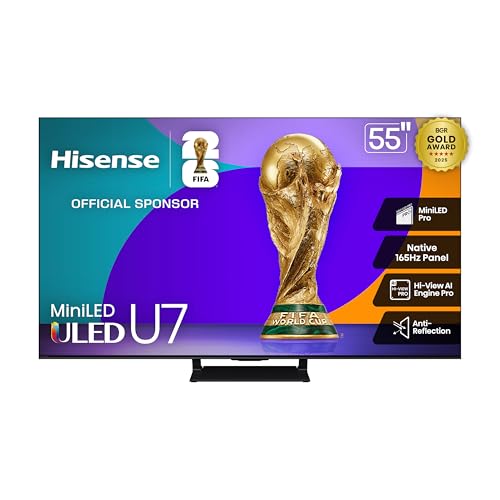
The Hisense U7 is the refresh-rate champion of this group, and the pick for PC gamers who want the widest VRR window. Its Mini-LED ULED panel runs natively at 165Hz, with Game Mode Ultra offering VRR from 48Hz to 165Hz and up to 288Hz VRR in supported modes. That range keeps tearing under control through deep frame-rate dips that would fall outside the VRR window on a narrower set, which is exactly the situation VRR exists to fix.
Brightness is another strength, with peak brightness up to 3000 nits and a large number of local dimming zones for an LCD TV. Dolby Vision IQ and HDR10+ are both supported, IMAX Enhanced is included, and the built-in 2.1.2-channel surround sound is the most ambitious audio setup in this guide. Google TV handles streaming, and the Game Bar makes it easy to check refresh rate and VRR status while you play.
The Hisense trades the perfect blacks and instant pixel response of OLED for brightness and refresh-rate headroom, and its viewing angle is narrower than the OLED picks. In a bright room, or at a desk where you sit directly in front of the screen, those trade-offs matter less. For a PC-first setup, the U7 is a compelling choice.
Check the Hisense U7 on Amazon
Comparison Table
| TV | Panel | Native Refresh and VRR | HDMI 2.1 Ports | HDR Formats | Best For |
|---|---|---|---|---|---|
| LG OLED evo C5 | OLED evo | 120Hz, VRR up to 144Hz | Four | Dolby Vision, HDR10, HLG | Best overall, all platforms |
| Samsung S90F OLED | QD-OLED | 120Hz, VRR up to 144Hz | Four | HDR10+ | Bright rooms and colour |
| TCL QM7K | Mini-LED QLED | 144Hz, VRR up to 240Hz | Two | Dolby Vision, HDR10+ | Best value Mini-LED |
| Hisense U7 | Mini-LED ULED | 165Hz, VRR up to 288Hz | Four | Dolby Vision IQ, HDR10+ | High refresh PC gaming |
Setting Up VRR Properly
Buying a VRR TV is only half the job. The feature has to be switched on at both ends, and a surprising number of owners never see it work because one setting is missed. Start on the console or PC. On PlayStation 5, VRR is in the screen and video settings. On Xbox Series X and Series S, VRR is in the general TV and display options, alongside the 120Hz output setting. On PC, enable G-Sync or FreeSync in your graphics driver, then confirm the display is set to its highest refresh rate in your operating system, not just in the game.
Next, check the TV. Enable game mode, confirm that VRR is on, and use the TV’s game bar to confirm the live refresh rate while a game is running. If the refresh rate stays fixed at 120Hz while the frame rate changes, VRR is not active. Also use a certified Ultra High Speed HDMI cable for any 4K 120Hz connection: older cables can cause dropouts or force the console to fall back to a lower refresh rate.
Finally, cap your frame rate sensibly on PC: a cap a few frames below the top of the VRR range keeps the game inside the VRR window and avoids tearing at the very top of the range. On console, choose the performance mode in games that offer one if smooth motion matters more to you than maximum resolution.
FAQ
What is VRR on a TV?
VRR, or variable refresh rate, lets a TV change how often it refreshes to match the frame rate coming from a console or PC. When the two are in sync, screen tearing and stutter are reduced, and motion looks smoother even when the frame rate rises and falls during play.
Do I need VRR if I only play at 60 frames per second?
It still helps, because many games do not hold a perfectly steady 60 frames per second. VRR smooths the dips below 60, so a game that drops to the low 50s feels less choppy.
Does VRR work on PlayStation 5 and Xbox Series X?
Yes. Both consoles support HDMI Forum VRR over HDMI 2.1, and many games support it. You need a TV with HDMI 2.1 and VRR, a suitable cable, and VRR switched on in the console settings. Not every game supports VRR, so check the game’s display options if you are unsure.
Is VRR the same as FreeSync and G-Sync?
They are related but not identical. VRR is the general idea, while FreeSync and G-Sync are specific implementations from AMD and NVIDIA. HDMI Forum VRR is the open standard in HDMI 2.1. A good gaming TV often supports more than one, which is why the picks in this guide list their standards separately.
Does VRR increase input lag?
No, VRR itself does not add meaningful input lag when it is working properly. Games often feel more responsive with VRR on, because frames are shown as soon as they are ready. If a TV feels laggy, the cause is usually game mode being off or extra motion processing being on, rather than VRR itself.
Conclusion
The best TVs with VRR share a simple formula: a 120Hz or faster panel, HDMI 2.1 with VRR support, low input lag in game mode, and a VRR range wide enough to cover real frame-rate dips. The LG OLED evo C5 is the best all-rounder, with four HDMI 2.1 ports and support for every major VRR standard. The Samsung S90F is the brighter, more colourful OLED alternative. The TCL QM7K brings Mini-LED brightness and a wide VRR range at a friendlier level, and the Hisense U7 pushes refresh rate and VRR range furthest for PC gamers.
Choose by room and platform first, panel second, and VRR range third. A dark-room, multi-platform gamer will be happiest with the LG or Samsung. A bright-room gamer, or anyone who wants maximum brightness and no OLED upkeep, should look at the TCL or Hisense. Whichever you pick, switch VRR on at both ends, use a proper Ultra High Speed cable, and check the live refresh rate while you play.
Disclosure: As an Amazon Associate, we earn from qualifying purchases.
More from Amazon
Programs that pair well with the guide above. Offers and eligibility are set by Amazon and may change.
Free shipping on eligible items, Prime Video and more. Eligible new members can start with a free trial.
Start a Prime free trialAd-free music streaming. Eligible new subscribers can start with a free trial.
Try Music Unlimited freeA Prime membership for ages 18-24 with a trial period. Eligibility is set by Amazon.
See Prime for Young AdultsAudiobooks and podcasts to listen to on the go. Eligible new members can start with a free trial.
Try Audible freeAs an Amazon Associate we earn from qualifying purchases.










Write Your Review
No reviews yet. Be the first to share your experience!