
Our Short List of 3

- Best for: Home-office desks that need full stand adjustment and built-in speakers.
- 23.8-inch IPS panel, 1920 by 1080 Full HD
- 100Hz refresh rate, 1500:1 contrast ratio
- Ultra-thin bezel design in Ash White
- Integrated 2 by 5W speakers

- Best for: Small, tidy desks that pair work with occasional casual gaming.
- 23.8-inch viewable IPS panel, 1920 by 1080 Full HD
- 100Hz refresh rate with Adaptive-Sync
- 1ms MPRT response time
- Frameless design, ultra-slim 6.5 millimeter profile

- Best for: Dual-monitor desks that want two identical frameless screens.
- 24-inch IPS panel, 1920 by 1080 Full HD
- 100Hz refresh rate
- 3-sided frameless design
- 106 percent sRGB coverage
All 5 Picks at a Glance
| Product | Specs | Action |
|---|---|---|
| Dell S2425HS |
| Check price on Amazon |
| ASUS VZ24EHF |
| Check price on Amazon |
| AOC 24B2H2 |
| Check price on Amazon |
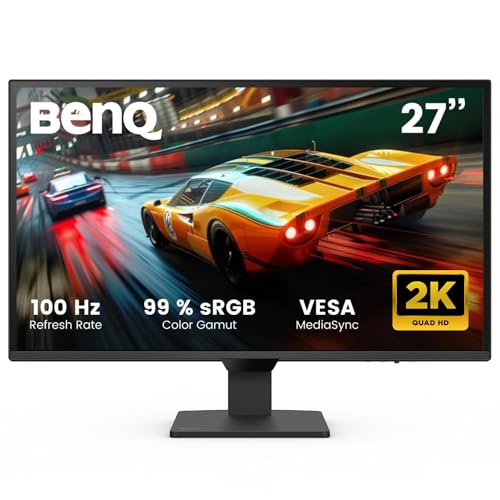 BenQ GW2790Q |
| Check price on Amazon |
 KTC H24T27 |
| Check price on Amazon |
Key takeaways
- Compare the best frameless monitors for desks, from compact 24-inch IPS picks to a 27-inch QHD screen, with thin bezels and simple everyday ports.
A frameless monitor is really a decision about edges. Thick bezels waste desk space, break up a dual-screen layout, and make a small desk feel crowded, while a three-sided borderless panel keeps the picture close to the frame on the top and sides. The catch is that frameless designs still differ a lot in panel quality, refresh rate, stand adjustment, and ports, so the thinnest bezel is not automatically the best buy.
This guide is for desk workers, students, and light gamers who want a cleaner setup without paying for features they will not use. The picks below come from current Amazon listings: a compact Dell with a fully adjustable stand, a slim ASUS eye-care model, a value AOC for multi-monitor desks, and two sharper QHD options from BenQ and KTC.
Quick Picks
As an Amazon Associate we earn from qualifying purchases
| Product | Best for | Key spec from title |
|---|---|---|
| Dell S2425HS | Adjustable home-office desks | 23.8-inch FHD IPS, 100Hz, ultra-thin bezel |
| ASUS VZ24EHF | Slim, minimal single-screen desks | 23.8-inch FHD IPS, 100Hz, frameless |
| AOC 24B2H2 | Matched pairs for dual setups | 24-inch FHD IPS, 100Hz, frameless |
| BenQ GW2790Q | Sharper text on a bigger screen | 27-inch QHD IPS, 100Hz, ultra slim bezel |
| KTC H24T27 | QHD detail in a compact frame | 24-inch QHD IPS, 100Hz, zero-frame |
How to Choose
Bezel Design and the Bottom Edge
Frameless almost always means frameless on three sides. The top and side bezels shrink to a few millimeters, but the bottom edge keeps a wider chin that holds the brand badge, buttons, and panel electronics. That matters most in multi-monitor setups, where two side bezels meet in the middle of your view. Check the listing photos and the stated design wording, such as three-sided borderless or zero-frame, and remember that a thin inner black border still shows around the image itself.
Panel Type and Resolution for Your Desk Size
Most frameless desk monitors use IPS panels, which hold color and brightness well when you lean back or share the screen. Resolution should match size: Full HD looks fine at 24 inches, but at 27 inches the same pixel count spreads thinner and text edges soften. If you read documents all day at 27 inches, a QHD panel is the safer match. Smaller desks with a short viewing distance suit 24-inch screens, where QHD adds sharpness without forcing windows to scale up.
Refresh Rate and Response for Mixed Use
A 100Hz refresh rate is now common in this class and makes scrolling, window dragging, and casual gaming look smoother than the older 60Hz and 75Hz standard. Listings pair that with Adaptive-Sync or FreeSync support to reduce tearing when frame rates wander. Response-time figures vary by measurement method, so treat a 1ms MPRT claim as a different yardstick from a gray-to-gray figure. For office work the difference is minor; for fast games, match the sync range and refresh rate to your graphics card.
Stand Adjustment, VESA, and Ports
Budget frameless monitors often ship with tilt-only stands, so confirm height, swivel, and pivot adjustment in the listing if you plan long sessions. A 100 by 100 millimeter VESA pattern lets you move the screen to an arm later, which also frees desk space. Port counts differ more than expected: some models offer a single HDMI input, while others add a second HDMI or a DisplayPort. Count your laptop, desktop, and console before choosing, or a switcher becomes one more desk accessory.
The 5 Best Options
Dell S2425HS
- Best for: Home-office desks that need full stand adjustment and built-in speakers.
- 23.8-inch IPS panel, 1920 by 1080 Full HD
- 100Hz refresh rate, 1500:1 contrast ratio
- Ultra-thin bezel design in Ash White
- Integrated 2 by 5W speakers
Home-office desks that need full stand adjustment and built-in speakers.
The white finish will not match an all-black setup, and there is no DisplayPort input.
The Dell S2425HS suits a single-desk home office where the monitor stays put all week and posture matters. Its ultra-thin bezel design keeps the 23.8-inch IPS panel looking clean, and the stand adjusts for height, tilt, swivel, and pivot, which is rare at this size. Integrated dual speakers remove a pair of desk speakers from the setup, and the 100Hz refresh rate keeps everyday motion smooth. Two HDMI ports cover a laptop and a second device without cable swapping.
ASUS VZ24EHF
- Best for: Small, tidy desks that pair work with occasional casual gaming.
- 23.8-inch viewable IPS panel, 1920 by 1080 Full HD
- 100Hz refresh rate with Adaptive-Sync
- 1ms MPRT response time
- Frameless design, ultra-slim 6.5 millimeter profile
Small, tidy desks that pair work with occasional casual gaming.
A single HDMI port limits connected devices, and the stand does not adjust for height.
The ASUS VZ24EHF is the pick for a minimal desk where the monitor should nearly disappear. The listing highlights an ultra-slim profile that measures 6.5 millimeters at its thinnest point, with a frameless IPS panel behind it. It still runs at 100Hz with Adaptive-Sync and a 1ms MPRT figure, so it handles light gaming after work. Eye-care features such as low blue light and flicker-free backlighting suit long reading sessions, and the three-year warranty is longer than most in this group.
AOC 24B2H2
- Best for: Dual-monitor desks that want two identical frameless screens.
- 24-inch IPS panel, 1920 by 1080 Full HD
- 100Hz refresh rate
- 3-sided frameless design
- 106 percent sRGB coverage
Dual-monitor desks that want two identical frameless screens.
No height adjustment on the stand, and no DisplayPort for daisy-chain style setups.
The AOC 24B2H2 makes the most sense bought as a matched pair. Its three-sided borderless panel and consistent 24-inch size keep two screens looking like one wide workspace, and the listing quotes color coverage above the usual baseline for this class. Two HDMI inputs per screen give each monitor room for a work laptop plus another source. The stand only tilts, so plan on the included feet or a dual VESA arm. For a home or office desk built around side-by-side documents, this is the straightforward option.
BenQ GW2790Q
- Best for: Readers and spreadsheet users who want a larger, sharper screen.
- 27-inch IPS panel, 2560 by 1440 QHD
- 100Hz refresh rate
- Ultra slim bezel design
- Eyesafe certified with Low Blue Light Plus
Readers and spreadsheet users who want a larger, sharper screen.
The stand adjusts by tilt only, and the bigger panel needs a deeper desk.
The BenQ GW2790Q steps up to a 27-inch QHD panel, which keeps text and spreadsheet lines crisp at a size where Full HD starts to look soft. The ultra slim bezel keeps that larger screen from feeling bulky on the desk. BenQ leans on eye care here, with Eyesafe certification, Brightness Intelligence that adapts to room light, and low blue light modes for long sessions. HDMI and DisplayPort inputs cover both a laptop dock and a desktop, and the tilt stand plus wall-mount support keep placement flexible.
KTC H24T27
- Best for: Compact desks that still need QHD sharpness for text and detail work.
- 24-inch IPS panel, 2560 by 1440 QHD
- 100Hz refresh rate
- Three-sided borderless zero-frame design
- HDR10 support
Compact desks that still need QHD sharpness for text and detail work.
The stand offers tilt only, and the smaller screen makes QHD interface scaling worth checking.
The KTC H24T27 packs QHD resolution into a 24-inch zero-frame body, which is the sharpest pixel density in this roundup. That suits compact desks where a 27-inch screen will not fit but small text still fills the day. The listing adds HDR10 support and sync compatibility for both major graphics camps, so the same screen can serve a work laptop and a gaming PC. Connectivity covers HDMI and DisplayPort plus a VESA mount for arm users, while the matte surface keeps reflections down near windows.
Which One Fits Your Situation
You Work From One Screen All Day
Choose the Dell S2425HS. The height, swivel, and pivot adjustments let you set the screen at eye level without stacking books under the stand, and the built-in speakers keep calls and videos off your laptop speakers. Its ultra-thin bezels keep a single screen looking tidy, and the second HDMI port leaves room for a personal machine after hours.
You Are Building a Two-Screen Desk
Choose the AOC 24B2H2 and buy two of the same model. Matching panels keep brightness and color consistent across the pair, and the three-sided frameless design narrows the gap where the screens meet. Two HDMI inputs on each unit also make it easy to mirror the same layout for a laptop and a desktop without moving cables.
Your Desk Is Small but Your Documents Are Dense
Choose the KTC H24T27. QHD resolution on a 24-inch panel keeps small fonts and fine spreadsheet grids readable at close range, while the zero-frame body leaves space for a keyboard and notebook. If you prefer a larger canvas and have the depth for it, the BenQ GW2790Q gives the same resolution with more room to spread windows out.
You Want One Screen for Work and Light Play
Choose the ASUS VZ24EHF. The 100Hz refresh rate and Adaptive-Sync support smooth out casual gaming, and the slim frameless body looks at home in a living space once work ends. Eye-care features help during long sessions, though the single HDMI input means a console and a PC will take turns unless you add a switch.
Common Mistakes
- Assuming frameless means no border at all, then being surprised by the bottom chin and the thin black inner edge around the image.
- Buying a 27-inch Full HD screen for text-heavy work and finding letters softer than on the smaller monitor it replaced.
- Overlooking the stand: tilt-only models cannot fix a screen that sits too low, so check adjustment or VESA support first.
- Counting on ports the listing does not have, such as expecting DisplayPort or a second HDMI on single-input models.
- Mixing two different models in a dual setup, which leaves mismatched bezels, colors, and heights across the middle of the desk.
Frequently Asked Questions
Does a frameless monitor really have no bezel?
Not entirely. Frameless designs shrink the top and side bezels to a few millimeters, but a wider bottom edge remains for controls and electronics, and a slim black border still frames the picture itself. The benefit is a cleaner look and a narrower gap in multi-monitor setups, not a truly edge-to-edge image.
Is 100Hz worth it on a desk monitor used mostly for work?
For most desk work it is a modest but noticeable upgrade. Scrolling documents, dragging windows, and moving the cursor look smoother than on a 60Hz screen, and the feature now appears on mainstream frameless models rather than only gaming displays. It will not change static text clarity, which depends on resolution and panel quality instead.
Should I pick Full HD or QHD for a frameless monitor?
Match resolution to screen size. Full HD suits 24-inch monitors at a normal desk distance, while QHD is the better fit at 27 inches, where Full HD pixels spread out and text loses edge definition. A 24-inch QHD model like the KTC above gives the sharpest result of all, though some users prefer larger interface scaling.
Can frameless monitors be mounted on an arm?
Most can, as long as the listing states a VESA mounting pattern, commonly 100 by 100 millimeters in this class. Check the product page before ordering, because a few ultra-slim models route cables or buttons in ways that favor the included stand. An arm also helps align two frameless screens at exactly the same height.
More from Amazon
Programs that pair well with the guide above. Offers and eligibility are set by Amazon and may change.
Free shipping on eligible items, Prime Video and more. Eligible new members can start with a free trial.
Start a Prime free trialAd-free music streaming. Eligible new subscribers can start with a free trial.
Try Music Unlimited freeA Prime membership for ages 18-24 with a trial period. Eligibility is set by Amazon.
See Prime for Young AdultsAudiobooks and podcasts to listen to on the go. Eligible new members can start with a free trial.
Try Audible freeAs an Amazon Associate we earn from qualifying purchases.










Write Your Review
No reviews yet. Be the first to share your experience!