
Our Short List of 3
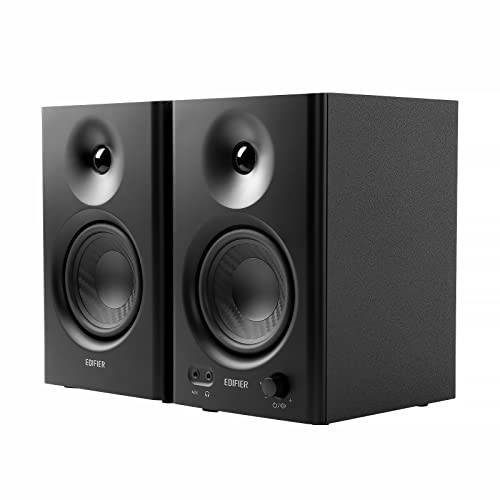
- Best for: Mixing and editing in a small home studio with an audio interface.
- Woofer: 4-inch diaphragm woofer with MICA
- Tweeter: 1-inch silk dome
- Power output: 21 W + 21 W Class D with DSP
- Frequency response: 60 Hz to 20 kHz

- Best for: A first monitor pair on a compact desk for production, streaming and everyday listening.
- Woofer: 3.5-inch woven composite
- Tweeter: 1-inch silk dome
- Amplifier: 50 W total (25 W per side), Class AB
- Frequency response: 80 Hz to 20 kHz

- Best for: Beginners who want one simple control instead of a panel of EQ knobs.
- Woofer: 3.5 inches
- Tweeter: 1 inch
- Maximum output power: 50 W
- Controls: front tone knob, desktop and bookshelf location switch
All 5 Picks at a Glance
| Product | Specs | Action |
|---|---|---|
| Edifier MR4 (Pair) |
| Check price on Amazon |
| PreSonus Eris 3.5 (Gen 2) |
| Check price on Amazon |
| Mackie CR3.5 |
| Check price on Amazon |
 M-Audio BX3 |
| Check price on Amazon |
 Pioneer DJ DM-40D-BT |
| Check price on Amazon |
Key takeaways
- Compare five inexpensive powered studio monitor pairs for home recording, with driver sizes, balanced inputs, tuning controls and desk fit explained.
Choosing a first pair of studio monitors is mostly a decision about honesty: powered bookshelf speakers and gaming speakers are tuned to flatter music, while a nearfield monitor is tuned to reveal it. In the inexpensive tier, the differences that matter are woofer size, how low the pair can reach, whether the inputs are balanced, and what tuning controls you get for a small room. Paying attention to those four points matters more than chasing wattage figures or extra features.
This guide is for bedroom producers, podcasters, streamers and video editors setting up a first desk-based studio. The five picks below are all powered nearfield pairs sold as a set of two, drawn from current Amazon listings by Edifier, PreSonus, Mackie, M-Audio and Pioneer DJ. They range from compact 3.5-inch models for tight desks to 4-inch pairs with balanced inputs and dual sound modes, so the right choice depends on your room, your interface and how you listen.
Quick Picks
As an Amazon Associate we earn from qualifying purchases
| Product | Best for | Key spec from title |
|---|---|---|
| Edifier MR4 (Pair) | Mixing in a small home studio | 4-inch woofer, balanced TRS input |
| PreSonus Eris 3.5 (Gen 2) | A first pair for a compact desk | 3.5-inch woofer, 50W Class AB power |
| Mackie CR3.5 | Beginners who want simple controls | Front tone knob, location switch |
| M-Audio BX3 | Streaming, podcasting and multimedia | 120W output, Kevlar woofer |
| Pioneer DJ DM-40D-BT | DJ practice with Bluetooth listening | Bluetooth, DJ and Production modes |
How to Choose
Woofer Size and Low-Frequency Reach
Driver size sets the physical limit of what a small monitor can reproduce. The listings here use 3.5-inch or 4-inch woofers, and their stated frequency responses start between 60 Hz and 80 Hz, so none of them covers the lowest octave of electronic music or film scores. A 4-inch woofer with a 60 Hz floor, such as the Edifier MR4, gives kick drums and bass lines more presence than a 3.5-inch design that stops at 80 Hz. If your work is bass-heavy, plan desk space and budget for a subwoofer later rather than expecting a compact pair to do everything.
Balanced and Unbalanced Inputs
How a monitor connects to your gear affects noise as much as convenience. Balanced quarter-inch TRS inputs reject interference picked up along the cable run, which matters when cables pass behind computers and power supplies. The Edifier MR4 and PreSonus Eris 3.5 both list balanced TRS inputs alongside unbalanced RCA, while the M-Audio BX3 adds a front aux input for a phone. Bluetooth, offered on the Pioneer DJ DM-40D-BT, suits casual listening but adds latency, so keep a wired connection for recording and editing work where timing has to stay tight.
Tuning Controls and Sound Modes
Small rooms color the sound of any speaker, so the controls on the back or front panel decide how well a pair adapts to your desk. Separate high and low knobs, found on the Edifier MR4, PreSonus Eris 3.5 and M-Audio BX3, let you trim bass build-up when monitors sit close to a wall. Mackie takes a simpler route on the CR3.5 with one tone knob plus a location switch that toggles between desktop and bookshelf placement. The Pioneer DJ DM-40D-BT instead offers DJ and Production modes, and the Production setting is the one to use for mixing decisions.
Size, Power and Desk Placement
Every pick in this guide is a powered stereo pair, so no separate amplifier is needed, but the cabinets still need room to work. Check the listed dimensions before ordering: the PreSonus Eris 3.5 stands 8.3 inches tall, while the Edifier MR4 active speaker is deeper at just under 8 inches. Rated power runs from 38 watts on the Pioneer DJ pair to 120 watts on the M-Audio BX3, yet nearfield listening happens at close range and modest volume, so driver size and placement influence the result more than the wattage headline.
The 5 Best Options
Edifier MR4 (Pair)
- Best for: Mixing and editing in a small home studio with an audio interface.
- Woofer: 4-inch diaphragm woofer with MICA
- Tweeter: 1-inch silk dome
- Power output: 21 W + 21 W Class D with DSP
- Frequency response: 60 Hz to 20 kHz
Mixing and editing in a small home studio with an audio interface.
There is no wireless input, and the tone knobs sit on the rear panel, which is awkward once the speakers are pushed against a wall.
The MR4 is the most mixing-focused design in this group. Edifier tunes it to a near-flat response, fits a balanced quarter-inch TRS input for a clean link to an audio interface, and adds a DSP-controlled Class D amplifier rated at 21 watts per side. The 4-inch woofer extends the stated response down to 60 Hz, deeper than the 3.5-inch pairs here, and separate high and low knobs on the rear panel help tame a desk against a wall. A front knob handles volume and switches between monitor mode for work and music mode for relaxed listening.
PreSonus Eris 3.5 (Gen 2)
- Best for: A first monitor pair on a compact desk for production, streaming and everyday listening.
- Woofer: 3.5-inch woven composite
- Tweeter: 1-inch silk dome
- Amplifier: 50 W total (25 W per side), Class AB
- Frequency response: 80 Hz to 20 kHz
A first monitor pair on a compact desk for production, streaming and everyday listening.
This is the wired Gen 2 version; the Bluetooth variant is a separate listing, so check the model name before ordering.
The second-generation Eris 3.5 is the safe first step into studio monitoring. Its woven-composite 3.5-inch woofer and silk-dome tweeter are driven by 50 watts of Class AB power, and the listing quotes a peak SPL of 98 dB at one meter, plenty for nearfield work at a desk. Connection options cover most starter setups: balanced quarter-inch TRS and RCA inputs on the back, plus a front aux input and a headphone jack that mutes the speakers when plugged in. Rear high and low tuning controls help adjust the response to your room.
Mackie CR3.5
- Best for: Beginners who want one simple control instead of a panel of EQ knobs.
- Woofer: 3.5 inches
- Tweeter: 1 inch
- Maximum output power: 50 W
- Controls: front tone knob, desktop and bookshelf location switch
Beginners who want one simple control instead of a panel of EQ knobs.
The single tone knob gives less precise correction than separate high and low controls, and this wired version has no Bluetooth.
Mackie’s third-generation CR3.5 aims at people who want to set up once and stop adjusting. Instead of separate EQ knobs, a single front tone knob moves the voicing from a transparent studio response toward a bass-and-treble lift for gaming or casual listening, and a location switch on the back optimizes the pair for desktop or bookshelf placement. The 3.5-inch woofer and 1-inch tweeter are rated for 50 watts of maximum output, and inputs cover TRS, RCA and 3.5 mm sources. Isolation pads and cables are included in the box, according to the listing.
M-Audio BX3
- Best for: Streamers, podcasters and multimedia creators who also record.
- Woofer: 3.5-inch Kevlar low-frequency driver
- Tweeter: 1-inch natural silk dome
- Maximum output power: 120 W
- Inputs: 1/4-inch TRS, RCA pair, front 1/8-inch aux
Streamers, podcasters and multimedia creators who also record.
The two speakers link with a light 1/8-inch interconnect cable, so the pair needs to stay close together on the desk.
The BX3 pair is built for desks that do more than music. M-Audio rates the system at 120 watts, the highest figure in this guide, and the Kevlar low-frequency drivers with rear bass-reflex ports are voiced for games, films and streams as much as for tracking. High and low EQ controls plus a left/right position switch sit on the active speaker, and the front panel carries an aux input and headphone output for quick checks. The bundle also includes music production software, foam feet and the cables needed to connect a computer or interface.
Pioneer DJ DM-40D-BT
- Best for: DJ practice and production at the same desk, with wireless listening between sessions.
- Woofer: 4 inches
- Tweeter: 0.75 inches (19 mm soft dome)
- Amplifier: Class D, 38 W maximum output
- Sound modes: DJ and Production with switched DSP settings
DJ practice and production at the same desk, with wireless listening between sessions.
The 38-watt rating is the lowest here, so it suits nearfield distances only, and DJ mode is voiced for playback rather than accurate mixing.
The DM-40D-BT is the pick for desks that split time between making music and playing it. A switch on the back flips the DSP between DJ mode and Production mode, so the same pair can present a fuller sound for practice sets and a flatter one for production work. Each cabinet holds a 4-inch woofer and a 0.75-inch soft dome tweeter driven by a Class D amplifier with 38 watts of maximum output. Bluetooth covers phone and laptop listening, while RCA and mini jack inputs wire up controllers, mixers and soundcards.
Which One Fits Your Situation
You Mix Your Own Tracks in a Bedroom
If mixing decisions are the priority, start with the Edifier MR4. Its balanced TRS input pairs cleanly with an audio interface, the near-flat tuning is designed for production work, and the 4-inch woofer reaches lower than the 3.5-inch options. Keep the monitor mode engaged while you work and save the music mode for checking how a finished track feels as a listener.
You Stream, Podcast or Edit Video
Choose the M-Audio BX3 if your desk handles voice work, streaming and video as well as music. The front aux input and headphone output make quick source changes easy, the included software bundle helps new creators get started, and the higher output rating gives dialogue and game audio more headroom at close range. The PreSonus Eris 3.5 is the alternative if desk space is tighter.
You Practice DJ Sets at Home
The Pioneer DJ DM-40D-BT fits a DJ desk best. Production mode keeps the response controlled while you prepare tracks, DJ mode adds weight for practice sessions, and Bluetooth lets you stream reference tracks from a phone without swapping cables. Its RCA and mini jack inputs connect directly to controllers and mixers, and the front headphone socket supports cueing without disturbing the room.
Your Desk Is Small and Against a Wall
Pick the Mackie CR3.5 or the PreSonus Eris 3.5. Both use compact 3.5-inch woofers that leave room for a screen and interface, and both give you a way to correct wall placement: the Mackie uses its location switch, while the PreSonus offers separate high and low tuning knobs. Angle either pair toward your ears and raise them off the desk surface for the clearest stereo image.
Common Mistakes
- Judging a monitor by its wattage figure alone, when driver size and listening distance shape the sound far more at a desk.
- Mixing in a boosted music or DJ mode instead of the flattest setting the pair offers, then wondering why tracks sound thin elsewhere.
- Laying monitors flat on the desk pointing at your chest, rather than raising and angling them so the tweeters aim at ear level.
- Running long unbalanced cables past power supplies and monitors, which invites hum that a balanced TRS connection would reject.
- Expecting a 3.5-inch or 4-inch woofer to reproduce deep sub-bass, instead of checking mixes on headphones or adding a subwoofer later.
Frequently Asked Questions
Are inexpensive studio monitors sold as pairs or single speakers?
All five picks in this guide are sold as stereo pairs, with one powered speaker driving a passive partner. That is not universal, though: many larger studio monitors are listed and sold per single speaker. Always check the unit count and set name in the product information before ordering, so the box that arrives matches the setup you planned.
Do I need an audio interface to use these monitors?
No. Every pair here can connect directly to a computer, phone or controller with the RCA, aux or Bluetooth inputs listed. An interface still helps: it provides balanced TRS outputs that reduce hum, a single volume knob for both speakers, and headphone monitoring while you record. Many creators start with a direct connection and add an interface when they buy a microphone.
What is the difference between monitor mode and music mode?
Monitor mode keeps the frequency response as flat and uncolored as the design allows, which is what you want when setting levels, EQ and effects. Music mode, and the DJ mode on the Pioneer DJ pair, usually lifts the bass and treble for a more exciting playback sound. Mix in monitor mode, then switch modes only to check how the result feels for listeners.
Can a 3.5-inch or 4-inch monitor handle bass-heavy music?
Only down to a point. The listings here state low-frequency limits between 60 Hz and 80 Hz, so the deepest sub-bass in electronic and hip-hop tracks will be missing or faint. You can still balance kick and bass against the rest of the mix, but confirm the lowest notes on headphones, and consider a studio subwoofer if bass decisions drive your work.
More from Amazon
Programs that pair well with the guide above. Offers and eligibility are set by Amazon and may change.
Free shipping on eligible items, Prime Video and more. Eligible new members can start with a free trial.
Start a Prime free trialAd-free music streaming. Eligible new subscribers can start with a free trial.
Try Music Unlimited freeA Prime membership for ages 18-24 with a trial period. Eligibility is set by Amazon.
See Prime for Young AdultsAudiobooks and podcasts to listen to on the go. Eligible new members can start with a free trial.
Try Audible freeAs an Amazon Associate we earn from qualifying purchases.










Write Your Review
No reviews yet. Be the first to share your experience!