
Our Short List of 3

- Best for: Stacked pairs of 49-inch or 57-inch super ultrawide curved monitors
- Screen size: 17 to 57 inches, flat, curved, ultrawide, and super ultrawide
- Capacity: 4.4 to 59.5 lbs per arm
- VESA: 75×75, 100×100, 200×100, and 200×200 mm
- Item model number: AVLT-DM107-1

- Best for: Two ultrawide curved monitors on a deep desk, with a USB charging point at the base
- Screen size: 13 to 40 inches
- Capacity: up to 26.4 lbs per arm
- VESA: 75×75 and 100×100 mm
- Adjustment: tilt from -30 to +85 degrees, swivel from -90 to +90 degrees, 360 degree rotation

- Best for: Standing desks and taller users who need extra lift with two curved screens
- Screen size: 13 to 40 inches, flat and curved
- Capacity: 4.4 to 26.4 lbs per screen
- VESA: 75×75 and 100×100 mm
- Adjustment: tilt from +85 to -30 degrees, 180 degree swivel, 360 degree rotation
All 4 Picks at a Glance
| Product | Specs | Action |
|---|---|---|
| AVLT Dual 57-Inch Heavy Duty Stacking Monitor Arm |
| Check price on Amazon |
| HUANUO NITROGLIDE Dual Monitor Stand (HNDS7) |
| Check price on Amazon |
| ErGear Dual Monitor Desk Mount (EGDS2) |
| Check price on Amazon |
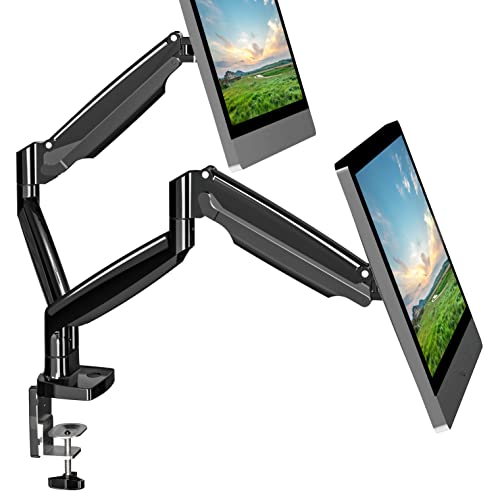 UPGRAVITY Dual Monitor Mount |
| Check price on Amazon |
Key takeaways
- Five dual monitor stands rated for heavy curved and ultrawide screens, compared by per-arm capacity, VESA fit, reach, and desk mounting options.
A dual stand for curved monitors is really a weight decision, not a size decision. Curved panels carry their mass farther out from the VESA plate, so an arm that holds a flat screen of the same weight can still let a curved one droop or drift downward. The listings that matter state a separate capacity for curved screens, and that lower number is the one to trust. Mount style matters too: a stacking pole suits two huge screens, while gas spring arms suit pairs you reposition often.
This guide is for readers pairing two curved screens: twin 34-inch ultrawides on a work desk, a stacked set of super ultrawides, or a standing desk that needs taller arms. The picks come straight from current Amazon listings: the AVLT stacking arm rated for screens up to 57 inches, the ARES WING RGB arm with a stated curved capacity, the HUANUO NITROGLIDE stand, the tall ErGear mount, and the UPGRAVITY gas spring mount.
Quick Picks
As an Amazon Associate we earn from qualifying purchases
| Product | Best for | Key spec from title |
|---|---|---|
| AVLT Dual 57-Inch Heavy Duty Stacking Monitor Arm | Stacked super ultrawides | 59.5 lbs per arm |
| ARES WING RGB Dual Monitor Arm | Heavy curved pairs | 28.6 lbs per arm curved rating |
| HUANUO NITROGLIDE Dual Monitor Stand (HNDS7) | Deep desks, USB charging | 26.4 lbs per arm, 25.59-inch reach |
| ErGear Dual Monitor Desk Mount (EGDS2) | Standing desks | 21-inch max height |
| UPGRAVITY Dual Monitor Mount | 34-inch curved pairs | 26.5 lbs per arm |
How to Choose
Start With the Curved Weight Rating
Screen size is the headline number, but per-arm weight capacity decides whether a stand actually works. Curved monitors shift their center of gravity away from the mount, which adds leverage on the tilt joint, so several makers publish a lower capacity for curved panels than for flat ones. The ARES WING arm, for example, lists a range up to 35.2 pounds for flat screens and up to 28.6 pounds for curved ones. Weigh each monitor without its factory stand, compare that figure against the curved rating where one exists, and leave headroom instead of running an arm at its limit.
Match the VESA Pattern to a Curved Back
Most curved monitors mount through a 75 by 75 millimeter or 100 by 100 millimeter VESA pattern, but the mounting area on a curved shell is often recessed, and some super ultrawide models step up to 200 millimeter patterns. The AVLT stacking arm covers 75, 100, and 200 millimeter patterns, while the other picks here use 75 and 100 millimeter plates. Check the pattern in your monitor manual, look at whether the recess needs spacer screws, and confirm the plate style: a quick-release plate makes it far easier to hang a heavy curved panel without holding its full weight.
Decide Between Side-by-Side Arms and a Stacking Pole
Two articulated arms place curved screens side by side, which suits twin 27 to 38 inch panels and lets each screen angle inward toward your seat. A stacking pole instead mounts one screen above the other, the layout the AVLT and similar heavy mounts are built for, and it keeps two 49 or 57 inch super ultrawides off a shallow desk. Stacking demands a taller pole, a stronger clamp, and enough ceiling of adjustment to line up the bezels. Measure your desk depth and viewing distance first, because a deep curve pulled too close fills your peripheral vision and forces constant head turns.
Check Desk Thickness, Clamp Style, and Cable Room
Every pick here mounts with a C-clamp, a grommet bolt, or both, and each listing states a desk thickness range, from about 0.4 inches up to roughly 3.5 inches depending on the model. Glass tops, hollow-core desks, and beveled edges can defeat a clamp, and heavy stacked screens may need the reinforcement plates AVLT includes. Curved monitors also swing wider arcs when they rotate, so leave clearance behind the desk. Finally, look for cable channels or clips in the arms; two power bricks and two display cables add up quickly and can pull a light arm out of position.
The 5 Best Options
AVLT Dual 57-Inch Heavy Duty Stacking Monitor Arm
- Best for: Stacked pairs of 49-inch or 57-inch super ultrawide curved monitors
- Screen size: 17 to 57 inches, flat, curved, ultrawide, and super ultrawide
- Capacity: 4.4 to 59.5 lbs per arm
- VESA: 75×75, 100×100, 200×100, and 200×200 mm
- Item model number: AVLT-DM107-1
Stacked pairs of 49-inch or 57-inch super ultrawide curved monitors
It stacks screens vertically rather than side by side, and the pole layout needs a desk that can take the clamp load of two very heavy panels.
The AVLT stacking arm is the pick built for the extreme end of this category: two super ultrawide curved screens mounted one above the other on a single pole. Its listing covers screens from 17 to 57 inches, including the 49 and 57 inch Samsung, LG, ASUS, AOC, and Dell super ultrawides, and each arm is rated from 4.4 to 59.5 pounds. USB-C and USB-A ports sit in the base, and the top-mount clamp ships with reinforcement plates for desks that flex. If your pair is a set of huge 32:9 panels, this is the stand sized for them.
ARES WING RGB Dual Monitor Arm
The ARES WING arm is unusual because its listing separates the numbers buyers of curved screens actually need: each arm supports 4.4 to 35.2 pounds for flat monitors and 4.4 to 28.6 pounds for curved ones, across screens from 17 to 38 inches. That makes it a strong match for two 34 or 38 inch curved ultrawides that are too heavy for basic dual arms. The base carries 20 infinite mirror lighting effects, the VESA plate is quick-release, and the arms adjust through 18.5 inches of height with cable management built in.
Specs
- Screen size: 17 to 38 inches, ultrawide
- Capacity: 4.4 to 35.2 lbs per arm flat, 4.4 to 28.6 lbs per arm curved
- VESA: 75×75 and 100×100 mm, quick-release plate
- Adjustment: 18.5 inches of height, tilt from -60 to +60 degrees, 360 degree swivel, rotation plus or minus 90 degrees
- Mounting: C-clamp or grommet for desks 0.4 to 3.1 inches thick
- Base: 20 infinite mirror lighting effects, iron and aluminum build
Best for: Two 34-inch or 38-inch curved ultrawides that need a published curved rating
Watch out for: The curved capacity tops out at 28.6 pounds per arm, so weigh heavier 38-inch panels before ordering.
ASIN: B0DHS2B3DQ
HUANUO NITROGLIDE Dual Monitor Stand (HNDS7)
- Best for: Two ultrawide curved monitors on a deep desk, with a USB charging point at the base
- Screen size: 13 to 40 inches
- Capacity: up to 26.4 lbs per arm
- VESA: 75×75 and 100×100 mm
- Adjustment: tilt from -30 to +85 degrees, swivel from -90 to +90 degrees, 360 degree rotation
Two ultrawide curved monitors on a deep desk, with a USB charging point at the base
The B07-series ASIN marks an older listing, and 26.4 pounds per arm leaves less headroom for the heaviest 38-inch curved panels.
The HUANUO HNDS7, sold in its current listing as the NITROGLIDE dual stand, targets heavier ultrawide pairs with solid aluminum arms, an enlarged base, and a dual C-clamp design. It holds two screens from 13 to 40 inches at up to 26.4 pounds each, and the long arms raise screens up to 21.1 inches and extend out to 25.59 inches, which helps on deep desks where curved panels sit farther back. A built-in USB port in the base adds a charging point, and both clamp and grommet mounting are supported.
ErGear Dual Monitor Desk Mount (EGDS2)
- Best for: Standing desks and taller users who need extra lift with two curved screens
- Screen size: 13 to 40 inches, flat and curved
- Capacity: 4.4 to 26.4 lbs per screen
- VESA: 75×75 and 100×100 mm
- Adjustment: tilt from +85 to -30 degrees, 180 degree swivel, 360 degree rotation
Standing desks and taller users who need extra lift with two curved screens
Check the seller and return terms before ordering, since the listing checked ships from a marketplace seller, and the B08-series ASIN marks an older product generation.
The ErGear EGDS2 is the tall option in this group, with longer arms that lift screens up to 21 inches high and extend 25.6 inches, a combination standing-desk users and taller readers tend to need with big curved panels. The listing covers flat and curved screens from 13 to 40 inches at 4.4 to 26.4 pounds each, and the arms include USB ports and cable management channels underneath. It mounts by C-clamp or grommet on desks from 0.39 to 3.54 inches thick, so it fits most butcher-block and laminate tops.
UPGRAVITY Dual Monitor Mount
- Best for: A main 34-inch curved ultrawide paired with a second curved screen you reposition often
- Screen size: ultrawide flat and curved screens up to 34 inches
- Capacity: 26.5 lbs max load per arm
- VESA: 75×75 and 100×100 mm
- Adjustment: tilt from +90 to -45 degrees, swivel from +90 to -90 degrees, 360 degree rotation
A main 34-inch curved ultrawide paired with a second curved screen you reposition often
The 26.5 pound per-arm ceiling rules out the heaviest 38-inch and larger curved panels, and the listing publishes no separate curved rating.
The UPGRAVITY mount is the straightforward gas spring choice for a pair of curved ultrawides in the 22 to 34 inch range. Each arm holds up to 26.5 pounds, and the listing is explicit that the mount is built for two larger, heavier flat or curved screens rather than small office panels. Motion is generous, with tilt from +90 to -45 degrees, swivel from +90 to -90 degrees, and full 360 degree rotation, so a side monitor can swing into portrait for documents or chat while the main curved screen stays put.
Which One Fits Your Situation
Two 34-Inch Curved Monitors Side by Side
If both of your curved screens sit in the 34 inch class and each weighs well under 26 pounds without its stand, a gas spring dual arm gives you the easiest daily adjustment. The UPGRAVITY mount covers this pairing directly, and the ARES WING arm adds a published curved rating up to 28.6 pounds per arm if your panels are heavier or you want the lighting base on a gaming desk.
A Stacked Pair of Super Ultrawides
For two 49 or 57 inch super ultrawide curved monitors, skip articulated arms and use a stacking pole mount. The AVLT arm is rated to 59.5 pounds per screen, supports the 200 millimeter VESA patterns these panels use, and includes reinforcement plates for the clamp. Confirm your desk is solid wood or similarly rigid before stacking that much weight in one spot.
A Standing Desk or a Tall Seating Position
Curved ultrawides on a standing desk need arms that lift higher than standard mounts, because the screen center should stay near eye level in both positions. The ErGear EGDS2 raises screens up to 21 inches and reaches 25.6 inches out, and the HUANUO HNDS7 matches that height with a dual-clamp base for stability. Either suits two curved screens up to 40 inches at moderate weights.
A Gaming Desk Where the Setup Is on Display
If the desk faces the room and the rig is part of the look, the ARES WING arm pairs its curved-screen rating with a base that runs 20 infinite mirror lighting effects, while the quick-release VESA plates make it simpler to swap panels. Keep the lighting tasteful by picking a single static effect, and route cables through the arm channels so the floating screens stay the focus.
Common Mistakes
- Buying by screen size alone: a stand can fit a 38-inch panel by dimension and still sag if the panel weight passes the per-arm capacity, so compare weights first.
- Using the flat-screen rating for a curved monitor: where a listing publishes a lower curved capacity, that lower figure is the safe limit.
- Skipping the VESA check: recessed mounts on curved shells may need spacers, and some super ultrawides use 200 millimeter patterns that 75 and 100 millimeter plates cannot fit.
- Clamping two heavy screens to a thin or hollow desk without reinforcement plates, which can crack the top or let the mount lean over time.
- Setting gas spring tension with only one monitor mounted, then adding the second screen and finding the first arm drifts out of position.
Frequently Asked Questions
Can one dual stand hold two 49-inch super ultrawide monitors?
Yes, but only a heavy-duty stacking mount is built for it. The AVLT arm in this guide is rated from 4.4 to 59.5 pounds per screen and lists the 49 and 57 inch super ultrawide models from Samsung, LG, ASUS, AOC, and Dell by name. Standard gas spring dual arms top out near 26 pounds per arm, which excludes these panels.
Why does my curved monitor keep tilting downward on its arm?
A curved panel’s weight sits farther from the tilt joint than a flat panel’s, so the joint carries more leverage than the headline capacity suggests. Raise the gas spring tension or tighten the tilt bolt, and check the screen weight against the curved rating where the maker publishes one. If the panel sits at the limit, a higher-capacity arm is the durable fix.
Do curved monitors need a special VESA adapter?
Usually not, but the mounting recess on a curved back can be deeper than the plate standoffs expect, so some panels need longer screws or spacers that may not be in the box. Confirm the VESA pattern, 75, 100, or 200 millimeters, in the monitor manual, and check whether the stand’s plate is quick-release if you plan to mount a heavy screen alone.
Is a stacking pole better than two arms for curved screens?
It depends on screen size and desk depth. A stacking pole suits two very large curved screens, keeps the footprint small, and handles the highest weights, but the upper screen sits high and suits reclined viewing. Two articulated arms suit screens up to about 40 inches, angle each panel toward you, and reposition more freely for mixed work and play.
More from Amazon
Programs that pair well with the guide above. Offers and eligibility are set by Amazon and may change.
Free shipping on eligible items, Prime Video and more. Eligible new members can start with a free trial.
Start a Prime free trialAd-free music streaming. Eligible new subscribers can start with a free trial.
Try Music Unlimited freeA Prime membership for ages 18-24 with a trial period. Eligibility is set by Amazon.
See Prime for Young AdultsAudiobooks and podcasts to listen to on the go. Eligible new members can start with a free trial.
Try Audible freeAs an Amazon Associate we earn from qualifying purchases.










Write Your Review
No reviews yet. Be the first to share your experience!