
Our Short List of 3
All 3 Picks at a Glance
| Product | Specs | Action |
|---|---|---|
 1. ASUS Zenbook 14 OLED: Best Overall Picture | Check price on Amazon | |
 2. Lenovo IdeaPad Slim 5: Best Big Screen for the Home | Check price on Amazon | |
 4. HP 15: Best Touchscreen Value for Films and Calls | Check price on Amazon |
Key takeaways
- Find the best laptops for entertainment with bright OLED and IPS screens, strong speakers, and long battery life for movies, music, and streaming in 2026.
The best laptops for entertainment are the ones that disappear when the film starts. The screen should be bright and colourful enough to watch in a living room or on a train, the speakers should fill a small room without sounding thin, and the battery should last through a full film, or two, without a charger hunt. A laptop bought mainly for streaming, music, video calls, and light browsing does not need a gaming graphics card or a workstation processor. It needs a good display, decent audio, comfortable viewing angles, enough storage for downloads, and Wi-Fi that keeps a 4K stream smooth. This guide explains how to choose one, compares four laptops that suit different budgets and screen sizes, and answers the questions buyers ask most before they decide.
How to Choose a Laptop for Entertainment
Start with the screen, because it decides most of the experience. Resolution matters, but panel type matters more. An OLED screen produces deep blacks and vivid colours because each pixel makes its own light, which makes films look richer, especially in dark scenes. An IPS screen is the next best choice for entertainment: it keeps colours consistent from wide angles, so two people can watch together without the picture washing out. A basic TN panel, by contrast, shifts colour badly when viewed from the side and is best avoided for a machine bought mainly for watching.
Size is a trade-off. A 14-inch laptop is easy to carry and fits on a tray table, while a 15.6-inch or 16-inch screen feels far more cinematic at home. If the laptop will mostly stay on a sofa or a desk, choose the larger screen. If it will travel daily, a 14-inch model with a bright screen is the better compromise. Look for at least Full HD resolution, which is 1920 by 1080 pixels on a 15.6-inch screen, or 1920 by 1200 pixels on a 14-inch or 16-inch screen with a taller 16:10 aspect ratio. Higher resolutions such as 2.8K OLED are a bonus for sharpness, but they are not essential for streaming, because most streaming services cap laptop playback below full 4K unless the app, browser, and display meet strict digital rights requirements.
Brightness matters more than many buyers expect. A screen rated at 250 nits is usable indoors, but it will struggle near a window. A screen rated at 300 nits or higher is comfortable in a bright room, and a screen rated at 400 to 500 nits, which many OLED laptops reach, stays clear even in daylight. Colour coverage is also worth checking: a screen covering 100 percent of the DCI-P3 colour space will show films with richer reds and greens than a screen covering only a narrow slice of the older sRGB space.
Sound is the second priority. Laptop speakers are small, so design matters. Look for upward-facing or front-facing speakers rather than downward-facing ones that fire into a desk, and for tuning or branding from a known audio partner, such as Harman Kardon or Dolby Atmos support. Four-speaker systems generally sound fuller than two-speaker systems, and a laptop with a dedicated audio amplifier will play louder without distorting. Headphones will always sound better than built-in speakers, so a standard 3.5 mm headphone jack, or reliable Bluetooth, is worth having for late-night viewing.
Performance for entertainment is modest. A modern mid-range processor, 16 GB of memory, and a 512 GB solid-state drive are the sweet spot. That combination opens streaming apps instantly, keeps a dozen browser tabs smooth, and leaves room for downloaded films and music. Eight gigabytes of memory can work for streaming alone, but 16 GB is noticeably smoother when you switch between a film, a music app, and a video call. Storage matters too: a 128 GB or 256 GB drive fills quickly once you download films for offline viewing, so 512 GB is the safer minimum.
Battery life deserves a careful reading. Manufacturers quote battery life under light use, and streaming video with the screen on and Wi-Fi active will always deliver less than the headline figure. A laptop rated for 13 to 15 hours of video playback should comfortably manage a long film and several episodes on a charge, while a laptop rated for 8 hours may need a top-up during a long-haul flight. A fast-charging battery that regains a useful charge in under an hour is a genuine benefit for travellers.
Connectivity and comfort round out the choice. Wi-Fi 6 or Wi-Fi 7 keeps streams stable on a busy home network, an HDMI port lets you connect the laptop to a television for a bigger picture, and a USB-C port with display output does the same job with a single cable. A backlit keyboard helps in a dark room, a touchscreen is useful for tapping play and pause, and a webcam with a privacy shutter matters if the same laptop will handle video calls. Weight is the final check: a laptop under 1.5 kilograms is easy to carry, while a 16-inch machine over 1.8 kilograms is better treated as a portable home cinema than a daily travel companion.
Top Picks
1. ASUS Zenbook 14 OLED: Best Overall Picture
The ASUS Zenbook 14 OLED is the pick for buyers who put picture quality first. Its 14-inch OLED touchscreen displays 1920 by 1200 pixels with deep blacks, vivid colour, and a 500-nit peak brightness in HDR, which makes films look striking even in a bright room. The AMD Ryzen 7 8840HS processor, 16 GB of memory, and 512 GB solid-state drive keep streaming, browsing, and multitasking smooth, while Wi-Fi 6E and Bluetooth 5.3 keep connections stable. The 75 Wh battery is rated for up to 15 hours of video playback, and the laptop weighs about 1.2 kilograms, so it is easy to carry to a cafe, a hotel, or a friend’s house.
The OLED panel is the reason to choose this model. Dark scenes in films and dramas keep detail instead of turning into a grey wash, and colours stay rich without looking oversaturated. The touchscreen is a useful bonus for entertainment, letting you tap to play, pause, and scrub through a timeline without reaching for the trackpad. The slim metal body and backlit keyboard make it comfortable for evening viewing, and the HDMI 2.1 port connects directly to a television when you want a larger screen. Its 14-inch size is the main compromise: it is superb for one viewer, but a 16-inch screen is better for two people watching together.
2. Lenovo IdeaPad Slim 5: Best Big Screen for the Home
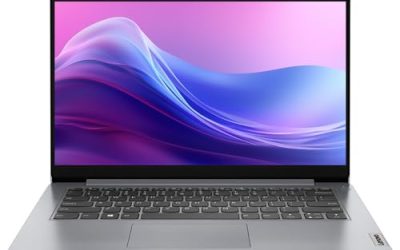
The Lenovo IdeaPad Slim 5 is the pick for buyers who want a larger screen without a heavy machine. Its 16-inch touchscreen displays 1920 by 1200 pixels, giving films and streaming interfaces more room than a 14-inch laptop, while the taller 16:10 aspect ratio shows more of a web page or a video app at once. The AMD Ryzen AI 5 340 processor, 16 GB of DDR5 memory, and 512 GB solid-state drive handle streaming and everyday multitasking comfortably, and Wi-Fi 7 is ready for fast home networks. Battery life is rated at around 11 hours, which covers a full evening of viewing, and the laptop runs Windows 11 Home with a backlit keyboard and a fingerprint reader.
The large screen is the star here. A 16-inch display makes subtitles easier to read, makes split-screen viewing practical, and makes the laptop feel like a small television when it sits on a coffee table or a kitchen counter. The touchscreen adds a tablet-like feel for browsing streaming catalogues, and the slim design keeps the machine portable despite its size. It is a strong choice for a household laptop that lives in the living room, serves as a second screen for films, and still travels well enough for a weekend away.
Lenovo IdeaPad Slim 5 Touchscreen Laptop
3. Acer Aspire 3: Best Value for Everyday Streaming
The Acer Aspire 3 A315-24PT-R0UX is the pick for buyers who want a capable entertainment laptop at a sensible cost. Its 15.6-inch Full HD IPS touchscreen displays 1920 by 1080 pixels with wide viewing angles, so the picture stays consistent when you share the screen with someone sitting beside you. The AMD Ryzen 5 7520U processor, 16 GB of LPDDR5 memory, and 512 GB NVMe solid-state drive are ample for streaming, music, video calls, and web browsing, and Wi-Fi 6 keeps playback smooth. Battery life is rated at up to 13 hours, and the slim silver body weighs about 3.92 pounds, which is manageable for a 15.6-inch machine.
Value is the reason to choose this model. It covers the entertainment essentials, a large IPS screen, enough memory and storage, a touchscreen, and long battery life, without paying for a premium OLED panel or a flagship processor that streaming does not need. The touchscreen makes it easy to browse a streaming library, the backlit keyboard helps in dim rooms, and the HDMI port connects to a television for a bigger picture. It is the most sensible pick for a student, a family laptop, or a second machine dedicated to films and music.
Acer Aspire 3 A315-24PT-R0UX Slim Laptop
4. HP 15: Best Touchscreen Value for Films and Calls
The HP 15 is the pick for buyers who want a large touchscreen and a comfortable keyboard for mixed use. Its 15.6-inch Full HD IPS touchscreen displays 1920 by 1080 pixels at 300 nits, with an anti-glare finish that reduces reflections in a bright room. The Intel Core i3-N305 processor with eight cores, 16 GB of DDR4 memory, and a 512 GB PCIe solid-state drive handle streaming, video calls, and everyday tasks, while Wi-Fi 6 and Bluetooth 5.4 keep wireless connections reliable. It runs Windows 11 Home, includes a full-size keyboard with a numeric keypad, and connects through HDMI and USB-C.
The HP 15 suits a household that uses one laptop for everything. The touchscreen is handy for scrolling through streaming apps, the numeric keypad helps with budgeting or spreadsheets, and the anti-glare IPS screen keeps the picture clear from the side, which matters when the laptop sits on a table between two viewers. It is not the brightest or most powerful laptop in this guide, and its processor is the most modest of the four, but for streaming, music, and video calls it is more than enough, and its large touch display is its strongest asset.
Comparison Table
| Laptop | Screen | Processor | Memory and storage | Battery life | Best for |
|---|---|---|---|---|---|
| ASUS Zenbook 14 OLED | 14 inch OLED touch, 1920 by 1200 | AMD Ryzen 7 8840HS | 16 GB, 512 GB SSD | Up to 15 hours video playback | Best overall picture |
| Lenovo IdeaPad Slim 5 | 16 inch IPS touch, 1920 by 1200 | AMD Ryzen AI 5 340 | 16 GB DDR5, 512 GB SSD | Around 11 hours | Best big screen for the home |
| Acer Aspire 3 | 15.6 inch IPS touch, 1920 by 1080 | AMD Ryzen 5 7520U | 16 GB LPDDR5, 512 GB SSD | Up to 13 hours | Best value for everyday streaming |
| HP 15 | 15.6 inch IPS touch, 1920 by 1080 | Intel Core i3-N305 | 16 GB DDR4, 512 GB SSD | Full evening of viewing | Best touchscreen value for films and calls |
Frequently Asked Questions
What screen is best for watching movies on a laptop?
An OLED screen is best for movies, because its self-lit pixels produce deep blacks and vivid colours, especially in dark scenes. A good IPS screen is the next best choice, because it keeps colours accurate from wide viewing angles, which matters when two people watch together. Look for at least Full HD resolution and a brightness rating of 300 nits or higher for comfortable viewing in a bright room.
How much RAM do I need for an entertainment laptop?
Sixteen gigabytes of memory is the sweet spot for an entertainment laptop. It keeps streaming apps, a web browser with several tabs, and a music app running smoothly at the same time. Eight gigabytes can work for streaming alone, but it will feel slower when you switch between apps, and it leaves less headroom for future software updates.
Can a laptop play 4K streaming video?
It depends on the laptop, the app, and the streaming service. Many services limit laptop playback to high definition unless the laptop, browser, and display meet strict digital rights requirements, even when the screen itself supports 4K. A Full HD or 2.8K OLED screen will still look excellent for streaming, and you can connect the laptop to a 4K television through HDMI for a larger picture when the service allows it.
Is a touchscreen useful on an entertainment laptop?
Yes, a touchscreen is useful for entertainment. It lets you tap to play, pause, and scrub through a timeline, scroll through a streaming catalogue, and adjust volume without using the trackpad. It is not essential, and a non-touch laptop with a good trackpad works just as well for watching, but it adds convenience, especially on a 2-in-1 or a laptop used on a sofa.
Should I choose a 14-inch or a 16-inch laptop for entertainment?
Choose a 14-inch laptop if you travel often and watch alone, because it is lighter, easier to carry, and fits on a tray table. Choose a 15.6-inch or 16-inch laptop if the machine will mostly stay at home, because the larger screen feels more cinematic, makes subtitles easier to read, and is better for two people watching together. The difference in viewing comfort at home is larger than the difference in portability suggests.
Conclusion
The best laptops for entertainment balance a bright, colourful screen, clear sound, long battery life, and enough memory and storage to keep streaming smooth. The ASUS Zenbook 14 OLED leads on picture quality, the Lenovo IdeaPad Slim 5 leads on screen size for home viewing, the Acer Aspire 3 leads on value, and the HP 15 leads on touchscreen versatility for mixed household use. Choose the screen size that fits where you watch, insist on an IPS or OLED panel with at least 300 nits of brightness, and pick 16 GB of memory with a 512 GB solid-state drive. With those basics covered, any of the four laptops in this guide will make films, music, and streaming feel effortless.
Disclosure: As an Amazon Associate, we earn from qualifying purchases.
More from Amazon
Programs that pair well with the guide above. Offers and eligibility are set by Amazon and may change.
Free shipping on eligible items, Prime Video and more. Eligible new members can start with a free trial.
Start a Prime free trialAd-free music streaming. Eligible new subscribers can start with a free trial.
Try Music Unlimited freeA Prime membership for ages 18-24 with a trial period. Eligibility is set by Amazon.
See Prime for Young AdultsAudiobooks and podcasts to listen to on the go. Eligible new members can start with a free trial.
Try Audible freeAs an Amazon Associate we earn from qualifying purchases.









Write Your Review
No reviews yet. Be the first to share your experience!