
Our Short List of 3

- Best for: A first-time buyer who wants full-auto setup and quiet printing in a shared room.
- 256 x 256 x 256 mm build volume
- Full-auto calibration
- Active flow rate compensation
- Quiet operation at 48 dB or less

- Best for: A hobbyist who wants a proven design with a large community and easy upgrades.
- 250 mm/s maximum print speed
- CR Touch auto leveling
- Sprite direct extruder with auto-load filament
- Dual Z-axis and Y-axis rails

- Best for: A buyer who wants the fastest prints in a compact CoreXY frame.
- 600 mm/s maximum print speed
- One-click fully auto leveling
- 280°C maximum nozzle temperature
- CoreXY all-metal structure
All 4 Picks at a Glance
| Product | Specs | Action |
|---|---|---|
| Bambu Lab A1 |
| Check price on Amazon |
| Creality Ender-3 V3 SE |
| Check price on Amazon |
| FLASHFORGE Adventurer 5M |
| Check price on Amazon |
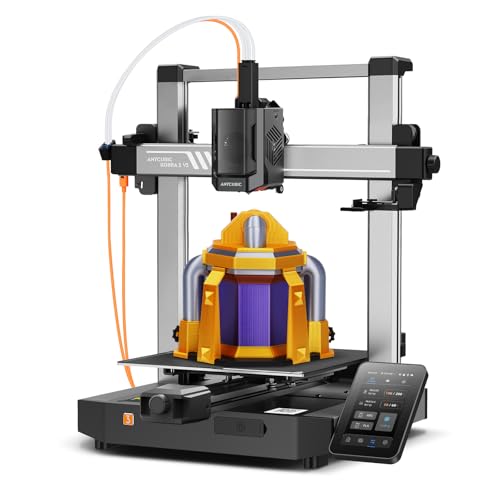 Anycubic Kobra 3 |
| Check price on Amazon |
Key takeaways
- Our guide to the best mid range 3d printers compares four capable FDM machines for home workshops, covering speed, build volume, calibration and materials.
A mid-range 3D printer sits between a starter machine and a workshop printer, and that middle ground is where most home buyers end up. You get faster printing, automatic calibration and a larger build volume than a basic model, without the enclosed chamber and industrial price tag of a professional machine. The real decision is not which printer is fastest on paper, but which balance of speed, size, ease of use and material support fits the things you plan to make, from household fixes and toys to prototypes and hobby parts.
This guide is for hobbyists who have outgrown a starter printer, makers setting up a home workshop, parents buying a capable family printer, and anyone who wants reliable prints without babysitting every layer. Each printer below was chosen from the names and specifications shown on its Amazon product page, and the guide weighs what each machine does well against what it gives up, so you can match a printer to the way you plan to use it.
Quick Picks
As an Amazon Associate we earn from qualifying purchases
| Product | Best for | Key spec from title |
|---|---|---|
| Bambu Lab A1 | First printer with full-auto setup | 256mm build volume with full-auto calibration |
| Creality Ender-3 V3 SE | Fast prints on a proven design | 250mm/s speed with CR Touch auto leveling |
| FLASHFORGE Adventurer 5M | Speed in a compact CoreXY frame | 600mm/s speed with 280°C nozzle |
| Anycubic Kobra 3 | Multicolor printing on a budget | 600mm/s speed with 250mm build volume |
How to Choose
Print Speed and Motion System
Print speed decides how long a part takes, and it varies more than the headline number suggests. A printer rated for very high speeds only reaches them on simple shapes, while detailed parts print slower so layers bond properly. The motion system matters too: a CoreXY frame moves the print head on a fixed gantry and handles high speeds with less shaking, while a bed-slinger moves the build plate back and forth, which suits slower, steadier work. Compare realistic speeds for the parts you plan to make, not just the maximum figure on the listing, and check acceleration figures if they are published.
Build Volume and Footprint
Build volume sets the largest single part you can print, and it is easy to overbuy or underbuy. A 220mm cube covers most household fixes, toys and hobby parts, while a 256mm cube adds room for helmets, cosplay pieces and larger prototypes. Measure the desk or bench where the printer will live, because a tall gantry and a spool holder need more space than the footprint suggests, and leave room around the machine for filament, tools and finished prints. If you often print tall objects, height matters more than width.
Calibration and Ease of Use
Calibration is where a mid-range printer earns its keep. Full-auto calibration checks the bed level and flow before each print, so a beginner gets good first layers without manual screws and paper tests. A touchscreen with clear menus, a guided first setup and a slicer with ready-made profiles all cut the learning curve. Check whether the printer ships mostly assembled, because some machines need an hour of assembly while others print within minutes of unboxing. Good software support matters as much as hardware, since profiles and updates shape daily use.
Safety, Ventilation and Placement
A 3D printer is a hot electrical machine, so placement and safety deserve a real decision. Nozzles run hot enough to burn skin, and the heated bed stays warm long after a print ends, so keep the printer away from children and pets and let parts cool before you touch them. Print in a ventilated room, because melted filament gives off fumes, and keep flammable material away from the machine. Place the printer on a stable, level surface away from draughts, since a wobbling bench or a cold draught can warp prints and loosen parts over time.
The 4 Best Options
Bambu Lab A1
- Best for: A first-time buyer who wants full-auto setup and quiet printing in a shared room.
- 256 x 256 x 256 mm build volume
- Full-auto calibration
- Active flow rate compensation
- Quiet operation at 48 dB or less
A first-time buyer who wants full-auto setup and quiet printing in a shared room.
The open frame suits PLA and PETG best, and multi-color printing needs the AMS lite unit, which is sold separately.
The Bambu Lab A1 is the easiest printer in this roundup to live with, and it suits a first-time buyer who wants good prints without a learning curve. Full-auto calibration checks the bed and flow before every print, active flow rate compensation keeps extrusion even, and quiet operation makes it comfortable in a shared room. Its 256mm build volume covers most home projects, and multi-color printing is available with the AMS lite unit, which is sold separately. The open frame keeps the machine light and accessible, though it limits printing with materials that need a warm chamber.
Creality Ender-3 V3 SE
- Best for: A hobbyist who wants a proven design with a large community and easy upgrades.
- 250 mm/s maximum print speed
- CR Touch auto leveling
- Sprite direct extruder with auto-load filament
- Dual Z-axis and Y-axis rails
A hobbyist who wants a proven design with a large community and easy upgrades.
The open bed-slinger frame moves the build plate during prints, so very tall parts need slower speeds for clean results.
The Ender-3 V3 SE is the proven workhorse of this roundup, and it suits a buyer who values a huge community and endless upgrade paths. CR Touch auto leveling maps the bed before each print, the Sprite direct extruder feeds filament reliably, and dual Z-axis screws keep the gantry steady as it rises. It prints at up to 250mm/s, which is fast enough for most home parts, and its 220 x 220 x 250 mm build volume covers the usual range of household and hobby prints. Spare parts and guides are easy to find, which matters when you want to fix or improve the machine yourself.
FLASHFORGE Adventurer 5M
- Best for: A buyer who wants the fastest prints in a compact CoreXY frame.
- 600 mm/s maximum print speed
- One-click fully auto leveling
- 280°C maximum nozzle temperature
- CoreXY all-metal structure
A buyer who wants the fastest prints in a compact CoreXY frame.
The 220mm build volume is smaller than the other picks, so large single-piece prints may need splitting.
The Adventurer 5M is the speed pick in this roundup, and it suits a buyer who wants fast prints in a compact frame. Its CoreXY structure moves the print head while the bed stays still, which supports speeds up to 600mm/s with less shaking than a bed-slinger. One-click auto leveling handles bed calibration, the quick-detachable nozzle swaps fast when you change materials, and the dual-sided PEI plate grips prints during printing and releases them when cool. The 220mm cube build volume is smaller than the A1, so it suits a buyer who values speed over size.
Anycubic Kobra 3
- Best for: A buyer who wants large, colorful prints on a mid-range budget.
- 600 mm/s maximum print speed
- Full-auto calibration
- 250 x 250 x 260 mm build volume
- Multi-color printing with ACE Pro, sold separately
A buyer who wants large, colorful prints on a mid-range budget.
Multi-color printing needs the ACE Pro unit, which is sold separately, and the open frame suits PLA and PETG best.
The Kobra 3 is the multicolor value pick in this roundup, and it suits a buyer who wants colorful prints without a premium machine. It prints at up to 600mm/s with full-auto calibration, and its 250 x 250 x 260 mm build volume is the largest here, so big parts fit without splitting. Multi-color printing works with the ACE Pro unit, which is sold separately and also dries filament while it feeds. The open frame keeps the printer accessible and easy to maintain, and the direct drive extruder handles flexible filament better than a Bowden setup.
Which One Fits Your Situation
First Printer for a Beginner
Pick the Bambu Lab A1 if this is your first printer. Full-auto calibration and active flow compensation remove the two jobs that trip up new owners, and the quiet operation suits a bedroom or a shared living space. The 256mm build volume leaves room to grow, and the ready-made profiles mean your first print can start within minutes of unboxing rather than after an evening of tuning.
Fast Prints in a Small Space
Pick the FLASHFORGE Adventurer 5M if speed matters and desk space is tight. Its CoreXY frame prints fast without shaking the bench, and the 220mm cube fits on a smaller desk than the taller bed-slingers. One-click leveling and a quick-swap nozzle keep downtime short, and the PEI plate makes removing finished parts simple. It suits a buyer who prints often and wants each job done quickly.
Tinkering and Upgrades
Pick the Creality Ender-3 V3 SE if you like to tinker. Its huge community means guides, spare parts and upgrade paths are easy to find, and the Sprite extruder and dual Z-axis give you a solid base to build on. It suits a hobbyist who enjoys improving a machine over time, and who values repairability and shared knowledge over out-of-the-box automation.
Multicolor Prints on a Budget
Pick the Anycubic Kobra 3 if you want colorful prints without paying for a premium machine. Its large build volume fits big parts, and the ACE Pro unit adds multi-color printing plus filament drying when you are ready for it. It suits a maker who prints toys, models and display pieces, and who wants color variety as a feature rather than an afterthought.
Common Mistakes
- Judging a printer by its maximum speed alone, without checking how fast it prints detailed parts that need clean layers.
- Buying a small build volume to save space, then finding every interesting part needs splitting into pieces.
- Skipping calibration checks, then blaming the printer when the first layer peels off the bed.
- Printing with the wrong material for the job, such as using PLA outdoors where heat and sun will warp it.
- Placing the printer on a wobbly table or in a draughty corner, then wondering why tall prints lean or warp.
Frequently Asked Questions
Is a mid-range printer good for a beginner?
Yes, and it is often the best starting point. Full-auto calibration, guided setup and ready-made slicer profiles remove the hardest jobs from a first print, so a beginner gets good results quickly. A mid-range machine also leaves room to grow, with a larger build volume and better speed than a starter model, so you are less likely to outgrow it soon.
What materials can these printers use?
All four printers in this guide use 1.75 mm filament, and PLA is the easiest material to start with. PETG adds strength and heat resistance for functional parts, while TPU adds flexibility for phone cases and gaskets. Materials such as ABS and nylon need a warm, still chamber, so they suit enclosed machines better than the open-frame printers in this guide.
How much space does a 3D printer need?
More than the footprint on the listing. Allow room for the spool holder, the gantry at full height, filament storage and finished prints, plus space to reach the touchscreen and remove the build plate. A stable, level bench in a ventilated room works best, and the printer should sit away from draughts, children and pets while it runs.
Do I need the multicolor unit?
Not at first. All four printers here print in a single color out of the box, and most household fixes, prototypes and hobby parts need only one color. A multicolor unit adds color variety for toys, models and display pieces, so buy it when you have a project that needs it, rather than paying for it before your first print.
More from Amazon
Programs that pair well with the guide above. Offers and eligibility are set by Amazon and may change.
Free shipping on eligible items, Prime Video and more. Eligible new members can start with a free trial.
Start a Prime free trialAd-free music streaming. Eligible new subscribers can start with a free trial.
Try Music Unlimited freeA Prime membership for ages 18-24 with a trial period. Eligibility is set by Amazon.
See Prime for Young AdultsAudiobooks and podcasts to listen to on the go. Eligible new members can start with a free trial.
Try Audible freeAs an Amazon Associate we earn from qualifying purchases.









Write Your Review
No reviews yet. Be the first to share your experience!