
Our Short List of 3

- Best for: gamers who also edit photos or watch a lot of video on the same screen.
- Size and panel: 27-inch Nano IPS
- Resolution: 2560 x 1440 (QHD)
- Refresh rate: 165Hz native, 180Hz overclocked
- Response time: 1ms GtG

- Best for: a shared PC and console desk where the stand has to fit more than one seating position.
- Size and panel: 27-inch Fast IPS
- Resolution: 2560 x 1440 (QHD)
- Refresh rate: 165Hz
- Response time: 1ms GtG
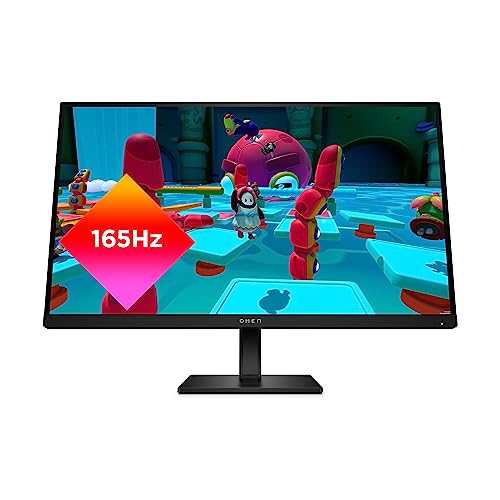
- Best for: multi-device desks that need two HDMI sockets and wide color in one screen.
- Size and panel: 27-inch IPS
- Resolution: 2560 x 1440 (QHD)
- Refresh rate: 165Hz
- Response time: 1ms GtG
All 3 Picks at a Glance
| Product | Specs | Action |
|---|---|---|
| LG UltraGear 27GP850-B |
| Check price on Amazon |
| Dell G2724D |
| Check price on Amazon |
| HP OMEN 27q |
| Check price on Amazon |
Key takeaways
- Three 165Hz gaming monitors that still sell new on Amazon, all 27-inch QHD IPS panels, with the input, sync and stand checks to run before you buy.
The number in this category is not the hard part, because every screen here advertises the same 165Hz. The real decision is whether the rest of the monitor lets you use that rate: the input you plug into has to carry 165Hz at the panel’s full resolution, the panel has to stay clean at speed without smeared trails, and the sync range has to cover the frame rates your graphics card actually holds in the games you play most.
This roundup is for PC gamers stepping up from a 60Hz or 75Hz screen, console players who want a monitor that also suits a desk PC, and anyone replacing an older 144Hz panel whose stand or inputs have started to feel dated. Every pick below was chosen from the specifications printed on its Amazon listing, and each one is a monitor whose listing states 165Hz rather than a lower rate dressed up by an overclock headline.
Quick Picks
As an Amazon Associate we earn from qualifying purchases.
| Product | Best for | Key spec from title |
|---|---|---|
| LG UltraGear 27GP850-B | Fast IPS color for mixed gaming and media | 27″ QHD Nano IPS, 165Hz (O/C 180Hz) |
| Dell G2724D | A full ergonomic stand and console-friendly HDMI | 27″ QHD Fast IPS, 165Hz, DisplayHDR 400 |
| HP OMEN 27q | Wide color coverage with dual HDMI inputs | 27″ QHD IPS, 165Hz, 95% DCI-P3 |
How to Choose
Confirm the 165Hz Figure Is the Panel’s Real Rate
Some monitors reach their headline number only through an overclock setting buried in the on-screen menu, and a few run that rate at a reduced resolution. Read the listing the way an engineer would: the refresh figure should sit next to the native resolution, and any overclock should be printed as a separate, higher number. All three monitors in this roundup list 165Hz as the panel rate at 2560 x 1440, and the LG goes further by printing its 180Hz overclock as a distinct step above the native figure, which is exactly how an honest listing should present it.
Match the Panel to the Games You Play
At this size and rate, the choice is usually between IPS and VA. IPS panels, like the three gathered here, keep motion clean and colors stable at wide angles, which suits fast shooters and shared viewing from a couch or a second chair. VA panels answer with much deeper contrast for dark scenes, but their slower dark transitions can smear in high-contrast movement. Response figures need care as well: a 1ms grey-to-grey claim describes the best-case pixel transition under overdrive, so treat it as a class marker for fast panels rather than a promise about every shade change.
Check the Input You Will Actually Use
A 165Hz badge means little if your cable lands on the wrong port. DisplayPort is the safe route to the full 165Hz at QHD on a PC, while HDMI inputs on monitors in this class often cap lower or reserve their best mode for consoles. Dell states the arrangement plainly on the G2724D: PC players get 165Hz, and consoles get up to 120Hz at QHD over HDMI. Before ordering, list every device you plan to connect, count the HDMI ports you genuinely need for them, and check the listing for the per-input rates instead of assuming each socket behaves the same.
Let Sync Range and the Stand Decide Daily Comfort
Adaptive sync only helps inside its working window, so a FreeSync Premium or G-SYNC Compatible badge matters most when your frame rate dips during heavy scenes; below the range, low-framerate compensation on certified models keeps motion from juddering. Check which badge your graphics card needs before choosing. The stand is the other daily factor. Height adjustment decides whether the screen meets your eye line without a stack of books, pivot suits a portrait second screen, and a VESA mount pattern is worth confirming if an arm is already on your desk, because a fixed tilt-only base cannot be corrected later.
The 3 Best Options
LG UltraGear 27GP850-B
- Best for: gamers who also edit photos or watch a lot of video on the same screen.
- Size and panel: 27-inch Nano IPS
- Resolution: 2560 x 1440 (QHD)
- Refresh rate: 165Hz native, 180Hz overclocked
- Response time: 1ms GtG
gamers who also edit photos or watch a lot of video on the same screen.
B&H lists this model as discontinued in its own channel, so confirm the Amazon listing shows new stock from a seller you accept before ordering.
The 27GP850-B is the pick for players who want speed without giving up color. Its Nano IPS panel pairs the 165Hz native rate with a 98% DCI-P3 gamut and DisplayHDR 400, so the same screen that runs a fast shooter cleanly also handles photo work and streamed video with richer color than a basic sRGB panel. LG prints the 180Hz overclock separately from the native rate, which makes the listing easy to trust. The stand covers tilt, height and pivot, and certification for both major sync systems means neither graphics card brand locks you out.
Dell G2724D
- Best for: a shared PC and console desk where the stand has to fit more than one seating position.
- Size and panel: 27-inch Fast IPS
- Resolution: 2560 x 1440 (QHD)
- Refresh rate: 165Hz
- Response time: 1ms GtG
a shared PC and console desk where the stand has to fit more than one seating position.
one Amazon mirror showed this model sold out in an older crawl while fresher trackers list it in stock, so verify the buy box shows a new unit before you commit.
Dell’s G2724D suits a desk that hosts both a PC and a console. The listing is unusually explicit about what each connection delivers: 165Hz for PC play and up to 120Hz at QHD for consoles over HDMI, so there is no guessing after setup. The Fast IPS panel carries DisplayHDR 400 and 99% sRGB coverage, and the stand is the most complete here, adding swivel to the usual tilt, height and pivot. Dell also includes a USB-C to DisplayPort cable in the box, a small touch that helps gaming laptops reach the full refresh rate without a separate purchase.
HP OMEN 27q
- Best for: multi-device desks that need two HDMI sockets and wide color in one screen.
- Size and panel: 27-inch IPS
- Resolution: 2560 x 1440 (QHD)
- Refresh rate: 165Hz
- Response time: 1ms GtG
multi-device desks that need two HDMI sockets and wide color in one screen.
a separate Renewed listing circulates under a different ASIN, so check the page you land on describes a new monitor, not a refurbished one.
The OMEN 27q is built for the buyer whose desk runs several HDMI devices at once. Its listing specifies two HDMI inputs alongside DisplayPort, so a PC, a console and a streaming box can stay connected without a cable swap. The IPS panel matches the others on rate and resolution while adding 95% DCI-P3 coverage beside its 99% sRGB figure, which gives creative applications more saturated color to work with. FreeSync Premium covers tearing on AMD cards and on compatible NVIDIA setups through adaptive sync, and the stand adjusts for height, so the screen is not stuck at one fixed level.
Which One Fits Your Situation
You Play Competitive Shooters on a PC
Take the LG UltraGear 27GP850-B. Its native 165Hz rate, fast Nano IPS response and dual sync certification cover both graphics card brands, and the printed 180Hz overclock gives you a documented step up if your card can feed it. DisplayPort will carry the full rate at QHD, so the panel, not the cable, sets the ceiling on your frame pacing.
Your Monitor Serves a PC and a Console
Choose the Dell G2724D. Dell states the console mode directly in the listing, up to 120Hz at QHD over HDMI, which is the highest rate current consoles target, and the PC side still receives the full 165Hz. The four-way stand also helps when the same desk alternates between a chair for PC work and a lower seat for console sessions.
You Keep Several Devices Plugged In
The HP OMEN 27q fits a crowded desk. Two HDMI inputs plus DisplayPort mean a PC, console and streaming device can each keep a permanent cable, and the height-adjustable stand keeps the screen usable from a standard desk chair. Its wider DCI-P3 coverage is a bonus if the same monitor doubles for video editing between game sessions.
Common Mistakes
- Assuming every port runs 165Hz, when the full rate often lives on DisplayPort and HDMI may cap lower or serve a console mode instead.
- Reading an overclock figure as the native rate, then blaming the panel when the standard mode turns out slower.
- Pairing a 165Hz QHD screen with a graphics card that holds far lower frame rates, leaving the sync range to do all the work.
- Ignoring the stand until setup day and discovering a tilt-only base that cannot reach eye level or accept your monitor arm.
- Landing on a Renewed or refurbished listing of the same model and comparing it against new listings as if they were the same offer.
Frequently Asked Questions
Is 165Hz noticeably smoother than 144Hz?
The step is real but modest. Frame times tighten slightly, and motion in fast pans looks a little cleaner, yet most players notice the jump from 60Hz far more. The stronger reason to pick a 165Hz model is usually the newer panel, inputs and stand around the rate, not the extra frames alone.
Can HDMI run a 165Hz monitor at its full rate?
Sometimes, but it depends on the port version and the monitor’s own per-input limits, which the listing should state. DisplayPort remains the dependable route to 165Hz at QHD on a PC. On consoles the target is different anyway: models like the Dell here accept up to 120Hz at QHD over HDMI, which matches what current consoles output.
Does a 165Hz monitor need a stronger graphics card?
It needs one that can render near the rate at 2560 x 1440 in your games, otherwise the headroom goes unused. Adaptive sync keeps lower frame rates smooth, so a mid-range card still benefits, but buyers planning around esports titles at high settings should budget the card and the screen together rather than treating the monitor as the whole upgrade.
Why do listings show both 165Hz and a higher overclock number?
The lower figure is the panel’s standard rate, and the higher one is available only when you enable overclocking in the monitor’s menu. The LG in this roundup is a clear example, listing 165Hz natively and 180Hz overclocked. Overclock modes can add slight image artifacts on some panels, so treat them as an optional extra, not the baseline.
More from Amazon
Programs that pair well with the guide above. Offers and eligibility are set by Amazon and may change.
Free shipping on eligible items, Prime Video and more. Eligible new members can start with a free trial.
Start a Prime free trialAd-free music streaming. Eligible new subscribers can start with a free trial.
Try Music Unlimited freeA Prime membership for ages 18-24 with a trial period. Eligibility is set by Amazon.
See Prime for Young AdultsAudiobooks and podcasts to listen to on the go. Eligible new members can start with a free trial.
Try Audible freeAs an Amazon Associate we earn from qualifying purchases.










Write Your Review
No reviews yet. Be the first to share your experience!