

Our Short List of 3
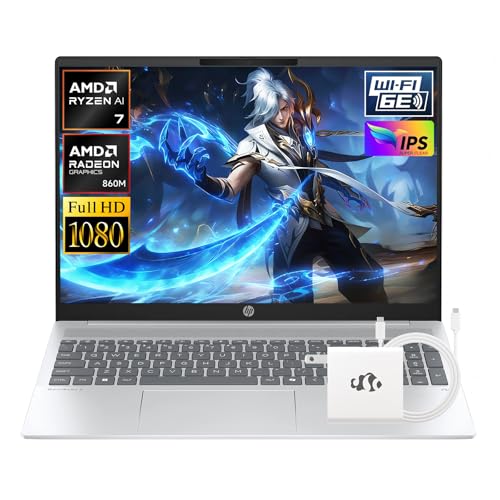
- Best for: students and home-office buyers who want a large 16-inch screen and a full port selection in a mainstream everyday laptop.
- Processor: AMD Ryzen AI 7 350, 8-core, up to 5.0 GHz
- Graphics: AMD Radeon 860M
- Memory: 16GB
- Storage: 512GB NVMe M.2 SSD

- Best for: buyers who want a light 2-in-1 with an OLED screen and pen for notes and sketching, with light gaming on the side.
- Processor: AMD Ryzen AI 7 350 with 50 TOPS NPU
- Graphics: AMD Radeon 860M
- Memory: 16GB LPDDR5X
- Storage: 1TB SSD

- Best for: commuters and students who want the most portable full-power option here, with a touchscreen and modern Wi-Fi 7.
- Processor: Intel Core Ultra 7 155H
- Graphics: Intel Arc (integrated)
- Memory: 16GB LPDDR5X onboard
- Storage: 512GB PCIe Gen4 SSD
All 4 Picks at a Glance
| Product | Specs | Action |
|---|---|---|
| HP OmniBook 5 16 |
| Check price on Amazon |
| Lenovo Yoga 7 2-in-1 14 |
| Check price on Amazon |
| Acer Swift Go 14 |
| Check price on Amazon |
 Acer Swift X 14 |
| Check price on Amazon |
Key takeaways
- Five laptops for light gaming compared: strong integrated graphics, entry GPUs, screen and battery checks, and which one fits your desk, dorm or commute.
A laptop bought for lectures, spreadsheets and streaming often ends up running games too, and that second job is where many everyday machines disappoint. Integrated graphics vary enormously, memory is frequently soldered, and a screen that looks fine for documents may feel dim for play. The real decision is not whether a slim laptop can game at all, but how much graphics headroom you need for esports titles, indie games and older favourites, and what you trade in weight, screen size and ports to get it.
This guide serves students carrying one machine between classes, home-office workers who play after hours, commuters who want the lightest possible bag, and creators who want an entry dedicated GPU without a gaming chassis. The five picks were chosen from the name and specifications on each Amazon listing, in the exact configurations recorded below.
Quick Picks
As an Amazon Associate we earn from qualifying purchases
| Product | Best for | Key spec from title |
|---|---|---|
| Lenovo IdeaPad Slim 5 16 | Desk-first mixed work and play | 16-inch WUXGA IPS touchscreen |
| HP OmniBook 5 16 | Students and home office | 16-inch WUXGA IPS display |
| Lenovo Yoga 7 2-in-1 14 | Pen notes and sketching | 14-inch WUXGA OLED touch display |
| Acer Swift Go 14 | Commuters and travel | 14-inch 1920 x 1200 IPS touch display |
| Acer Swift X 14 | Heavier play plus photo and video editing | NVIDIA GeForce RTX 4060 graphics |
How to Choose
Integrated Graphics or a Dedicated GPU
This is the decision that shapes everything else. The strongest integrated graphics, such as the AMD Radeon 860M and Intel Arc graphics in this lineup, are built for esports titles, indie games and older, less demanding releases, and they keep the laptop slim, quiet and efficient for work. An entry or mid-tier dedicated GPU, like the RTX 4060 in the Acer Swift X 14, adds real headroom for heavier games and GPU-accelerated editing, but it arrives in a thicker, costlier body. Decide by the games you actually play: if your library is light, integrated graphics in a better everyday machine usually serve you longer than a weak gaming laptop.
Memory You Cannot Upgrade Later
Most slim laptops now use soldered memory, which means the amount fitted at the factory is the amount you keep for the life of the machine. Sixteen gigabytes is the sensible floor for a laptop that works all day and games in the evening, because modern browsers, chat apps and a game together stretch smaller configurations quickly. Check the listing carefully before ordering: if the memory is described as onboard or LPDDR5X, there is no slot to fill later. Storage matters almost as much, since game installs are large; a 1TB drive saves you from deleting titles to make room, while 512GB suits a small, rotating library.
Screen Size, Panel Type and Brightness
A 16-inch screen gives documents and strategy games room to breathe and suits a desk-bound machine, while a 14-inch panel keeps the bag light for commuting. Panel type changes the feel of everything: OLED screens in this group deliver deep contrast and wide colour coverage that make films and games look rich, while IPS panels are a steady, glare-friendly choice for bright rooms. Touch support and a 16:10 aspect ratio, both common here, help with documents and web pages as much as with play. Refresh rate only matters once the graphics can feed it, so treat a high-refresh OLED as a bonus on a dedicated-GPU model rather than a reason to buy.
Weight, Ports and Battery for the Daily Carry
A light-gaming laptop still has to survive your ordinary day, so judge it as a work machine first. Weight decides whether it travels: the convertibles and 14-inch models here sit near three pounds, while the 16-inch machines approach four. Count the ports you use weekly, because slim bodies drop them quickly; an HDMI port, a couple of USB-A sockets and a card reader can save you a pocketful of dongles. Battery capacity in watt-hours is the figure to compare across listings, and remember that gaming drains any battery fast, so plan to play plugged in and let the battery serve your work and streaming hours.
The 5 Best Options
Lenovo IdeaPad Slim 5 16
The largest screen in this lineup anchors a machine built for desk-based days that end with some play. Its listing describes the Ryzen AI 7 350 as enabling seamless multitasking for streaming, chatting and gaming, and calls the 16-inch touchscreen well suited to movies, photo editing and immersive gaming, which is exactly the everyday-plus-gaming brief. The Radeon 860M integrated graphics are the strong class of integrated graphics, the memory uses two standard SODIMM sticks rather than solder, and Wi-Fi 7 plus an FHD/IR hybrid camera round out a complete work specification.
Specs
- Processor: AMD Ryzen AI 7 350, 8 cores, 2.00 GHz up to 5.00 GHz
- Graphics: AMD Radeon 860M
- Memory: 16GB DDR5-5600 (2 x 8GB SODIMM)
- Storage: 512GB SSD M.2 2242 PCIe Gen4
- Display: 16-inch WUXGA 1920 x 1200 IPS touchscreen
- Wireless: Wi-Fi 7
- Camera: FHD/IR hybrid camera
- Battery: 60Wh
- Weight: approximately 4 lbs
Best for: buyers who want the biggest screen in the lineup for mixed work, streaming and light gaming at a desk.
Watch out for: the 16-inch body is the heaviest here at about 4 lbs, and the memory is two 8GB sticks, so both slots are already filled.
ASIN: B0G1D4KT7F
HP OmniBook 5 16
- Best for: students and home-office buyers who want a large 16-inch screen and a full port selection in a mainstream everyday laptop.
- Processor: AMD Ryzen AI 7 350, 8-core, up to 5.0 GHz
- Graphics: AMD Radeon 860M
- Memory: 16GB
- Storage: 512GB NVMe M.2 SSD
students and home-office buyers who want a large 16-inch screen and a full port selection in a mainstream everyday laptop.
this is a reseller listing for an upgraded configuration, and the seller states the manufacturer box is opened to install upgrades, so check the exact configuration and warranty terms on the page before buying.
HP positions this OmniBook 5 for creators, business, gaming and college in its own listing title, and the specification backs the everyday half of that promise: a 16-inch WUXGA screen, the same Ryzen AI 7 350 processor and Radeon 860M graphics as the IdeaPad above, a backlit keyboard and the fullest port selection in this group, including USB 4 Type-C and HDMI 2.1. It is sold as an upgraded configuration by a third-party seller, so the value here is the generous specification in a mainstream silver chassis at a size that suits a home desk or a dorm room shared between study and play.
Lenovo Yoga 7 2-in-1 14
- Best for: buyers who want a light 2-in-1 with an OLED screen and pen for notes and sketching, with light gaming on the side.
- Processor: AMD Ryzen AI 7 350 with 50 TOPS NPU
- Graphics: AMD Radeon 860M
- Memory: 16GB LPDDR5X
- Storage: 1TB SSD
buyers who want a light 2-in-1 with an OLED screen and pen for notes and sketching, with light gaming on the side.
the OLED panel runs at 60Hz, and the memory is soldered LPDDR5X, so there is no RAM upgrade path later.
The Yoga 7 folds flat, takes notes with the included stylus pen and still carries the same Radeon 860M integrated graphics as the two 16-inch machines, so light gaming travels with it. Its 14-inch OLED touch display is the prettiest screen among the integrated-graphics picks, with 600-nit brightness, full DCI-P3 coverage and HDR True Black 500 support, and the 70Wh battery is the largest in this group relative to the machine’s 3.08 lb weight. A terabyte of storage leaves genuine room for a game library alongside coursework, and the convertible hinge makes it the natural pick for readers, sketchers and presenters.
Acer Swift Go 14
- Best for: commuters and students who want the most portable full-power option here, with a touchscreen and modern Wi-Fi 7.
- Processor: Intel Core Ultra 7 155H
- Graphics: Intel Arc (integrated)
- Memory: 16GB LPDDR5X onboard
- Storage: 512GB PCIe Gen4 SSD
commuters and students who want the most portable full-power option here, with a touchscreen and modern Wi-Fi 7.
the LPDDR5X memory is onboard and not upgradeable, and 512GB fills quickly once a game library grows.
The Swift Go 14 is the commuter’s version of this brief: a 14-inch thin-and-light built around Intel’s Core Ultra 7 155H and its Arc integrated graphics, with a 1920 x 1200 IPS touchscreen, Wi-Fi 7 and a microSD card reader for camera cards and file transfers. It is an Intel Evo-class everyday machine, so the appeal is a full-power processor and modern connectivity in the most portable body here, with enough graphics strength for esports and indie play at the end of the day. Everything is onboard, so the configuration you order is the configuration you keep.
Acer Swift X 14
- Best for: buyers whose light gaming leans heaviest in this group, and who also edit photos or video, without moving up to a full gaming laptop.
- Processor: Intel Core Ultra 7 155H
- Graphics: NVIDIA GeForce RTX 4060 (60W)
- Memory: 16GB LPDDR5X
- Storage: 1TB SSD
buyers whose light gaming leans heaviest in this group, and who also edit photos or video, without moving up to a full gaming laptop.
the RTX 4060 here is a lower-wattage 60W version tuned for a slim creator chassis, and the memory is not upgradeable.
The Swift X 14 is where this lineup crosses into dedicated graphics: an RTX 4060 inside a slim 14.5-inch creator body rather than a gaming-laptop chassis. The supporting specification is creator-grade too, with a 2880 x 1800 OLED display running at 120Hz, Calman Verified colour, a Core Ultra 7 155H processor and a full terabyte of storage. For buyers whose light gaming leans heaviest in this group, or who also edit photos and video, it offers the most headroom here without stepping up to a full gaming laptop and everything that size implies for noise, weight and battery life.
Which One Fits Your Situation
Your Desk Is Home Base
If the laptop rarely leaves one room, the two 16-inch machines make the most of the space. Their larger screens suit long documents, split-screen study and strategy games alike, and the extra weight stops mattering once the machine lives on a desk. Choose between them on ports and memory: the IdeaPad Slim 5 uses standard memory sticks, while the OmniBook 5 carries the fullest port selection in the group.
Classes All Day, Games at Night
A student machine has to survive a backpack before it entertains anyone. The Acer Swift Go 14 is the easiest carry here, and the Lenovo Yoga 7 adds a pen and a convertible hinge for lecture notes and marked-up readings. Both pair strong integrated graphics with 16GB of memory, so coursework, streaming and lighter games share one bag-friendly laptop without a second device.
You Sketch, Annotate and Present
The Yoga 7 2-in-1 is the only pick designed around a pen. Its OLED touch display folds back for sketching, annotating documents or presenting to a small group, and the included stylus means there is nothing extra to buy. The same machine still carries Radeon 860M graphics and a terabyte of storage, so the creative tool doubles as the evening gaming machine without compromise on library space.
One Machine for Editing and Play
If your evenings split between a timeline and a game library, the Acer Swift X 14 is the fit. Its RTX 4060 accelerates photo and video work as well as games, the Calman Verified OLED serves colour-sensitive editing, and the 120Hz panel keeps motion smooth. It stays slimmer and quieter than a gaming laptop while covering both jobs in a single purchase.
Common Mistakes
- Assuming all integrated graphics are equal: the Radeon 860M and Intel Arc graphics in this lineup are a different class from basic integrated graphics, so check the exact graphics named in the listing.
- Buying soldered 8GB memory to save money: on machines with onboard memory there is no upgrade later, and 16GB is the comfortable floor for work plus gaming.
- Ordering a sibling configuration by mistake: similar model names hide different processors, storage and operating systems, so match the full configuration on the listing to the one you researched.
- Expecting gaming-laptop behaviour from a slim creator chassis: a lower-wattage GPU in a thin body is tuned for quiet, efficient running, not for matching a full gaming laptop.
- Ignoring storage until the library grows: modern game installs are large, and a 512GB drive shared with work files fills faster than most buyers expect.
Frequently Asked Questions
Can Integrated Graphics Really Handle Gaming?
Yes, within the right expectations. The strong integrated graphics in this lineup, the Radeon 860M and Intel Arc, are aimed at esports titles, indie games and older or less demanding releases rather than the newest heavy games. If your library lives in that lighter territory, a well-specified everyday laptop covers work and play in one machine, and you avoid the size and noise of a gaming laptop.
Is 16GB of Memory Enough for Light Gaming?
For this class of laptop, yes. Sixteen gigabytes comfortably covers the operating system, a browser, chat and streaming apps, and a light game running together. The bigger risk is buying a machine with 8GB of soldered memory, because there is no way to add more later. Every pick in this guide carries 16GB, the floor worth insisting on for a laptop you plan to keep for years.
Does a 120Hz Screen Matter on an Everyday Laptop?
It matters most when the graphics can feed it. On the Acer Swift X 14, the RTX 4060 and the 120Hz OLED pair up for visibly smoother motion in games and scrolling. On an integrated-graphics machine, a 60Hz panel is a reasonable match for lighter titles, and you gain more from brightness, contrast and colour quality, which is why the Yoga 7’s OLED still feels like an upgrade at 60Hz.
Should I Choose a 14-Inch or 16-Inch Model?
Choose by where the laptop spends its day. A 16-inch screen suits a desk, giving documents and games more room, but the machines here approach four pounds. A 14-inch model near three pounds disappears into a backpack and suits commuting and classes. Performance barely differs between the two sizes in this lineup, since several picks share the same processor and graphics, so let the carry decide.
More from Amazon
Programs that pair well with the guide above. Offers and eligibility are set by Amazon and may change.
Free shipping on eligible items, Prime Video and more. Eligible new members can start with a free trial.
Start a Prime free trialAd-free music streaming. Eligible new subscribers can start with a free trial.
Try Music Unlimited freeA Prime membership for ages 18-24 with a trial period. Eligibility is set by Amazon.
See Prime for Young AdultsAudiobooks and podcasts to listen to on the go. Eligible new members can start with a free trial.
Try Audible freeAs an Amazon Associate we earn from qualifying purchases.









Write Your Review
No reviews yet. Be the first to share your experience!