

Our Short List of 3
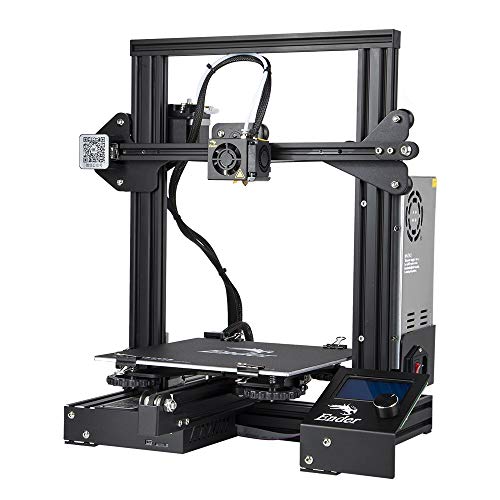
- Technology: FDM, open-frame Cartesian design
- Build volume: 220 x 220 x 250 mm
- Frame: Aluminium extrusion with V-slot rails, Prusa i3 style layout
- Extruder: Bowden drive, 1.75 mm filament

- Technology: FDM, open-frame Cartesian design
- Build volume: 220 x 220 x 250 mm (8.66 x 8.66 x 9.84 inches in the listing)
- Build surface: Removable magnetic plate
- Power supply: MeanWell, UL certified according to the listing

- Technology: FDM, open-frame Cartesian design
- Build volume: 220 x 220 x 250 mm
- Mainboard: Silent board with quiet stepper drivers
- Build surface: Carborundum glass platform
All 4 Picks at a Glance
| Product | Specs | Action |
|---|---|---|
| 1. Creality Ender 3 (Comgrow) — the classic DIY kit |
| Check price on Amazon |
| 2. Creality Ender 3 Pro (Comgrow) — the kit with a better bed |
| Check price on Amazon |
| 3. Creality Ender 3 V2 — the quieter, more refined DIY kit |
| Check price on Amazon |
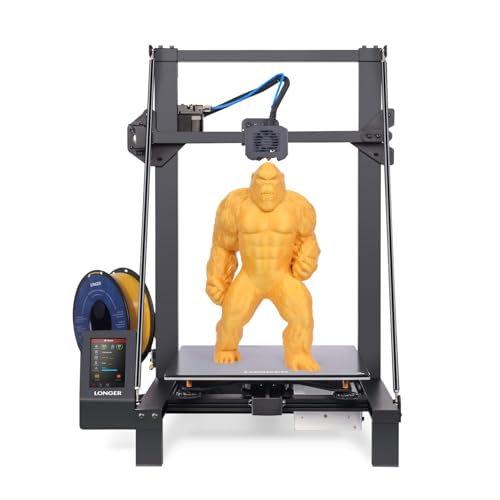 4. Longer LK5 Pro — the large-format assembly build |
| Check price on Amazon |
Key takeaways
- Compare the best DIY 3D printers that arrive as assembly kits, from the classic Ender 3 to the large-format Longer LK5 Pro, by build volume, extruder, bed and leveling.
As an Amazon Associate we earn from qualifying purchases.
Disclosure: This article contains affiliate links. If you buy through a link on this page, we may earn a commission at no extra cost to you.
A DIY 3D printer is not a machine you unbox and start in five minutes. It arrives as a kit of frames, rails, motors, belts, wiring and a control board, and you build the printer before the printer builds anything for you. That extra work is exactly the point for many buyers. Assembling the frame teaches you how each axis moves, why belt tension matters, how the hotend is wired, and where to look first when a print goes wrong six months later. A kit you built yourself is also a kit you can repair, adjust and upgrade yourself, instead of treating the machine as a sealed box.
This guide is deliberately strict about what counts. Every pick below is sold as a DIY kit or as a printer that requires real assembly according to its Amazon listing. Fully assembled plug-and-play machines were left out, even popular ones, because they do not deliver the build experience this keyword is about. All four picks are FDM printers that melt plastic filament, all use a 1.75 mm filament path and a 0.4 mm nozzle class setup, and all sit on open frames you put together on a desk or workbench. They differ in build volume, bed surface, power supply, mainboard noise and how much of the machine arrives pre-assembled, and those differences decide which kit fits your space, patience and projects.
Our top picks
Quick picks
- Best classic kit build: Creality Ender 3 (Comgrow) — The original open-source DIY printer, with a 220 x 220 x 250 mm build volume, V-slot rails and resume printing.
- Best kit with a better bed and power supply: Creality Ender 3 Pro (Comgrow) — The Ender 3 formula plus a removable magnetic build surface and a MeanWell power supply, in the same 220 x 220 x 250 mm envelope.
- Best quieter, more refined kit: Creality Ender 3 V2 — A silent mainboard, a carborundum glass platform and a colour screen, still a DIY FDM kit at 220 x 220 x 250 mm.
- Best large-format assembly build: Longer LK5 Pro — A much bigger 300 x 300 x 400 mm build volume that arrives mostly pre-assembled, with a silent mainboard and open-source firmware for DIY home and school printing.
1. Creality Ender 3 (Comgrow) — the classic DIY kit
- Technology: FDM, open-frame Cartesian design
- Build volume: 220 x 220 x 250 mm
- Frame: Aluminium extrusion with V-slot rails, Prusa i3 style layout
- Extruder: Bowden drive, 1.75 mm filament
The Ender 3 is the machine that defined the modern budget DIY kit, and the Comgrow listing describes it plainly as a fully open-source DIY 3D printer with resume printing and a printing size of 8.66 x 8.66 x 9.84 inches. You assemble the aluminium extrusion frame, mount the gantry on V-slot rails, fit the Bowden extruder and hotend, wire the control box and level the bed by hand. Nothing about the build is hidden from you, which is why this kit remains a useful first printer for someone who wants to learn the mechanics rather than skip them.
Because the design is open source, the Ender 3 also has the deepest pool of printable upgrades, replacement parts and community-written guides of any printer in this roundup. If you want to add a different extruder, change the bed surface or experiment with firmware later, you are working on a platform that thousands of other builders have already modified in almost every direction. The trade-off is that the stock kit is manual in places newer machines automate: bed leveling is done with wheels and a sheet of paper, and the first successful print depends on how carefully you squared the frame during assembly.
Key specifications
Pros
Cons
View the Creality Ender 3 (Comgrow) on Amazon
2. Creality Ender 3 Pro (Comgrow) — the kit with a better bed
- Technology: FDM, open-frame Cartesian design
- Build volume: 220 x 220 x 250 mm (8.66 x 8.66 x 9.84 inches in the listing)
- Build surface: Removable magnetic plate
- Power supply: MeanWell, UL certified according to the listing
The Ender 3 Pro keeps the same DIY assembly job and the same 220 x 220 x 250 mm build volume as the standard Ender 3, then improves two things builders touch every day: the bed and the power supply. Comgrow lists this model for DIY home and school printing with a removable build surface plate and a UL certified MeanWell power supply. The magnetic build surface flexes so finished parts release without prying, and a branded power supply is a meaningful upgrade on a machine whose bed and hotend draw sustained heat for hours at a time.
In build terms, expect the same semi-kit experience as the Ender 3: major sub-assemblies arrive partly built, and you bolt the frame together, square the gantry, connect the wiring and level the bed yourself. That makes the Pro a sensible choice if you like the Ender 3 learning curve but already know a fixed build plate and a generic power supply would annoy you. It does not change the fundamental character of the machine, so the same cautions apply — leveling is manual, the extruder is a Bowden design, and print quality still rewards a careful, unhurried assembly.
Key specifications
Pros
Cons
View the Creality Ender 3 Pro (Comgrow) on Amazon
3. Creality Ender 3 V2 — the quieter, more refined DIY kit
- Technology: FDM, open-frame Cartesian design
- Build volume: 220 x 220 x 250 mm
- Mainboard: Silent board with quiet stepper drivers
- Build surface: Carborundum glass platform
The Ender 3 V2 is the pick for builders who want the kit experience without the kit-era noise and interface. Its listing describes an upgraded DIY FDM 3D printer with a silent motherboard, a branded power supply, a carborundum glass platform and resume printing, at the familiar printing size of 8.66 x 8.66 x 9.84 inches. The silent mainboard uses quieter stepper drivers, so the machine is easier to live with in a bedroom, study or shared room, and the rotary-knob colour screen is clearer than the basic display on earlier Ender models.
Assembly is still your job. You build the frame, mount the gantry, fit the glass bed and connect the electronics, and the integrated structure design hides more of the wiring and power supply inside the base than the original Ender 3 did. That tidier layout looks better on a desk and keeps cables out of the way, although it also means some connections are less exposed than on the fully open original. The glass platform gives a flat, smooth first-layer surface that suits PLA parts with clean bottoms, but it asks for patience at removal time, since parts release best once the bed has cooled.
Key specifications
Pros
Cons
View the Creality Ender 3 V2 on Amazon
4. Longer LK5 Pro — the large-format assembly build
- Technology: FDM, open-frame Cartesian design
- Build volume: 300 x 300 x 400 mm
- Mainboard: Silent motherboard in the listing
- Firmware: Open source, adjustable by the user
The Longer LK5 Pro is the size step in this guide. Its listing gives a build size of 11.8 x 11.8 x 15.7 inches, which is 300 x 300 x 400 mm, and describes an FDM printer for DIY home and school printing with a silent motherboard and resume printing. That volume is in a different league from the Ender models: helmets, large enclosures, tall vases and multi-part assemblies that would need splitting on a 220 mm bed can often print in one piece here, provided your desk can take the taller frame.
The honest caveat is assembly depth. Longer lists this machine as mostly pre-assembled, at around ninety percent in the listing title, so the build is closer to final assembly — fitting the frame sections, gantry and bed, then wiring and leveling — than to the full nut-and-bolt education of an Ender kit. For many buyers that is the right balance: you still learn the machine’s structure and still level and calibrate it yourself, but you reach a first print sooner and with fewer chances to misalign something structural. The open-source firmware also matters at this size, because large prints benefit from tuning flow, acceleration and retraction for the specific filament you run.
Key specifications
Pros
Cons
View the Longer LK5 Pro on Amazon
How to choose a DIY 3D printer
Start with how much building you actually want. A full or semi kit such as the Ender 3 teaches the most, because you handle the frame, motion system and wiring yourself, but it also means your assembly quality sets the ceiling for print quality. A mostly pre-assembled machine such as the LK5 Pro shortens that path and reduces early mistakes, at the cost of some practical learning. Neither answer is wrong; the mistake is buying a deep kit when you wanted a weekend project, or a nearly finished machine when you wanted to learn.
Build volume comes next, and it should follow the parts you plan to make, not the biggest number on the page. A 220 x 220 x 250 mm envelope covers most brackets, enclosures, tools, figures and functional parts, and it keeps the printer small enough for a normal desk. Step up to 300 x 300 x 400 mm only if you regularly print helmets, cosplay pieces, large prototypes or tall objects, because the machine, the print times and the filament use all grow with the volume.
Then check the bed and leveling story. Every printer here relies on manual leveling in its listing, so budget the time to learn it whichever kit you choose. A removable magnetic surface is forgiving for part removal, while glass is flat and smooth but releases parts on its own schedule as it cools. Consider noise as well: a silent mainboard is a genuine quality-of-life feature if the printer will run in a room where people sleep, study or work. Finally, value the ecosystem. Open-source designs with large user communities make replacement parts, spare nozzles, upgrade extruders and troubleshooting help far easier to find a year or two after you build the machine.
FAQs
How long does it take to assemble a DIY 3D printer kit?
It depends on how much arrives pre-assembled. A semi-kit Ender-style build is a focused session of bolting, squaring and wiring followed by leveling, while a mostly pre-assembled large printer is mainly final assembly and setup. Rushing helps nothing: a square frame and correct belt tension matter more than speed, and most first-print problems trace back to an assembly step that was hurried.
Are DIY kit printers good for beginners?
They are good for beginners who want to learn how 3D printing works, because the build itself is the lesson. If your only goal is to print a part today with the least possible setup, a kit is the wrong category. If you are comfortable following instructions, checking that frames are square and learning bed leveling, a kit gives you repair and upgrade skills that stay useful for every printer you own afterwards.
What tools do I need to build one of these kits?
These printers are designed to be assembled with basic hand tools such as hex keys and a screwdriver, and kits in this class typically include the small tools needed for their own fasteners. A square or a straight edge for checking the frame, and a sheet of plain paper for manual bed leveling, cover the rest of a normal first build. Always confirm the exact box contents on the listing for the specific model you order.
Can a DIY kit printer print flexible filament?
A Bowden extruder, as used on the Ender models here, feeds filament through a tube, which works reliably with PLA and PETG but makes soft flexible materials harder to push consistently. Short, slow and carefully tuned flexible prints are possible, yet if flexible filament is your main material, a direct-drive machine would suit you better than any Bowden kit in this guide. Check the supported materials on the listing before ordering.
What should I print first after building the kit?
Print something small, flat and forgiving while you dial in leveling and first-layer height: a calibration cube, a simple bracket or a bed-level test pattern. Confirm the frame is square, the belts are snug and the bed is level before attempting a long or tall print. On a large machine such as the LK5 Pro, resist starting with a full-volume piece until a few small prints have come out cleanly.
Conclusion
The best DIY 3D printers reward the time you put into building them. Choose the original Ender 3 if you want the classic, fully open kit build and the largest community of fellow builders. Choose the Ender 3 Pro if the same build with a removable magnetic bed and a branded power supply sounds like the version you would keep longer. Choose the Ender 3 V2 if quiet running, a glass bed and a tidier integrated base matter for the room the printer will live in. And choose the Longer LK5 Pro if your projects genuinely need a 300 x 300 x 400 mm volume and you prefer a shorter, mostly pre-assembled build. Whichever kit you pick, check the current listing before ordering, confirm the box contents and build volume match what you expect, and give the assembly the careful hour or two it deserves — the printer you build well is the printer that prints well.
More from Amazon
Programs that pair well with the guide above. Offers and eligibility are set by Amazon and may change.
Free shipping on eligible items, Prime Video and more. Eligible new members can start with a free trial.
Start a Prime free trialAd-free music streaming. Eligible new subscribers can start with a free trial.
Try Music Unlimited freeA Prime membership for ages 18-24 with a trial period. Eligibility is set by Amazon.
See Prime for Young AdultsAudiobooks and podcasts to listen to on the go. Eligible new members can start with a free trial.
Try Audible freeAs an Amazon Associate we earn from qualifying purchases.


Write Your Review
No reviews yet. Be the first to share your experience!