

Our Short List of 3
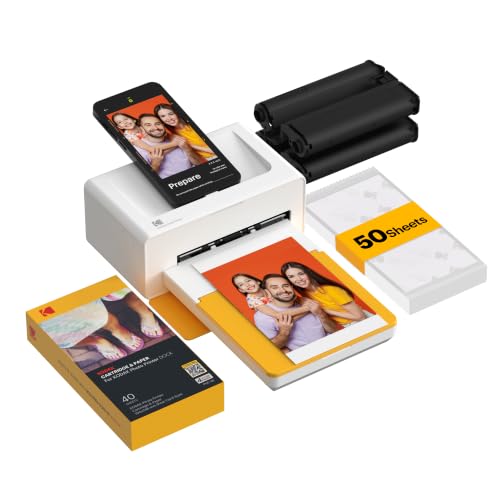
- Print technology: 4PASS dye-sublimation with a lamination pass
- Print size: 4 x 6 inches
- Connectivity: Bluetooth and phone docking
- Compatibility, per the listing: iPhone and Android smartphones

- Print technology: Thermal dye-sublimation
- Print size: 4 x 6 inches
- Maximum colour print resolution: 300 dpi, per the listing
- Connectivity: Built-in Wi-Fi hotspot, up to 5 simultaneous connections per the listing

- Print technology: Inkjet
- Print sizes: Borderless 4 x 6 inches and 5 x 7 inches
- Stated speed: A 4×6 photo in as fast as 37 seconds, per the listing
- Connectivity: Wireless printing, per the listing
All 4 Picks at a Glance
| Product | Specs | Action |
|---|---|---|
| 2. Kodak Dock Plus — Best Dock-Style 4×6 Printer |
| Check price on Amazon |
| 3. Liene M100 — Best for a Large Starter Supply |
| Check price on Amazon |
| 4. Epson PictureMate PM-400 — Best for 4×6 and 5×7 |
| Check price on Amazon |
 5. HP Sprocket Studio Plus — Best Simple Phone Printer |
| Check price on Amazon |
Key takeaways
- The best 4x6 photo printers compared: Canon SELPHY CP1500, Kodak Dock Plus, Liene M100, Epson PictureMate PM-400 and HP Sprocket Studio Plus for true 4x6 prints.
Disclosure: PC Reviewer is reader-supported. When you buy through links on our site, we may earn a commission at no extra cost to you. As an Amazon Associate, we earn from qualifying purchases.
A 4×6 photo printer does one job that a normal home printer and a pocket printer both handle poorly: it produces a proper postcard-size photograph, the size that fits a standard frame, a standard album sleeve and a standard envelope, without trimming and without wasted paper. Pocket printers stop at wallet size, and full-size photo printers are built around letter-size and larger output, so the 4×6 format sits in its own category with its own hardware.
That hardware splits into two families. Most dedicated 4×6 printers use dye-sublimation, laying down colour in passes and finishing with a clear protective layer, fed from matched ink and paper sets. The exception here uses inkjet instead, printing on ordinary photo paper in more than one size. Both produce a real 4×6 print; they differ in supplies, speed, extra sizes and connections.
This guide covers five printers whose listings confirm 4×6 inch output: the Canon SELPHY CP1500, the Kodak Dock Plus, the Liene M100, the Epson PictureMate PM-400 and the HP Sprocket Studio Plus.
Our top picks
Best for: a Large Starter Supply
Check price on AmazonQuick Picks
- Best overall 4×6 printer: Canon SELPHY CP1500 — a wireless dye-sublimation printer with a maximum media size of 4×6 inches, smaller label and card sizes besides, and a paper cassette system built around postcard-size sets.
- Best dock-style printer: Kodak Dock Plus — a 4PASS dye-sublimation printer that combines Bluetooth printing with a phone dock, sold in this listing as a bundle with sheets included.
- Best for a large starter supply: Liene M100 — a Wi-Fi dye-sublimation printer whose listing bundles a large pack of paper and multiple cartridges, with a built-in hotspot that accepts several devices at once.
- Best for 4×6 and 5×7: Epson PictureMate PM-400 — the only inkjet here, printing borderless 4×6 and 5×7 photos on standard photo paper, with wireless printing and a fast stated 4×6 print time.
- Best simple phone printer: HP Sprocket Studio Plus — a Wi-Fi dye-sublimation printer for 4×6 prints, paired with an editing app and sold here with a starter set of sheets and a cartridge.
1. Canon SELPHY CP1500 — Best Overall 4×6 Photo Printer
The Canon SELPHY CP1500 is a compact wireless photo printer built around dye-sublimation printing at postcard size. Its listing gives a maximum media size of 4 x 6 inches, and the same machine also handles smaller formats listed at 3.5 x 4.7 inches, 2.1 x 3.4 inches and 2.1 x 2.1 inches, so one printer covers framed prints, card-size prints and small square prints without changing hardware. For a household that mostly wants 4×6 prints for albums and frames, with the occasional smaller novelty size, that range is the practical sweet spot.
Dye-sublimation suits this job because the colour is transferred in passes and sealed, producing a finished print that leaves the printer dry and ready to handle. Canon describes the output as water resistant, and the prints emerge from a paper cassette system that uses matched ink and paper sets, which removes the guesswork of pairing separate ink and paper supplies. The listing for this white model, model number 5540C002, names the box contents as the printer itself, a paper cassette for postcard size, a trial standard paper pack, a trial ink cassette, a compact power adapter and an AC cable, so the trial supplies let a new owner print straight away before ordering a full set.
Wireless printing is central to the CP1500: photos move from phone or computer without a cable, and the compact body suits a shelf or desk corner. Choose it for the established dedicated 4×6 format, the widest choice of smaller sizes, and matched ink and paper sets.
Specifications
- Print technology: Dye-sublimation
- Maximum media size: 4 x 6 inches
- Other listed sizes: 3.5 x 4.7 inches, 2.1 x 3.4 inches, 2.1 x 2.1 inches
- Model number: 5540C002 (white version in this listing)
- Connectivity: Wireless
- In the box, per the listing: Printer, postcard-size paper cassette, trial paper pack, trial ink cassette, compact power adapter and AC cable
Pros
- Dedicated 4×6 output with three smaller sizes available on the same machine
- Matched ink and paper sets remove supply pairing guesswork
- Water-resistant dye-sublimation finish, dry to handle on exit
- Compact wireless design for phone and computer printing
Cons
- Trial paper and ink in the box run out quickly, so a full set is an early extra purchase
- Maximum size stops at 4×6, with no larger photo option
- Dye-sublimation supplies are model-specific sets rather than generic paper
Check the Canon SELPHY CP1500 on Amazon
2. Kodak Dock Plus — Best Dock-Style 4×6 Printer
- Print technology: 4PASS dye-sublimation with a lamination pass
- Print size: 4 x 6 inches
- Connectivity: Bluetooth and phone docking
- Compatibility, per the listing: iPhone and Android smartphones
The Kodak Dock Plus takes a different physical approach: the phone sits on the printer. It is a 4×6 inch photo printer using Kodak 4PASS dye-sublimation technology, combining docking and Bluetooth connection for iPhone and Android phones. The listing for this ASIN describes a bundle with 50 sheets, so the starting supply is larger than a small trial pack and covers a first album or event before refills are needed.
The 4PASS name describes the process: colour passes build the image and a final pass adds a lamination layer. Kodak presents that laminated finish as protection for the print surface, which matters for photos that will be handled, pinned up or passed around rather than filed straight into an album. The dock itself solves a small daily friction — the phone rests in a defined place while it prints, instead of lying loose beside the printer — and Bluetooth covers phones that are not docked, plus repeat prints sent from across the room.
This is a stationary, photo-only machine: it does not print documents, and its format is fixed at 4×6. Choose it if the printer will live in one spot and a dock appeals more than a plain wireless box.
Specifications
Pros
Cons
Check the Kodak Dock Plus on Amazon
3. Liene M100 — Best for a Large Starter Supply
- Print technology: Thermal dye-sublimation
- Print size: 4 x 6 inches
- Maximum colour print resolution: 300 dpi, per the listing
- Connectivity: Built-in Wi-Fi hotspot, up to 5 simultaneous connections per the listing
The Liene M100, model DHP513 in this listing, is a 4×6 inch photo printer using thermal dye-sublimation, sold here in a large bundle: the listing title specifies 100 sheets of paper and 3 cartridges. That starting supply is the main reason to shortlist it, because a household printing an event, a holiday or a school project in one stretch can finish the job without an immediate refill order.
Connection is the second strength. The printer creates its own Wi-Fi hotspot, so a phone connects directly to the printer instead of relying on a home network, and the listing states support for up to five simultaneous device connections. For a family gathering, that means several people can queue prints from their own phones. The listing gives a maximum colour print resolution of 300 dpi, a paper cassette capacity of 20 sheets, Wi-Fi connectivity and app control, with compatibility across iPhone, Android and PC. The dye-sublimation output is described as laminated and resistant to water, scratches and fingerprints, the standard protective behaviour of this print method.
The cassette holds 20 sheets at a time, so a long run means reloading mid-job, and supplies are Liene cartridges matched to the printer. Choose the M100 if several people will print from their own phones and a large starting bundle matters.
Specifications
Pros
Cons
Check the Liene M100 on Amazon
4. Epson PictureMate PM-400 — Best for 4×6 and 5×7
- Print technology: Inkjet
- Print sizes: Borderless 4 x 6 inches and 5 x 7 inches
- Stated speed: A 4×6 photo in as fast as 37 seconds, per the listing
- Connectivity: Wireless printing, per the listing
The Epson PictureMate PM-400 is the different machine in this guide: a compact inkjet photo printer rather than a dye-sublimation model. Its listing confirms borderless photos at both 4 x 6 inches and 5 x 7 inches, and that second size is the reason to choose it. A 5×7 print suits a desk frame or a card without cropping a 4×6 file up, and borderless output means the photo runs to the paper edge like a lab print.
Because it is an inkjet, the PM-400 prints on standard Epson photo paper instead of matched ink-and-paper sets, which some buyers prefer: paper can be bought on its own in the sizes the machine supports. Epson states the PM-400 prints a 4 x 6 inch photo in as fast as 37 seconds, the fastest stated 4×6 time in this guide, and the listing describes a total wireless solution, so phones and computers print without a cable. The model number in the listing is C11CE84201.
An inkjet with two paper sizes is larger than the dye-sublimation boxes, and its cartridge supplies vary in cost per print with coverage. Choose the PM-400 if you genuinely print both 4×6 and 5×7 and prefer buying paper separately from ink.
Specifications
Pros
Cons
Check the Epson PictureMate PM-400 on Amazon
5. HP Sprocket Studio Plus — Best Simple Phone Printer
- Print technology: Dye-sublimation
- Print size: 4 x 6 inches
- Connectivity: Wi-Fi
- Bundle in this listing: Printer with 10 sheets and a cartridge
The HP Sprocket Studio Plus is a 4×6 wireless photo printer using dye-sublimation, positioned as a simple home machine for printing phone photos. The listing for this ASIN describes a bundle of 10 sheets plus a cartridge, Wi-Fi connection, and an editing app for preparing photos before printing. Where some 4×6 printers emphasise hardware controls, this one puts the phone app at the centre: select, edit and print from the same screen.
Dye-sublimation gives prints that come out dry with a protective finish, and Wi-Fi keeps the connection cable-free. The starter bundle is small at 10 sheets, so a refill set belongs in the same order for anyone planning an album. Choose it if your workflow is almost entirely phone-based and an in-app editing step appeals.
Specifications
Pros
Cons
Check the HP Sprocket Studio Plus on Amazon
How to Choose a 4×6 Photo Printer
Start with the print method. Dye-sublimation, used by four of the five printers here, builds colour in passes and seals it under a protective layer. Its supplies come as matched ink and paper sets, so every print in a set uses the same pairing and the supply question is simply how many sheets remain. Inkjet, used by the PictureMate PM-400, prints on standard photo paper bought separately from ink, which adds paper choice and a second size here, at the cost of a larger machine.
Confirm the size is truly 4×6. Pocket printers with similar names often stop at 2×3 inches. Every printer in this guide has 4 x 6 inches confirmed in its listing as a print or maximum media size. If you also want a larger option, only the PM-400 adds 5×7; the dedicated models are fixed at 4×6 and smaller novelty sizes, which is fine if 4×6 is genuinely all you print.
Match the connection to your habit. A built-in Wi-Fi hotspot, as on the Liene M100, works anywhere and lets several phones connect. A dock, as on the Kodak Dock Plus, suits one fixed spot and one main phone. Standard wireless, as on the Canon, Epson and HP models, fits a home where the printer stays on the network. None of these machines needs a computer, so decide based on where the printer will live.
Count the starter supply, not just the printer. Trial packs, 10-sheet bundles and 100-sheet bundles change what the first month looks like. Check what the specific listing includes, and order the matching refill set at the same time if the starter supply is small.
Accept the format limit. A dedicated 4×6 printer does not print documents, labels or large photos, and that focus is its strength: one size, one supply type, no settings sprawl. If you regularly need larger prints or documents, a general photo printer is the better tool and this category is the wrong one.
FAQs
Are 4×6 photo printers dye-sublimation or inkjet?
Most dedicated models are dye-sublimation, including the Canon, Kodak, Liene and HP printers in this guide, because the method suits matched ink and paper sets at one fixed size. The Epson PictureMate PM-400 shows the inkjet alternative, printing on standard photo paper at 4×6 and 5×7.
Do these printers need a computer?
No. Each model here is built around phone printing by Wi-Fi, Bluetooth, a dock or an app, and several also accept prints from a computer. The connection type in each specification list tells you which route that model uses.
What paper do dye-sublimation 4×6 printers use?
They use matched sets that pair the ink cassette or cartridge with the correct paper for that model family. Generic photo paper does not substitute, which is why checking the refill set for your exact model matters before ordering in quantity.
Can a 4×6 printer print smaller photos?
Some can. The Canon SELPHY CP1500 lists smaller sizes down to a 2.1 x 2.1 inch format alongside 4×6. Others, such as the Kodak and HP models here, are listed at 4×6 only, so check the size list for the specific model if smaller prints matter.
Can any of these print larger than 4×6?
Only the Epson PictureMate PM-400, which adds borderless 5×7. The four dedicated dye-sublimation models stop at 4×6, so choose the Epson if a second, larger size is a real requirement rather than a maybe.
Conclusion
For most buyers, the Canon SELPHY CP1500 is the safest 4×6 choice: a dedicated dye-sublimation printer with the full postcard size, smaller sizes besides, and matched supplies. Pick the Kodak Dock Plus for a docked home corner, the Liene M100 for the largest starter bundle and multi-phone hotspot printing, the Epson PictureMate PM-400 for 5×7 output and standard photo paper, or the HP Sprocket Studio Plus for the simplest app-led phone workflow. Match the connection and the starter supply to how you actually print, and any of the five will turn phone photos into real 4×6 prints at home.
More from Amazon
Programs that pair well with the guide above. Offers and eligibility are set by Amazon and may change.
Free shipping on eligible items, Prime Video and more. Eligible new members can start with a free trial.
Start a Prime free trialAd-free music streaming. Eligible new subscribers can start with a free trial.
Try Music Unlimited freeA Prime membership for ages 18-24 with a trial period. Eligibility is set by Amazon.
See Prime for Young AdultsAudiobooks and podcasts to listen to on the go. Eligible new members can start with a free trial.
Try Audible freeAs an Amazon Associate we earn from qualifying purchases.










Write Your Review
No reviews yet. Be the first to share your experience!