

Our Short List of 3
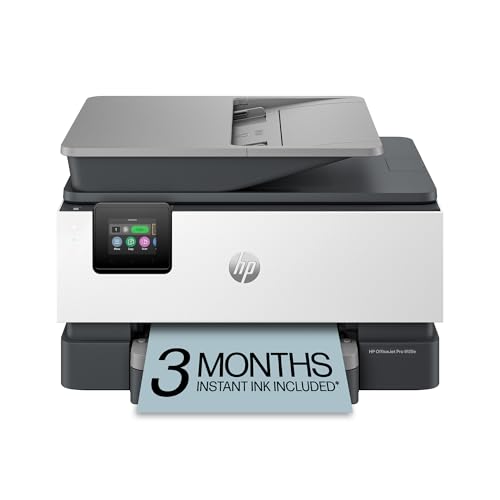
- Best for: A busy home desk with daily colour documents and frequent scanning.
- Wireless all-in-one colour inkjet printer: print, scan, copy and fax
- Up to 22 ppm black and 18 ppm colour
- 250-sheet paper input tray with automatic document feeder
- Automatic duplex printing and dual-band Wi-Fi

- Best for: A home office that prints often and wants the lowest ink bills.
- INKvestment Tank wireless all-in-one colour inkjet printer
- Up to 1 year of ink included in the box
- Duplex printing with mobile and cloud print, works with Alexa
- 20-sheet automatic document feeder

- Best for: A home office that mixes documents with borderless photo printing.
- All-in-one printer for home office: copier, scanner, fax and auto document feeder
- Six-colour hybrid ink system with borderless photo printing
- 4.3-inch colour touchscreen LCD
- AirPrint, Android printing, works with Alexa
All 4 Picks at a Glance
| Product | Specs | Action |
|---|---|---|
| HP OfficeJet Pro 9125e |
| Check price on Amazon |
| Brother MFC-J4335DW |
| Check price on Amazon |
| Canon PIXMA TR8620a |
| Check price on Amazon |
 Epson EcoTank ET-2800 |
| Check price on Amazon |
Key takeaways
- Our guide to the best home office wireless printers compares ink tank, cartridge and all-in-one models on print speed, running costs and easy Wi-Fi setup.
A home office printer has one job: produce a clean page whenever it is needed, without a cable hunt or a driver fight. The real decision is about running costs and reliability, because the cheapest printer on the shelf often becomes the most expensive one over two years of ink. A good wireless printer connects to every device in the house, prints from a phone as easily as from a laptop, and stays ready through weeks of silence. The best home office printer is the one that is ready on a Monday morning after two quiet weeks, not the one with the longest feature list.
This guide is for home workers, students and small households who print documents, forms and the occasional photo. Every printer below was chosen from the names and specs on its Amazon page, with a focus on wireless setup, print speed, ink or tank costs, duplex printing and the all-in-one features a home office actually uses.
Quick Picks
As an Amazon Associate we earn from qualifying purchases
| Product | Best for | Key spec from title |
|---|---|---|
| HP OfficeJet Pro 9125e | Fast colour documents for a busy desk | All-in-one, ADF, duplex printing |
| Brother MFC-J4335DW | Low ink costs with a year of ink in the box | INKvestment Tank, duplex printing |
| Canon PIXMA TR8620a | Documents plus borderless photos | All-in-one, ADF, AirPrint |
| Epson EcoTank ET-2800 | Refillable tanks for heavy printing | Cartridge-free Supertank, scan and copy |
How to Choose
Start with the true cost of ink
The purchase price is only the first cost, so work out what a page costs over a year of normal printing. Cartridge printers are cheap to buy and dear to run, while tank printers cost more upfront and far less per page. Check how many pages the included ink or tanks cover, and how much a replacement set costs. A household that prints a few pages a week can live with cartridges, but a home office printing daily will save real money with a tank system. Keep a spare set of ink or a spare bottle on the shelf, so a deadline is never missed for want of supplies.
Check wireless setup before buying
A wireless printer should join the home network in minutes and stay connected through router restarts. Look for dual-band Wi-Fi, which handles crowded networks better, and for mobile printing support such as AirPrint or the maker’s app. Printers with a touchscreen make setup and troubleshooting easier than those with only blinking lights. Test the connection from a phone as well as a laptop, since the phone is often the device that prints a boarding pass or a form. A printer with an Ethernet port as a backup is useful when the Wi-Fi in a far room proves unreliable.
Match speed and paper handling to the work
Print speed matters when a report must be ready before a meeting, so check the pages-per-minute rating for black and colour separately. An automatic document feeder saves time on multi-page scans and copies, and automatic duplex printing halves paper use on long documents. The paper tray size matters too: a 250-sheet tray suits a busy desk, while a 100-sheet tray needs frequent refills. Match these features to the real workload, not the imagined one. Check the first-page-out time as well, since a slow start matters more than top speed for single pages.
Decide which all-in-one features matter
Most home office printers also scan, copy and sometimes fax, but the quality of those features varies. A flatbed scanner handles books and ID cards, while an ADF feeds a stack of pages for copying. Photo printing needs a separate photo tray or borderless support, and a memory card slot helps for direct printing. List the features the household actually uses each month, then buy the printer that covers them without paying for extras that stay idle. A printer that scans to email or cloud storage saves the step of moving files by hand.
The 4 Best Options
HP OfficeJet Pro 9125e
- Best for: A busy home desk with daily colour documents and frequent scanning.
- Wireless all-in-one colour inkjet printer: print, scan, copy and fax
- Up to 22 ppm black and 18 ppm colour
- 250-sheet paper input tray with automatic document feeder
- Automatic duplex printing and dual-band Wi-Fi
A busy home desk with daily colour documents and frequent scanning.
The printer works only with HP chips in its cartridges, so third-party ink is not an option.
The OfficeJet Pro 9125e is the workhorse pick for a busy home office, printing up to 22 pages per minute in black and 18 in colour. Its 250-sheet paper tray, automatic document feeder and duplex printing handle long reports and multi-page scans without fuss. Dual-band Wi-Fi with self-healing connection keeps the printer online, and the colour touchscreen makes copying and scanning simple. A three-month Instant Ink trial comes in the box, and HP Wolf Pro Security protects the connection. The printer also handles envelopes and labels from the main tray, which suits a household that posts parcels and letters.
Watch out for: The printer works only with HP chips in its cartridges, so third-party ink is not an option.
Brother MFC-J4335DW
- Best for: A home office that prints often and wants the lowest ink bills.
- INKvestment Tank wireless all-in-one colour inkjet printer
- Up to 1 year of ink included in the box
- Duplex printing with mobile and cloud print, works with Alexa
- 20-sheet automatic document feeder
A home office that prints often and wants the lowest ink bills.
The Wi-Fi can drop after the printer sleeps, so wake it before a print job when it has sat idle.
The MFC-J4335DW is the low-running-cost pick, with INKvestment Tank cartridges and up to a year of ink included in the box. Its front-loading tank cartridges hold more ink than standard ones, and high-yield replacements print up to 6,000 black pages. The printer handles print, scan, copy and fax with duplex printing, and connects over Wi-Fi with mobile and cloud printing plus Alexa voice control. A 20-sheet automatic document feeder and a compact footprint suit a small desk. The printer also prints directly from cloud services, so a document stored online needs no computer in between.
Watch out for: The Wi-Fi can drop after the printer sleeps, so wake it before a print job when it has sat idle.
Canon PIXMA TR8620a
- Best for: A home office that mixes documents with borderless photo printing.
- All-in-one printer for home office: copier, scanner, fax and auto document feeder
- Six-colour hybrid ink system with borderless photo printing
- 4.3-inch colour touchscreen LCD
- AirPrint, Android printing, works with Alexa
A home office that mixes documents with borderless photo printing.
The photo-quality ink runs through cartridges faster than a tank system, so heavy photo printing costs more.
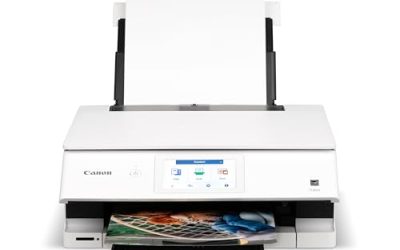
The PIXMA TR8620a is the versatile pick for a home office that prints documents and photos in equal measure. Its six-colour hybrid ink system produces borderless photos up to letter size, while the 4.3-inch touchscreen and automatic document feeder make office tasks simple. AirPrint, Android printing and Alexa support cover every device in the house, and the SD card slot prints photos straight from a camera card. Print speeds reach 15 images per minute in black and 10 in colour. The printer also supports two-sided copying from the feeder, which saves paper on multi-page jobs.
Watch out for: The photo-quality ink runs through cartridges faster than a tank system, so heavy photo printing costs more.
Epson EcoTank ET-2800
- Best for: Heavy home printing where refillable tanks beat cartridges on cost.
- Wireless colour all-in-one cartridge-free Supertank printer
- Print, scan and copy with borderless photo printing
- Up to 10 ppm black printing speed
- 100-sheet paper capacity with rear feed for thicker media
Heavy home printing where refillable tanks beat cartridges on cost.
The printer has no automatic document feeder and no fax, so multi-page scanning is done one sheet at a time.
The EcoTank ET-2800 is the refillable-tank pick for a household that prints in volume and hates buying cartridges. Its Supertank holds enough ink for thousands of pages, and refill bottles cost far less per page than cartridges. The printer handles wireless printing, scanning and copying, with borderless photo printing and a rear feed for thicker paper. A 1.44-inch colour display and 100-sheet paper capacity keep the design simple, and the included ink bottles cover up to two years of typical use. The printer also handles borderless photos up to letter size, which suits a household that prints pictures for framing.
Watch out for: The printer has no automatic document feeder and no fax, so multi-page scanning is done one sheet at a time.
Which One Fits Your Situation
Daily colour documents and scanning
Choose the HP OfficeJet Pro 9125e, whose fast print speeds, large tray and document feeder handle a busy desk without queues. The touchscreen makes copying simple, and the self-healing Wi-Fi stays connected through router restarts. It is the printer for a home office that treats printing as a daily tool. Keep the tray full and the ink fresh, and the printer will be ready whenever a deadline appears.
Printing often on a tight ink budget
Choose the Brother MFC-J4335DW, whose tank cartridges and included year of ink keep running costs low from day one. Duplex printing saves paper, and the compact size fits a small desk. It suits a household that prints schoolwork, forms and reports every week. Set the driver to duplex by default, and paper use will fall without any extra effort.
Documents plus family photos
Choose the Canon PIXMA TR8620a, whose six-colour ink and borderless printing turn out photos worth framing. The touchscreen and SD card slot make photo printing easy, while the document feeder covers office work. It is the printer for a home that works and remembers in equal measure. Print photos on proper photo paper, since plain paper dulls the colours the printer can produce.
High-volume printing without cartridges
Choose the Epson EcoTank ET-2800, whose refillable tanks cover thousands of pages per fill. The rear feed handles card and thick paper for craft projects, and the simple design keeps maintenance easy. It suits a household that prints in bulk and wants ink costs to stay low for years. Refill the tanks over a tray or newspaper, since a spill on a desk is hard to clean.
Common Mistakes
- Buying the cheapest printer and discovering the ink costs more than the machine within months.
- Placing the printer on a weak Wi-Fi spot and blaming the printer for dropped jobs.
- Ignoring duplex printing and paying for twice as much paper on long documents.
- Letting an inkjet sit unused for months, which can clog the print heads.
- Choosing a printer without checking whether the phone and tablet in the house can print to it.
Frequently Asked Questions
Which type of printer is cheapest to run at home?
A tank printer is usually cheapest to run, since refill bottles cost far less per page than cartridges. A cartridge printer suits light use, where the low purchase price outweighs the ink cost. Work out the pages printed each month before choosing, since heavy use favours tanks strongly. Laser toner never dries out, which suits very light use.
Can I print from my phone to a wireless printer?
Yes, most wireless printers support AirPrint on iPhones and the maker’s app on Android. Connect the printer to the same Wi-Fi network as the phone, then choose print from the share menu. Some printers also accept email-to-print, which works from any device. If the printer asks for a PIN, it is printed on a label on the machine itself.
How often should I use an inkjet printer?
Print at least once a week to keep the ink flowing and the heads clear. A short test page is enough if no real printing is due. If the printer will sit idle for months, a laser printer may suit better, since toner does not dry out. Run the cleaning cycle from the menu if lines appear, before replacing any ink.
Do I need a printer with a scanner and copier?
Most home offices benefit from an all-in-one, since scanning a form or copying an ID is a weekly task for many households. A single-function printer costs less but needs a separate scanner for those jobs. Choose the all-in-one unless the desk space is very tight. A flatbed scanner also copies book pages and ID cards that a feeder cannot take.
More from Amazon
Programs that pair well with the guide above. Offers and eligibility are set by Amazon and may change.
Free shipping on eligible items, Prime Video and more. Eligible new members can start with a free trial.
Start a Prime free trialAd-free music streaming. Eligible new subscribers can start with a free trial.
Try Music Unlimited freeA Prime membership for ages 18-24 with a trial period. Eligibility is set by Amazon.
See Prime for Young AdultsAudiobooks and podcasts to listen to on the go. Eligible new members can start with a free trial.
Try Audible freeAs an Amazon Associate we earn from qualifying purchases.

Write Your Review
No reviews yet. Be the first to share your experience!