
Our Short List of 3

- Best for: quiet all-day video calls in a shared house.
- 13.6-inch Liquid Retina display
- M4 chip with 10-core CPU and 10-core GPU
- 24 GB unified memory, 512 GB SSD storage
- 12 MP Center Stage camera, Touch ID

- Best for: touchscreen notes and marking up documents.
- 15.6-inch HD touchscreen display, 1366 x 768 resolution
- AMD Ryzen 3 7320U processor, up to 4.1 GHz max boost clock, 4 cores, 8 threads
- 8 GB LPDDR5-5500 memory
- 128 GB PCIe NVMe M.2 SSD
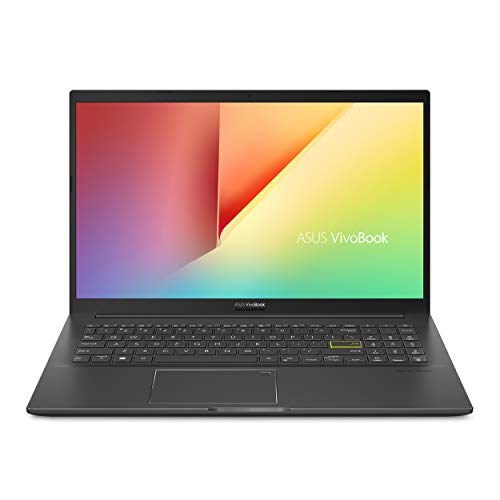
- Best for: heavy multitasking and large files.
- 15.6-inch FHD display
- AMD Ryzen 7 5700U processor, Radeon Graphics
- 8 GB DDR4 RAM, 1 TB PCIe SSD
- Fingerprint reader
All 3 Picks at a Glance
| Product | Specs | Action |
|---|---|---|
| Apple MacBook Air 13-inch M4 |
| Check price on Amazon |
| HP 15.6 inch Laptop 15-fc0099nr |
| Check price on Amazon |
| ASUS VivoBook 15 S513 |
| Check price on Amazon |
Key takeaways
- Four laptops for home offices, from a quiet MacBook Air to touchscreen Windows picks, compared by screen, keyboard, webcam and battery from Amazon.
A laptop for working from home lives a different life from a laptop for the office. It moves between the kitchen table, the couch, and the spare room, it joins video calls all day, and it has to be quiet enough for a shared house. That changes what matters: the webcam and the microphone matter as much as the processor, the keyboard matters more than the graphics card, and a screen you can read for eight hours beats a screen that only looks good in a shop.
This guide is for remote workers, students, and anyone setting up a home office for the first time. The picks come from names and specifications on the Amazon product page, with screen, memory, storage, and camera details taken from the listing itself, so you can check each claim before you buy.
Quick Picks
As an Amazon Associate we earn from qualifying purchases
| Product | Best for | Key spec from title |
|---|---|---|
| Apple MacBook Air 13-inch M4 | Quiet all-day video calls | 13.6-inch Liquid Retina display, M4 chip, 24 GB memory |
| Lenovo IdeaPad Slim 3 | Big screen for documents | 15.6-inch FHD display, Ryzen 3, 8 GB memory |
| HP 15.6 inch Laptop 15-fc0099nr | Touchscreen on a tight setup | 15.6-inch HD touchscreen, Ryzen 3, 8 GB memory |
| ASUS VivoBook 15 S513 | Heavy multitasking and big files | 15.6-inch FHD display, Ryzen 7, 1 TB SSD |
How to Choose
Screen size and eye comfort
Screen size decides how your workday feels, because a home office laptop shows documents, spreadsheets, and video calls side by side for hours at a time. A 13.6-inch display keeps the laptop light enough to carry around the house, while a 15.6-inch display gives you room for two windows at once without squinting. Check the resolution in the listing as well as the size, since a full HD panel shows sharper text than an HD panel of the same size, and an anti-glare finish helps when your desk faces a window.
Keyboard, webcam, and calls
The keyboard and the webcam decide how your calls look and how your hands feel at the end of the day. A full-size keyboard with a number pad suits spreadsheet work, while a backlit keyboard helps when you work in a dim room. The webcam matters just as much, because a 12-megapixel Center Stage camera follows you around the frame, while a basic 720p camera leaves you soft and dark on calls. Check the listing for the camera resolution and the keyboard layout before you buy.
Memory and storage for multitasking
Memory and storage decide whether the laptop keeps up when you open a browser full of tabs, a video call, and a document at the same time. Eight gigabytes of memory covers everyday office work, while 16 or 24 gigabytes gives you headroom for heavier multitasking and future software. Storage works the same way: 128 GB fills up fast once you save files locally, while 256 GB or more leaves room for documents, photos, and apps. Check both numbers in the listing, and favour the larger option when the gap is small.
Battery and moving around the house
Battery life decides whether the laptop stays tied to a wall socket or follows you around the house. A laptop with an 18-hour battery figure on the listing can work a full day away from the charger, while a laptop with a smaller battery needs a socket nearby by the afternoon. Weight matters here too, since a 3.5-pound laptop moves easily from room to room, while a heavier machine tends to stay on one desk. Check the battery figure and the weight in the listing, and match them to how much you move during the day.
The 4 Best Options
Apple MacBook Air 13-inch M4
- Best for: quiet all-day video calls in a shared house.
- 13.6-inch Liquid Retina display
- M4 chip with 10-core CPU and 10-core GPU
- 24 GB unified memory, 512 GB SSD storage
- 12 MP Center Stage camera, Touch ID
quiet all-day video calls in a shared house.
this model comes in several configurations, so confirm the 24 GB memory and 512 GB storage in the listing before buying.
The MacBook Air is the quiet laptop for a home office, and it is the pick for buyers who spend all day on video calls. Its M4 chip runs the 13.6-inch Liquid Retina display without a fan, so the laptop stays silent while you talk, and the 12-megapixel Center Stage camera keeps you in frame as you move. The 24 GB of unified memory and the 512 GB SSD handle heavy multitasking, and the 18-hour battery figure on the listing covers a full workday away from the charger.
Watch out for: this model comes in several configurations, so confirm the 24 GB memory and 512 GB storage in the listing before buying.
Lenovo IdeaPad Slim 3
The IdeaPad Slim 3 is the big-screen laptop for buyers who work with documents all day. Its 15.6-inch full HD display shows two windows side by side, which suits spreadsheets, writing, and research, and the Ryzen 3 processor handles everyday office apps without fuss. The 8 GB of memory and the 256 GB of storage cover the usual home office workload, and the thin, light body makes it easy to move between rooms. It is the pick for a buyer who wants the most screen for everyday work.
Specs
- 15.6-inch FHD display
- AMD Ryzen 3 7320U processor, 8 GB memory
- 256 GB storage
- Windows 11
- Model 82XQ001GUS, Arctic Grey
- Lightweight everyday laptop
Best for: a big screen for documents and spreadsheets.
Watch out for: the 256 GB of storage fills up fast if you save large files locally, so check your storage habits before buying.
HP 15.6 inch Laptop 15-fc0099nr
- Best for: touchscreen notes and marking up documents.
- 15.6-inch HD touchscreen display, 1366 x 768 resolution
- AMD Ryzen 3 7320U processor, up to 4.1 GHz max boost clock, 4 cores, 8 threads
- 8 GB LPDDR5-5500 memory
- 128 GB PCIe NVMe M.2 SSD
touchscreen notes and marking up documents.
Windows 11 Home in S Mode only runs apps from the Microsoft Store, so check whether your work apps are available there before buying.
The HP 15.6 inch Laptop is the touchscreen pick for a home office, and it suits buyers who like to tap, scroll, and mark up documents directly on the screen. Its 15.6-inch HD touchscreen responds to touch, and the Ryzen 3 processor with 8 GB of memory handles calls, documents, and browsing. The 128 GB SSD keeps the laptop quick to start, and the 3.52-pound body moves easily around the house. It is the pick for a buyer who wants touch input on a straightforward home office laptop.
Watch out for: Windows 11 Home in S Mode only runs apps from the Microsoft Store, so check whether your work apps are available there before buying.
ASUS VivoBook 15 S513
- Best for: heavy multitasking and large files.
- 15.6-inch FHD display
- AMD Ryzen 7 5700U processor, Radeon Graphics
- 8 GB DDR4 RAM, 1 TB PCIe SSD
- Fingerprint reader
heavy multitasking and large files.
the listing shows Windows 10 Home, so confirm the operating system version before buying.
The VivoBook 15 S513 is the workhorse for buyers who juggle many apps and large files. Its Ryzen 7 processor and 8 GB of memory keep a browser full of tabs, a video call, and a document running at the same time, and the 1 TB SSD leaves room for years of files. The 15.6-inch full HD display gives you space for two windows, and the fingerprint reader unlocks the laptop fast between tasks. It is the pick for a buyer whose home office workload is heavier than average.
Watch out for: the listing shows Windows 10 Home, so confirm the operating system version before buying.
Which One Fits Your Situation
You spend all day on video calls
Pick the MacBook Air. Its fanless design keeps the laptop silent on calls, and the 12-megapixel Center Stage camera keeps you in frame. The 18-hour battery covers a full day of meetings, and the 24 GB of memory handles calls alongside documents. The fanless design also means no background noise reaches your microphone.
You want the biggest screen for documents
Pick the IdeaPad Slim 3. Its 15.6-inch full HD display shows two windows side by side, which suits spreadsheets and writing. The Ryzen 3 processor and 8 GB of memory cover everyday office work, and the light body moves easily between rooms. The thin design also makes it simple to carry from the desk to the couch.
You want a touchscreen for notes and marking up
Pick the HP 15.6 inch Laptop. Its HD touchscreen lets you tap, scroll, and mark up documents directly, and the 3.52-pound body is easy to carry around the house. Check that your work apps run in Windows 11 Home in S Mode first.
You juggle many apps and big files
Pick the VivoBook 15 S513. Its Ryzen 7 processor keeps many apps running at once, and the 1 TB SSD holds years of files without running short. The fingerprint reader unlocks the laptop fast between tasks, and the 15.6-inch display gives you room for two windows side by side.
Common Mistakes
- Choosing a small screen to save space, then struggling to read two documents side by side
- Buying 128 GB of storage and running out of room for files and apps within a year
- Ignoring the webcam, then looking soft and dark on every video call
- Assuming Windows 11 Home in S Mode runs all your apps, instead of checking the Microsoft Store first
- Forgetting the battery figure, then working tied to a wall socket all day
Frequently Asked Questions
How much memory do I need for working from home?
Eight gigabytes covers everyday office work, with a browser, a video call, and a document open at once. If you juggle many apps, large spreadsheets, or photo editing, 16 GB or 24 GB gives you headroom and keeps the laptop smooth for longer.
Is a 15.6-inch laptop too big for a small desk?
A 15.6-inch laptop fits most desks, and the extra screen space helps when you keep two windows open side by side. If your desk is very small or you move rooms often, a 13.6-inch laptop like the MacBook Air is lighter and easier to carry around the house.
Do I need a touchscreen for home office work?
No, a touchscreen is a bonus rather than a must. It helps for tapping, scrolling, and marking up documents, and the HP 15.6 inch Laptop offers it on a straightforward office machine. If you type and use a mouse all day, a standard screen works just as well.
Mac or Windows for working from home?
Both work well, and the choice comes down to the apps you use. The MacBook Air suits buyers who want a quiet laptop with a strong webcam and long battery life. The Windows laptops here suit buyers who need specific Windows apps, a touchscreen, or a larger screen for documents.
More from Amazon
Programs that pair well with the guide above. Offers and eligibility are set by Amazon and may change.
Free shipping on eligible items, Prime Video and more. Eligible new members can start with a free trial.
Start a Prime free trialAd-free music streaming. Eligible new subscribers can start with a free trial.
Try Music Unlimited freeA Prime membership for ages 18-24 with a trial period. Eligibility is set by Amazon.
See Prime for Young AdultsAudiobooks and podcasts to listen to on the go. Eligible new members can start with a free trial.
Try Audible freeAs an Amazon Associate we earn from qualifying purchases.










Write Your Review
No reviews yet. Be the first to share your experience!