

Our Short List of 3

- Best for: everyday productivity where a good stand and built-in speakers matter.
- 27-inch IPS panel, 3840 x 2160 resolution, 16:9
- 60 Hz refresh rate, 4 ms GtG, AMD FreeSync 40 to 60 Hz
- HDR10 content playback
- 2x HDMI 2.0, 1x DisplayPort 1.2, 3.5 mm audio line-out

- Best for: photo and video editing where colour accuracy is the whole point.
- 27-inch IPS panel, 3840 x 2160 resolution, 16:9
- 60 Hz refresh rate, 5 ms GtG, Adaptive-Sync
- HDR10 and VESA DisplayHDR 400
- Near-full DCI-P3 and Adobe RGB coverage, full sRGB coverage, Delta E under 2, Calman Verified

- Best for: a premium laptop desk that needs one cable for video, charging, and Ethernet.
- 27-inch IPS Black panel, 3840 x 2160 resolution, 16:9
- 60 Hz refresh rate, 5 ms GtG, no variable refresh rate support
- VESA DisplayHDR 400 and HDR10
- Wide DCI-P3 coverage, 1.07 billion colours, 400 nits brightness
All 3 Picks at a Glance
| Product | Specs | Action |
|---|---|---|
| Dell S2721QS |
| Check price on Amazon |
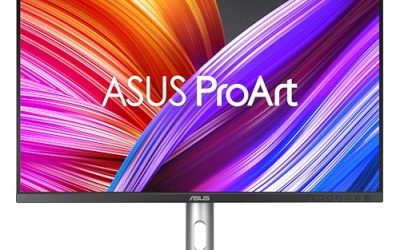
| ASUS ProArt Display PA279CRV |
| Check price on Amazon |
| Dell UltraSharp U2723QE |
| Check price on Amazon |
Key takeaways
- Compare the 5 best 27-inch 4K monitors for home office and photo editing, with colour accuracy, USB-C power, HDR, and stand fit checked per model.
The best 27-inch 4K monitor for most home offices is the ASUS ProArt PA279CRV, with the Dell UltraSharp U2723QE close behind for buyers who want a single-cable laptop dock. The LG 27UL500-W is the cheapest way into sharp 4K text, the Dell S2721QS is the solid everyday all-rounder, and the BenQ PD2705U suits video editors who need accurate Rec.709 colour. All five are 60 Hz IPS panels, so the choice comes down to colour accuracy, USB-C power, and stand adjustability rather than refresh rate.
This guide is for home workers who stare at text all day, photo and video editors who need trustworthy colour, and anyone replacing a second screen with one sharp panel. Every monitor below was chosen from its Amazon listing for the exact 27-inch model, with panel type, ports, and USB-C power checked against the listing rather than borrowed from a 32-inch sibling.
Quick Picks
As an Amazon Associate we earn from qualifying purchases
| Product | Best for | Key spec from title |
|---|---|---|
| LG 27UL500-W | Budget 4K home desk | 27-inch IPS, 3840 x 2160, HDR10 |
| Dell S2721QS | Everyday productivity | 27-inch IPS, 3840 x 2160, adjustable stand |
| ASUS ProArt PA279CRV | Colour-critical photo editing | 27-inch IPS, 3840 x 2160, USB-C 96 W |
| BenQ PD2705U | Video editing on a Mac desk | 27-inch IPS, 3840 x 2160, USB-C 65 W |
| Dell UltraSharp U2723QE | Premium single-cable laptop dock | 27-inch IPS Black, 3840 x 2160, USB-C 90 W |
How to Choose
Panel and colour accuracy
A 27-inch 4K panel packs 3840 by 2160 pixels into a small space, so text stays crisp even at normal viewing distance, and that is the real reason to buy one. All five monitors here use IPS-family panels, but colour accuracy varies a lot between them. The ASUS and BenQ models are factory calibrated and carry independent verification, which matters if you edit photos or grade video for clients. The LG and the Dell S2721QS cover the standard sRGB range well enough for office work and web browsing, yet neither is a colour-critical tool. Check the listing for calibration claims before you pay extra for a creator badge.
USB-C power and ports
USB-C with power delivery turns a monitor into a laptop dock, but only three of these five monitors offer it, and the wattage differs. The ASUS delivers 96 watts, the Dell UltraSharp 90 watts, and the BenQ 65 watts, so a 16-inch laptop may charge slowly on the BenQ while it charges at full speed on the ASUS. The LG and the Dell S2721QS have no USB-C at all, which is fine if your laptop stays plugged into its own charger and you connect over HDMI or DisplayPort. Count the ports on the exact 27-inch listing too, because the 32-inch version of the same line often carries a different set.
HDR and brightness honesty
HDR on a 60 Hz office monitor is mostly a label, and the listings are not always clear about it. Only the ASUS and the Dell UltraSharp carry VESA DisplayHDR 400 certification, while the LG, the Dell S2721QS, and the BenQ list HDR10 only. HDR10 on these panels means the monitor can accept an HDR signal, not that it shows dramatic highlights, and the S2721QS in particular looks washed out in HDR mode according to independent reviews. Brightness figures need the same care: the BenQ is rated 250 nits typical with a 350-nit peak, so treat the peak as a peak and never as everyday brightness.
Stand, size, and desk fit
A 27-inch 4K monitor is wide enough to replace two smaller screens, yet it still fits a normal desk, which is why this size suits home offices so well. The stand matters more than most buyers expect. The LG stand tilts only, with no height adjustment, so you may need a monitor arm or a stack of books to reach eye level. The Dell S2721QS, the ASUS, the BenQ, and the Dell UltraSharp all adjust for height, pivot, swivel, and tilt. Check the VESA mount size as well if you plan to arm-mount the screen later.
The 5 Best Options
LG 27UL500-W
The LG 27UL500-W is the cheapest route to a sharp 27-inch 4K desktop, and for text-heavy work it delivers most of what the pricier models offer. The IPS panel renders text crisply at 3840 by 2160, FreeSync smooths casual video playback, and HDR10 support is there even if it will not impress anyone. Two HDMI ports and a DisplayPort cover a desktop and a laptop without a switch. The trade-offs are honest: a tilt-only stand with no height adjustment, no USB-C port, and no USB hub, so plan on a separate charger and a monitor arm if you need either.
Specs
- 27-inch IPS panel, 3840 x 2160 resolution, 16:9
- 60 Hz refresh rate, 5 ms response, AMD FreeSync
- HDR10 support
- 2x HDMI, 1x DisplayPort, headphone jack
- 300 nits brightness, 1000:1 contrast, 178-degree viewing angles
Best for: a budget home desk where sharp text matters more than USB-C or a fancy stand.
Watch out for: the stand tilts only with no height adjustment, and there is no USB-C port or USB hub.
Dell S2721QS
- Best for: everyday productivity where a good stand and built-in speakers matter.
- 27-inch IPS panel, 3840 x 2160 resolution, 16:9
- 60 Hz refresh rate, 4 ms GtG, AMD FreeSync 40 to 60 Hz
- HDR10 content playback
- 2x HDMI 2.0, 1x DisplayPort 1.2, 3.5 mm audio line-out
everyday productivity where a good stand and built-in speakers matter.
HDR is playback only and looks washed out, and the DisplayPort is 1.2 rather than 1.4.
The Dell S2721QS is the dependable everyday pick in this group, built for long days of documents, spreadsheets, and video calls rather than colour-critical work. Its IPS panel is sharp and bright, the fully adjustable stand lets you set height, pivot, swivel, and tilt without buying extra hardware, and built-in speakers handle calls and background video. The 4 ms response and FreeSync range of 40 to 60 Hz keep casual playback smooth. HDR is playback only and looks washed out in practice, and there is no USB-C port, so keep your laptop charger handy.
Watch out for: HDR is playback only and looks washed out, and the DisplayPort is 1.2 rather than 1.4.
ASUS ProArt Display PA279CRV
- Best for: photo and video editing where colour accuracy is the whole point.
- 27-inch IPS panel, 3840 x 2160 resolution, 16:9
- 60 Hz refresh rate, 5 ms GtG, Adaptive-Sync
- HDR10 and VESA DisplayHDR 400
- Near-full DCI-P3 and Adobe RGB coverage, full sRGB coverage, Delta E under 2, Calman Verified
photo and video editing where colour accuracy is the whole point.
it is 60 Hz only, so do not buy it as a high-refresh gaming monitor.
The ASUS ProArt PA279CRV is the strongest colour tool in this group and the best choice for photo and video editors working from home. Its IPS panel is factory calibrated with a Delta E under 2 and Calman verification, covering nearly the full DCI-P3 and Adobe RGB ranges, so colours stay trustworthy from edit to export. The 96-watt USB-C port charges a laptop and carries video over one cable, while the DisplayPort output supports daisy-chaining a second screen. It is still a 60 Hz panel, so it is not a gaming monitor, but for colour work nothing else here matches it.
Watch out for: it is 60 Hz only, so do not buy it as a high-refresh gaming monitor.
BenQ PD2705U
The BenQ PD2705U is built for video editors who work in Rec.709 and want accurate colour without paying for a reference monitor. Its IPS panel is factory calibrated and Pantone validated, with near-full sRGB and Rec.709 coverage and a Delta E of 3 or under. The included Hotkey Puck G2 switches colour modes without digging through menus, the KVM switch shares one keyboard and mouse between two computers, and the 65-watt USB-C port handles a single-cable Mac desk. Check the listing live before buying, because availability signals conflict and one November check flagged it unavailable.
Specs
- 27-inch IPS panel, 3840 x 2160 resolution, 16:9
- 60 Hz refresh rate, 5 ms GtG, AMD FreeSync
- HDR10 support
- 1x HDMI 2.0, 1x DisplayPort 1.4, 1x USB-C with 65 W Power Delivery
- USB hub, KVM switch, Hotkey Puck G2 included
- 250 nits typical brightness, 350 nits peak, factory calibrated, Pantone Validated
- 2x 2.5 W speakers, height, tilt, swivel and pivot stand
Best for: video editing in Rec.709 and a single-cable Mac desk.
Watch out for: check the listing live before buying, since one November check flagged it unavailable and availability signals conflict.
Dell UltraSharp U2723QE
- Best for: a premium laptop desk that needs one cable for video, charging, and Ethernet.
- 27-inch IPS Black panel, 3840 x 2160 resolution, 16:9
- 60 Hz refresh rate, 5 ms GtG, no variable refresh rate support
- VESA DisplayHDR 400 and HDR10
- Wide DCI-P3 coverage, 1.07 billion colours, 400 nits brightness
a premium laptop desk that needs one cable for video, charging, and Ethernet.
no variable refresh rate support, and the HDMI port is 2.0 rather than 2.1.
The Dell UltraSharp U2723QE is the premium office monitor in this group and the best single-cable dock for a laptop-based desk. Its IPS Black panel doubles the contrast of a standard IPS screen, so blacks look deeper and text stays readable in a bright room. The 90-watt USB-C port charges a laptop, carries video, and connects the built-in hub and Ethernet port through one cable, while Auto KVM switches between two computers. There is no variable refresh rate support, so do not buy it for gaming, and the HDMI port is 2.0 rather than 2.1.
Watch out for: no variable refresh rate support, and the HDMI port is 2.0 rather than 2.1.
Which One Fits Your Situation
You live in documents and spreadsheets
Pick the Dell S2721QS if you want a fully adjustable stand and built-in speakers for calls, or the LG 27UL500-W if the budget is tight and you can live with a tilt-only stand. Both give you the same sharp 3840 by 2160 text, and neither wastes money on colour calibration you will never use.
You edit photos for clients
Pick the ASUS ProArt PA279CRV. Factory calibration, a Delta E under 2, and near-full DCI-P3 and Adobe RGB coverage mean the colours you see are the colours your client gets. The 96-watt USB-C port is a bonus, but colour accuracy is the reason to spend the extra money on this monitor.
You dock a MacBook with one cable
Pick the Dell UltraSharp U2723QE for its 90-watt USB-C port, built-in Ethernet, and Auto KVM, which together replace a separate dock. If your laptop is light enough to charge on 65 watts, the BenQ PD2705U is the cheaper single-cable option, though you should check its live availability before you buy.
You want the cheapest sharp 4K screen
Pick the LG 27UL500-W. It is the lowest-cost way into a 27-inch 4K IPS panel, and for reading, writing, and browsing it is genuinely hard to fault. Accept the tilt-only stand and the lack of USB-C, and put the money you save toward a monitor arm if you need height adjustment.
Common Mistakes
- Borrowing specs from the 32-inch version of the same line, which often has different ports, brightness, and refresh behaviour.
- Paying extra for HDR10 and expecting dramatic highlights, when only the ASUS and the Dell UltraSharp carry DisplayHDR 400.
- Assuming every 4K monitor has USB-C, when the LG and the Dell S2721QS have no USB-C port at all.
- Buying a 60 Hz office panel and expecting high-refresh gaming, especially the Dell UltraSharp, which has no variable refresh rate support.
- Ignoring the stand and discovering too late that the LG only tilts, with no height adjustment.
Frequently Asked Questions
Is 27 inches big enough for 4K?
Yes, 27 inches is the sweet spot for 4K on a desk. At 3840 by 2160, text and interface elements stay crisp without scaling everything up, and the screen still fits a normal desk. Go larger only if you sit far back or want a second screen built into one panel.
Can I use a 27-inch 4K monitor for gaming?
You can play casual games on any of these, since all five support FreeSync or Adaptive-Sync except the Dell UltraSharp, but none is a gaming monitor. All five run at 60 Hz, so fast competitive games will feel less responsive than on a high-refresh panel built for the job.
Do I need USB-C on a monitor?
You need it only if you want one cable to carry video, charge your laptop, and connect accessories. The ASUS at 96 watts and the Dell UltraSharp at 90 watts charge most laptops at full speed, while the BenQ at 65 watts suits lighter machines. If your laptop has its own charger, HDMI or DisplayPort works fine.
Is DisplayHDR 400 worth paying for?
It is worth paying for only if you watch HDR video or preview HDR edits, and even then the effect is modest on an office panel. The ASUS and the Dell UltraSharp are the only two here with the certification. The other three list HDR10 only, which means they accept an HDR signal without showing strong highlights.
More from Amazon
Programs that pair well with the guide above. Offers and eligibility are set by Amazon and may change.
Free shipping on eligible items, Prime Video and more. Eligible new members can start with a free trial.
Start a Prime free trialAd-free music streaming. Eligible new subscribers can start with a free trial.
Try Music Unlimited freeA Prime membership for ages 18-24 with a trial period. Eligibility is set by Amazon.
See Prime for Young AdultsAudiobooks and podcasts to listen to on the go. Eligible new members can start with a free trial.
Try Audible freeAs an Amazon Associate we earn from qualifying purchases.

Write Your Review
No reviews yet. Be the first to share your experience!