

Key takeaways
- Compare five laptops built for live streaming, from GPU encoding power to sharp webcams, quiet cooling, and the ports your setup needs for long sessions.
A live stream asks a laptop to do three heavy jobs at once: run the game or creative app, encode the video feed, and keep the broadcast stable for hours. A machine that feels fast in normal use can still drop frames, stutter, or overheat once the encoder, the chat, the browser sources, and the game all compete for the same processor. Choosing a streaming laptop means weighing encoding power, camera quality, cooling, and ports together, not chasing a headline specification.
This guide is written for game streamers who broadcast from one machine, creators who stream editing and design sessions, and presenters who run live calls and webinars from a laptop. Each of the five laptops below was chosen from the names and specifications shown on its Amazon product page, with attention to the parts that matter most on a live broadcast: the encoder, the webcam, the cooling system, and the ports.
Quick Picks
As an Amazon Associate we earn from qualifying purchases
| Product | Best for | Key spec from title |
|---|---|---|
| Apple MacBook Pro 16 M4 Pro | All-day creative streams | M4 Pro chip with 48GB unified memory |
| Lenovo Legion Pro 5i Gen 9 | Single-PC game streaming | RTX 4070 with 64GB DDR5 memory |
| ASUS ROG Strix G16 | Long sessions without throttling | RTX 4060 with liquid metal cooling |
| MSI Katana 15 | A first dedicated streaming laptop | RTX 4070 with Thunderbolt 4 |
| Lenovo ThinkPad X1 Carbon Gen 12 | Streaming on the move | 2.41-pound body with 1080p IR camera |
How to Choose
Encoding Power Comes First
Streaming software encodes every frame before it leaves your laptop, and that job needs dedicated hardware. A graphics card with a hardware encoder, such as the NVENC encoder in an RTX card, takes the encoding load off the processor, which keeps game frame rates steady while the broadcast stays smooth. Apple silicon laptops use a built-in media engine for the same job. A laptop with only a processor-based encoder can still stream, but it will struggle once a demanding game, several browser sources, and a chat overlay all run at once. Look for a dedicated GPU or a modern media engine, plus enough memory to hold the stream, the game, and the browser without swapping.
Check the Webcam and Microphone
Your face is on screen for the broadcast, so the built-in camera deserves as much attention as the processor. A 1080p camera with a wide field of view keeps you sharp in room light, while an older 720p camera softens every detail and struggles in dim rooms. Some laptops add a camera that follows you as you move, which helps when you stand up or shift in your chair. The built-in microphone array matters too, since a noisy or distant mic makes a stream hard to follow even when the picture looks good. If the camera or mic falls short, budget for an external camera or USB microphone before your first broadcast.
Cooling and Fan Noise Matter on Air
A stream can run for three or four hours without a break, and that is when cooling decides whether a laptop holds its speed or slows down. Machines with vapor chambers, liquid metal, or extra intake fans keep the processor and graphics card cooler for longer, which keeps frame rates steady deep into a broadcast. Fan noise matters just as much, because a loud fan sits close to the built-in microphone and bleeds into the audio your audience hears. A laptop that stays quiet under load is worth more to a streamer than one that wins a short benchmark and then roars.
Ports and a Stable Connection
A streaming setup grows quickly: an external microphone, a camera, a capture card, a second monitor, and a headset all need somewhere to plug in. Count the USB ports before you buy, and check for a full-size HDMI port for a monitor and an Ethernet port for a wired connection, since a cable beats wireless when the upload must stay steady. Thunderbolt ports help too, because one cable can carry a dock with several devices at once. A laptop with too few ports forces you into hubs and adapters, which add clutter and another point of failure on a live night.
The 5 Best Options
Apple MacBook Pro 16 M4 Pro

The MacBook Pro 16 is the strongest all-round streaming machine in this set, because its media engine handles encoding while the processor and graphics stay free for the app on screen. The large XDR display shows the stream, the chat, and the editing timeline side by side, and the 12MP Center Stage camera keeps the presenter framed without an external camera. Battery life stretches through long sessions away from a charger, and the three Thunderbolt 5 ports plus HDMI take a full desk setup. The weight and the closed ecosystem are the trade-offs to accept.
Specs
- M4 Pro chip with 14-core CPU and 20-core GPU
- 16.2-inch Liquid Retina XDR display with 1600 nits peak brightness
- 48GB unified memory and 512GB SSD storage
- 12MP Center Stage camera with three studio-quality mics and six speakers
- Three Thunderbolt 5 ports, MagSafe 3 charging, SDXC card slot, HDMI port
- Up to 24 hours of video streaming on battery, per the listing
Best for: creators who stream editing sessions and long broadcasts from one machine.
Watch out for: heavy for a travel bag, and macOS software choices differ from Windows streaming tools, so check your tools run on Mac before buying.
ASIN: B0DLHGVQ7J
Lenovo Legion Pro 5i Gen 9

The Legion Pro 5i is built for streamers who play and broadcast from the same machine. Its RTX 4070 carries the encoding work through its hardware encoder, so the i9 processor stays free for the game, the overlays, and the browser sources. The 240Hz display keeps fast gameplay smooth, and the large memory and storage leave room for recordings, clips, and a growing game library. Six USB ports take a microphone, a camera, and a capture card without a hub. The listing notes the box is opened for the memory and storage upgrade, so confirm the configuration before checkout.
Specs
- Intel Core i9-14900HX processor, 24 cores, up to 5.8 GHz, 36MB L3 cache
- NVIDIA GeForce RTX 4070 graphics with 8GB GDDR6 memory
- 16-inch WQXGA display, 2560 by 1600, 240Hz, 500 nits
- 64GB DDR5 memory and 8TB SSD storage
- 6 USB ports, HDMI, Thunderbolt, Ethernet RJ-45, Wi-Fi 6E
- Nahimic Audio speakers and integrated microphone, webcam included
- Windows 11 Pro
Best for: single-PC game streamers who need encoding, gameplay, and chat on one machine.
Watch out for: the listing states the original seal is opened for the memory and storage upgrade, so confirm the exact configuration and warranty before checkout.
ASIN: B0F5B9KGHX
ASUS ROG Strix G16

The Strix G16 suits streamers who run long sessions and need the machine to hold its speed hour after hour. Liquid metal on the processor and a third intake fan keep temperatures in check, while the RTX 4060 handles encoding at a high power limit. The 165Hz display stays smooth for fast games, and the color-accurate panel helps when the stream includes creative work. A 90Wh battery gives useful time away from a charger. The 16GB of memory is the tightest in this set, so heavy multitaskers should plan an upgrade.
Specs
- Intel Core i7-13650HX processor, 14 cores, up to 5.0 GHz, 24MB L3 cache
- NVIDIA GeForce RTX 4060 graphics with 8GB memory at 140W Max TGP
- 16GB DDR5-4800MHz memory and 1TB PCIe Gen4 SSD
- 16-inch FHD display, 165Hz, full sRGB coverage, Pantone Validation
- Liquid metal cooling with a third intake fan and MUX Switch with Advanced Optimus
- 90Wh battery, 4 USB ports, 1 Thunderbolt, 1 HDMI, 1 Ethernet, Wi-Fi 6E
- Webcam and built-in microphone, 5.5 lbs
- Windows 11 Home
Best for: streamers who broadcast for hours and need steady cooling.
Watch out for: 16GB of memory fills fast with a game, browser sources, and chat open, and availability has varied across listing copies, so confirm the offer before ordering.
ASIN: B0CRDCXRK2
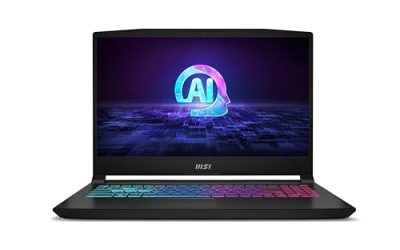
MSI Katana 15
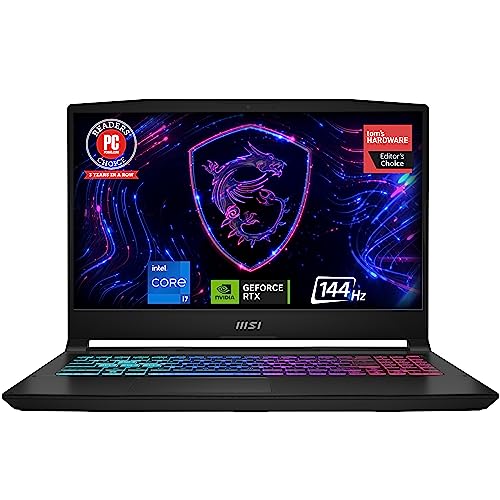
The Katana 15 is the straightforward pick for a first dedicated streaming laptop. Its RTX 4070 takes the encoding load, while the i7 processor and 16GB of memory handle the game, the stream software, and a handful of browser sources at once. Thunderbolt 4 gives the setup room to grow with a dock, an external drive, or a capture card, and the Cooler Boost 5 fans are built for long sessions. The screen is a plain FHD panel, so streamers who also edit video will want an external monitor. At 7.59 lbs it is the heaviest machine here, so it suits a fixed desk more than a travel bag.
Specs
- Intel Core i7-13620H processor, 10 cores, up to 4.9 GHz
- NVIDIA GeForce RTX 4070 graphics with GDDR6 memory
- 16GB DDR5 memory, expandable to 64GB, and 1TB NVMe SSD
- 15.6-inch FHD display, 144Hz, anti-glare
- Thunderbolt 4, USB-C, HDMI, Ethernet, Wi-Fi 6
- Cooler Boost 5 cooling, 53.5Wh battery, webcam included
- Windows 11 Home
Best for: a first dedicated streaming laptop for game broadcasts from a fixed desk.
Watch out for: heavy at 7.59 lbs, and the listing carries garbled fields for drive size and color screen, so rely on the title specs rather than the details table.
ASIN: B0BT3FKZ3N
Lenovo ThinkPad X1 Carbon Gen 12

The X1 Carbon is the travel pick: a 2.41-pound laptop with a sharp OLED screen and a proper 1080p camera with a privacy shutter, built for streams from hotel rooms, offices, and events. The 64GB of fast memory swallows browser sources, chat, and presentation software without slowing down, and the Thunderbolt 4 ports take a full desk dock when you are back home. It has no dedicated graphics card, so heavy game streaming is out of reach, but for talking-head streams, webinars, and IRL broadcasts it is the lightest serious option here.
Specs
- Intel Core Ultra 7 165U vPro processor, 12 cores, up to 4.9 GHz, Intel AI Boost
- 64GB LPDDR5X-6400MHz memory (soldered) and 1TB Gen4 SSD
- 14-inch 2.8K OLED display, 2880 by 1800, 120Hz, 400 nits, full DCI-P3 color
- 1080p FHD IR and RGB camera with privacy shutter and dual-microphone array
- 2x Thunderbolt 4, 2x USB-A, HDMI 2.1, Wi-Fi 6E, Bluetooth 5.3
- 57Wh battery, 2.41 lbs, MIL-STD 810H tested
- Windows 11 Pro
Best for: travel streamers, webinars, and talking-head broadcasts on the move.
Watch out for: sold by a third-party seller, and the memory is soldered, so choose the configuration carefully because it cannot be upgraded later.
ASIN: B0D5P4QTQ4
Which One Fits Your Situation
You Stream Games from One PC
Pick the Legion Pro 5i. Its RTX 4070 encodes the broadcast while the i9 runs the game, and the 64GB of memory holds the overlays and browser sources without strain. The Strix G16 is the backup if you want a lighter machine with stronger cooling.
You Stream Creative Work from a Mac
Pick the MacBook Pro 16. The media engine encodes while the XDR display shows the timeline, the canvas, and the chat at once, and the Center Stage camera keeps you framed without extra gear. Battery life covers a full day away from a charger.
You Stream While Traveling
Pick the ThinkPad X1 Carbon. At 2.41 lbs it disappears into a bag, the OLED screen stays readable in bright rooms, and the 1080p camera with a privacy shutter is ready the moment you open the lid. Add a small USB microphone for cleaner audio.
You Want a First Streaming Laptop
Pick the MSI Katana 15. The RTX 4070 and Thunderbolt 4 give you real encoding power and room to add a capture card or dock later, without the size and weight of the bigger machines. Keep it on a desk, since it is the heaviest pick here.
Common Mistakes
- Buying for game frame rates only and forgetting the encoder needs its own hardware.
- Trusting a dim 720p webcam and hoping the audience will not notice.
- Streaming over wireless with no Ethernet option when the upload must stay steady.
- Running the game, the stream software, browser sources, and chat on 16GB of memory with nothing to spare.
- Placing the laptop so the fan exhaust blows straight into the microphone.
Frequently Asked Questions
Do I Need a Capture Card to Stream Console Games?
Yes, if the game runs on a console. A capture card takes the console signal into the laptop, and the laptop encodes it for the broadcast. PC games need no capture card, since the game and the stream software run on the same machine. Check the card has the ports your console and laptop both support before buying.
Is 16GB of Memory Enough for Streaming?
It is enough for a simple setup: one game, the stream software, and a few browser sources. It gets tight once you add chat overlays, a music app, a second monitor with a dashboard, and a browser full of tabs. If you plan to grow the setup, 32GB or more gives comfortable headroom and fewer dropped frames.
Can a Thin Ultrabook Handle Live Streaming?
Yes, for talking-head streams, webinars, and presentations. A modern ultrabook encodes a camera feed easily and stays quiet, which keeps the audio clean. It struggles with demanding games, since it has no dedicated graphics card and thins out under sustained load. Match the machine to the stream: camera-first streams suit ultrabooks, game streams need a GPU.
Does the Built-in Webcam Matter If I Own an External Camera?
Less, but it still matters as a backup. An external camera gives a sharper picture and better low-light performance, yet it needs a mount, a cable, and a free USB port. The built-in camera covers travel days, quick streams, and the moment the external camera fails mid-broadcast. A good built-in camera is cheap insurance.
More from Amazon
Programs that pair well with the guide above. Offers and eligibility are set by Amazon and may change.
Free shipping on eligible items, Prime Video and more. Eligible new members can start with a free trial.
Start a Prime free trialAd-free music streaming. Eligible new subscribers can start with a free trial.
Try Music Unlimited freeA Prime membership for ages 18-24 with a trial period. Eligibility is set by Amazon.
See Prime for Young AdultsAudiobooks and podcasts to listen to on the go. Eligible new members can start with a free trial.
Try Audible freeAs an Amazon Associate we earn from qualifying purchases.
Write Your Review
No reviews yet. Be the first to share your experience!