

Key takeaways
- Find the best compact printer for a small desk, a dorm room, or the road. Compare size, ink costs, wireless printing, and the features worth paying for.
As an Amazon Associate we earn from qualifying purchases.
The real decision when buying a compact printer is not how fast it prints. It is what you give up to save space, and whether the printer still does the jobs you need once it sits on your desk. A machine that fits in a drawer but jams, drains an expensive cartridge in a week, or refuses to talk to your phone has not saved you anything. Size is the starting point, not the whole answer, and the best compact printers are the ones that stay small without turning everyday printing into a chore.
This guide is for apartment dwellers with one small desk, students in shared rooms, remote workers who print a few pages a week, and travellers who need to print from a hotel room or a client site. It walks through the trade-offs that decide whether a compact printer fits your life: footprint against features, ink costs against convenience, wireless printing against a simple cable, and single-function simplicity against an all-in-one that scans and copies too.
How to Choose
Measure the space first, then the printer
Start with the surface the printer will live on, not the dimensions on the box. A printer needs clearance behind it for the paper tray to extend and room above it to lift the lid, so a shelf that looks deep enough can still fail. Measure the width, depth, and height of the spot, then leave room on each side for your hands. If the printer will travel, weigh the bag too: a model that looks portable on paper can feel like a brick after a day of carrying it. Check whether the paper tray folds away or stays exposed, because an open tray collects dust. A printer that fits its space gets used; one that needs rearranging gets ignored.
Work out what ink will cost you over a year
The price of the printer is the smallest part of what you will spend, so work out the running cost first. Look at the cartridge capacity in pages, not the number of cartridges in the box, and compare a full replacement set against the printer’s own price. A printer that ships with starter cartridges holding only a fraction of a standard fill can cost more than its own price to refill within the first month. If you print rarely, check how the printer handles idle weeks: some inkjets clog when left unused, wasting ink on cleaning cycles. Consider larger-capacity cartridges or a subscription ink plan, and whether third-party cartridges are an option you are comfortable using.
Decide how you will actually connect to it
A compact printer is only convenient if it connects the way you work, so think about your devices first. If you print from a phone or tablet, look for direct wireless printing that works without a router, plus an app for printing from the cloud. If you print from a laptop at a hotel or a client office, a model with its own wireless network or a cable option saves hunting for network passwords. Check whether the printer supports the printing system built into your phone, because an app-only printer adds a step every time you print. Also check setup: some need a computer for the first setup even if you only print from a phone.
Choose the functions you will use, not the ones on the box
Compact printers come in two broad shapes: single-function machines that only print, and all-in-ones that also scan and copy. The all-in-one sounds like the better deal until you realise the scanner lid and document feeder are what make it bulky, and a flatbed adds real height. If you scan documents weekly, an all-in-one earns its size, especially one with a feeder that handles several pages at once. If you scan once a year, your phone camera and a scanning app will do the job, and a print-only model will be smaller, lighter, and cheaper to run. Also consider duplex printing, which prints on both sides automatically and halves your paper use.
Which One Fits Your Situation
A desk in a small apartment
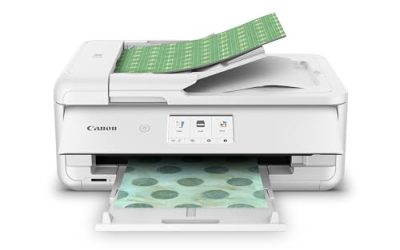
Pick a compact all-in-one with a folding paper tray and wireless printing, because it covers printing and scanning without taking over the desk. Look for a model that can sit on a shelf or at the back of a desk and print from your phone, so no cable is needed. Duplex printing halves the paper pile, and cheap cartridges matter more than speed. Skip battery-powered travel models here: you pay for mobility you will never use.
Printing on the road
Pick a truly portable printer built for travel, with a battery and direct wireless printing from a phone. Weight and folded size matter most, because it has to fit a bag you already carry. Check it prints without a router and charges over a standard cable. Accept slower printing and fewer pages than a desk model, and carry a small stack of paper rather than expecting a tray. Pack a spare cartridge for client sites with no shop nearby.
A student in shared housing
Pick a small wireless printer everyone in the flat can use from their own laptop or phone, because a cabled printer becomes one person’s printer. Shared printing means the ink budget matters more than the footprint, so favour large-capacity cartridges or an ink plan that keeps the cost per page low. A compact all-in-one is worth the extra size here, since students scan notes and copy forms often. Agree who buys the next cartridge before the first runs dry.
A home office that prints mostly documents
Pick a compact laser printer rather than an inkjet, because text documents want crisp pages and toner that never dries out. A small monochrome laser is often no bigger than an inkjet all-in-one, prints faster, and costs less per page. Wireless printing still matters, since you will print from a laptop, a phone, and maybe a tablet. Skip photo features unless you regularly print images, and check the tray holds enough sheets to avoid constant refills.
Common Mistakes
-
Buying the smallest printer without checking what it drops. The tiniest models achieve their size by removing the scanner, shrinking the paper tray to a handful of sheets, and using smaller cartridges that need replacing more often. If you print more than a page or two at a time, a tray that holds ten sheets means you will stand beside the printer feeding paper while it works. If you scan documents even occasionally, a print-only model forces you to find another way to digitise them. Before you choose the smallest option, list the jobs you did with your last printer over the past month and check that the new one can do all of them. A printer that is a few centimetres wider but keeps the scanner and a proper tray is usually the better buy, and the size difference disappears once it sits on the desk. Compact should mean well designed, not stripped down.
-
Ignoring the cost of ink until the first cartridge runs out. A printer that costs very little upfront can easily cost several times its own price in cartridges over a year, especially if it ships with starter cartridges that hold only a fraction of a normal fill. Many buyers discover this a few weeks after purchase, when the printer stops mid-job and the replacement cartridge costs almost as much as a new printer. Work out the cost per page before you buy: divide the price of a replacement cartridge set by the number of pages it is rated to print, then multiply by the pages you expect to print each month. If you print rarely, also ask how the printer copes with long idle periods, because some inkjets run cleaning cycles that burn ink every time they wake up after a week unused. A subscription ink plan or a model that accepts high-capacity cartridges can change the maths completely, so compare the running cost across models, not just the sticker price on the box.
-
Assuming wireless printing will just work everywhere. Wireless printing sounds effortless until you try to print from a hotel network that blocks devices from talking to each other, or from a phone that cannot find the printer on a crowded shared network. Some compact printers only work when your phone and the printer share the same network, which fails in offices and hotels that isolate connected devices. Others need a companion app for every print job, adding friction to a task that should take seconds. Before you buy, check whether the printer can create its own wireless network for direct printing, whether it supports the printing system built into your phone, and whether the first setup requires a computer even if you only plan to print from a phone. If you travel, a model that prints over a cable or its own network will save you from the most common wireless headaches, and a printer that needs a specific app for everything will frustrate you within a week.
-
Forgetting that paper and power need space too. A compact printer is only compact when it is closed, and the moment you unfold the paper tray and plug in the power brick it can take up twice the space you measured. Buyers often measure the printer’s body and forget the tray that extends from the back, the lid that lifts for scanning, and the cable that needs to reach a socket without draping across the desk. Portable models have the same problem in a bag: the printer may fold flat, but the charger, a spare cartridge, and a stack of paper still need room. Measure the full working footprint with the tray open and the lid raised, and check where the power socket sits relative to the spot you have chosen. If the printer will travel, pack it once with everything it needs before your first trip, so you discover the real size of the kit while you can still choose a bigger bag or a smaller printer.
-
Choosing a printer for photos when you mostly print documents. Photo printing and document printing pull a printer in opposite directions, and a machine tuned for one will disappoint at the other. A photo-focused compact printer often uses dye-based inks that produce vivid images but cost more per page for plain text, print more slowly, and use small cartridges that run out quickly. A document-focused printer produces crisp black text cheaply but makes photos look flat and washed out. If you print a photo once a month and documents every day, buy for the documents and send the occasional photo to a print shop, which will do a better job for less money. If you genuinely print photos every week, accept the higher running costs and choose a model with dedicated photo paper handling and borderless printing. Matching the printer to your most common job, rather than the most exciting one, is what keeps the running costs down and the results good.
Frequently Asked Questions
How small can a compact printer actually get?
The smallest portable printers are roughly the size of a paperback book and weigh under a kilogram, while desk models are about the size of a shoebox. Portable models drop the scanner and shrink the tray, so they print more slowly and hold less paper. Desk models keep the scanner and tray while fitting on a shelf. Choose the size that matches where the printer will live.
Do compact printers cost more to run than full-size ones?
They often do, because smaller cartridges cost more per page than larger ones. Starter cartridges can need a refill within weeks, and the replacements can cost a large share of the printer’s price. Check the cost per page before buying, and look for high-capacity cartridges or an ink plan. If you print heavily, a larger printer with cheaper ink usually costs less over a year.
Can I print from my phone without a computer?
Yes, most modern compact printers support wireless printing from a phone, either through the printing system built into your phone or through the manufacturer’s app. Some can also create their own wireless network, so you can print where there is no router, useful in hotels and offices. Check that the printer supports your phone’s system before you buy, and note that the first setup sometimes still needs a computer.
Is a compact laser printer better than a compact inkjet?
It depends on what you print. A laser suits text documents: it prints faster, text is sharper, and toner never dries out. An inkjet suits mixed use and photos, since it handles colour and images far better than a small monochrome laser. If you print mostly documents, a laser is usually the cheaper and more reliable choice; if you print photos regularly, an inkjet is the better fit.
More from Amazon
Programs that pair well with the guide above. Offers and eligibility are set by Amazon and may change.
Free shipping on eligible items, Prime Video and more. Eligible new members can start with a free trial.
Start a Prime free trialAd-free music streaming. Eligible new subscribers can start with a free trial.
Try Music Unlimited freeA Prime membership for ages 18-24 with a trial period. Eligibility is set by Amazon.
See Prime for Young AdultsAudiobooks and podcasts to listen to on the go. Eligible new members can start with a free trial.
Try Audible freeAs an Amazon Associate we earn from qualifying purchases.



Write Your Review
No reviews yet. Be the first to share your experience!