

Key takeaways
- Socket: AM5 only, with DDR5 memory. DDR4 is not supported.
- Cooler mounting: AM4 coolers usually fit AM5 because the hole spacing is the same, but check the mounting kit.
- BIOS: choose boards with BIOS Flashback so you can update without a CPU.
- Memory: pick EXPO-labelled kits at 6000 MT/s CL30 for the best pairing with Ryzen 9000.
- Storage: PCIe 4.0 NVMe is enough, and a heatsink on the drive prevents throttling.
- Case airflow: two intake fans and one exhaust keep both CPU and GPU in range.
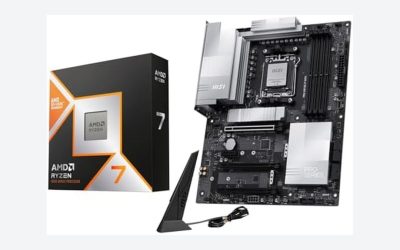
A Ryzen 7 9700X build makes the most sense when you want eight fast Zen 5 cores that stay cool and quiet, because the chip is rated at 65 W and still reaches a 5.5 GHz boost. AMD lists it with 8 cores and 16 threads, a 3.8 GHz base clock, 40MB of combined cache and TSMC 4nm manufacturing, and it can be switched to a 105 W mode in the BIOS for extra multi-core speed. The best 2026 pairing is a B850 board, 32GB of DDR5-6000 CL30 and a 16GB GPU, with a decent tower cooler instead of a costly liquid loop.
The 9700X sits between the budget 9600X and the gaming-focused X3D chips. It does not have stacked cache, so it trails the Ryzen 7 9800X3D in games, but it wins on running cost and is a better fit for mixed work such as coding, compiling, light video editing and streaming. Below are seven builds that cover different budgets and uses, followed by tuning tips and a worked example.
Our top picks


As an Amazon Associate we earn from qualifying purchases at no extra cost to you.
Quick Comparison of the Seven Builds
| Build | Target | GPU | Board | Cooler | RAM | PSU |
|---|---|---|---|---|---|---|
| A. Everyday allrounder | 1440p gaming and office | RX 9060 XT 16GB | Gigabyte B850 Aorus Elite WiFi7 | Peerless Assassin 120 SE | 32GB DDR5-6000 | 750 W |
| B. Mainstream gamer | 1440p high refresh | RX 9070 XT | MSI MAG B850 Tomahawk Max WiFi | Peerless Assassin 120 SE | 32GB DDR5-6000 | 850 W |
| C. Nvidia creator | Gaming plus editing | RTX 5070 Ti | ASUS TUF Gaming B850-Plus WiFi | Noctua NH-D15 G2 | 64GB DDR5-6000 | 850 W |
| D. Developer workstation | Compiling and VMs | RTX 5060 Ti 16GB | B850 ATX | Dual-tower air | 64GB DDR5-5600 to 6000 | 750 W |
| E. Silent office-plus-gaming | Low noise | RX 9060 XT 16GB | B850 micro-ATX | Large single tower | 32GB DDR5-6000 | 650 W |
| F. High-end 4K | 4K gaming | RTX 5080 | X870E ATX | 360 mm AIO | 32GB DDR5-6000 | 1,000 W |
| G. Compact travel PC | Small footprint | Two-fan RTX 5060 Ti 16GB | B850 mini-ITX | Low-profile or 120 mm AIO | 32GB DDR5-6000 | SFX 750 W |
What the 9700X Gives You Over the 9600X
The step up from the Ryzen 5 9600X is two additional cores and four more threads for the same 65 W rating, along with a slightly higher 5.5 GHz boost. In games the difference is small, usually a few percent, because most titles do not use more than six threads effectively. The extra cores matter more in compiling code, rendering and running a game while recording or streaming. If gaming is your only goal, putting the same money toward a faster GPU often brings a bigger gain.
The 9700X is also the sweet spot for efficiency. A default socket power of about 88 W means an inexpensive dual-tower air cooler can hold it, and the whole system can run on a modest power supply. For comparison, the Ryzen 9 9950X is a 170 W part and needs a stronger cooler and board.
Build A: Everyday Allrounder
This build suits someone who uses one machine for work, study and weekend gaming. It uses the Gigabyte B850 Aorus Elite WiFi7, which per roundup listings has a 14+2+2 power design, VRM and M.2 thermal guards, three M.2 slots, Wi-Fi 7, 2.5GbE and a five-year warranty. The Radeon RX 9060 XT 16GB has a 160 W board power and a single 8-pin connector, so a 750 W supply is more than enough.
Trade-off: the 128-bit memory bus of the GPU limits 4K, but at 1440p with FSR it holds up well. Best for: students, home offices and light creators.
Build B: Mainstream Gaming PC
Here the focus is frame rate. The Radeon RX 9070 XT has 16GB of GDDR6, a 256-bit bus (up to 640 GB/s) and 304 W board power, and AMD suggests roughly a 750 W supply. The MSI MAG B850 Tomahawk Max WiFi is repeatedly named the best overall B850 board in 2026 roundups for its 80 A power stages, Wi-Fi 7, PCIe 5.0 for graphics and storage, and a 20 Gbps front Type-C port. With the 9700X, you get a balanced pairing where the processor rarely holds back the GPU at 1440p.
Trade-off: the 9700X trails X3D chips in CPU-limited games, so competitive players on 360 Hz screens may prefer the Ryzen 7 9800X3D. Best for: players who want strong 1440p and some 4K.
Build C: Nvidia Creator Build
Pair the 9700X with the GeForce RTX 5070 Ti if you edit video or photos alongside gaming. The card offers 16GB of GDDR7 on a 256-bit bus (896 GB/s) at 300 W, and Nvidia’s encoder speeds up exports in popular editors. The ASUS TUF Gaming B850-Plus WiFi gives a 14+2+1 80 A VRM, three M.2 slots and a Thunderbolt header, and 64GB of memory lets you work with large timelines. The Noctua NH-D15 G2, a dual-tower cooler 168 mm tall with two 140 mm fans, keeps the chip below its throttle point even in the 105 W mode.
Trade-off: the NH-D15 G2 is large and costs several times more than budget towers. Best for: hybrid gaming and content work.
Build D: Developer Workstation
Developers gain from the extra threads when building large projects or running containers. Choose 64GB of DDR5 so virtual machines have room, a fast NVMe drive for the system and a second drive for data. The graphics card can be modest, such as the RTX 5060 Ti 16GB with 448 GB/s of bandwidth and a 180 W rating, which still handles GPU acceleration in many tools. A dual-tower air cooler keeps noise low during long builds.
For memory, DDR5-6000 is best, but a 4-stick configuration may need to run slower on some boards. If you need 128GB, expect memory speeds to drop and check the board’s qualified list.
Trade-off: four-stick setups lower memory speed. Best for: programmers, data analysts and anyone running virtual machines.
Build E: Silent Office-and-Gaming PC
Because the 9700X is a 65 W part, it can be cooled by a large single-tower cooler with a slow 140 mm fan. Pair it with a micro-ATX B850 board, an RX 9060 XT 16GB and a 650 W Gold supply that can run in fanless mode at low load. Use a case with sound-damping panels and set fan curves in the BIOS so the fans stay near 500 rpm until temperatures pass 65 degrees Celsius.
Trade-off: sound-damped cases restrict airflow, so avoid very powerful GPUs. Best for: shared rooms and recording voiceovers.
Build F: High-End 4K Gaming
Move to an X870E board such as the MSI MAG X870E Tomahawk WiFi, a GeForce RTX 5080 and a 360 mm AIO like the Arctic Liquid Freezer III 360. A 1,000 W supply covers the card’s draw plus the CPU’s 105 W mode. At 4K the GPU is the limit, so the 9700X is enough and you can later drop in a 9800X3D if you want more frames.
Per GamersNexus data, the Liquid Freezer III 360 outperformed the Noctua NH-D15 G2 at a 200 W load, with a lead of several degrees at equal noise. That is far more than a 9700X needs, but the extra headroom keeps fans slow and leaves room for a hotter processor.
Trade-off: this is the most expensive build, and the CPU is not the star. Best for: 4K players who might upgrade the processor later.
Build G: Compact Travel PC
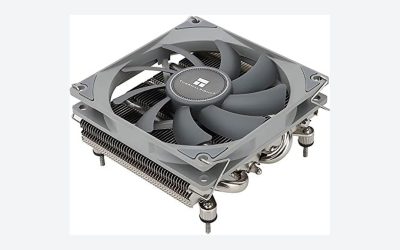
For small cases choose a mini-ITX B850 board, an SFX Gold supply and a two-fan graphics card under 260 mm. The low heat of the 9700X makes this possible without loud fans. Pick a case that supports a 120 mm AIO or a low-profile tower, and confirm the RAM height with the cooler. Use 32GB because mini-ITX boards have only two DIMM slots.
Trade-off: fewer ports and harder cable routing. Best for: LAN trips and small desks.
Decision Matrix: Which Build for You
| If you mostly… | Pick | Reason |
|---|---|---|
| Work and play lightly | Build A | Lowest cost, 160 W GPU |
| Play AAA games at 1440p | Build B | RX 9070 XT, strong board |
| Edit video and game | Build C | RTX 5070 Ti, 64GB RAM |
| Compile code | Build D | Eight cores, 64GB memory |
| Need silence | Build E | 65 W CPU, slow fans |
| Play at 4K | Build F | RTX 5080, X870E board |
| Need small size | Build G | Mini-ITX, SFX supply |
Tuning the 9700X: 65 W vs 105 W Mode
AMD allows the 9700X to run in a 105 W configuration, with a higher power limit that raises multi-core performance. The gain shows up in rendering and compile jobs, not in most games, where the chip rarely reaches the limit. If you only game, leave the 65 W default and enjoy lower temperatures. If you render regularly, enabling the higher mode costs about 17 W more under load and needs a cooler that handles 105 W without strain, such as a dual-tower air cooler.
Another useful setting is Curve Optimizer, which lowers voltage per core. A modest negative offset often reduces temperatures and can raise sustained clocks, but each chip behaves differently, so test stability with a stress program for at least an hour before trusting a setting.
Worked Example: Power and Running Cost
For Build B, the GPU draws up to 304 W, the CPU up to 88 W (or about 105 W in the higher mode) and the rest of the system roughly 50 W: 304 + 105 + 50 = 459 W. Allowing 40 percent headroom for transients gives about 640 W, so an 850 W supply runs at roughly 55 percent load in games, which is the efficient zone. If the system draws an average of 250 W for 20 hours a week, annual use is about 260 kWh. At 0.15 per kWh that equals roughly 39 per year, so upgrading to a more efficient GPU saves little compared with the purchase price.
Parts Checklist and Compatibility
- Socket: AM5 only, with DDR5 memory. DDR4 is not supported.
- Cooler mounting: AM4 coolers usually fit AM5 because the hole spacing is the same, but check the mounting kit.
- BIOS: choose boards with BIOS Flashback so you can update without a CPU.
- Memory: pick EXPO-labelled kits at 6000 MT/s CL30 for the best pairing with Ryzen 9000.
- Storage: PCIe 4.0 NVMe is enough, and a heatsink on the drive prevents throttling.
- Case airflow: two intake fans and one exhaust keep both CPU and GPU in range.
Common Mistakes
- Overspending on a flagship board when a B850 model offers the same performance for this CPU.
- Skipping a cooler, since the 9700X does not include one.
- Installing only one memory stick, which halves bandwidth.
- Forgetting to enable EXPO so the kit runs at default speed.
- Choosing a PCIe 5.0 SSD that needs active cooling when a PCIe 4.0 drive would be quieter.
Choosing the Motherboard Step by Step
- Decide the form factor first. ATX gives the most M.2 slots and PCIe lanes, micro-ATX saves space and cost, and mini-ITX is for small cases only.
- Pick the chipset by features, not speed. B650 and B850 boards run the 9700X at the same speed as an X870E board. B850 adds PCIe 5.0 for graphics and storage on most models, while cheaper B650 boards remain valid if the BIOS supports Ryzen 9000.
- Count your drives. If you plan more than two NVMe drives, look for three or four M.2 slots. The MSI Tomahawk Max is listed with four, and the ASUS TUF B850-Plus and Gigabyte Aorus Elite with three.
- Check networking. Wi-Fi 7 and 2.5GbE are standard on mid-range B850 boards, but a few entry models still use older Wi-Fi 6E or 1GbE.
- Confirm the warranty. Some vendors offer extended terms, such as the five-year coverage listed for the Gigabyte board.
Memory and Storage Planning
With eight cores, the 9700X benefits from more memory than the 9600X when you run several applications at once. A 32GB kit is the baseline for gaming. Content creators and developers should consider 64GB, while 16GB is no longer comfortable for modern games plus background apps. Use two modules of equal size rather than four, because two-module kits are more likely to hold their rated EXPO speed.
For storage, a 1TB PCIe 4.0 drive holds the operating system and a handful of games, but modern titles regularly exceed 100GB each. A 2TB drive is a better starting point if you install many games, and a second drive keeps project files separate. Choose a drive with its own DRAM cache or host memory buffer support for consistent speed, and avoid very cheap models that slow down when the cache fills.
When a Different Ryzen Chip Is the Better Choice
- Pure gaming at high refresh: the Ryzen 7 9800X3D has 8 cores, 96MB of L3 cache, a 5.2 GHz boost and 120 W TDP, and most 2026 gaming guides rank it first.
- Tight budget: the Ryzen 5 9600X saves money and plays most games nearly as well at 1440p.
- Heavy rendering: a Ryzen 9 with 12 or 16 cores finishes jobs faster, at the cost of a bigger cooler.
- Existing AM4 board: the 9700X needs AM5, so a Ryzen 7 5700X3D may be cheaper if you want to keep older parts.
The 9700X remains attractive because it avoids both extremes: it does not need a premium cooler, a premium board or a large supply, yet it carries enough cores to avoid feeling limited for the next several years.
Noise and Temperature Expectations
With a dual-tower air cooler, the 9700X typically idles in the low 30s Celsius and settles in the 60s during long gaming sessions, according to common reviewer ranges for 65 W Zen 5 chips. Short bursts can push it to the high 70s in the 105 W mode. Set a fan curve that ramps gently, since Ryzen chips boost in short spikes and an aggressive curve makes fans surge. A one-to-two second delay on fan response removes most of that noise.
Case and Airflow Recommendations
Because the 9700X produces modest heat, almost any well-ventilated case works. A mesh-front design such as the Fractal Design North, Lian Li Lancool 216 or Corsair 4000D Airflow gives the GPU fresh air without needing extra fans. Glass-front cases look attractive but often restrict intake, which can raise graphics card temperatures by several degrees. Whichever you choose, verify three clearances before buying: maximum GPU length, maximum cooler height (168 mm for the NH-D15 G2, 155 mm for the Peerless Assassin 120 SE) and radiator support if you want a 360 mm AIO in the top or front.
Cable management also affects airflow. Route the 24-pin and GPU cables along the rear tray, tie them down, and keep the area in front of the intake fans clear. A tidy case runs a few degrees cooler and is easier to service when you upgrade the graphics card or swap the processor later.
Quick Buying Order That Saves Money
Buy the GPU and CPU first, since they set the budget and the power requirement. Then pick the power supply from the GPU’s rating, the board from the storage and networking you need, and finally the case and cooler to match. Parts that rarely need replacement, such as the case and power supply, are worth buying well because they carry over to the next build. Parts that age quickly, such as the graphics card, are better bought once the budget is clear.
Frequently Asked Questions
Is the Ryzen 7 9700X better than the 9600X?
It has two more cores and a slightly higher boost clock. Games gain a few percent, but multi-threaded work such as rendering and compiling benefits more.
Should I buy the 9700X or the 9800X3D for gaming?
The 9800X3D is faster in games thanks to 96MB of stacked cache, but it costs more and runs at 120 W. The 9700X is the better value for mixed work and cooler operation.
What cooler does the 9700X need?
A dual-tower air cooler such as the Thermalright Peerless Assassin 120 SE is sufficient. A 240 or 360 mm AIO is optional.
What memory speed is best?
DDR5-6000 with CL30 is the usual recommendation for Ryzen 9000 because it keeps the memory controller and fabric in sync.
Can I run the 9700X in a small case?
Yes. The 65 W rating suits mini-ITX cases, provided you choose a low-profile or 120 mm cooler and a short graphics card.
Will an X870E board improve performance?
Not for this chip. X870E adds connectivity such as extra USB4 and PCIe lanes. A B850 board performs the same for gaming.



Write Your Review
No reviews yet. Be the first to share your experience!